CashCoach: categories first, then transactions
CashCoach
At a glance
- What is it?
- A personal finance tracker built as a Django REST Framework backend with PostgreSQL and a React frontend, organised around three API groups and six screens. The data model has a dependency that decides the order you use it in, and the installation section still carries a template placeholder.
- Who is it for?
- CashCoach fits someone who wants a small self-hosted tracker for income and expenses with per-category budgets and does not want to evaluate a product, since the data model is simple enough to read in one sitting and the endpoint list is short. Three things to know before you run it.
- Can I use it commercially?
- Yes. MIT is a permissive licence: you can use, modify and sell software built on it, as long as you keep its copyright and licence notices.
- Is it still maintained?
- Probably not. The repository last received commits 22 months ago, on December 3, 2024.
- What is it written in?
- Mainly Python, according to GitHub's language statistics.
Answers come from the project's GitHub data, last synced on October 23, 2026, and from our analysis. They are not legal advice.
Star history
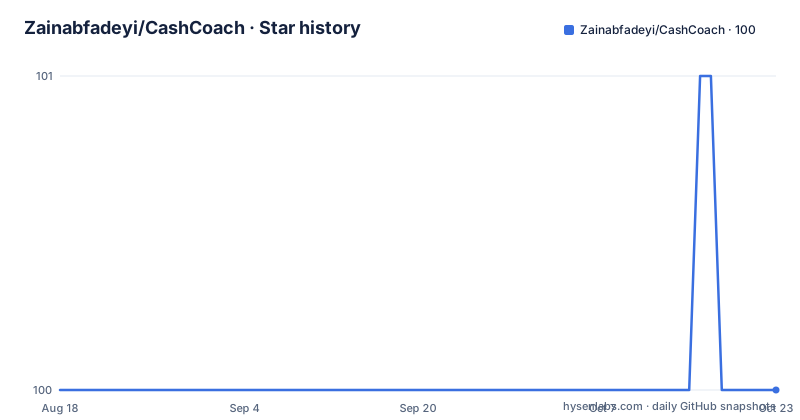
- Zainabfadeyi/CashCoach100 ★ · +0
| Repository | 2026-08-18 | 2026-10-23 |
|---|---|---|
| Zainabfadeyi/CashCoach | 100 | 100 |
0 Stars in the last 66 days, measured from the daily GitHub snapshot. Compare with other projects
Editorial analysis
Django REST Framework behind, React in front
The stack is a conventional split. The backend is Django for the logic, models and APIs, with Django REST Framework providing the API surface the frontend consumes, and PostgreSQL for persistent storage. The frontend is React for the interface and dynamic data handling, Axios for HTTP requests to the backend API, and Chart.js for the interactive financial trend charts. The application is described as letting users add, categorize and monitor financial transactions, set budgets and visualise income and spending over time, with charts, dynamic data fetching and category based organisation. The repository holds a Backend/ directory, a Frontend/ directory, an images folder and the MIT licence, and the language recorded for the project is Python. A hosted copy sits at a Vercel address, while the local instructions in the README point at two localhost ports.
Categories come first, because nothing else works without them
The data model has a dependency, and the README is explicit about it. To create a transaction there must be a category, so the flow starts on the Categories page where the available categories for transactions are managed. Once a category exists it appears dynamically when a transaction is added, and the options that appear differ depending on whether the entry is income or expense. Budgets inherit the same rule with an extra filter: a budget is created against a specific category filtered by expense, so an income category cannot carry one. That single constraint explains the shape of the whole application, since the transaction form, the budget manager and the analytics breakdowns are all keyed by category rather than by a free text label. It is also the first thing to get wrong on a fresh install, because entering an amount before creating a category leaves you with nothing to attach it to.
Budgets carry their own progress bar
Budget management is the feature with the most moving parts. A budget is set for a specific category, and the amount spent against it updates dynamically from the transactions that match that category rather than being entered by hand. In the interface this appears as a real-time progress bar showing the amount spent against the total budget for each category, and it updates automatically as matching transactions are added, so there is no refresh step and no separate spending entry. On the backend the matching API handles budget creation and updates as well as that progress tracking, which means the progress value is derived server side from the transaction data rather than computed in the browser. The Dashboard then shows an overview of income, expenses and budgets together, which is where the bars and the trend charts meet.
The API is three groups and eight endpoints
The documented surface is small enough to read in one pass, and it splits into authentication, transactions and budgets. Authentication is two POST endpoints: `/api/auth/login/` takes an email and password, and `/api/auth/register/` creates a user. Transactions are the only full CRUD set: GET and POST on `/api/transactions/`, with PUT and DELETE on `/api/transactions/<id>/`. Budgets are three: GET and POST on `/api/budgets/`, plus GET on `/api/budgets/<id>/progress/`, which is the endpoint behind each progress bar. What is not in the list is as informative as what is: there is no category endpoint, even though categories gate both transactions and budgets, so the frontend's category management has to come from somewhere the README does not itemise. That gap is the first place to look if you are extending this.
The install steps still contain a template placeholder
The backend setup is a normal Django sequence, and it is worth reproducing exactly.
python -m venv env
source env/bin/activate  # For Windows: env\Scripts\activate
pip install -r requirements.txt
psql -U postgres
python manage.py migrate
python manage.py runserver
Three rough edges sit around those commands. The clone line above them still reads `git clone https://github.com/yourusername/CashCoach.git`, a placeholder that was never filled in, and the directory name changes between the two lines that follow, first cash-coach and then finance-personal-manager. The Frontend Setup heading has no commands under it at all; it jumps straight to telling you the app will be at http://localhost:3000 and the API at http://localhost:8000. And the contributing section still names the project Finance Personal Manager, which is the clearest sign that this README was written for a template and partly filled in. Expect to spend a few minutes reconciling it against the tree.
Analytics has an XLSX export the feature list forgot
The application has six areas reachable from navigation: a Dashboard overview shown right after login, Categories, Transactions, Budgets, Analytics and a Profile area for account settings and logging out. Analytics is the one with a capability that never made it into the features list at the top. Beyond the charts, which show daily income trends and monthly expense breakdowns by category, it lets you download and export the data as an XLSX spreadsheet with paginated transactions. That is the only mention of spreadsheet export anywhere in the documentation, and it sits in the navigation walkthrough rather than in the feature summary, which is a good indicator of where the interesting behaviour lives. The three features the summary does list, transaction management, category organisation, budget management and trend tracking, are what the backend and frontend structure sections also describe, with one endpoint group each.
Three things on the roadmap, and no release since 2024
The future improvements section lists three items, and they are the gaps a user would notice first. Mobile optimization, meaning making the frontend fully responsive for mobile devices. Notifications, so a user is told when a budget limit is about to be exceeded rather than discovering it from the progress bar. And recurring transactions, so income and expense entries can repeat without being entered each period. Those three map onto the three gaps in the current design: no responsive layout, no alerting mechanism behind the budget endpoints, and no scheduler for periodic entries. On the repository side, the default branch is master, the last recorded push is 3 December 2024, the repository is not archived, and there are no GitHub releases, so there is no version to pin. There is no repository description and no changelog, which leaves the commit history as the only record of what changed.
Editorial conclusion
CashCoach fits someone who wants a small self-hosted tracker for income and expenses with per-category budgets and does not want to evaluate a product, since the data model is simple enough to read in one sitting and the endpoint list is short. Three things to know before you run it. The order of use is fixed: a category must exist before a transaction, and a budget must attach to an expense category, so an empty install looks broken until you visit the Categories page. The setup instructions are partly unfilled, with a clone URL still carrying a placeholder username, two different directory names in consecutive lines, and no commands at all for the frontend. And the project has not been pushed since 3 December 2024, with no releases, so treat the deploy at the Vercel address as a snapshot rather than a maintained service. MIT licensed, PostgreSQL for storage, Chart.js for the charts.
Frequently asked questions
What is Cash Coach?
A web application for managing personal finances that tracks income and expenses, groups transactions into categories, sets per-category budgets with a progress bar, and charts income and spending over time. The backend is Django REST Framework with PostgreSQL, and the frontend is React with Axios and Chart.js.
How do I set up the Cash Coach backend?
Create and activate a virtual environment with python -m venv env and source env/bin/activate, install with pip install -r requirements.txt, set up PostgreSQL with psql -U postgres, run python manage.py migrate and start the server with python manage.py runserver. The README's clone URL still contains a placeholder username and its two directory names do not match.
What API endpoints does Cash Coach expose?
Authentication with POST /api/auth/login/ and POST /api/auth/register/. Transactions with GET and POST on /api/transactions/, plus PUT and DELETE on /api/transactions/<id>/. Budgets with GET and POST on /api/budgets/, plus GET on /api/budgets/<id>/progress/.
Do I need a category before adding a transaction in Cash Coach?
Yes. A transaction requires a category, which is managed on the Categories page and then appears dynamically in the income and expense forms. A budget must be linked to a category you created, filtered by expense.
Can CashCoach export my financial data?
The Analytics section describes downloading and exporting the data as an XLSX spreadsheet with paginated transactions, alongside charts of daily income trends and monthly expense breakdowns by category.
Official sources
Add this badge to your README
If you maintain this project, the badge below links readers to this analysis and shows its maintenance status from the daily GitHub snapshot. Paste the markdown into your README; add ?metric=license or ?metric=stars to the image URL for a different field.

[](https://hysenlabs.com/projects/zainabfadeyi-cashcoach)Star history chart for your README
[](https://hysenlabs.com/projects/zainabfadeyi-cashcoach)Was this useful?