Cascade Studio: a live-scripted CAD kernel running in the browser
A Full Live-Scripted CAD Kernel in the Browser
At a glance
- What is it?
- Cascade Studio is an MIT licensed browser IDE that puts the full OpenCascade 8.0 geometry kernel behind a JavaScript or OpenSCAD scripting environment, with sketches, sweeps, fillets, a selector API for querying faces and edges, and export to STEP, STL and OBJ. It suits a designer or engineer who wants a scriptable CAD workflow with no install, and it is the wrong tool if you need a full parametric desktop CAD with feature trees.
- Who is it for?
- Cascade Studio fits someone who wants a real B-rep kernel without installing a desktop CAD package, because the whole OpenCascade kernel is exposed in the browser with a scripting layer over it, and the model lives in the URL so a design is shareable by copying a link. It is a poor fit if your workflow depends on a desktop CAD application that can open the result directly in a feature tree, since the exported files are the interchange path rather than the native one.
- Can I use it commercially?
- Yes. MIT is a permissive licence: you can use, modify and sell software built on it, as long as you keep its copyright and licence notices.
- Is it still maintained?
- Yes. The repository last received commits 19 days ago.
- What is it written in?
- Mainly JavaScript, according to GitHub's language statistics.
Answers come from the project's GitHub data, last synced on November 7, 2026, and from our analysis. They are not legal advice.
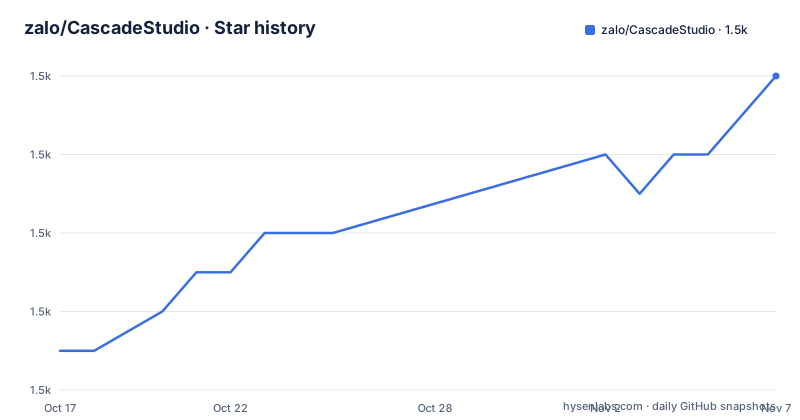
Star history
- zalo/CascadeStudio1,502 ★ · +7
| Repository | 2026-10-17 | 2026-11-07 |
|---|---|---|
| zalo/CascadeStudio | 1.5k | 1.5k |
7 Stars in the last 21 days, measured from the daily GitHub snapshot. Compare with other projects
Editorial analysis
A CAD kernel in a browser tab, not a viewer
Cascade Studio is described as a full live-scripted CAD kernel and IDE in the browser, and the mechanics are what make it more than a viewer. Use code to create 3D models with features ranging from simple primitives and CSG through to complex revolves, sweeps and fillets, and it exposes the full power of the OpenCascade kernel, OCCT 8.0, while providing a concise standard library for simple operations. The two supported languages are JavaScript and OpenSCAD, with real-time visualisation, export to .step, .stl or .obj, and the URL copied to share the model with anyone. The homepage is zalo.github.io/CascadeStudio and the licence is MIT, with the last push on 2026-10-18 and the repository not archived.
The standard library covers the operations you would actually type
The feature list opens with a powerful standard library for primitives, booleans, sweeps, lofts, fillets and more, and there is automatic caching acceleration of standard library operations underneath it. The kernel itself is reachable directly through an oc. namespace, so the standard library is a convenience layer rather than a wall. The interesting part is that the caching sits below the convenience layer, which means a repeated primitive in a script is not re-evaluated, and that is what makes a live script responsive when the script re-runs on every edit. The topic list names brep, cad, modeling, opencascade and scad, so the boundary representation work is the core of it, not a by-product.
Sketches and a selector API are what make it a modelling tool
Two APIs are worth understanding before writing anything. The Sketch API draws in a plane you name, with the constructor taking a point and a plane name, so new Sketch([x,y], 'XZ') draws in the XZ plane, and the same applies to XY or YZ. The Selector API queries the model you have built, with Edges(shape) filtered by a direction and then reduced, for example parallel to a vector, taking the max along it, and returning indices. That is a query language over the topology rather than a fixed set of modelling commands, and it is what lets a script find the edge it needs instead of assuming a position. The Measurement Functions complete the set, with Volume, SurfaceArea and CenterOfMass available directly.
The history timeline is the feature that changes how you debug a model
A modeling history timeline lets you scrub through the build steps in the 3D viewport, and IntelliSense autocomplete provides full TypeScript definitions and JSDoc. The combination is what makes a live-scripted CAD environment usable rather than frustrating, because the two failure modes of live scripting are not knowing what the model currently contains and not knowing what the API accepts. The history view answers the first by letting you step back to a state you know worked, and IntelliSense with TypeScript definitions answers the second, which is a stronger guarantee than the README's reference to a VS Code-like editor experience, since the definitions are the actual types.
An Agent API and a reusable core package widen the scope
Two entries push this beyond a single page application. The Agent API exposes window.CascadeAPI for programmatic control via Playwright or developer tooling, which is what makes automated testing of a model possible, and the repository ships a playwright.config.js with @playwright/test as a dev dependency and the test script running playwright test, so the same approach is used in the project's own tests. The reusable CAD engine is published as the cascade-core npm package for embedding CAD modelling in any web app, and the root package.json defines two workspaces, packages/cascade-core and packages/cascade-studio, with a build script that runs each package's own build script in turn.
File formats, sharing and offline use
Interchange is handled explicitly. The formats are .STEP, .IGES and .STL for import and .STEP, .STL and .OBJ for export, so a model can come in from another CAD application and go back out. There is URL serialization of the code for easy sharing, which is the mechanism behind the example links in the README, each of which carries the model source in a query parameter along with a gui parameter. Projects can be saved and loaded to preserve code, layout and imported files. An integrated GUI system of sliders, checkboxes and buttons comes from Tweakpane, the layout is responsive with mobile support, and the whole thing is installable for offline use as a Progressive Web App. A devcontainer configuration is present at the root as well, so the editor can be run against a pinned toolchain rather than whatever happens to be installed.
Your first model is a sketch and a rotation, in whichever language you prefer
The quickest way to see what the API feels like is to draw a profile and revolve it, and the README gives the shapes the two APIs expect. A sketch is created with a point and a plane name, so the constructor form is new Sketch([x,y], 'XZ') to draw in the XZ plane, with XY and YZ the other two choices. To interrogate what you built, the Selector API takes a shape and returns matching topology, and the form given in the README is Edges(shape).parallel([0,0,1]).max([0,0,1]).indices(), which selects the edges parallel to a direction, takes the extreme one along it and reports its indices, and the same pattern applies to faces.
new Sketch([x,y], 'XZ')
Edges(shape).parallel([0,0,1]).max([0,0,1]).indices()
The measurement functions sit alongside them.
Volume()
SurfaceArea()
CenterOfMass()
Nothing here needs a build step on your side, because the kernel is already in the page. If you would rather work in OpenSCAD, the dual editor mode means the same model can be written that way instead, and the viewport updates as you type.
Editorial conclusion
Cascade Studio fits someone who wants a real B-rep kernel without installing a desktop CAD package, because the whole OpenCascade kernel is exposed in the browser with a scripting layer over it, and the model lives in the URL so a design is shareable by copying a link. It is a poor fit if your workflow depends on a desktop CAD application that can open the result directly in a feature tree, since the exported files are the interchange path rather than the native one. Verify first whether OpenSCAD mode or the JavaScript API suits your modelling habits, because the two are genuinely different languages for the same geometry, and note that the whole tool runs in a browser tab, so very large models will hit the memory of the tab rather than of your machine.
Frequently asked questions
What is Cascade Studio built on?
The full OpenCascade geometry kernel, OCCT 8.0, running in the browser, with a concise standard library over it. You write in JavaScript or OpenSCAD, see the result in real time, and export to .step, .stl or .obj.
Can I share a model I built in Cascade Studio?
Yes. The code is serialized into the URL, so copying the link shares the model with anyone, and the README's examples are links carrying the model source in a query parameter. Projects can also be saved and loaded to preserve code, layout and imported files.
Does Cascade Studio need a desktop CAD application?
No. Everything runs in the browser tab, including the OpenCascade kernel, and the app is installable as a Progressive Web App for offline use. Files can be imported from and exported to STEP, IGES, STL and OBJ if you need to move geometry into another tool.
Can I embed Cascade Studio's CAD engine in my own web app?
Yes. The reusable CAD engine is published as the cascade-core npm package for embedding CAD modelling in any web app, and there is also an Agent API on window.CascadeAPI for programmatic control through Playwright or other developer tooling.
Official sources
Add this badge to your README
If you maintain this project, the badge below links readers to this analysis and shows its maintenance status from the daily GitHub snapshot. Paste the markdown into your README; add ?metric=license or ?metric=stars to the image URL for a different field.

[](https://hysenlabs.com/projects/zalo-cascadestudio)Star history chart for your README
[](https://hysenlabs.com/projects/zalo-cascadestudio)Was this useful?