gtm-cheat-codes: fourteen go-to-market workflows as agent skills
A field guide for go to market teams using coding agents. Installable skills for campaign planning, CRM context, customer proof, and reviewable agent workflows.
At a glance
- What is it?
- gtm-cheat-codes is a documentation repository from Zapier that turns repeatable go-to-market jobs into agent skills for Codex, Claude Code, Cursor and similar harnesses. Its value is the workflow catalogue and the governance vocabulary around it; its weakness is that enforcement is left to the team, and there is no release to pin.
- Who is it for?
- gtm-cheat-codes is worth adopting for a go-to-market team that already runs Codex, Claude Code or Cursor against a CRM, a helpdesk and a ticketing system, because the fourteen workflows and the sheet cache bridge pattern are written out rather than left to be reinvented per team. It is the wrong repository for a team without those systems, for a shop standardised on a different automation layer, and for anyone wanting a runtime rather than instructions.
- Can I use it commercially?
- Yes. MIT is a permissive licence: you can use, modify and sell software built on it, as long as you keep its copyright and licence notices.
- Is it still maintained?
- Yes. The repository last received commits 125 days ago.
- What is it written in?
- GitHub does not report a main language for this repository.
Answers come from the project's GitHub data, last synced on November 15, 2026, and from our analysis. They are not legal advice.
Star history
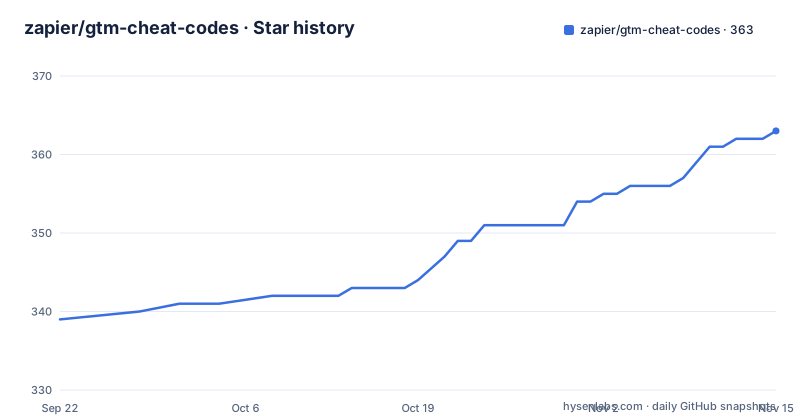
- zapier/gtm-cheat-codes363 ★ · +24
| Repository | 2026-09-22 | 2026-11-15 |
|---|---|---|
| zapier/gtm-cheat-codes | 339 | 363 |
24 Stars in the last 54 days, measured from the daily GitHub snapshot. Compare with other projects
Editorial analysis
Fourteen go-to-market workflows, one skills folder each
The repository presents itself as more than a prompt library, and the concrete form of that claim is a list of fourteen repeatable jobs aimed at marketing, sales, customer operations and business operations leads. Most are ordinary chores with sharp names: media inbox triage for press, partnership, customer and urgent-risk requests in a shared inbox; lead follow-up QA for the follow-ups that were missed, slow or low quality; account prioritization that ranks target accounts by why-now signals; cross-CRM coordination that keeps opportunity, account and customer context aligned across multiple CRMs.
Two of them describe data plumbing rather than judgement, and those are the interesting ones. Support triage has the agent researching a ticket across helpdesk, issue-tracking, backlog and knowledge-base systems. Legal operations has it prioritizing urgent client callbacks from call transcripts and approved case context. Both ask an agent to read across systems the team already runs, which is where the failure modes live rather than in the drafting.
A plain-English version of the whole catalogue sits in docs/vp-marketing-skill-breakdown.md, which the README names as the entry point for anyone who wants the business-level view before opening a skill folder.
Context, tools, governance, harnesses: the four layers every skill assumes
Every skill is described against the same four layers, and that shared vocabulary is the closest thing the guide has to an architecture. Context is the input surface: CRM, docs, chat or collaboration tools, Sheets, customer proof, product usage, meetings and campaign notes. Tools are the authenticated actions, reached through Zapier MCP, the Zapier SDK and connected systems. Governance covers identity, permissions, approval gates, audit trails and safe writeback. Harnesses are the agent environments the work is meant to run in: Codex, Claude Code, Cursor, Sidekick, ChatGPT and others.
The split matters because the layers fail independently. An agent can run in the right harness and still stop at the governance layer, since the guide treats approval gates as something a team keeps in place rather than something a skill installs. It can hold every permission and still produce nothing usable, because context is assembled before any tool call happens, and a CRM record that never reached the context layer produces a confident, wrong draft.
The Zapier MCP and Zapier SDK pairing also fixes the shape of the action layer. Steps are authenticated calls into a named system, which is what makes an audit trail and a controlled writeback possible at all.
registry/skills.csv is the index, and the file set per skill is uneven
Navigation is a two-step affair. registry/skills.csv is the index, described as the place to find the skill or automation pattern closest to a team's workflow, and once you have a name the folder carries its own documentation: README.md, SKILL.md, SETUP.md and SCHEMA-MAP.md.
That last file is where the unevenness shows. The instruction to read those four is qualified with where available, which means no schema map exists for every skill, and a team that assumes a documented field mapping for a CRM write finds the gaps exactly where integrations break. SETUP.md, by the same token, is the file that would say which credentials a skill needs, and its absence is the difference between a short setup and an afternoon of it.
The top-level listing carries more context files than a skill repository usually does: AGENTS.md, CLAUDE.md, CONTRIBUTING.md, llms.txt and a .claude-plugin/ directory. Read together they say what this is built for. A bundle meant to be loaded by an agent, with a plugin manifest at the root and an llms.txt for machine consumption, not a library imported by application code.
skills/install-zapier is a folder of instructions, not an installable package
There is no command to copy, and that is the honest answer to how these skills get installed. No command is printed, and the top-level entries hold no package manifest and no build configuration. Installation is a directory: skills/install-zapier/ holds the steps, and you follow them with whatever agent harness you already run.
The documented path runs in five moves. Read docs/vp-marketing-skill-breakdown.md for the business-level overview. Use registry/skills.csv to find the nearest skill. Open the folder and read the files it happens to have. Map the workflow to your own approved systems through docs/zapier-mcp-sdk-patterns.md. Then keep a human approval gate in front of anything that sends a message, updates a CRM record or publishes an asset.
Step four is where the work sits. A skill written against Zapier MCP assumes an authenticated connection to systems the team already pays for, so setup is not copying files but mapping tool calls onto the exact systems the team is allowed to touch. Teams that skip it end up with a skill that reasons fluently about records it cannot read.
The sheet cache bridge keeps Sheets as a read surface
One workflow describes a migration pattern rather than a task, and it is the most reusable idea in the repository. Sheet cache bridges keep a record store as the source of truth while legacy Google Sheets-based tools keep reading a lightweight cache tab.
The direction of that arrow is the whole point. Instead of rewriting spreadsheet-based tooling, you leave it in place and point it at a tab downstream of the real data. Sheets becomes a read surface, the record store stays authoritative. The cost is a synchronization layer and the discipline to treat the tab as derived data, which the guide does not spell out and no file in the visible layout describes.
Operations teams already know the failure mode: somebody edits the cache tab directly, the two disagree, and nobody can say which is right. A bridge only works when the write path is closed, and closing it is an organizational decision rather than a code change.
The safety bar names nouns that nothing in the repository enforces
The safety guidance is one short section, and it carries the most weight, because these workflows are designed for source-backed execution rather than blind automation. CRM data, transcripts, emails, web pages and company notes are named as sensitive inputs. The prescription is sanitized examples, least-privilege credentials, and explicit approval steps for any action that changes a system of record or sends a message externally.
Read closely, none of that is machinery. The visible layout has no policy engine, no secrets scanner, no audit schema and no test that fails when an agent writes without approval. Each control is a practice a team adopts, so the safety bar is exactly as strong as the team's willingness to keep a person in the loop.
The phrase to hold onto is system of record. It marks the line the guide draws: reading from a CRM is one thing, writing to it is another, and the second needs a human. Teams automating campaign output will feel that gate most, because a drafted post waiting for approval is a delay while a published post nobody read is a correction.
No releases and no manifest, so you consume a moving branch
The maintenance picture is plain. The default branch is main, the last push was on 2026-07-13, and the repository has no GitHub releases, which means there is no tag to pin and no changelog to diff a change against. The licence is MIT, with the text in LICENSE at the root, so vendoring a skill folder into an internal repository and editing it is straightforward as long as the notice travels along.
A moving branch is normal for a collection of Markdown instructions and unusual for anything running in production. The failure mode here is not a broken import, it is a skill whose instructions quietly change what an agent may do, mid-quarter, with no release note explaining it. Teams that care about audit trails for agent actions, which is most teams with a reason to read the governance layer, will want their own snapshot.
There is no versioned schema for a skill's inputs either. SCHEMA-MAP.md appears where available, so a team that depends on one skill's field mapping has to copy it, because the upstream copy can move.
Every workflow assumes a CRM, a helpdesk and a Zapier connection
The wrong-tool case is easy to state. Nothing here runs without a business systems layer: campaign planning starts from briefs and launch notes, support triage reads a helpdesk plus an issue tracker plus a backlog plus a knowledge base, legal operations works from call transcripts, and cross-CRM coordination presumes more than one CRM in the stack. A team with none of that gets a folder of prose about systems it does not have.
The second mismatch is narrower and just as real. Actions are authenticated calls through Zapier MCP and the Zapier SDK, so a shop standardised on a different automation layer has to translate the tool calls, and docs/zapier-mcp-sdk-patterns.md is a Zapier-shaped document rather than a portability guide. The thinking transfers; the integration does not.
The third is scope. These are fourteen repeatable workflows, not an agent platform. Nobody here supplies a runtime, a memory layer or an evaluation harness, and the repository lists no primary language because there is no source code at the top level to have one.
Editorial conclusion
gtm-cheat-codes is worth adopting for a go-to-market team that already runs Codex, Claude Code or Cursor against a CRM, a helpdesk and a ticketing system, because the fourteen workflows and the sheet cache bridge pattern are written out rather than left to be reinvented per team. It is the wrong repository for a team without those systems, for a shop standardised on a different automation layer, and for anyone wanting a runtime rather than instructions. Before wiring anything in, open docs/zapier-mcp-sdk-patterns.md and confirm your skill folder actually ships a SETUP.md, because the file set is explicitly optional and its absence is what turns a quick install into a day of credential work.
Frequently asked questions
How do I install the skills in gtm-cheat-codes?
There is no install command and no package manifest in the top-level entries. Installation lives in the skills/install-zapier/ folder, and the documented route is to read docs/vp-marketing-skill-breakdown.md, find the nearest skill in registry/skills.csv, read the files the folder has, then map the workflow to your own systems via docs/zapier-mcp-sdk-patterns.md.
Does gtm-cheat-codes work with Codex, Claude Code and Cursor?
Yes. The harness layer names Codex, Claude Code, Cursor, Sidekick, ChatGPT and other agent environments, and the tool layer is authenticated actions through Zapier MCP, the Zapier SDK and connected systems.
What is the sheet cache bridge pattern in gtm-cheat-codes?
It keeps a record store as the source of truth while legacy Google Sheets-based tools keep reading a lightweight cache tab. The spreadsheet becomes a read surface and the record store stays authoritative, which requires closing the write path to the tab.
What must be in place before a gtm-cheat-codes skill acts on a system?
Governance is described as identity, permissions, approval gates, audit trails and safe writeback, and the safety bar adds sanitized examples, least-privilege credentials and explicit approval steps for any action that changes a system of record or sends a message externally. Those steps are team practices, not code in the repository.
What licence is gtm-cheat-codes released under?
MIT, with the licence text in the LICENSE file at the repository root. The default branch is main and the last push was on 2026-07-13.
Official sources
Add this badge to your README
If you maintain this project, the badge below links readers to this analysis and shows its maintenance status from the daily GitHub snapshot. Paste the markdown into your README; add ?metric=license or ?metric=stars to the image URL for a different field.

[](https://hysenlabs.com/projects/zapier-gtm-cheat-codes)Star history chart for your README
[](https://hysenlabs.com/projects/zapier-gtm-cheat-codes)Was this useful?