sitedorks runs one search term across hundreds of sites at once
Search Google/Bing/Ecosia/DuckDuckGo/Yandex/Yahoo for a search term (dork) with a default set of websites, bug bounty programs or custom collection.
At a glance
- What is it?
- SiteDorks is a Python script that takes a search term and a category of sites, then opens the matching search engine queries in your browser, with CSV lists of 638 dorkable sites and per-country catalogues. It suits OSINT and bug bounty reconnaissance work, and it is at the mercy of how a search engine reacts to automated queries.
- Who is it for?
- sitedorks fits an OSINT or bug bounty researcher who wants the same term queried against hundreds of specific sites quickly, and who is willing to tune the query split and the wait time to stay under a search engine's radar. It does not fit automated harvesting at scale, and it is not a scanner.
- Can I use it commercially?
- Yes, with conditions. GPL-3.0 is a copyleft licence: if you distribute software that includes it, you must release that software's source code under the same licence. Running it internally without distributing it does not trigger that obligation.
- Is it still maintained?
- Yes. The repository last received commits 30 days ago.
- What is it written in?
- Mainly Python, according to GitHub's language statistics.
Answers come from the project's GitHub data, last synced on November 7, 2026, and from our analysis. They are not legal advice.
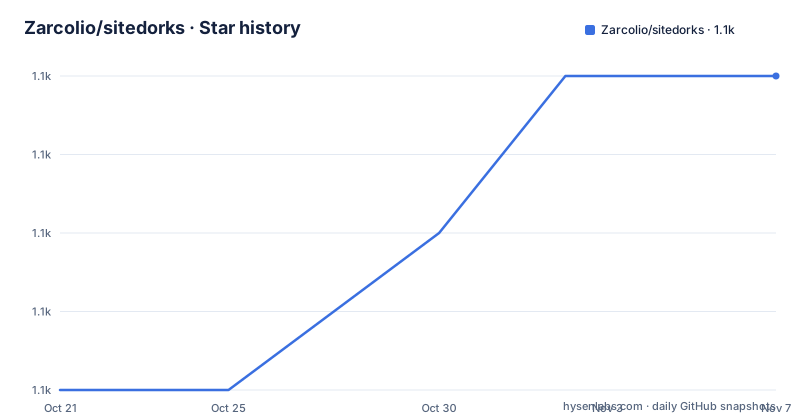
Star history
- Zarcolio/sitedorks1,070 ★ · +4
| Repository | 2026-10-21 | 2026-11-07 |
|---|---|---|
| Zarcolio/sitedorks | 1.1k | 1.1k |
4 Stars in the last 17 days, measured from the daily GitHub snapshot. Compare with other projects
Editorial analysis
One term, many sites, one browser tab each
SiteDorks answers a narrow question: how do you run the same search term against a specific list of websites without typing it out by hand? The project description says it plainly, search Google, Bing, Ecosia, DuckDuckGo, Yandex or Yahoo for a search term with a default set of websites, a set of bug bounty programs or a custom collection, and the readme expands the engine list to include Brave.
The mechanism is a browser, not a scraping library. The tool builds the search URLs and opens them in your default browser, so each result page appears as a tab and you read them yourself. That is the whole design, and it is why there is a -browser option to point it at a specific executable and a -echo option to print the URLs instead of opening them, which the readme suggests for piping or bookmarking.
The value is in the lists rather than in the query. The default list holds 638 dorkable websites, grouped into categories such as ai with 7 entries, analysis with 13, cloud with 105, comm with 83, dev with 69, docs with 80, orgs with 61, social with 100, shortener with 41 and storage with 9, and the list is described as updated regularly. Someone who has already curated which sites are worth searching for a given kind of content gets to reuse that curation instead of rebuilding it.
The repository is a single Python script, sitedorks.py, with an install.sh, a requirements file and a csv directory holding the lists. The last push was on 2026-10-08 and the project is not archived, though the repository has no GitHub releases, so the version is tracked by commits. A hosted web version of the tool is also offered at antihacker.nl/sitedorks.
Category files decide which sites get queried
The category system is the core of the design, and it is built on CSV files. The default list is WorldWide.csv, and the readme explains how a query is assembled from it: you pick one or more categories with the -cat option, using a comma as the delimiter, and the tool searches every site in those categories.
Listing the categories is itself a command. The -cats option shows all the categories on file, and it can be combined with -file to inspect a different CSV. The help text goes further with the -hh option, which shows the help inside a CSV file, and the mechanism is simple: lines at the beginning of the file that start with a hash are treated as help and displayed.
That last detail matters more than it looks. Because the help lives inside the data file, a list can carry its own documentation, which means a custom collection is self-describing rather than needing a separate manual. The readme points at the same idea for the country lists, with separate files for China, France, Germany, Korea, the Netherlands and Russia, and it notes that a Dutch government and educational services list is included as well, searchable with a single command.
The lists are the part of the project that needs the most care from a user. The readme asks for help in two directions, more entries in the current lists and more country lists, and the categories on file are a curated set rather than an index of the whole web. A category named for cloud infrastructure does not contain every cloud provider, it contains the ones somebody added.
The command line, engine by engine
The tool uses argparse, and the option set is short enough to read in one screen. A query term is mandatory and goes in -query, the engine goes in -engine, and the site operator is controlled by -site, which turns the site: operator on or off or replaces it with inurl:, with Google being the engine where inurl: is offered. The -cat option takes one or more categories, -file takes a custom website list, -filter restricts the search to sites containing a given string, and -excl removes domains from the query.
The engine choices are google, baidu, bing, brave, bing-ecosia, duckduckgo, yahoo and yandex, with google as the default. The examples in the readme show the shape of a normal invocation and a modified one:
sitedorks -query '"uber.com"'sitedorks -cat comm -site disable -engine yandex -query uberThe second example is interesting for a detail in the documentation. The help text describes the -site values as on, off or inurl, while the example uses disable, and the readme describes the same intent in prose as leaving site out of the query. The accepted spelling is worth confirming with the -help output on your own machine rather than assuming, and it is the kind of small inconsistency that turns a working command into a silent no-op.
The -wait option sets how many seconds to wait between queries, and it defaults to 7. That default, and the warning attached to it, are the most important operational facts in the readme.
Installing it and the CAPTCHA you are going to meet
Installation assumes a security distribution. The readme says SiteDorks should be able to run with a default Kali Linux installation using Python 3 without installing additional Python packages, and gives three commands:
git clone https://github.com/Zarcolio/sitedorks
cd sitedorks
bash install.sh
The requirements file lists two packages, bbrecon and tldextract, which the install script presumably covers, and the second of them, tldextract, is the component that knows how to separate a registered domain from its subdomains, which is what makes a per-site query work on a list of hosts. A hosted web version also exists at antihacker.nl/sitedorks for people who do not want to run a local copy.
The warning in the readme is about rate limiting, and it is the reason to read this section before using the tool. If you do not use the -cat option, SiteDorks will open a lot of tabs in your browser and probably make Google throw a CAPTCHA, and the advice is to increase the waiting time with the -wait option to lower the chance. There is a second reason the same option exists, stated earlier in the document: some search engines ignore queries with too many keywords or characters, and the -count argument splits one dork into several queries, with the count setting how many websites are searched per query, because Google has a maximum length for a query.
So there are two dials, and they pull in opposite directions. A higher -count means fewer, longer queries, which helps with the query length limit and increases the CAPTCHA risk. A higher -wait slows everything down and reduces the CAPTCHA risk. Finding the balance is the actual skill, and the defaults are a starting point rather than a setting you can ignore.
Custom lists, filtering and printing instead of opening
The tool is designed to be pointed at your own material. The -file option takes a custom website list, the readme gives the example of putting dozens of domains in one file for a penetration test, and adding sites is a matter of editing the file, either as a CSV with categories or as a plain list. That is the argument for the whole project over a manual approach, and the readme puts it as a list: it is easy to query different engines, dorks can be run per category or across several, different input files can be kept for different uses, and new sites are added by editing a file rather than by rewriting a query.
The filter and exclusion options are what make a custom list usable at scale. -filter keeps only the sites whose name contains a given string, and -excl removes domains from the query entirely, so you can start from a broad category and narrow it down to a region, a language or a technology without maintaining a second file.
The -echo flag is the escape hatch. It prints the search query URLs instead of opening them, and the readme suggests it for further use such as piping or bookmarking. In practice that means the tool can hand its output to another program, to a notes file or to a session log, which is what turns it from a browser helper into something you can record.
The -browser option completes the picture. You can name the browser executable to use, or leave it to the default, which matters on a machine with several browsers where the default is not the one you want to open a hundred tabs in, or where you want a dedicated profile for research work.
Where a manual search fits better
The honest alternative is doing it by hand in one search engine with a handful of site: terms, and for a small, targeted question that is faster and cleaner than starting this tool.
The difference in approach is scope and repetition. A manual search is one query, one engine, one judgement about which sites matter, and it produces one page of results. sitedorks multiplies a single term across a curated list of hundreds of sites, in a browser, at a pace set by a wait timer, and it produces as many tabs as there are sites in the categories you selected. The value of that multiplication is real when the point is coverage, since you are looking for one specific artefact on one specific kind of site, and the point of a term appearing in a document, a pastesite or a code hosting site. The value is low when you are exploring, because hundreds of tabs is a lot of context to hold.
There is a second alternative worth naming, and it is the reason the readme points at dork lists and dork search sites at all. If you want to find the interesting query, this tool is the wrong instrument: it applies a term you already know to sites you already have, while the dork resources are about discovering the terms themselves. The two are complementary and the readme lists them separately for that reason.
The limits of the tool are mostly limits of the search engines. Search engines change their interfaces, add their own anti-automation measures, and a tool that opens URLs in a browser is one step ahead of a block list rather than around it. Treat a CAPTCHA as a signal to slow down rather than as an obstacle to route around, and remember that the terms of service of the engines you query still apply to you.
Licence, dependencies and the shape of the project
SiteDorks is licensed under GPL-3.0, with the licence file in the repository root. For a research tool that people run locally, GPL-3.0 is a strong copyleft licence, but it does not affect the ordinary use of running the script.
The dependency list is short and explains the design. bbrecon is the bug bounty reconnaissance component, which lines up with the project description mentioning bug bounty programs as one of the target collections, and tldextract handles domain parsing so that a list of hosts can be turned into valid per-site queries without the tool guessing where the registrable domain starts.
The repository itself is minimal: sitedorks.py, install.sh, requirements.txt, a csv directory and the readme. A single script is easy to read, easy to patch and easy to run, and it also means there is no plugin system and no configuration beyond the CSV files and the command line. The category and country lists are the part that is maintained as a community effort, and the readme asks for contributions in two directions, more entries for the existing lists and new lists for other countries, with a help wanted label on the project.
The web version at antihacker.nl/sitedorks is worth knowing about for two reasons. It removes the install step for anyone who only wants to try the tool, and it makes the maintained lists visible to people who might not install anything, which is a reasonable way for a list of dorkable sites to stay current.
Editorial conclusion
sitedorks fits an OSINT or bug bounty researcher who wants the same term queried against hundreds of specific sites quickly, and who is willing to tune the query split and the wait time to stay under a search engine's radar. It does not fit automated harvesting at scale, and it is not a scanner. Verify first which category files exist for the sites you care about, that the -count and -wait values you choose keep you below the engine's rate limits, and that the browser you point it at is the one you want it opening.
Frequently asked questions
How do I install sitedorks?
Clone the repository, change into the sitedorks directory and run bash install.sh. The project states that it should run on a default Kali Linux installation with Python 3 without installing additional packages, and the requirements file lists bbrecon and tldextract.
What search engines does sitedorks support?
The -engine option accepts google, baidu, bing, brave, bing-ecosia, duckduckgo, yahoo and yandex, with google as the default. The -site option controls whether the site: operator is used, and for Google it can be replaced with inurl:.
Why do I get a CAPTCHA when using sitedorks?
The readme warns that without the -cat option the tool opens a lot of tabs and Google will probably return a CAPTCHA, and that you should increase the wait time with the -wait option, which defaults to 7 seconds. The -count option works the other way, splitting one dork into several queries because Google has a maximum query length.
Can I search a custom list of sites with sitedorks?
Yes. The -file option takes a custom website list, and the -filter option keeps only sites containing a given string while -excl removes domains from the query. The -cats option shows the categories in a CSV file, and -hh shows the help lines stored at the top of that file.
Official sources
Add this badge to your README
If you maintain this project, the badge below links readers to this analysis and shows its maintenance status from the daily GitHub snapshot. Paste the markdown into your README; add ?metric=license or ?metric=stars to the image URL for a different field.

[](https://hysenlabs.com/projects/zarcolio-sitedorks)Star history chart for your README
[](https://hysenlabs.com/projects/zarcolio-sitedorks)Was this useful?