The server component has no password, the websocket library is a fork, and the sample config disagrees with the flag
A high-performance HTTP tunneling tool.
At a glance
- What is it?
- Suo5 is a Go HTTP tunneling tool that turns a file deployed inside a Java, PHP or .NET application into a local SOCKS5 proxy, published by one author with a warning that it is for authorized testing only; the mechanics are documented in detail and so are the gaps, from a server side with no authentication to a client that forwards to whatever address it is given.
- Who is it for?
- Suo5 fits a security tester who already has authorized access to an application server and needs a pivot out of it, and it does the job with one target URL and a local proxy. Four things to weigh before using it, all of them stated in its own documentation.
- Can I use it commercially?
- Yes. MIT is a permissive licence: you can use, modify and sell software built on it, as long as you keep its copyright and licence notices.
- Is it still maintained?
- Yes. The repository last received commits 124 days ago.
- What is it written in?
- Mainly Go, according to GitHub's language statistics.
Answers come from the project's GitHub data, last synced on November 15, 2026, and from our analysis. They are not legal advice.
Star history
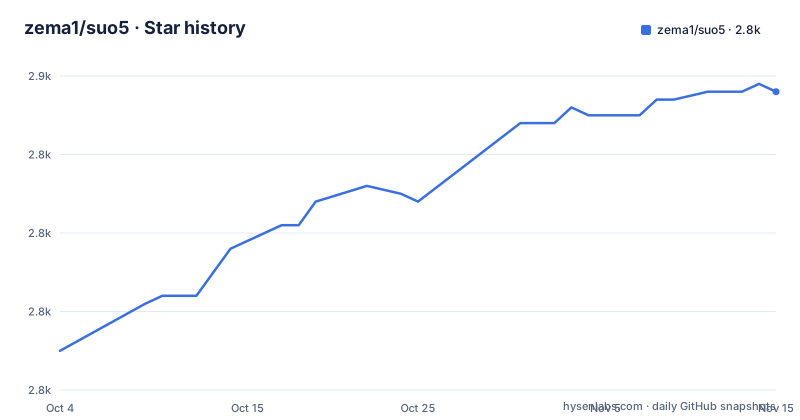
- zema1/suo52,848 ★ · +33
| Repository | 2026-10-04 | 2026-11-15 |
|---|---|---|
| zema1/suo5 | 2.8k | 2.8k |
33 Stars in the last 42 days, measured from the daily GitHub snapshot. Compare with other projects
Editorial analysis
The server component has no password and the file name is the defence
The FAQ answers the authentication question by separating two things that are easy to confuse. The client flag --auth sets credentials for the local SOCKS5 proxy in username:password form, and the text is explicit that this is to stop unauthorized use of the local proxy and is unrelated to the server.
Then it says the server script itself contains no password protection, and offers two suggestions: change the server file's name and path, or use the access rules that come with the memory shell.
So the entire server-side protection story is a different filename and a different directory, plus whatever the injected component already provides. Nothing in the documentation describes a token, a shared secret or a handshake value that the client and server agree on before a tunnel opens.
The startup log makes the shape of the handshake visible without describing a credential: it reports the target, the preferred connection mode, then a handshake success carrying a session id, then the local tunnel address. That session id is generated for the connection rather than presented by the operator, which is consistent with there being nothing to authenticate against.
The client will forward to another address whenever it is told to
This is the part to read before pointing the tool at anything.
The load balancing feature works by deploying the server component on every backend and giving the client a redirect URL with -r. The documented mechanism is that the client checks whether the IP address in that -r URL matches the server's own network interface address, and forwards the request when it does not. There is no allow list, no confirmation, no dry run and no switch that limits where a forwarded request may go. The set of reachable destinations is whatever appears in the URL the operator supplies.
The other two features widen it further. Port forwarding mode sends raw TCP to an address and port given on the command line, and upstream proxy support chains the client's own traffic through an HTTP or SOCKS5 proxy, so a tunnel can be relayed again.
The defaults are conservative. The local listener is 127.0.0.1:1111 with no authentication, which is loopback only. One documented example changes that to 0.0.0.0:7788 with a credential typed in plain text on the command line, which is the shape to think about before copying an example onto a real machine.
The websocket library is replaced by a fork in the author's namespace
The go.mod file contains a replacement directive rather than a normal requirement:
replace github.com/gorilla/websocket v1.5.3 => github.com/zema1/websocket v0.0.0-20240728051525-7fc49edb27c2So the websocket implementation that ships inside the binary is not the upstream library at the version it names. It is a fork published under the project author's own namespace and pinned to a pseudo-version whose timestamp is in July 2024. A reader auditing the dependency tree has to notice this line, because the module path still reads as the well known upstream one.
It is not the only such dependency. The direct requirements include github.com/zema1/rawhttp, a second fork from the same namespace, and github.com/refraction-networking/utls, a fork of the TLS library that exists to control the ClientHello fingerprint. Two of those choices are deliberate for a tunneling tool, and one is simply the author's own code.
The rest of the direct list is conventional: urfave/cli for the command line, stretchr/testify for tests, go-gost/gosocks5 for the local SOCKS5 side, gobwas/glob, kataras logging helpers, pkg/errors and golang.org/x/time. The go directive reads 1.26.5, pinned to a patch release.
Four modes, qualitative numbers, and one that Burp can read
The transport table names four modes and gives each a principle, a latency and a throughput rating, and a situation to use it in. Automatic probes and picks. Full duplex uses bidirectional chunked encoding over a single connection and is rated lowest latency and highest throughput, for a direct connection or a simple reverse proxy. Half duplex pairs a long downstream connection with short upstream ones and is rated for Nginx reverse proxies and some WAF situations. Short connection uses short connections in both directions with polling and is the fallback for multi-layer proxies and environments that restrict long connections.
The ratings are words, not measurements: extremely low, low, medium, extremely high, high, medium. The separate claim that full duplex performance is close to FRP also carries no number, so nothing here can be checked against anything.
One operational detail in the FAQ is more informative than the table. Capturing the traffic in Burp works only in short connection mode, because a long connection cannot be handled by it. So the mode that is rated worst for latency and throughput is the only one an intercepting proxy can sit in front of, which is a fair trade to know about before choosing.
The sample config disables the cookie jar the flag enables
Parameters can live in a JSON file, and the GUI and the command line are said to read the same format. The sample file is the reference for what the keys are:
  "method": "POST",
  "listen": "127.0.0.1:1111",
  "mode": "auto",
  "buffer_size": 327680,
  "timeout": 10,
  "no_auth": true,
  "disable_cookiejar": true,
  "exclude_domain": null
The cookie jar is enabled on the command line by a flag called --jar, described as keeping session cookies for servers that need them. The sample configuration sets the opposite key to true, so a file copied out of the documentation starts with the cookie jar switched off regardless of what the flag implies.
Two other defaults are worth reading literally. The authentication is off with empty username and password fields, which matches the loopback default. And the sample carries a raw header:
"User-Agent: Mozilla/5.0 (Linux; Android 6.0; Nexus 5 Build/MRA58N) AppleWebKit/537.36"which is a fixed claim of an old Android phone, shipped as the example value for anyone to copy.
A GUI that needs a system WebView and a CLI that needs none
Two clients ship from the same releases page. The names are suo5-gui- for the graphical build and suo5-cli- for the command line, covering Windows, macOS on both Intel and Apple Silicon, and Linux.
The GUI is built on Wails and is the recommended one for most people, with the reason for its own requirement given plainly: it depends on the system WebView framework, which Windows 11 and macOS already include, while other systems will prompt to download and install it and will not work until that is allowed. The CLI is for people who want a terminal and for running on a server.
The command line surface visible in the help output is small:
   --config value, -c value    the filepath for json config file
   --target value, -t value    the remote server url, ex: http://localhost:8080/suo5.jsp
   --listen value, -l value    listen address of socks5 server (default: "127.0.0.1:1111")
   --method value, -m value    http request method (default: "POST")
The target is a URL pointing at the deployed file, and the listen address is the local SOCKS5 endpoint. The remaining options in the output are cut off after the redirect flag.
Compatibility is claimed as loose ranges with no matrix
The server side claim is a list of application servers and runtime versions. For Java: Tomcat, WebLogic, JBoss and Resin, with support from JDK6 up to what the text calls JDK 2x. For .Net: every .Net Framework version from 2.0 upwards under IIS. For PHP: Nginx and Apache environments, from PHP 5.6 to PHP 8.x.
None of that is a matrix. There is no table pairing an application server with a runtime with a file to deploy, even though the assets directory holds a separate server file per platform and the deployment step asks you to pick the right one and confirm it executes.
The write of JDK 2x is the clearest case: it names no upper bound at all, in a document whose other ranges are specific. A reader cannot tell from this whether a given container is covered, and the only signal offered is whether the file runs.
The deployment step also points Java users at a third-party project for generating a memory shell, which is a separate tool with its own behaviour, and the documentation gives no guidance on when to choose that route over uploading a file.
The documentation is Chinese only and so are the release titles
The repository carries one README file and it is written in Chinese. There is no English version alongside it, and the release names follow the same pattern, with titles such as Suo5 v2.2.0 published. The warning that opens the document is also in Chinese, and it is the one that matters most: the tool is for authorized security testing, vulnerability assessment and auditing, and unauthorized attacks or penetration testing with it are illegal with the user carrying the responsibility.
The rest of the repository is laid out by function: an assets directory holding the server files, a core directory named after the project, ctrl, netrans and tpl directories, a gui directory for the Wails build, and tests. There is a mise.toml for toolchain tasks and a golangci configuration for linting, a CHANGELOG and a DONATION file.
Two reference projects are credited at the end, Chunk-Proxy and Neo-reGeorg, both tunneling or re-injection tools, which tells you what this is descended from. The license is MIT, the default branch is main, and the last push is dated 2026-07-14, the same timestamp as the v2.2.0 release.
Editorial conclusion
Suo5 fits a security tester who already has authorized access to an application server and needs a pivot out of it, and it does the job with one target URL and a local proxy. Four things to weigh before using it, all of them stated in its own documentation. The server component has no authentication, and the suggested protections are a different file name and path or whatever access rules the injected shell provides. The client offers no per-target allow list, no dry run and no kill switch, and it will forward to another address when told to. Two dependencies come from the author's own namespace, including a websocket library that replaces the upstream one by directive. And the documentation is Chinese only, with no English file in the repository. Use it only on systems you are authorized to test. The last release is v2.2.0 from 2026-07-14, published at the same moment as the branch push.
Frequently asked questions
What is Suo5, and who is it intended for?
A Go HTTP tunneling tool that turns a server component deployed inside an application into a local SOCKS5 proxy, so traffic leaves through that server. The documentation carries a warning that it is for authorized security testing, vulnerability assessment and auditing, and that unauthorized attacks or penetration testing with it are illegal and the user's own responsibility.
How does Suo5 authentication work, and what does the auth flag protect?
The --auth flag sets credentials in username:password form for the local SOCKS5 proxy, to prevent unauthorized use of that local proxy, and it is unrelated to the server. The server script itself has no password protection; the suggested protections are changing the file name and path, or using the access rules built into the memory shell.
Which Suo5 transport mode works behind an Nginx reverse proxy?
auto is the default and probes for the best mode on its own. The guide names --mode half for an Nginx reverse proxy, --mode full for a direct connection or a simple reverse proxy, and --mode classic for multi-layer proxies, CDNs and strict environments. Only short connection mode can be captured in Burp, since a long connection stops it from handling the traffic.
How is Suo5 installed and where does its server component come from?
Download a binary from the releases page, either suo5-gui- for the Wails based GUI, which needs a system WebView that Windows 11 and macOS already include, or suo5-cli- for the command line, on Windows, macOS or Linux. The server side is a file taken from the assets directory and uploaded to the target, and for Java targets the documentation points at a separate project for generating a memory shell.
Official sources
Add this badge to your README
If you maintain this project, the badge below links readers to this analysis and shows its maintenance status from the daily GitHub snapshot. Paste the markdown into your README; add ?metric=license or ?metric=stars to the image URL for a different field.

[](https://hysenlabs.com/projects/zema1-suo5)Star history chart for your README
[](https://hysenlabs.com/projects/zema1-suo5)Was this useful?