watchvuln Docker Setup for Filtered Vulnerability Alerts
一个高价值漏洞采集与推送服务 | Collect valueable vulnerabilities and push them to various services
At a glance
- What is it?
- WatchVuln is a Go service that collects selected vulnerability sources, applies source-specific filtering, stores results, and pushes alerts to chat or webhook services. Its Docker setup is straightforward, but source scraping, credentials, persistence, and filtering rules require attention before adoption.
- Who is it for?
- WatchVuln suits operators who want a narrow alert stream from a fixed collection of public vulnerability pages and already operate one of its supported notification services. It is a poor fit for broad CVE ingestion, comprehensive vulnerability-management workflows, or deployments that require documented behavior when source layouts change.
- Can I use it commercially?
- Yes. MIT is a permissive licence: you can use, modify and sell software built on it, as long as you keep its copyright and licence notices.
- Is it still maintained?
- Yes. The repository last received commits 62 days ago.
- What is it written in?
- Mainly Go, according to GitHub's language statistics.
Answers come from the project's GitHub data, last synced on November 7, 2026, and from our analysis. They are not legal advice.
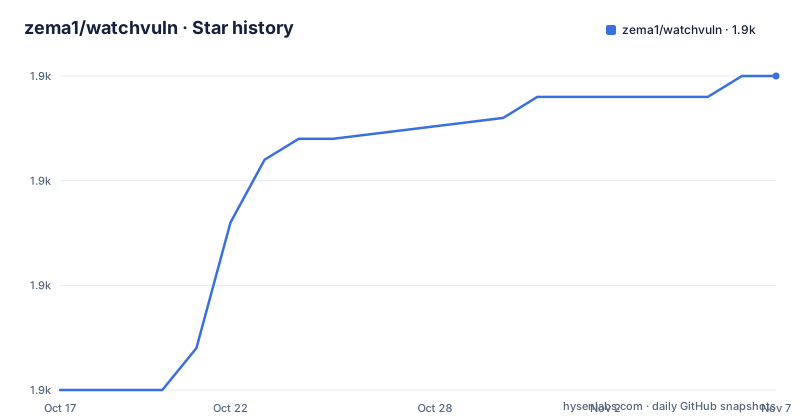
Star history
- zema1/watchvuln1,915 ★ · +15
| Repository | 2026-10-17 | 2026-11-07 |
|---|---|---|
| zema1/watchvuln | 1.9k | 1.9k |
15 Stars in the last 21 days, measured from the daily GitHub snapshot. Compare with other projects
Editorial analysis
What WatchVuln Filters From Public Vulnerability Pages
WatchVuln addresses notification overload rather than vulnerability database coverage. Its stated goal is to collect selected, comparatively useful vulnerability records and send them to a team instead of presenting every CVE as an undifferentiated stream. The target user is an operator or security team that follows Chinese and international public sources but wants source-specific qualification before an alert reaches a chat group.
The documented sources include Alibaba Cloud AVD, Chaitin, OSCS, Qi An Xin, ThreatBook, Seebug, Venustech, CISA KEV, and Apache Struts2 Security Bulletins. Filtering differs by source. AVD, ThreatBook, Seebug, Venustech, and Struts2 generally require high or critical severity. Chaitin additionally requires a Chinese title, OSCS requires a `预警` tag, and Qi An Xin requires at least one of `奇安信CERT验证`, `POC公开`, or `技术细节公布`. Every CISA KEV record is pushed because that source is treated differently.
This design makes WatchVuln more than a generic RSS reader, but it also defines its scope. The README does not claim complete CVE coverage, asset matching, exploitability analysis against a reader's environment, or automatic remediation. It reduces selected public pages to alert records under explicit rules. A team that needs coverage of all CVE records or prioritization based on its own inventory would still need other data and decision layers.
WatchVuln Collection, Persistence, and Deduplication Path
Based on the repository layout, WatchVuln separates collection, control, persistence, and delivery into packages named `grab/`, `ctrl/`, `ent/`, and `push/`. The dependency list supports this interpretation: `goquery` is present for HTML-oriented processing, while Resty, Req, goja, and GitHub-related code indicate HTTP retrieval and source-specific processing beyond simple static feed parsing. The README does not document each scraper's internal control flow, so the exact parsing sequence should not be inferred from package names alone.
The externally visible data path is clearer. `SOURCES` selects enabled information sources. Each source is polled according to `INTERVAL`, and its records are checked against that source's push strategy. A qualifying new vulnerability is sent immediately. The second supported case is a new record that initially fails the policy but is later updated until it qualifies. The README states that both cases have built-in deduplication, preventing the same alert from being pushed repeatedly.
Persistence is configurable through `DB_CONN`. The environment-variable table gives `sqlite3://vuln_v3.sqlite3` as the default, while `go.mod` includes SQLite, MySQL, PostgreSQL, and pgx dependencies. The repository's Compose example instead uses PostgreSQL 14.4. That split matters: Docker is presented as the preferred configuration path, but the sample deployment makes database persistence explicit through a mounted PostgreSQL volume rather than relying on the documented SQLite default.
A watchvuln Docker Compose Setup for DingTalk and PostgreSQL
The visible quick-use documentation recommends Docker and environment variables for service configuration. The repository's `docker-compose.yaml` defines WatchVuln and PostgreSQL, places credentials in environment entries, sets a 30-minute interval, and mounts PostgreSQL data under `./data/postgresql`. The placeholders must be replaced with a real DingTalk token and signing secret before the example represents a usable DingTalk deployment. The visible README does not provide a Docker Compose launch command or document the expected console output, so neither is invented here.
The repository example is:
services:
  watchvuln:
    restart: always
    image: zemal/watchvuln:latest
    environment:
      DINGDING_ACCESS_TOKEN: YOUR_TOKEN_HERE
      DINGDING_SECRET: YOUR_SECRET_HERE
      DB_CONN: postgres://watchvuln:watchvuln@postgres:5432/watchvuln
      INTERVAL: 30m
    depends_on:
      - postgres
`DINGDING_ACCESS_TOKEN` is the `access_token` portion of the DingTalk robot URL. `DINGDING_SECRET` is the signing value, and the README states that DingTalk signature authentication is the supported method. `DB_CONN` points at the `postgres` service, while `INTERVAL` sets the check period to 30 minutes. The Compose file also declares `restart: always`, so this is intended to remain running rather than execute once.
Choosing watchvuln Sources and Delivery Credentials
A first configuration should be narrower than enabling every supported source. The documented default for `SOURCES` is `avd,ti,oscs,threatbook,seebug,struts2,venustech`. `ti` corresponds to the Qi An Xin source described in the source table. The environment-variable table also lists `chaitin` as an available source selector, although that name is absent from the stated default list.
Delivery is equally configurable. The README lists DingTalk, WeCom, Lark, Lanxin, Server酱, PushPlus, WPUSH, Slack Webhook, Telegram Bot, Bark, and a custom webhook. Telegram requires both `TELEGRAM_BOT_TOKEN` and `TELEGRAM_CHAT_IDS`; the latter accepts a comma-separated list. Slack uses `SLACK_WEBHOOK_URL` and `SLACK_CHANNEL`. A custom deployment uses `WEBHOOK_URL`, with an example directory under `examples/webhook/`.
This breadth is useful, but secrets and destination permissions become an operational dependency. WatchVuln is designed to send security notifications to external services, so a deployment owner must control the robot credentials and webhook endpoints. The documentation identifies supported providers and their variables, but it does not describe retry policy, delivery receipts, rate-limit handling, or recovery behavior when a push endpoint is unavailable. Those details should not be assumed from the provider list.
Scraper Dependence and Source-Specific Blind Spots
The main technical limitation is visible in the architecture. Several inputs are public HTML pages rather than stable, fully documented APIs. A change to a site's markup, navigation, tag vocabulary, or accessibility can alter what the collector sees. The README does not document selector repair, parser failure alerts, source health checks, or an explicit replay mechanism. That does not prove those behaviors are absent, but it means the documentation does not provide an operational guarantee for them.
The filters are also intentionally narrow. Chaitin items need a Chinese title even when high or critical. Qi An Xin alerts require one of three named tags. OSCS requires the `预警` tag. A record that is operationally serious but lacks those textual markers may not be delivered under the documented policy. Conversely, severity and tag matching do not account for whether a vulnerable product exists in the recipient's environment.
CISA KEV has a different profile because every catalog entry is pushed. Teams that cannot tolerate a larger stream should account for that source before including it. The service is therefore best understood as a policy-based public-page collector, not as a complete triage system. Its value depends on whether its fixed filters match a team's information needs.
watchvuln Alternatives and the Cost of Source Coupling
A real alternative is a general-purpose webhook workflow connected to authoritative vulnerability feeds or internal scanners. That approach can ingest broader data, retain richer metadata, correlate findings with an asset inventory, and apply organization-specific rules. Its extra cost is that the team must assemble and maintain that pipeline. WatchVuln instead supplies predefined sources, filters, deduplication, storage, and multiple Chinese and international push integrations as one Go application.
Another practical comparison is with an RSS reader. An RSS reader can subscribe to multiple sources, but it does not, according to the WatchVuln documentation, provide the same built-in source-specific qualification and two-stage alert behavior when an initially unqualified record later becomes eligible. WatchVuln is more specialized for this exact public-page collection and notification task.
Maintenance is supported by recent repository activity. The repository is not archived, and the last push was on 2026-09-07. Releases include v2.7.0 on 2025-11-14, v2.6.0 on 2025-06-24, and v2.5.1 on 2025-03-27. That indicates recent changes, but the documentation still leaves source maintenance and delivery failure handling unspecified. The MIT license permits use, modification, distribution, and sublicensing under its conditions, subject to preserving the license and copyright notice. This is a licensing summary, not legal advice.
Editorial conclusion
WatchVuln suits operators who want a narrow alert stream from a fixed collection of public vulnerability pages and already operate one of its supported notification services. It is a poor fit for broad CVE ingestion, comprehensive vulnerability-management workflows, or deployments that require documented behavior when source layouts change. Verify the selected sources, database choice, push credentials, and exact filtering rules first. As documented, the default Docker Compose service runs `zemal/watchvuln:latest` with `INTERVAL=30m` and PostgreSQL-backed storage.
Frequently asked questions
How do I run watchvuln with Docker?
The repository provides `docker-compose.yaml` with `zemal/watchvuln:latest` and PostgreSQL 14.4. The visible quick-use documentation recommends Docker, but it does not show a launch command or expected startup output.
Which notification services does watchvuln support?
The README lists DingTalk, WeCom, Lark, Lanxin, Server酱, PushPlus, WPUSH, Slack Webhook, Telegram Bot, Bark, and a custom webhook service. Each provider has its own documented environment variables.
Does watchvuln send duplicate vulnerability alerts?
The README states that both new qualifying vulnerabilities and previously unqualified vulnerabilities that later qualify go through built-in deduplication. The documentation does not describe the deduplication key or retention period.
Official sources
Add this badge to your README
If you maintain this project, the badge below links readers to this analysis and shows its maintenance status from the daily GitHub snapshot. Paste the markdown into your README; add ?metric=license or ?metric=stars to the image URL for a different field.

[](https://hysenlabs.com/projects/zema1-watchvuln)Star history chart for your README
[](https://hysenlabs.com/projects/zema1-watchvuln)Was this useful?