oh-story-dsh adds four writing workbenches to DeepSeek Harness, and nothing else
A DeepSeek Harness community plugin for writing web novels and short dramas, with built-in workbenches for novels, short dramas, games and video recaps.
At a glance
- What is it?
- A community DSH plugin that ships novel, short-drama, game and video-recap workbenches with pinned upstream skill bundles, refuses to keep a second database, requires every vendor API key to sit in host environment variables, and pins the DSH version in both npx commands.
- Who is it for?
- oh-story-dsh fits a DeepSeek Harness user whose real work is fiction, short drama, playable adaptations or video recaps and who wants the harness rather than a separate writing application, since the plugin keeps agents, sessions, models and approvals native and treats files as the only record of creative state. Four checks come first.
- Can I use it commercially?
- Yes. MIT is a permissive licence: you can use, modify and sell software built on it, as long as you keep its copyright and licence notices.
- Is it still maintained?
- Yes. The repository last received commits 3 days ago.
- What is it written in?
- Mainly Python, according to GitHub's language statistics.
Answers come from the project's GitHub data, last synced on November 14, 2026, and from our analysis. They are not legal advice.
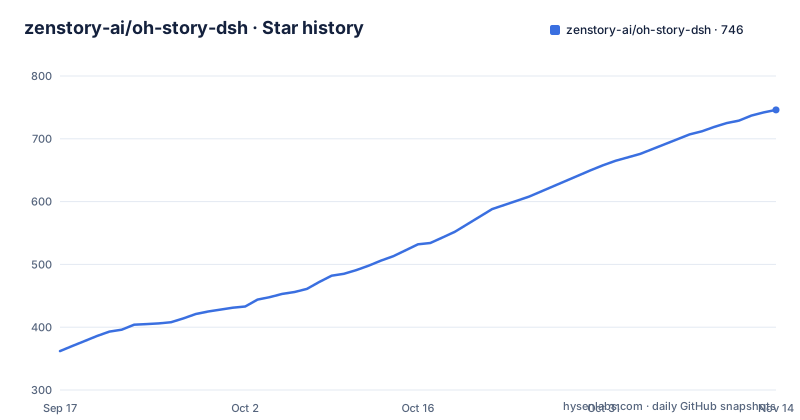
Star history
- zenstory-ai/oh-story-dsh746 ★ · +384
| Repository | 2026-09-17 | 2026-11-14 |
|---|---|---|
| zenstory-ai/oh-story-dsh | 362 | 746 |
384 Stars in the last 58 days, measured from the daily GitHub snapshot. Compare with other projects
Editorial analysis
The plugin adds skills, roles and a UI, never a second runtime
The scope statement is the first thing to read, because a plugin that bundled its own runtime would be a different product. Agent, sessions, models, permission approval and Chat all stay DeepSeek Harness native. What the plugin adds is creation skills, professional roles, a project file protocol and the workbench interface, with no second agent runtime and no project database. Four workbenches appear, each bundling a pinned upstream release: Oh Story 0.8.4 with 13 skills and 7 roles for the novel workbench, Drama Skills 0.8.0 with 11 skills for short drama, NovelToGame 0.4.0 with 7 skills and a bundled playable Golden Lotus example for the game workbench, and video-recap-skills 0.6.0 with 6 skills for video recap. Entry points are slash commands: /story, /story-long-write and /story-review; /short-drama with its write, storyboard and edit variants; /novel-to-game quick, /game-build and /game-qa; /video-recap and /video-script. The project states it is a community plugin with no affiliation to DeepSeek.
Both npx commands must pin the DSH release, or you install an incompatible pair
Installation needs Node.js 24 or newer, and the install command brings its own pnpm temporarily so a machine with only Node can run it:
npx -y --package [email protected] --package @deepseek-ai/[email protected] dsh plugin --profile web add @oh-story/[email protected] &&
npx -y @deepseek-ai/[email protected] web
The version pins are load-bearing and the README is blunt about why. The plugin declares compatibility with the DSH 0.2.0 patch line only, and a bare `npx @deepseek-ai/dsh` currently resolves to the npm latest tag at 0.1.7-rc.2, which is not compatible, so both commands have to name the version. DSH from 0.1.7 onward checks at install and load time and shows an incompatibility notice instead of loading, with `dsh plugin allow-version` available if you accept the risk; older DSH does no such check and loads it anyway. Keep the terminal open while you work: the browser opens by default, otherwise copy the printed `http://127.0.0.1:3080/?token=...` link, whose token is needed for first authentication, and closing the terminal stops the service.
A separate profile keeps the vanilla web instance clean on a second port
A plugin is installed into a profile, and every session in that profile loads the creation skills, so installing into the default web profile puts them in every session. To keep the vanilla instance untouched, the plugin goes into its own profile:
npx -y --package [email protected] --package @deepseek-ai/[email protected] dsh plugin --profile story add @oh-story/[email protected]A new profile has no interface until you edit `~/.dsh/profiles/story/package.json` and set the bundle list, because the profile is a CLI shell until DSH's own web package is in it:
"bundles": [
  "@deepseek-ai/dsh-base",
  "@deepseek-ai/dsh-web-app",
  "@oh-story/dsh"
]
Order matters there: the web interface package has to load before the creation plugin. With both bundles in place the two profiles run side by side on different ports, and models, credentials, workspace and session history stay managed centrally by DSH:
npx -y @deepseek-ai/[email protected] web                          # 原版 DSH
npx -y @deepseek-ai/[email protected] --profile story --port 3081  # 创作工作台
The short-drama workbench is five Markdown files per episode
Short drama is the most structured of the four because it defines its own file contract: at most five Markdown files per episode, the script, visual settings, storyboard, image prompts and video prompts. A production view projects those files into a shot board, an asset board, tasks and versions, the final cut order and a relationship canvas, and it reports problems in place rather than in a log, naming duplicate IDs, dangling references and format errors. Anything that costs money is gated: image, video, voice and music tasks preview first and call the vendor API only after you confirm the exact content. The finished cut is rendered by /short-drama-edit from the edit list document into a per-episode production folder. The novel workbench is looser by comparison, a three-column layout of file tree, editor and chat where the editor follows the agent as it writes, and clicking a filename in chat opens that file.
Vendor keys live in host environment variables, and the plugin only reports presence
Media generation is not built in; DeepSeek writes the script, storyboard and prompts, and the short-drama production view delegates actual generation to a skill that calls vendor APIs. Five built-in adapters are registered at plugin start into a credential-free configuration file, written by default into a per-user directory in the system temporary location that only the current user can read and write, with the full path shown in the generation environment entry. When the agent runs the production tool it points at that file, and `OH_STORY_DRAMA_ADAPTER_CONFIG` lets you point somewhere else to add an adapter or change timeouts. Keys stay in host environment variables, and the plugin only reports whether each one is set:
export OPENAI_API_KEY=...            # 图片
export ARK_API_KEY=... SEEDANCE_MODEL=...   # 视频,模型/Endpoint ID 以账号开通的为准
npx -y @deepseek-ai/[email protected] web
The providers cover images through GPT Image 2, video through Seedance and MiniMax H3, speech and music through MiniMax. Configure only what you use: without a video key you can still write storyboards and generate keyframe images, and the production view header shows which vendor is configured and which variable is missing.
The video workbench needs Python 3.10 and an ffmpeg built with libass
The video pipeline is the one workbench with host requirements beyond Node, and the ffmpeg situation is the sharp edge. It needs Python 3.10 or newer plus ffmpeg and ffprobe carrying the libass `subtitles` filter; on Debian and Ubuntu that is `sudo apt install ffmpeg`. On macOS it is not automatic, because Homebrew's ffmpeg has shipped without libass since January 2026, so either install a separate libass build or tell the pipeline `--no-burn-subtitles` and skip burning. Video recap also reads `MIMO_API_KEY`, and Fish Audio text to speech additionally needs `FISH_API_KEY`. The workbench itself keeps a strict layout, with projects under `video-recaps/<project>/` split into `sources/` for the original footage, `work/` for working files and `outputs/` for deliverables, preview switching between the original, the cut version and the final, and HTTP Range streaming so a long source can be scrubbed without downloading it whole.
The game workbench runs in a separate origin and an iframe sandbox
Playable adaptations get the strictest isolation of the four. `/novel-to-game quick` writes its output into `game-adaptations/<project>/`, and once `build/app/index.html` is ready the project appears in the project list with refresh, fullscreen and project switching, with live play on the left and chat on the right. The important part is where it runs: in a separate origin inside an iframe sandbox, so the generated game cannot reach the harness page around it. Two shared rules sit underneath all four workbenches and explain most of the interface. Files are the creative fact: a workbench only projects the project's files, keeps no parallel database, and does not overwrite unsaved human edits with a concurrent agent write. And the workbenches do not take over unrelated work: the layout only switches when the current workspace actually holds a creation project, can be collapsed at any time to return the session to native DSH form, and remembers that choice per workspace.
Parity checks against the pinned upstream bundles run in the test scripts
The repository is a pnpm workspace with Node 24 as its engine floor, MIT licensed, and the root package marked private with a `packageManager` field pinning pnpm 11.7.0. Most of the scripts exist to protect the promise that the bundled upstream workbenches match their pinned releases. There is an assets sync script per workbench and an assets check that runs four parity scripts, one per upstream project, plus a `dsh:boundary` script whose name describes its purpose. Tests come in three flavors: unit tests per package, contract tests per package, and two DSH tests, one a native smoke run and one named for a real installation. Linting is `eslint . --max-warnings=0`, typechecking runs per package, and a demo script renders each of the four workbench demos individually. Secrets are handled by example rather than by template: `.env.example` holds one empty `DEEPSEEK_API_KEY` line with a comment telling you to copy it to `.env.local` and never commit a real key. Releases are frequent at 0.1.x, with v0.1.12 published on 28 September 2026.
Editorial conclusion
oh-story-dsh fits a DeepSeek Harness user whose real work is fiction, short drama, playable adaptations or video recaps and who wants the harness rather than a separate writing application, since the plugin keeps agents, sessions, models and approvals native and treats files as the only record of creative state. Four checks come first. Pin @deepseek-ai/[email protected] in both npx commands, because the unversioned package resolves to an older release that the plugin declares incompatible. Add the plugin to a dedicated profile if you want a clean vanilla web instance. Expect to supply vendor keys in host environment variables, one per media type, and read only what the production view reports about them. And on macOS, check whether your ffmpeg has libass before planning the video workbench.
Frequently asked questions
What does the oh-story-dsh plugin add to DeepSeek Harness?
It adds four creation workbenches, for novels, short drama, playable games and video recaps, as creation skills, professional roles, a project file protocol and the workbench interface. Agents, sessions, models, permission approval and chat stay native to DSH, and there is no second agent runtime or project database.
How do I install oh-story-dsh with the right DSH version?
Use the version-pinned commands with Node 24 or newer: npx -y --package [email protected] --package @deepseek-ai/[email protected] dsh plugin --profile web add @oh-story/[email protected], then npx -y @deepseek-ai/[email protected] web. A bare npx @deepseek-ai/dsh resolves to 0.1.7-rc.2, which the plugin declares incompatible.
Where do API keys go in oh-story-dsh?
In host environment variables before DSH starts: DEEPSEEK_API_KEY for the model provider, OPENAI_API_KEY for images, ARK_API_KEY with SEEDANCE_MODEL for Seedance video, MINIMAX_API_KEY for MiniMax video, speech and music, MIMO_API_KEY for video recap and FISH_API_KEY for Fish Audio speech. The plugin only reports whether each variable is set.
What does the video recap workbench need on the host machine?
Python 3.10 or newer and ffmpeg and ffprobe built with the libass subtitles filter, installed on Debian or Ubuntu with sudo apt install ffmpeg. Homebrew's ffmpeg has shipped without libass since January 2026, so on macOS you need a separate build or pass --no-burn-subtitles.
Can I keep a plain DeepSeek Harness instance alongside the creation workbenches?
Yes. Install the plugin into a separate profile, add @deepseek-ai/dsh-web-app to its bundles ahead of @oh-story/dsh, then run both profiles on different ports. Models, credentials, workspace and session history remain saved centrally by DSH.
Official sources
Add this badge to your README
If you maintain this project, the badge below links readers to this analysis and shows its maintenance status from the daily GitHub snapshot. Paste the markdown into your README; add ?metric=license or ?metric=stars to the image URL for a different field.

[](https://hysenlabs.com/projects/zenstory-ai-oh-story-dsh)Star history chart for your README
[](https://hysenlabs.com/projects/zenstory-ai-oh-story-dsh)Was this useful?