Oxen borrows git's verbs and rebuilds the index as a merkle tree, with a self-host compose file pinned to a 0.1.0 image
Lightning fast data version control system for large repositories of data. Feels like git, pushes and pulls like oxen.
At a glance
- What is it?
- A data version control system in Rust with a git-shaped command line, a Python package and an HTTP API, whose metadata extractors cache into a merkle tree, whose build bundles DuckDB and RocksDB, and whose release tags carry plankton codenames while the workspace demands Rust 1.97.1 on top of a 1.94 base image.
- Who is it for?
- Oxen fits a team versioning training data, model weights or large media sets, and willing to run its own server rather than push to a hosted hub, with the caveat that self-hosting means reading the migrations document on every upgrade. Four things to check first.
- Can I use it commercially?
- Yes. Apache-2.0 is a permissive licence: you can use, modify and sell software built on it, as long as you keep its copyright and licence notices.
- Is it still maintained?
- Yes. The repository last received commits 1 day ago.
- What is it written in?
- Mainly Rust, according to GitHub's language statistics.
Answers come from the project's GitHub data, last synced on November 14, 2026, and from our analysis. They are not legal advice.
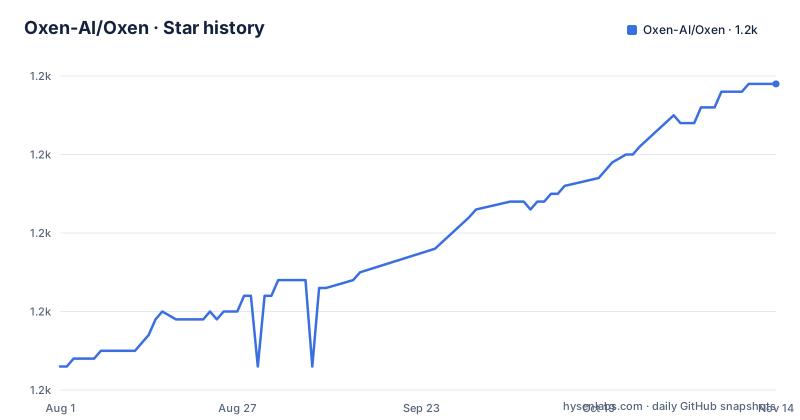
Star history
- Oxen-AI/Oxen1,209 ★ · +36
| Repository | 2026-08-01 | 2026-11-14 |
|---|---|---|
| Oxen-AI/Oxen | 1.2k | 1.2k |
36 Stars in the last 105 days, measured from the daily GitHub snapshot. Compare with other projects
Editorial analysis
Git's verbs, and a merkle tree doing the indexing
The command surface is a deliberate copy of git:
oxen init
oxen add images/
oxen add annotations/*.parquet
oxen commit "Adding 200k images and their corresponding annotations"
oxen push origin main
Same nouns, same subcommands, same shape. The stated reason is ergonomics: if you know git, you know this. The claim is that it is built for any data type, from machine learning training data and model weights to game assets and studio media, and that it is optimized for repositories with millions of files and terabytes of data.
The mechanism underneath is what differs. Behind the scenes it can store any blob type, but it has specialized metadata extractors for certain file types, and it caches that extracted metadata in a merkle tree for fast access later. That is the whole performance story compressed into one sentence: the tree is not just a content hash of your files, it is an index of what is inside them, and it is consulted on every later operation rather than rebuilt.
The payoff the file names is native tabular handling. It indexes and queries csv, parquet and jsonl directly, which is the case git handles worst, since those are files you want to filter and join rather than merely diff.
Three surfaces sit on the same core: the command line tool, a Python package named oxenai, and an HTTP API. Repositories live on the hosted hub or on your own oxen-server, and the same engine is published as an embeddable Rust crate.
The server does not build on Windows, and every upgrade has a migration step
Platform support is a table, and one cell is empty:
| Component | Linux | macOS | Windows | |---|:---:|:---:|:---:| | `oxen` CLI | yes | yes | yes | | `oxenai` Python package | yes | yes | yes | | `oxen-server` | yes | yes | no |
The explanation is that oxen-server is not supported on Windows, and should be run on Linux, macOS or in Docker, while the CLI and the Python client are supported on Windows and connect to a server hosted on a supported platform. So the client-server split is not incidental: it is also how Windows users are accommodated.
The upgrade path is the other operational fact. Installation is through Homebrew, through pip, or from the releases page, and then there is this instruction: when upgrading the command line tool or a self-hosted oxen-server, check the migrations document for any step the new release asks you to run.
That is a manual step in the upgrade path, and it applies to both the client and the server. Anyone scripting this across a fleet has to treat a version bump as a migration, not a pull.
The release naming is a small personality note: recent tags carry codenames, with 0.61.0 named volvox, 0.60.0 named copepod and 0.59.0 named paramecium. They are all the same kind of thing, and the workspace version in the manifest matches the newest tag.
One gap in the documentation is easy to hit. There is a System Architecture-style section in the outline whose body is not present in this version of the file, so the architecture has to be read from the feature list and the directory layout.
The contributing guide describes a Rust workspace as a Python library
The contributing section opens with a sentence that does not match the repository: this repository contains the Python library that wraps the core Rust codebase.
The repository is in fact a Cargo workspace. Its manifest declares members as a wildcard over a crates directory and excludes two paths, one of which is a data crate and the other of which is every experiment. The Python interface lives in a subdirectory of the same tree, and the primary language recorded for the repository is Rust.
So the sentence is either left over from when the Python package was the main event or a copy error, and it is the kind of error that costs a new contributor an afternoon.
Three places are named as worth contributing to: the Rust library and binaries under the crates directory, the Python interface, and the documentation, which lives in a separate repository rather than in this one. External contributions are governed by a contributing document, and a code of conduct document is required of everyone, with the summary given as be nice and respectful.
The build story is split the same way. Each codebase has its own build instructions, but they share pre-requisites and pre-commit hooks. There is an automatic installer for those pre-requisites that supports macOS and Debian based Linux, with manual steps for anything else, and the shared pre-requisites include a Rust toolchain, cmake, and four cargo tools: one to run a server with reload on changes, one to find unused dependencies, one to measure test coverage, and one to keep manifest files organised.
DuckDB and RocksDB are bundled, and a linker flag once killed the whole server
The build documentation says Oxen is purely written in Rust. The build manifest tells a more interesting story.
A lint entry allows a specific linker message across the whole workspace, and the comment above it is a war story. The allowance exists for the expected macOS note about an exception handling frame section being too large, which comes from the bundled DuckDB and RocksDB and is described as slower unwind lookups that are harmless.
What follows is the part worth reading twice. That note must never be silenced with a linker flag that disables compaction of unwind information, because doing so turned every DuckDB error into a terminating uncaught exception that aborted the entire server. Not one query failing, the process dying.
So the storage and query layer is native code linked into a Rust binary, the suppression is workspace wide rather than crate local, and the reason for it is recorded in the manifest where the next person will hit it.
The dependency list has other details of the same kind. The Arrow version is pinned with an exact equals rather than a caret, so it cannot float. The benchmark harness is the criterion crate renamed to a compatibility package for a hosted benchmarking service, which means benchmarks execute on someone else's infrastructure. The web framework is configured for rustls rather than the platform TLS stack. And one async runtime dependency is enabled with its unstable feature.
The compose file mounts the Docker socket, pins a 0.1.0 image and matches a literal 0.0.0.0 host
Self-hosting is documented, and the compose file that ships with it has three things in it worth reading before you run it.
The first is the image. The service is declared as an image tagged 0.1.0, while the workspace version in the manifest is 0.61.0. Whatever that image contains, it is not the build in this repository at the version the tags point to. If you are following the shipped compose file, you are not running the code you just read about.
The second is the routing rule. The service carries labels that enable the proxy and set the router rule to match the host 0.0.0.0. That is a literal string, not a wildcard, so the router is matching a hostname that is an IP address, and requests to your actual host name will not match it.
The third is the proxy. It runs a Traefik v2 image, publishes port 80, mounts the host Docker socket into the container so the proxy can watch Docker events, and mounts a local configuration file. Mounting the Docker socket gives that container control over the Docker daemon on the host, which is the standard trade for event driven routing and also the standard container escape surface.
Two smaller notes. The oxen service itself publishes no port of its own and relies entirely on the proxy in front of it, and its only volume is a data directory. And the file still declares a compose version field, which current Compose releases ignore.
One version file feeds Docker, the developer installer and CI, while two build blocks sit commented out
The container build is where this project's engineering habits show most clearly.
Tool pins live in a single file described in a comment as the one source of truth shared by the Linux developer installer and continuous integration. The build copies that file together with a helper script, installs FFmpeg through the helper, and deletes the helper afterwards so it does not ship in the final image. The comment explains the FFmpeg 9 pin is for the video thumbnail feature. A build argument carries the target architecture, and the pkg-config path is pointed at the installed FFmpeg prefix.
The toolchain handling is subtler. The first stage is built on a Rust 1.94 Debian image, while the manifest requires Rust 1.97.1 and a toolchain file pins the real version. A comment says rustup reads the toolchain file from the working directory and the base image's toolchain is not the pinned one, so the build resolves the correct compiler at build time rather than relying on whatever the base image shipped.
Two blocks are commented out and left that way: one that would build ImageMagick 7.1 from source, and one that would build the mold linker, pinned to version 2.0.0. Both are fully written out, with their own configure, build and install steps. That is dead configuration kept as a record of an experiment, which is a reasonable thing to keep and a confusing thing to inherit.
The system packages tell you what the binary actually needs at build time: clang, OpenSSL development headers, pkg-config, the JPEG and PNG development libraries, a build toolchain, cmake, and xz utilities.
The root of the repository is half process documents and half test scaffolding
The top level tells you how the project is run as much as what it contains.
There are eight markdown files that are not documentation for users: a command workflow document, a file structure document, a merge conflict document, a performance document, a releasing document, release notes, a self hosting document and a to-do list. Alongside them sit an agent instruction file, a code of conduct, a contributing guide, a pre-commit configuration, a coderabbit configuration and a Claude directory.
Then there is the tooling: a bacon configuration for the reload-on-change runner, a clippy configuration, a Cargo configuration directory, a pinned toolchain file, the shared tool version file, a Nix flake with its lock, a benchmark directory, a command line test directory, an experiments directory and a scripts directory.
And three entries that are easy to misread. A Python file sits at the root of a project whose documentation says it is purely written in Rust. A data directory sits at the root of a data version control system. And an images directory sits next to both.
The experiments directory is excluded from the Cargo workspace along with one crates subdirectory, so neither is built by default, which is consistent with experiments being scratch space. Everything else in that list is either load bearing or documentation of a decision.
Editorial conclusion
Oxen fits a team versioning training data, model weights or large media sets, and willing to run its own server rather than push to a hosted hub, with the caveat that self-hosting means reading the migrations document on every upgrade. Four things to check first. The compose file in the repository references an image tagged 0.1.0 while the workspace is at 0.61.0, so the shipped self-host path is not the current build. The router rule in that file matches a literal 0.0.0.0 hostname. Despite the claim of being written purely in Rust, the build bundles two native database engines. And the server does not run on Windows at all.
Frequently asked questions
What does Oxen handle that git handles badly?
Large datasets. It is optimized for repositories with millions of files and terabytes of data, has specialized metadata extractors for certain file types whose output is cached in a merkle tree for later access, and handles tabular data natively by indexing and querying csv, parquet and jsonl files rather than merely diffing them.
Can I self-host Oxen on Windows?
No. The platform table marks oxen-server as unsupported on Windows, and says to run it on Linux, macOS or in Docker. The oxen command line tool and the oxenai Python package are supported on Windows and connect to a server hosted on a supported platform.
What does upgrading Oxen involve?
A migration step. The documentation says that when upgrading the command line tool or a self-hosted oxen-server you should check the migrations document for any step the new release asks you to run, so a version bump is a migration rather than a pull. Recent release tags carry codenames, with 0.61.0 named volvox, 0.60.0 copepod and 0.59.0 paramecium.
Is Oxen written only in Rust?
The build documentation says so, and the core is a Rust workspace on edition 2024 requiring 1.97.1. The manifest also allows a macOS linker message that comes from the bundled DuckDB and RocksDB native libraries, and a Python file sits at the root of the repository, so the native database engines are linked into the binary.
How do I install the Oxen client?
Three ways: brew install oxen, pip install oxenai, or the releases page. The same core is also published as an embeddable Rust crate, and repositories can be cloned with oxen clone against a hub URL. The Python package and the command line tool are the two client surfaces, both supported on Linux, macOS and Windows.
Official sources
Add this badge to your README
If you maintain this project, the badge below links readers to this analysis and shows its maintenance status from the daily GitHub snapshot. Paste the markdown into your README; add ?metric=license or ?metric=stars to the image URL for a different field.

[](https://hysenlabs.com/projects/oxen-ai-oxen)Star history chart for your README
[](https://hysenlabs.com/projects/oxen-ai-oxen)Was this useful?