zetaloop/desktop: a Chinese build of GitHub Desktop
专注要事,别和 Git 过不去。GitHub Desktop 汉化
At a glance
- What is it?
- zetaloop/desktop is a community localization of GitHub Desktop for Chinese speakers, going past the interface into error text, documentation links, screen reader output and Git command line results, and adding a few extras of its own.
- Who is it for?
- zetaloop/desktop fits a Chinese speaking developer who wants GitHub Desktop in their own language without losing the upstream application, and the deeper localization work covers the parts most builds skip. It does not fit a Linux user, since the README marks Linux as not localized, and it is not an upstream contribution channel.
- Can I use it commercially?
- Yes. MIT is a permissive licence: you can use, modify and sell software built on it, as long as you keep its copyright and licence notices.
- Is it still maintained?
- Yes. The repository last received commits 138 days ago.
- What is it written in?
- Mainly TypeScript, according to GitHub's language statistics.
Answers come from the project's GitHub data, last synced on November 7, 2026, and from our analysis. They are not legal advice.
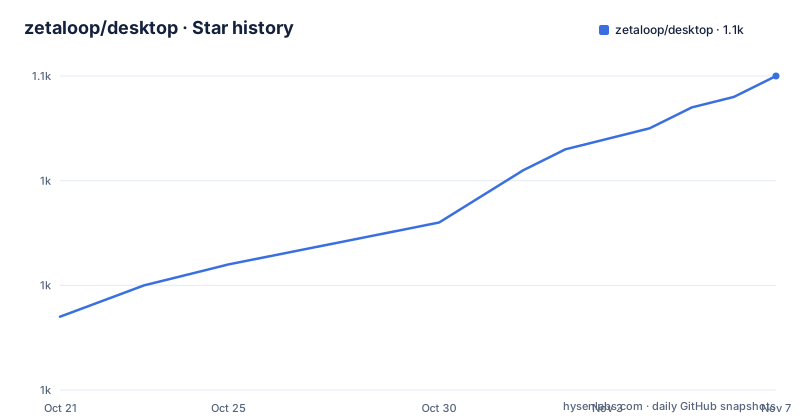
Star history
- zetaloop/desktop1,050 ★ · +23
| Repository | 2026-10-21 | 2026-11-07 |
|---|---|---|
| zetaloop/desktop | 1k | 1.1k |
23 Stars in the last 17 days, measured from the daily GitHub snapshot. Compare with other projects
Editorial analysis
What this repository is
zetaloop/desktop is a community Chinese localized version of GitHub Desktop. The README points at desktop/desktop as the original project, and the repository is a fork of it with a localization layer on top, working on the l10n branch.
GitHub Desktop itself is an open source Git client built on Electron, and the description in the README says exactly that. What the fork changes is the language of the application, and that turns out to be a larger job than translating a handful of strings.
The repository layout makes the relationship obvious. The package.json still points its repository field at github.com/desktop/desktop, the app/ directory holds the application, and the tree carries the upstream test infrastructure, including Playwright for end to end tests and a set of scripts under script/ for the build and packaging. The tree also carries changelog.json and a file named 汉化指南.md, which is the localization guide, meaning the process of translating is documented for contributors.
The project is MIT licensed, and the last push to the repository was on 2026-06-23. The recent tags track upstream releases: GitHub Desktop 3.5.8 on 2026-04-21, 3.5.9-beta1 on 2026-04-22 and 3.5.9-beta2 on 2026-04-30, the latter two being the upstream pre-releases.
How far the translation goes
The README's own summary is that this is a more thorough localization, and then it lists what that means. The items are worth quoting as a list because they show where the effort went.
Dates and times are localized. Error messages are localized. Documentation links are redirected to the official Chinese documentation rather than the English pages. Image assets are localized. Accessibility screen reader text is localized. Git command line output is replaced with Chinese text, which means the results panel reads as Chinese rather than as raw Git output. The Electron right click menu is replaced. And the command line tool is localized, with UTF-8 encoding problems fixed as part of the work.
That list is the substance of the project. A shallow translation leaves the error dialogs in English, the help links in English and the Git output in English, which is precisely the part of the interface a developer reads most often. Replacing the Git command line output is the hardest item on the list, because it means intercepting and translating the result of a process rather than translating a string in the source.
The effect is that the parts of GitHub Desktop that most translations skip are the parts this fork addresses, which is a good indicator of where its maintenance time goes.
The added features beyond translation
The README lists a second group of items under enhanced features, and these are changes to behaviour rather than to strings.
Commit history can be searched with fuzzy matching, which matters on a long-lived repository where remembering the exact wording of a commit message is often impossible. GitHub Copilot is integrated, with three documented options: referencing recent commit content in the prompt, custom prompts, and a limit on the maximum number of characters read. Difftastic can be plugged in as the diff engine. Automatic updates are served from a GitHub Pages based channel, hosted in the separate zetaloop/desktop-metadata repository, and the macOS build has its Squirrel setup modified to support those updates. Continuous integration builds the installers automatically.
The Copilot integration is the one with a real design question attached, because a repository can be large and a prompt that references recent commits can carry a lot of text. The option to cap the number of characters read is the answer to that, and it is the kind of setting that a translation-focused fork would not otherwise have.
The trade-off is that each of these features is a divergence from upstream, and every divergence is a thing to re-apply when the upstream release moves. The fork is therefore carrying a maintenance load proportional to the number of extras, on top of the translation work itself.
Installing the Chinese build and the macOS quarantine step
The installation route is the releases page of this repository rather than the upstream one. The README asks users to go to the latest release and download the Chinese installer, and gives a table of which file matches which system:
| System | Package | | --- | --- | | Windows (x64) | GitHubDesktop-Windows-x64.exe | | Windows (ARM64) | GitHubDesktop-Windows-arm64.exe | | macOS (Apple silicon) | GitHubDesktop-macOS-arm64.zip | | macOS (Intel) | GitHubDesktop-macOS-x64.zip | | Linux | not localized yet |
The Linux row is empty on purpose, and the README points Linux users at the English builds, naming shiftkey/desktop and pol-rivero/github-desktop-plus as alternatives.
On macOS the README adds a specific instruction. If the installer is reported as damaged after installation, the quarantine attribute has to be removed:
xattr -rd com.apple.quarantine "GitHub Desktop.app"That is the standard macOS Gatekeeper behaviour for an application that is not notarised through the official channel, and the README asks for it to be run on the installed application rather than on the download.
Automatic updates are supported on Windows and macOS, and not on Linux, where the README says a package repository may come later. The update server is the zetaloop/desktop-metadata repository served through GitHub Pages, so the channel is a fork of the upstream mechanism rather than a new one.
Licence, trademarks and the reporting path
The repository is MIT licensed, and the README adds a trademark note that is worth reading carefully. The rights granted by the MIT licence do not extend to GitHub's trademarks, including the logo design, and GitHub retains full rights over them. The Invertocat styled artwork in the app/static/logos folder, whose file names contain logo, is covered by that statement, and the README links to GitHub's brand guidelines for the rules on using the mark.
That is a real constraint for a fork that ships a renamed application. The code can be redistributed under MIT, the trademark cannot, and a build that presents itself as an official GitHub product would be crossing a line the licence explicitly draws. A team that wants to hand the Chinese build to colleagues internally is in a different position from one that puts it on a public download page.
For problems, the README asks for an issue or an email contact, and it asks specifically for reports where a translation causes a misunderstanding, not only where a function breaks. That is the right priority for a localization project, since a mistranslated string in an error dialog can send someone down the wrong debugging path without ever producing an error.
The licence question for users is simple, then: MIT for the code, GitHub's brand rules for the logo, and the fork's own release channel for the binaries.
Where this fork is the wrong tool
The first case is a Linux user. The README marks Linux as not localized, and while it points at two English builds, the features added here, the fuzzy commit search and the Copilot integration, are Windows and macOS features in practice.
The second case is a user who wants to contribute to GitHub Desktop itself. This repository is a fork with a localization layer, so a patch that improves the upstream application belongs in desktop/desktop. The fork does maintain a localization guide, which is the right place for translation work, and the README says the original project is the place to go for the application itself.
The third case is a team that already works in English and does not want a second Git client. The extras are the tiebreaker here, not the language. Fuzzy commit search is genuinely useful, and so is the Copilot integration with a character cap, but neither is a reason to run a fork whose updates arrive from a separate GitHub Pages channel rather than from the upstream release pipeline.
What to verify before relying on a build is the version it tracks. The tags here mirror the upstream release numbers, and the beta tags mean the build can be a pre-release of the application, so a team that wants the stable upstream behaviour should pick the tag that matches the stable release and check the changelog.json entry that ships with it.
Editorial conclusion
zetaloop/desktop fits a Chinese speaking developer who wants GitHub Desktop in their own language without losing the upstream application, and the deeper localization work covers the parts most builds skip. It does not fit a Linux user, since the README marks Linux as not localized, and it is not an upstream contribution channel. Check first which upstream release a given build tracks, since the tags here are the upstream release names with a beta suffix for the pre-releases.
Frequently asked questions
How do I install the Chinese version of GitHub Desktop?
Download the installer from the latest release page of the zetaloop/desktop repository. The build ships Windows x64 and ARM64 executables and macOS zips for Apple silicon and Intel, while Linux is not localized and the README points to English builds instead.
Why does macOS report the GitHub Desktop app as damaged?
The README asks you to remove the quarantine attribute by running xattr -rd com.apple.quarantine "GitHub Desktop.app" on the installed application. This is the standard Gatekeeper behaviour for an application distributed outside the official notarised channel.
What does the Chinese localization cover beyond the interface?
The README lists dates and times, error messages, documentation links redirected to the official Chinese docs, image assets, accessibility screen reader text, Git command line output, the Electron right click menu, and the command line tool with UTF-8 encoding fixes.
Does the Chinese build of GitHub Desktop support automatic updates?
Yes on Windows and macOS, with the update channel hosted as GitHub Pages in the zetaloop/desktop-metadata repository. Linux does not support automatic updates, and the README says a package repository may follow.
Official sources
Add this badge to your README
If you maintain this project, the badge below links readers to this analysis and shows its maintenance status from the daily GitHub snapshot. Paste the markdown into your README; add ?metric=license or ?metric=stars to the image URL for a different field.

[](https://hysenlabs.com/projects/zetaloop-desktop)Star history chart for your README
[](https://hysenlabs.com/projects/zetaloop-desktop)Was this useful?