the codex auth helper builds a synthetic id_token, and says so
Codex login helper: securely exports your logged-in ChatGPT session configuration locally and generates a Codex-compliant auth.json local backup file.
At a glance
- What is it?
- codex-auth-helper is a Chrome extension that reads your logged-in ChatGPT session inside the browser and downloads a Codex-shaped auth.json, with no server in the path. It claims two permissions and a fully local pipeline, and it states that it constructs a synthetic identifier token rather than exporting the one the service issued.
- Who is it for?
- This extension fits a developer who wants to move their own ChatGPT session to a local tool and is willing to read two source files before running it. It does not fit anyone who treats the exported file as a portable credential, because the identifier token inside it is described as a synthetic construction rather than the token the service issued.
- Can I use it commercially?
- Not without permission. GitHub finds no licence file in the repository, and without a licence all rights are reserved by default: you may read the code but not reuse it. Check the README, or ask the authors, before using it.
- Is it still maintained?
- Yes. The repository last received commits 161 days ago.
- What is it written in?
- Mainly CSS, according to GitHub's language statistics.
Answers come from the project's GitHub data, last synced on November 14, 2026, and from our analysis. They are not legal advice.
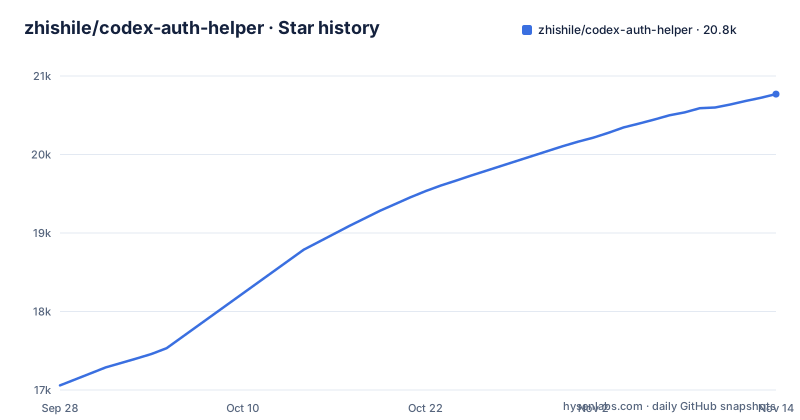
Star history
- zhishile/codex-auth-helper20,770 ★ · +3,712
| Repository | 2026-09-28 | 2026-11-14 |
|---|---|---|
| zhishile/codex-auth-helper | 17.1k | 20.8k |
3,712 Stars in the last 47 days, measured from the daily GitHub snapshot. Compare with other projects
Editorial analysis
It reads your session and writes a file, with no server in between
The mechanism is straightforward and worth stating plainly before anything else. The extension detects whether the current browser profile is logged in to the service, reads the token expiry so the popup can show a countdown, assembles a configuration file, and triggers a download of it directly as a data URL, with the project stating that no third-party server is involved at any point and that there is no upload path. The consequence is that the threat model here is not the network. The credential never leaves the browser, so there is no server to attack, and the entire risk concentrates in the extension code, which runs in a context that already holds the session you are logged into. That is a defensible design and it is also the reason the review that matters is a source review rather than a network review.
The identifier token is described as a synthetic construction, not the real one
The feature list says the extension implements what it calls JWT simulation construction and automatically generates the synthetic signed identifier token that the Codex format requires, for what it calls seamless authentication. Read literally, that is a statement that the token in the exported file is one this extension built, not one the service signed. That has two consequences. The file is a reconstruction rather than a copy. And the documentation does not say how the signature is produced, so a reader cannot tell from the readme whether it is an inert placeholder or something that satisfies a check it should not. This is the single line in the project a reviewer should resolve by reading the code, and the readme does not help with it.
Two permissions, which is also the entire attack surface
The security section claims a minimal permission declaration: file downloads, and access to the ChatGPT origin in order to read the local session, and nothing else. That is a good discipline and a short list, and the two entries in it are the right two for the job. It is also worth being blunt about what they mean. A host permission for a whole origin plus the ability to save a file is exactly what an extension that wanted to exfiltrate your session would ask for, so the permission list on its own is not reassurance, it is a statement of intent. The reassurance has to come from the next claim, which is that the code is closed-loop, that you can inspect the background script and the popup script in the browser's developer tools, and that no external library is loaded from a content delivery network. Those three are checkable in a few minutes.
Installation is load-unpacked from a clone, so nothing is verified for you
The install path is a developer one and there is no alternative in the file. You download or clone the repository, open the browser's extensions page, switch on developer mode, choose the option to load an unpacked extension, and select the extension directory that contains the manifest file, then pin the extension from the toolbar. Exporting is the same shape: be logged in on the service in that browser profile, open the popup, let the extension read the session, and press the button that generates and saves the file. Nothing in that path involves a store review, a signature or an update channel, which means the only verification that happens is the verification you do. For a tool that handles a live session credential, that is the correct trade, and it is also why the code review is not optional.
The landing page lives in the repository and is served from another domain
Two directories sit at the top level, the extension itself and a landing page, and the project metadata records a different domain as the homepage. So the marketing surface is versioned alongside the code, which is tidy, and it is published somewhere the repository does not control, which is not. That combination is the social-engineering gap in this project. A user who arrives from a search result, or from a link in a chat, and trusts the page, is trusting a domain that a diff of the repository will not show you anything about, and that domain is exactly where a credential-harvesting page would live. The mitigations are procedural rather than technical: read the extension in the browser's developer tools before pinning it, and if you found the project through its landing page rather than through the source host, treat the page as unverified.
One release, four days before the last commit, and a licence to read
The version facts are thin in a way that is normal for a small extension and worth stating. There is a single tagged release, version 1.0.0, published on 2026-06-03, and the last push recorded for the repository is 2026-06-07, so there is a little work on the branch after the tag and no second tag to describe it. The primary language recorded is a stylesheet language, which tells you where the effort went, since the readme spends a paragraph on the interface. And the licence is the one inconsistency to check: the repository's licence field carries no identifier, while the readme states the project is under the MIT licence and links a LICENSE file that is not among the repository's top-level entries. Treat the licence as unconfirmed, and pin the commit you reviewed rather than the tag.
The review is short and mechanical, and it is the whole decision
Because the project is small and the claims are specific, checking it takes minutes rather than judgement. Read the two files the project names, the background script and the popup script, since between them they are the extension. Load it unpacked with the machine's network disabled and use it once, which tells you whether the promise about third-party servers holds, because a fetch that is not made cannot be made. Look at the declared permissions and confirm there are exactly two. Then look specifically at where the identifier token is assembled, because that is the part the readme describes only in the most flattering terms. If those four checks pass, the thing does what it says on a machine you control. If the token construction turns out to be doing something other than what the feature list claims, you have learned that before you put a session file anywhere.
Editorial conclusion
This extension fits a developer who wants to move their own ChatGPT session to a local tool and is willing to read two source files before running it. It does not fit anyone who treats the exported file as a portable credential, because the identifier token inside it is described as a synthetic construction rather than the token the service issued. Before you run it, read background.js and popup.js, which the project names itself, load the unpacked extension with the network disabled to confirm nothing is fetched, and check that the only two permissions are file downloads and the ChatGPT origin. And treat the landing page's domain as unverified: the marketing site is versioned in this repository but published somewhere the repository does not control.
Frequently asked questions
How do I authenticate codex?
The route this project offers is to take a session you already hold in your browser and export it as a configuration file in the format Codex expects. The extension reads the logged-in ChatGPT session locally, assembles the file, including a synthetic identifier token it builds itself, and downloads it. The readme does not describe any other authentication method.
What permissions does the Codex Auth Helper extension ask for?
Two, according to the project: the downloads permission so it can save the generated file, and access to the ChatGPT origin so it can read the local session. It states that it declares no other permissions and that no external content delivery network library is loaded.
What is the synthetic id_token in the exported auth.json?
The project describes it as a simulated JWT construction that it performs itself in order to produce the signed identifier token the Codex format requires, rather than exporting the token the service issued. The documentation does not say how the signature is produced, which is the part to check in the code before trusting the file.
How do I install the Codex Auth Helper extension?
The README documents only a developer-mode install. You clone or download the repository, open the browser extensions page, enable developer mode, use the option to load an unpacked extension and select the extension directory containing the manifest file, then pin it from the toolbar. Nothing is verified at install time.
Official sources
Add this badge to your README
If you maintain this project, the badge below links readers to this analysis and shows its maintenance status from the daily GitHub snapshot. Paste the markdown into your README; add ?metric=license or ?metric=stars to the image URL for a different field.

[](https://hysenlabs.com/projects/zhishile-codex-auth-helper)Star history chart for your README
[](https://hysenlabs.com/projects/zhishile-codex-auth-helper)Was this useful?