Donut Browser packs six ways to install into one release, and three of them need fixing afterwards
Simple Yet Powerful Anti-Detect Browser 🍩
At a glance
- What is it?
- zhom/donutbrowser is an anti-detect Chromium browser built on the Wayfern fork, with isolated profiles, per-profile proxies and a REST API plus an MCP server. Its Linux packaging is the most instructive part: four formats, each with a documented failure mode, and a Snap that starts with the microphone, camera and keyring disconnected.
- Who is it for?
- Donut Browser suits a user who needs several Chromium profiles that do not share cookies, extensions or a fingerprint, and who wants to attach a proxy, a WireGuard config or a DNS blocklist to each profile rather than globally. It suits automation work through the REST API or the MCP server, where the per-profile proxy handling and the first-hop claims are covered by dedicated tests.
- Can I use it commercially?
- Yes, with strict conditions. AGPL-3.0 is a network copyleft licence: if people use a modified version over a network, for example as a hosted service, you must offer them its source code under the same licence.
- Is it still maintained?
- Yes. The repository last received commits 2 days ago.
- What is it written in?
- Mainly Rust, according to GitHub's language statistics.
Answers come from the project's GitHub data, last synced on November 15, 2026, and from our analysis. They are not legal advice.
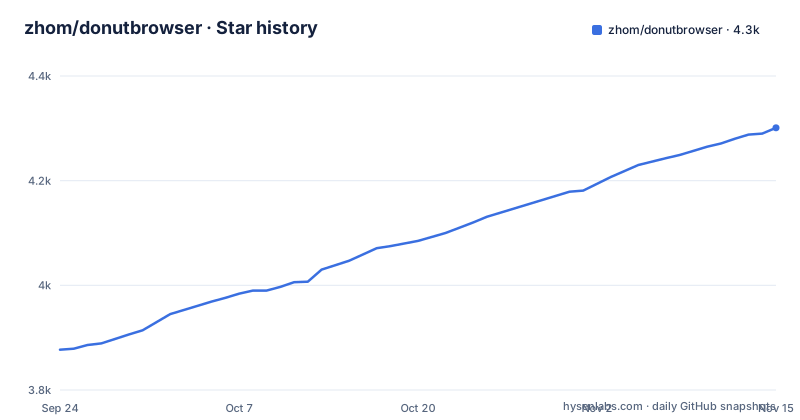
Star history
- zhom/donutbrowser4,301 ★ · +424
| Repository | 2026-09-24 | 2026-11-15 |
|---|---|---|
| zhom/donutbrowser | 3.9k | 4.3k |
424 Stars in the last 52 days, measured from the daily GitHub snapshot. Compare with other projects
Editorial analysis
The engine is a Chromium fork called Wayfern, and the detection claim names two services
The anti-detect behaviour does not come from an extension or a configuration panel. It comes from the browser binary: Donut runs on Wayfern, described as a privacy focused Chromium fork whose fingerprint spoofing is not detected by Cloudflare or by reCaptcha v3. That is the whole of the published claim, and its shape matters. Two named services, no version numbers, no test procedure, no description of which signals are spoofed. A reader deciding whether the claim holds for their own traffic is being asked to take it on that basis, and the repository does not add a benchmark, a detection report or a list of spoofed fields to check against. The rest of the isolation story is more concrete. Each profile carries its own fingerprint, cookies, extensions and data, and the number of profiles is not capped. Proxy settings are per profile and cover HTTP, HTTPS, SOCKS4 and SOCKS5 with support for dynamic proxy URLs, so one profile can rotate addresses without touching the others. VPN support exists at the same granularity, with a WireGuard config attached to a profile rather than to the machine.
Four Linux formats, and the documentation is a ladder of failures
Linux gets a deb, an rpm and an AppImage, each in an x86_64 and an ARM64 build, plus a Flatpak and a Snap discussed separately. The interesting file is the AppImage troubleshooting block, because it is the only place in the repository where install steps are written as a sequence of things that went wrong. The first failure is a segfault on launch, and the fix is either installing the FUSE library for your distribution or skipping FUSE entirely by extracting and running the file:
APPIMAGE_EXTRACT_AND_RUN=1 ./Donut.Browser_x.x.x_amd64.AppImageThe second failure is an EGL display error after that, and the fix is an environment variable on the same command, either disabling the DMA buffer renderer or forcing the x11 backend. The third line of the ladder is the useful one: if the problems persist, the deb and the rpm packages are more reliable. So the documentation's own ordering is that AppImage is the last resort rather than the recommended path, even though it is the format that needs no privileges to unpack.
The Snap installs with three interfaces deliberately disconnected
The Snap is installed with an explicit dangerous flag and, once running, does not have the microphone, the camera or the keyring. Reconnecting them is a separate command per interface:
sudo snap connect donutbrowser:audio-record
sudo snap connect donutbrowser:camera
sudo snap connect donutbrowser:password-manager-service
The keyring interface is named for a reason: the keyring is what profile import uses, so importing cookies and extensions from another browser fails under Snap until password-manager-service is connected. That makes the Snap the worst choice for the one operation that migrating users need most, and it is a property of the sandbox rather than a bug in the browser. The Snap and the Flatpak bundles are built from the deb and tested inside their sandboxes by a workflow named for Linux packages, which means the sandbox behaviour is exercised continuously but the defaults are still restrictive.
The Flatpak can run the browser but cannot register it as the default handler
The Flatpak installs per user with no elevated privileges:
flatpak install --user Donut_*_x86_64.flatpakIt also has one hard limit. The application can set itself as the default browser and can choose which profile opens each link, but a Flatpak build cannot change the system default, so the same feature has to be configured from the desktop environment's own settings instead. That is the difference between a feature that works everywhere on Linux and a feature that works on the deb, the rpm, the AppImage, the Snap and the Nix route but not on the Flatpak. Worth noting before install: there is also a shell installer that pipes a remote script into sh, a Homebrew cask for macOS, and a Nix attribute, so a Linux user has five documented routes and no guidance about which to prefer for a given distribution.
The macOS release ships two DMG architectures and a Homebrew cask named donut
macOS is served as two disk images, one for Apple Silicon and one for Intel, with matching release asset names that carry the architecture in the file name. The Homebrew path is a single cask:
brew install --cask donutWindows is served as an installer executable and as a portable zip, both x64 only, with no ARM64 build listed. That asymmetry is easy to miss on a Windows machine on ARM hardware: there is a macOS ARM64 package, an ARM64 package for every Linux format, and no Windows ARM64 package. The Nix route is one attribute against the repository:
nix run github:zhom/donutbrowser#release-startThe release stream runs in parallel with the numbered versions: alongside the v0.31.3 tag there is a rolling nightly tag and a dated nightly tag carrying a build hash, which is what the Flatpak and Snap bundles are pulled from. Anyone who wants the newest code has a path that is separate from the versioned assets every platform table links to.
Sync is a server you can run yourself, and the password never leaves it
Profile sync is not tied to a vendor account. The repository points at a self-hosting guide with Docker based setup instructions for running your own sync server, and states that doing so syncs profiles, proxies and groups across devices at no cost. Above that sits an optional end-to-end encryption layer described as requiring a password only you know. The two features compose in one specific way: the self-hosted server is the thing that moves your data between machines, so it is also the thing that sees it in the clear unless the end-to-end layer is switched on. The privacy claim made alongside this is zero telemetry, meaning no tracking and no device fingerprinting by the project itself. Anyone reading this should weigh the sync design against the isolation design: the profiles are isolated from each other by design, and the channel that carries them between devices is the part with an encryption switch rather than encryption as the default.
The test chain spends three suites on proxies and one on a sync path
The package manifest reveals more about the project's priorities than the feature list does. The test script chains seventeen suites in one command, and the names are unusually specific: proxy string parsing, proxy type handling, and first-hop claims get a suite each, on top of suites for window decorations, cookie bot limits, cookie bot outcomes, backend errors, translation parity, profile search, theme handling and tips. Two entries stand out for what they cover rather than what they are called. One runs the Rust unit tests, which is the native daemon and the shell side of the Tauri application. The other is an end-to-end sync test, so the sync path has a real integration test rather than only the unit level coverage the rest of the chain uses. The licence suite is different again: it generates the third party notice file and then checks it, which is what an AGPL project needs to keep its attribution obligations honest when it vendors Chromium.
Translations are a first-class contribution path in a Rust and TypeScript codebase
The repository root shows the shape of the project before any documentation does: a Tauri shell directory, a Next.js front end started on a fixed local port with the turbopack flag, a separate daemon binary, a sync server directory, an SDK directory, a Snap directory, a packaging directory, a patches directory, an end-to-end directory, and two Nix files. Language is reported as Rust, and the manifest is an ES module package with a pnpm lockfile and a workspace file, so the desktop shell, the daemon and the sync server are three separately versioned pieces that a release has to line up. Contributions are asked for in five ways, and only two involve code: fixing translations under the locales directory, and writing code under the contributing guide. The other three are answering questions in discussions, reporting bugs, and telling other people about the project, which is a project that expects word of mouth rather than a large external contributor base. Build credentials for macOS live in an example environment file holding the signing identity and the notarytool triple, so signing and notarization are a documented part of the release path rather than a secret.
Editorial conclusion
Donut Browser suits a user who needs several Chromium profiles that do not share cookies, extensions or a fingerprint, and who wants to attach a proxy, a WireGuard config or a DNS blocklist to each profile rather than globally. It suits automation work through the REST API or the MCP server, where the per-profile proxy handling and the first-hop claims are covered by dedicated tests. It does not suit someone who wants the browser to be the default handler from inside a Flatpak sandbox, because the sandbox cannot register itself that way, and it does not suit a workflow that depends on the microphone, the camera or profile import under Snap without reconnecting those interfaces by hand. Before adopting it, pick the package format for your platform from the maintenance table rather than the newest one, decide whether sync is self-hosted before you create profiles, and read the troubleshooting steps for your format so you are not debugging a segfault later.
Frequently asked questions
What is Donut Browser?
It is an open source anti-detect browser for Windows, macOS and Linux, built on the Wayfern Chromium fork. Each profile is fully isolated with its own fingerprint, cookies, extensions and data, and the number of profiles is not capped.
How do you install Donut Browser on Linux?
Linux builds ship as deb, rpm and AppImage for both x86_64 and ARM64, plus an x86_64 Flatpak and a Snap. The AppImage needs the FUSE library or the APPIMAGE_EXTRACT_AND_RUN=1 variable, and the documentation says the deb and rpm are more reliable if problems persist.
Which browser blocks fingerprinting?
Donut Browser spoofs the fingerprint at the engine level rather than through an extension, because it runs on Wayfern, a privacy focused Chromium fork whose spoofing is described as not detected by Cloudflare or reCaptcha v3. It also offers per-profile DNS blocking for ads, trackers and other unwanted content.
What are the alternatives to Donut Browser?
The project does not name competing anti-detect browsers. It documents migration instead: profiles and cookies can be imported from Chrome, Edge, Brave or other Chromium browsers, cookies and extensions can be exported per profile, and profiles can be grouped with bulk settings applied.
Official sources
Add this badge to your README
If you maintain this project, the badge below links readers to this analysis and shows its maintenance status from the daily GitHub snapshot. Paste the markdown into your README; add ?metric=license or ?metric=stars to the image URL for a different field.

[](https://hysenlabs.com/projects/zhom-donutbrowser)Star history chart for your README
[](https://hysenlabs.com/projects/zhom-donutbrowser)Was this useful?