Shadowrocket-ADBlock-Rules ships ten generated rule files, not a proxy
提供多款 Shadowrocket 规则,带广告过滤功能。用于 iOS 未越狱设备选择性地自动翻墙。
At a glance
- What is it?
- This repository publishes plain text rule files for the Shadowrocket iOS app, generated with Python from GFWList and ad block lists, with blacklist, whitelist, domestic split and homecoming variants. The rules decide what goes direct and what goes through a proxy, and the project itself provides no tunneling service.
- Who is it for?
- Adopt these rule files if you run Shadowrocket on iOS and want the routing and ad filtering decided for you, and if you are comfortable importing a configuration by QR code and re-activating it when the file updates. Skip them if you need the app itself, a proxy server, or a promise of complete ad blocking, since the project states that video ad filtering cannot stay current.
- Can I use it commercially?
- Check first. The repository uses a licence we do not classify automatically, so read its LICENSE file before any commercial use.
- Is it still maintained?
- Yes. The repository received new commits within the last day.
- What is it written in?
- Mainly Python, according to GitHub's language statistics.
Answers come from the project's GitHub data, last synced on November 7, 2026, and from our analysis. They are not legal advice.
Star history
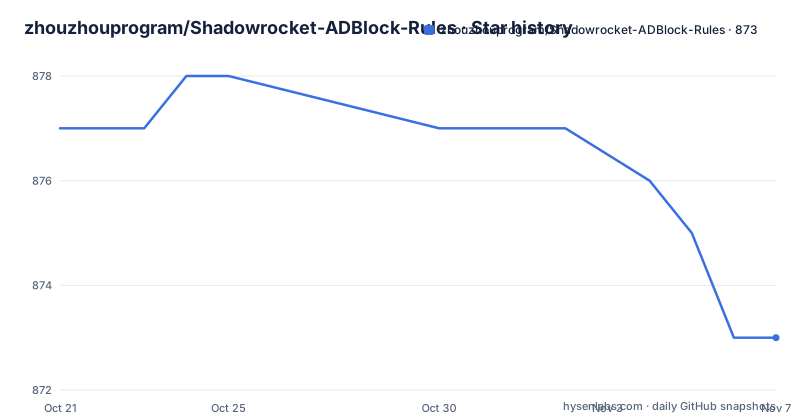
- zhouzhouprogram/Shadowrocket-ADBlock-Rules873 ★ · -4
| Repository | 2026-10-21 | 2026-11-07 |
|---|---|---|
| zhouzhouprogram/Shadowrocket-ADBlock-Rules | 877 | 873 |
-4 Stars in the last 17 days, measured from the daily GitHub snapshot. Compare with other projects
Editorial analysis
The repository ships configuration, not connectivity
The project description makes the scope clear: it offers several Shadowrocket rule sets with ad filtering, aimed at letting unjailbroken iOS devices selectively reach sites that are otherwise unreachable. The primary language is Python, and the top-level entries confirm the shape of the thing.
What sits in the repository is a set of `.conf` files, a `factory/` directory, a `requirements.txt`, a `readme.md` and a `LICENSE`. There is no server, no client binary, no protocol implementation. The README is explicit about this, stating that the rules define which sites can connect directly and which must go through a proxy, that the rules are a plain text file, and that they cannot provide the circumvention capability on their own.
That boundary matters when you evaluate the project. You still need the Shadowrocket app and a working proxy subscription. What this repository contributes is the routing decision, the ad filtering list, and the maintenance work of keeping both current.
There is also a lineage to note. The README explains that the original author no longer updates the repository automatically, so this is a third-party fork of the h2y repository, published and maintained separately. The README states the repository publishes updates daily and that there may be some simple maintenance, and it directs readers who want the full documentation to the original readme file.
Ten rule files that differ in one decision only
The rule catalogue is the core of the project, and the README describes ten files that differ mostly in how they treat unknown domains and whether they include ad filtering.
The blacklist files, `sr_banlist.conf` and `sr_banlist_ad.conf`, proxy the sites that are blocked and let normal sites connect directly, with unknown sites treated as direct. The whitelist files, `sr_top500_whitelist.conf` and `sr_top500_whitelist_ad.conf`, treat unknown sites as proxied, and the whitelist version routes the top500 sites that can be reached directly along with Chinese sites.
The domestic split files, `sr_cnip.conf` and `sr_cnip_ad.conf`, send Chinese sites direct and foreign sites through the proxy, and the README notes that for some Hong Kong, Macau and Taiwan sites the proxy route can even be faster than a direct connection. The homecoming files, `sr_backcn.conf` and `sr_backcn_ad.conf`, invert that arrangement for users living overseas who want to reach services inside China, with foreign sites direct and Chinese sites proxied.
Two files are ad filtering only. `sr_direct_banad.conf` routes every request directly, and the README positions it as a way to use Shadowrocket as a global ad blocking tool on iOS. `sr_proxy_banad.conf` sends everything except local network requests through the proxy, and is described as a global ad blocking plus global proxy setup.
Across all of them, the README states that requests inside the local network always go direct.
Python templates turn public lists into SR rule syntax
The generation side lives in the `factory/` directory, and the README gives a contribution rule that describes it: in the usual case you only need to edit the three `manual_*.txt` files under `factory/`.
The inputs are public. The README says the blacklist is converted automatically from the latest GFWList, and that the whitelist is generated periodically from the connectivity status of the global top500 sites. The ad filtering side is assembled from the latest versions of `EasyList`, `Eaylist China` and a third ruleset the README names in Chinese, converted to Shadowrocket rule format, with duplicates removed, and combined with the project's own custom rules for iOS web ads, in-app ads and video ads.
The Python side uses three libraries, listed in `requirements.txt`.
beautifulsoup4
requests
lxml
`requests` for fetching the upstream lists, `lxml` and `beautifulsoup4` for parsing them, and the rest of the work is the rule templates and the dedup pass described in the README.
The custom rules deserve a note, because the README frames them as the part that is not simply copied from an upstream list. They target ads specific to iOS, which covers in-app advertising surfaces that a desktop-oriented list never sees, and the README points to an issue with statistics on filtering results as evidence of how these behave in practice.
Importing a rule set by QR code in Shadowrocket
Using the rules is a two minute job inside the app, and the README describes it in two steps. You open the configuration page in Shadowrocket, tap the button that scans a QR code to add a rule, and then activate the rule file you just added.
The README also advises disconnecting and reconnecting Shadowrocket once afterwards, to make sure the new rule file takes effect.
The addresses to point the scanner at are raw file links, and each rule set has its own. The three main ones with ad filtering look like this.
https://github.com/zhouzhouprogram/Shadowrocket-ADBlock-Rules/raw/master/sr_banlist_ad.conf
https://github.com/zhouzhouprogram/Shadowrocket-ADBlock-Rules/raw/master/sr_top500_whitelist_ad.conf
https://github.com/zhouzhouprogram/Shadowrocket-ADBlock-Rules/raw/master/sr_cnip_ad.conf
The variants without ad filtering are the same paths with the `_ad` suffix dropped, and the ad only files are `sr_direct_banad.conf` and `sr_proxy_banad.conf`. The README points out that many browsers now ship their own ad blocking, and that the ad filtering rules are bulky, so if you do not need to block in-app and video ads globally you can pick a version without them.
The project also suggests downloading several rule sets and switching between them, which is the practical answer to the question of which one to choose.
A 2000 line rule file and a 50 line one cost the same to match
The most useful piece of engineering explanation in the README answers the question of whether thousands of proxy rules slow down browsing, and the answer is no.
The reasoning is worth reading because it depends on how Shadowrocket implements matching. The author originally assumed the rule file was executed for every network packet, matching line by line, and therefore had to be kept as small as possible. After discussing it with the app's author, that turned out to be a misconception: Shadowrocket builds a search tree when it loads the rules, which can be understood as a finite state machine DFA over hostnames read from the back of the name, and it also keeps a hash cache of each match result.
In other words, a 2000 line rule and a 50 line rule have the same order of time complexity, O(1), in the app.
This has a practical consequence for the files themselves. A large, explicit rule set is not penalized for its size at match time, so the project can afford to keep the full GFWList conversion and the full ad lists inline rather than trimming them. It also explains why the README can describe a per-package, per-app and video ad ruleset without worrying about the cost of every packet.
Ad filtering is best effort and video ads are the weak point
The README does not claim complete ad blocking, and the FAQ entry on incomplete filtering is candid about the limit. The rules do not guarantee that all ads are filtered, and video ads in particular are called out as a different case from web ads, because an app such as Youku can change its advertising strategy on every update, which makes it hard to guarantee that blocking stays current in real time.
That is a moving-target problem rather than a bug. The upstream inputs change constantly, the projects change their ad strategies, and the rule set is only as fresh as the last daily publication. The README's own advice for diagnosing a miss is practical: turn on the Shadowrocket log, and check which blocked domain went direct or which reachable domain went through the proxy, then report the information so the rule can be corrected.
There is a related trade-off in choosing between the ad and no-ad variants. The ad filtering rules are described as bulky, and the README notes that browsers now include their own ad blocking, so for someone whose main concern is web ads in a browser, the ad filtering version adds bulk and download size for coverage of in-app surfaces that a browser cannot filter anyway.
The project also asks for contributions of a specific kind: a diagnosis from the log turned into an edit to the `manual_*.txt` files under `factory/`.
A custom licence, no releases, and daily published updates
Maintenance facts here are unusual and worth stating precisely. The repository is not archived, and the last push was on 2026-10-19. It has no GitHub releases, so there is no version history to consult and no changelog to diff. The README says the repository publishes updates daily, and it points to the original author's readme for the full documentation rather than duplicating it.
The licence is the part that needs attention. GitHub does not classify it, and the `LICENSE` file in the top-level entries holds the terms, which are custom rather than one of the standard licences. Anyone planning to reuse these rule files in their own configuration, redistribute them, or base work on them needs to read that file directly, because a custom licence can carry conditions that a standard one would not. The README also says the project accepts no donations of any form.
Feedback is routed through Issues on the original h2y repository, or through the author's own site if you have no account, and the README asks for log-based reports of misrouted domains as the most useful contribution.
Editorial conclusion
Adopt these rule files if you run Shadowrocket on iOS and want the routing and ad filtering decided for you, and if you are comfortable importing a configuration by QR code and re-activating it when the file updates. Skip them if you need the app itself, a proxy server, or a promise of complete ad blocking, since the project states that video ad filtering cannot stay current. Verify first that the file you pick matches the behaviour you want for unknown domains, and check the Shadowrocket log after the first switch to see whether the domains you expect are routed as intended.
Frequently asked questions
How do I add these Shadowrocket-ADBlock-Rules to Shadowrocket?
The README says to open the configuration page in the Shadowrocket app, tap the button that scans a QR code to add a rule, and activate the added file. It also advises disconnecting and reconnecting Shadowrocket once so the new rule file takes effect.
Which rule set should I use, the blacklist or the whitelist?
The README says the most commonly used ones are the blacklist and the whitelist, and the difference is how unknown websites are treated: the blacklist defaults unknown sites to direct, while the whitelist defaults them to the proxy. It suggests downloading both and switching between them.
Does a large Shadowrocket rule file slow down browsing?
The README says it does not. It explains that Shadowrocket builds a search tree when loading rules, comparable to a finite state machine DFA over hostnames, and caches match results, so a 2000 line rule and a 50 line rule have the same O(1) time complexity in the app.
Will these rules block all ads?
No. The README states the rules do not guarantee filtering all ads, and identifies video ads as the weak point because apps such as Youku can change their advertising strategy with each update. It suggests enabling the Shadowrocket log to find which domain was missed and reporting it.
How are the rules generated, and can I contribute changes?
The rules are generated with Python from the latest GFWList, from connectivity checks of the global top500 sites, and from ad lists including `EasyList`, `Eaylist China` and a third ruleset the README names in Chinese, with duplicates removed. The README says contributions usually mean editing the three `manual_*.txt` files under the `factory/` directory.
Official sources
Add this badge to your README
If you maintain this project, the badge below links readers to this analysis and shows its maintenance status from the daily GitHub snapshot. Paste the markdown into your README; add ?metric=license or ?metric=stars to the image URL for a different field.

[](https://hysenlabs.com/projects/zhouzhouprogram-shadowrocket-adblock-rules)Star history chart for your README
[](https://hysenlabs.com/projects/zhouzhouprogram-shadowrocket-adblock-rules)Was this useful?