TheaterJS declares version 3.2.0, its newest tag is v2.0.1 from 2015, and its migration guide stops at v2
GitHub describes it as Typing animation mimicking human behavior.. The repository metadata lists JavaScript as its primary language. The metadata lists the MIT license. This article stays within the project description and details documented in the GitHub repository README.
At a glance
- What is it?
- TheaterJS is a small MIT-licensed JavaScript library that types text out with variable delays and the occasional wrong character, driven by actors and scenes. The documentation lives inside the README as anchors rather than on a site, the homepage field points at a CodePen, and the last commit to the default branch is dated 2023-01-04.
- Who is it for?
- Use TheaterJS if you want a typewriter effect that reads as human, with mistakes on the right keyboard, and you are content to ship the built file rather than depend on a package that keeps changing shape. Four things to settle first.
- Can I use it commercially?
- Yes. MIT is a permissive licence: you can use, modify and sell software built on it, as long as you keep its copyright and licence notices.
- Is it still maintained?
- Probably not. The repository last received commits 46 months ago, on January 4, 2023.
- What is it written in?
- Mainly JavaScript, according to GitHub's language statistics.
Answers come from the project's GitHub data, last synced on October 23, 2026, and from our analysis. They are not legal advice.
Star history
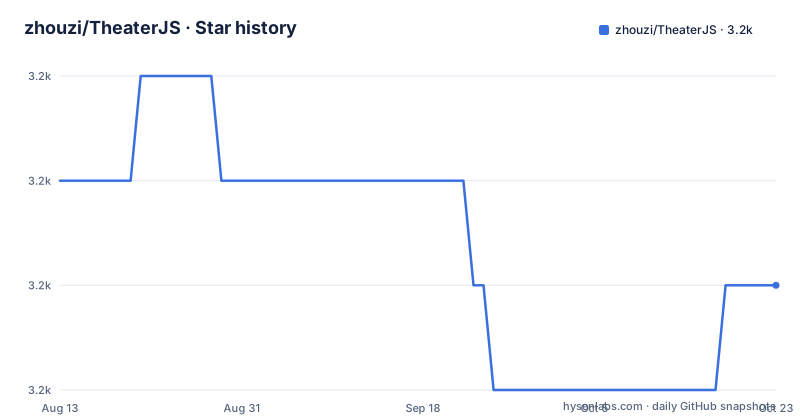
- zhouzi/TheaterJS3,213 ★ · -1
| Repository | 2026-08-13 | 2026-10-23 |
|---|---|---|
| zhouzi/TheaterJS | 3.2k | 3.2k |
-1 Stars in the last 71 days, measured from the daily GitHub snapshot. Compare with other projects
Editorial analysis
The manifest says 3.2.0 and the newest release tag is from 2015
Three numbers describe this package and they do not agree.
The manifest declares version 3.2.0. The newest GitHub release is v2.0.1, published 2015-11-02, twenty minutes after v2.0.0 on the same day, and before that v1.4.2 from 2015-04-13. So the entire tagged history sits in 2015 while the package on the registry declares a 3.x version.
The last push to the default branch master is dated 2023-01-04, which is where the 3.x line came from, and the repository is not archived. Nothing has landed since.
The dependency list explains the shape of the code and also its age. There are three runtime dependencies, random-float, random-int and void-elements, each pinned to an exact patch rather than a range, and the development tools are pinned the same way: Babel 7.6.0, jest 24.9.0, eslint 6.3.0 and prettier 1.18.2.
Documentation is a list of anchors into the README, and the homepage is a CodePen
There is no documentation site. The homepage field points at a CodePen, and the README's own table of contents is seven links: a CodePen demo, an examples anchor, installation, documentation, localized keyboards, a change log, and a migration document.
Six of those seven resolve inside the same file. The seventh, the path from v1.x to v2, points at MIGRATING.md, which is the only prose document in the repository besides the README and the licence.
That migration file also fixes the version story in an awkward way. It documents the step into v2, while the package declares 3.2.0, so a reader arriving on the 3.x line has a guide for the version before the last one and nothing for the last one.
The root is correspondingly bare: a .babelrc, an .eslintrc, a .gitignore, a .travis.yml, a package-lock.json, a package.json and src/. The test script runs jest while ignoring dist, so the tests execute against source rather than the published output.
Actor names double as DOM ids, and the callback may be a selector
An actor is added with a name, an options object and a callback, and the name is doing more work than it looks.
theater
  .addActor("vader")
  .addActor("luke", 0.8, ".luke-selector")
  .addActor("yoda", { accuracy: 0.4, speed: 0.6 }, function(displayValue) {
    console.log("%s said yoda", displayValue);
  });
The options argument defaults to 0.8 and may be given as a number or as an object with two keys: accuracy between 0 and 1 for how often the actor makes mistakes, and speed between 0 and 1 for how fast it types.
The callback is either a function called when the display value is set, or a string, in which case TheaterJS treats it as a DOM selector, looks up the element and writes the value into its innerHTML. Leave the callback out and the library looks for an element whose id equals the actor name, so `addActor("vader")` finds `#vader`. In that case the actor also gains a `$element` property.
One scene method takes five argument types, and a number means two things
addScene is where the API is densest, because the type of the argument picks the behaviour.
theater
  .addScene("vader:Luke... ") // 1
  .addScene(800) // 2
  .addScene("I am your father!") // 3
  .addScene(-7) // 4
  .addScene(function(done) {
    // do stuff
    done();
  }); // 5
A positive number is a break in milliseconds before the next scene. A negative number is a count of characters to erase. A string containing a colon erases the actor's current display value and types the new one instead. A string without a colon appends to whatever is already displayed. A function receives a done callback, which is how a scene pauses until something outside the animation finishes.
The number overload is the one to watch. 800 and -7 are the same type and mean opposite things, and only the sign separates a pause from an erasure.
autoplay decides whether a scene runs or waits
Scenes are queued, and one option decides what queuing means. With autoplay true, which is the default, adding a scene also plays the scenario. The option table states it plainly: if true, automatically play the scenario when calling addScene.
The object's state is readable through one of two public read-only properties. `theater.options` gives back the options it was built with, and `theater.status` reports whether the object is playing, stopping or ready. Those three words are the entire observable state machine, and nothing in the documentation describes how a scene queue behaves when autoplay is off.
There is also a replay entry point used as a scene in its own right, `theater.replay`, passed to addScene like any other argument. It is the only documented way to run the scenario a second time, and it appears in an example rather than in a section of its own.
Speed is configured as a delay range whose names read against intuition
The two speed options are delays in milliseconds, and the defaults describe a range from fast to slow: minSpeed is `{ erase: 80, type: 80 }` and maxSpeed is `{ erase: 450, type: 450 }`.
So the option named for the minimum is the floor of the range and the fastest setting, and the option named for the maximum is the ceiling and the slowest. Each can be given separately for erasing and for typing.
The documentation also shows the object form being replaced by a single number for both, which is the form most callers will use.
{
  "minSpeed": 80,
  "maxSpeed": 450
}
One caveat sits next to these numbers: the delay between each character varies, and the source spells the reason as mimicking human behavior. The variation is the feature, not jitter to be tuned away.
locale exists to pick the keyboard that produces the mistakes
A typing animation that fakes a typo has to type that typo on a real keyboard layout, and locale is the option that decides which.
var theater = theaterJS({ locale: "fr" });The default is the string `detect`, which uses the visitor's locale when it is one the library supports. The option table ties it to one purpose: determine which keyboard to use when typing random characters, that is, when making mistakes.
It is a narrower role than the name suggests. It does not change the text an actor types, only the keyboard the wrong characters come from, so a French visitor sees a French keyboard being typed at and a Spanish visitor sees Spanish.
Localized keyboards are given their own entry in the README's table of contents, which suggests the set of supported layouts is worth checking before you promise a localised demo.
The README sends simple cases to a stripped-down fiddle, and its first example stops mid-call
The most honest paragraph in the file is the one recommending something else. It says that if you are not particularly interested in managing multiple actors and the features TheaterJS offers, such as mistakes, variable speed, callbacks and HTML support, there is a minimalist fiddle that supports play and stop, is heavily commented, and might well be enough for your usage. The paragraph ends with a typo, your usage rather than your use.
That is a list of what the library gives up in the simple version, written by the project itself: multiple actors, mistakes, variable speed, callbacks and HTML support.
The opening example is cut off as well. The script block adds a class when typing starts, removes it when typing ends, using `actor.$element`, and its last line is `theater.addActor("vader").addAct`, which stops inside a method name. The numbered list of scene types ends the same way, with the fifth form's description cut off after its opening characters.
Editorial conclusion
Use TheaterJS if you want a typewriter effect that reads as human, with mistakes on the right keyboard, and you are content to ship the built file rather than depend on a package that keeps changing shape. Four things to settle first. Which version you actually have, since the manifest says 3.2.0, the newest release tag is v2.0.1 from 2015-11-02, and the migration guide covers only the step from v1 to v2, so the tag list tells you nothing about the code you install. What you give up, because the README itself steers readers who do not need multiple actors, mistakes, variable speed, callbacks or HTML support toward a much smaller fiddle instead. How you build it, since the package publishes only dist and the entry point is dist/index.js, produced by babel from src with tests ignored during the copy. And whether you accept the maintenance position: the repository is not archived, but the last push to the default branch is dated 2023-01-04, and every dependency is pinned to an exact patch version from that same period.
Frequently asked questions
What is TheaterJS?
It is a JavaScript library for a typing animation that mimics human behavior, described in its own manifest as a typing effect mimicking human behavior. You create a theater object, add actors, and queue scenes. It installs from npm with npm install theaterjs or from yarn with yarn add theaterjs, and it is MIT licensed.
Which options does the theaterJS() function accept?
Four: autoplay, which defaults to true and plays the scenario when a scene is added; locale, which defaults to detect and chooses the keyboard used when typing mistakes; minSpeed, defaulting to 80 milliseconds for both erasing and typing; and maxSpeed, defaulting to 450. Each speed can be a number used for both actions or an object separating erase from type. The object exposes theater.options and theater.status read-only.
What do the arguments to addActor mean?
The name identifies the actor, the options default to 0.8 and may be given as an object with accuracy between 0 and 1 for how often mistakes happen and speed between 0 and 1 for how fast it types. The callback may be a function called when the display value changes, or a string treated as a DOM selector whose innerHTML is then written. With no callback the library looks for an element whose id matches the actor name.
What do the different addScene arguments do?
The argument type selects the behaviour. A string containing a colon erases the current display value and types the new one, a string without a colon appends to it, a positive number is a break in milliseconds, a negative number erases that many characters, and a function receives a done callback for scenes that wait on outside work. The number form is overloaded, so only the sign separates a pause from an erasure.
Is TheaterJS still being updated?
The repository is not archived and the default branch is master, but the last push is dated 2023-01-04. The three visible releases are v2.0.1 and v2.0.0 from 2015-11-02 and v1.4.2 from 2015-04-13, while package.json declares version 3.2.0, so there is no tag for the 3.x line.
What does the TheaterJS package ship and what does it depend on?
The manifest sets main to dist/index.js and the files array to dist alone, so only the built output is published, and the build script runs babel from src to dist with the test directories ignored. There are three runtime dependencies, random-float, random-int and void-elements, each pinned to an exact patch version, and the test script runs jest while ignoring dist.
Official sources
Add this badge to your README
If you maintain this project, the badge below links readers to this analysis and shows its maintenance status from the daily GitHub snapshot. Paste the markdown into your README; add ?metric=license or ?metric=stars to the image URL for a different field.

[](https://hysenlabs.com/projects/zhouzi-theaterjs)Star history chart for your README
[](https://hysenlabs.com/projects/zhouzi-theaterjs)Was this useful?