claude-context: semantic code search for coding agents, and the two keys it needs first
Code search MCP for Claude Code. Make entire codebase the context for any coding agent.
At a glance
- What is it?
- claude-context is an MCP server that indexes a repository into a Zilliz Cloud vector database so a coding agent can pull only relevant code into context. It runs on Node.js 20 or newer and depends on a hosted vector store plus an embedding API before it answers a single query.
- Who is it for?
- claude-context suits teams already paying for a hosted vector database and an embedding API, on Node.js 20 or newer, whose agent wastes context window reading whole directories. It does not suit anyone unwilling to have code fragments indexed in Zilliz Cloud and text sent to an embedding provider, and the README configuration examples all use Zilliz Cloud.
- Can I use it commercially?
- Yes. MIT is a permissive licence: you can use, modify and sell software built on it, as long as you keep its copyright and licence notices.
- Is it still maintained?
- Yes. The repository last received commits 2 days ago.
- What is it written in?
- Mainly TypeScript, according to GitHub's language statistics.
Answers come from the project's GitHub data, last synced on November 12, 2026, and from our analysis. They are not legal advice.
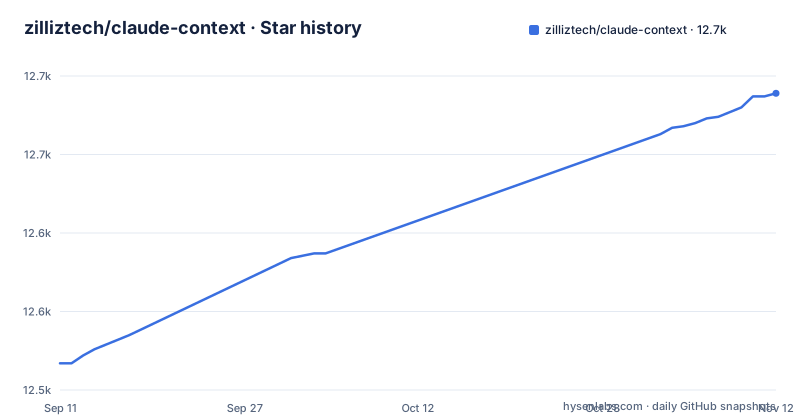
Star history
- zilliztech/claude-context12,689 ★ · +172
| Repository | 2026-09-11 | 2026-11-12 |
|---|---|---|
| zilliztech/claude-context | 12.5k | 12.7k |
172 Stars in the last 62 days, measured from the daily GitHub snapshot. Compare with other projects
Editorial analysis
A vector database and an embedding key are both mandatory
The setup path runs on two hosted services before a single search happens. The three environment variables repeated across the client configurations are MILVUS_ADDRESS, your Zilliz Cloud public endpoint, MILVUS_TOKEN, your Zilliz Cloud API key, and OPENAI_API_KEY, which the README says is needed for the embedding model and always starts with sk-. This is what registering the server looks like for Claude Code:
claude mcp add claude-context \
  -e OPENAI_API_KEY=sk-your-openai-api-key \
  -e MILVUS_ADDRESS=your-zilliz-cloud-public-endpoint \
  -e MILVUS_TOKEN=your-zilliz-cloud-api-key \
  -- npx @zilliz/claude-context-mcp@latest
Every configuration example shown uses a Zilliz Cloud API key. The consequence for a reader is direct: fragments of your source are held in someone else's database, and an expired or unpaid Zilliz account takes the search tool down with it.
The Codex and Gemini blocks leave MILVUS_ADDRESS out
Of the client configurations printed in full, six carry the endpoint and two do not. The Codex CLI block sets only the OpenAI key and the token:
# IMPORTANT: the top-level key is `mcp_servers` rather than `mcpServers`.
[mcp_servers.claude-context]
command = "npx"
args = ["@zilliz/claude-context-mcp@latest"]
env = { "OPENAI_API_KEY" = "your-openai-api-key", "MILVUS_TOKEN" = "your-zilliz-cloud-api-key" }
# Optional: override the default 10s startup timeout
startup_timeout_ms = 20000
The Gemini CLI block in ~/.gemini/settings.json omits it the same way, while Qwen Code, Cursor, Void, Windsurf, Claude Desktop, and the claude mcp add command all include it. Nobody flags the difference, so a reader who copies the Codex or Gemini block verbatim is left to work out that the endpoint has to be added by hand.
Codex needs twenty seconds because npx resolves the package at startup
startup_timeout_ms = 20000 appears in exactly one configuration, and its comment says it overrides the default 10s startup timeout. Ten seconds is the budget a client gives an MCP server before it stops waiting, and the process being launched is npx with an unpinned tag, so the runtime has to resolve the package before a server exists to answer anything. The README gives no reason for the value; its comment marks the override as optional. No other client block carries an equivalent knob, so a team that moves from Codex to Cursor keeps the fix nowhere and inherits the same wait. Anyone porting the idea should expect a specific shape of failure: a server that was entirely healthy but was declared dead before it finished booting, and a log that points at the client rather than at the tool.
Every install path pins nothing, and the repository has no releases
Every configuration launches npx @zilliz/claude-context-mcp@latest, and the repository has no GitHub releases to compare against. Inside the monorepo the pieces are split into @zilliz/claude-context-core for the indexing core and @zilliz/claude-context-mcp for the server, published by release scripts that pass --no-git-checks, alongside semanticcodesearch for the VS Code extension; the root package is private at version 0.1.15. The practical effect is that what you install is whatever npm serves on the day you run it, with no changelog and no release to diff against. Nothing in the repository top level marks a boundary for this either: the entries include build-benchmark.json, evaluation/, examples/, python/, and scripts/, so there is measurement code present, and the last push to this repository is dated 2026-07-14. If you need a repeatable environment or want to prove which build an agent was reading, you have to pin the version yourself, because nothing in the documented path does it for you.
Void registers the server as code-context while the rest use claude-context
The key inside the JSON object is the name a client uses, and it is not consistent across the examples. Six configurations register the server as claude-context, matching the name given to claude mcp add, while the Void block uses code-context. Void is also configured through Settings, MCP, Add MCP Server rather than by editing a file, so that key gets typed by hand and a block pasted from another client arrives with the wrong name attached. Whether the name is free-form or matched against something is never stated, which is what makes a mismatch easy to misattribute to the quality of the index instead of to the configuration file. Match the key to the client you are actually configuring.
Three clients pass -y to npx and four do not
The args array is not uniform either. Cursor, Void, and Windsurf pass ["-y", "@zilliz/claude-context-mcp@latest"], while the Claude Desktop block, the Qwen Code settings file, the Gemini CLI settings file, and the Codex TOML drop the flag and pass the package name alone. When the flag is required, and what changes if it is missing, is not explained anywhere, so the difference is undocumented rather than deliberate. That matters the moment anyone consolidates configuration across clients, because the flag is the only difference between blocks that otherwise launch an identical package. Stripping it during cleanup is a silent change that will not show up as a configuration error at all.
The env file has to live outside your repository
Provider selection is handled by a file rather than by the client blocks. .env.example sets EMBEDDING_PROVIDER=OpenAI, EMBEDDING_MODEL=text-embedding-3-small, and EMBEDDING_BATCH_SIZE=100, notes that a larger batch size generally means less indexing time, and names VoyageAI, Gemini, and Ollama as the other provider choices. Its own comment gives the destination, with the usage line cp env.example ~/.context/.env, and then warns that the file does not work if you put it in your codebase directory because it may conflict with the environment variables of your codebase project. The embedding configuration is therefore global by design: two projects cannot hold different embedding models or batch sizes through this route, and moving the file next to your source to get that reintroduces the conflict the warning describes.
Editorial conclusion
claude-context suits teams already paying for a hosted vector database and an embedding API, on Node.js 20 or newer, whose agent wastes context window reading whole directories. It does not suit anyone unwilling to have code fragments indexed in Zilliz Cloud and text sent to an embedding provider, and the README configuration examples all use Zilliz Cloud. Before adopting it, copy the configuration block for your own client rather than the first one you find: two of the printed blocks omit MILVUS_ADDRESS, three pass -y to npx and four do not, and the Void block registers a different server name. If you need repeatable environments, pin the version yourself, because every documented command uses @latest.
Frequently asked questions
What is claude-context?
It is an MCP plugin that adds semantic code search to Claude Code and other AI coding agents, giving them context from your entire codebase. Instead of loading whole directories into the model on every request, it stores the codebase in a vector database and puts only related code into context.
How do you set up claude-context?
Add the server with the claude mcp add command, passing OPENAI_API_KEY, MILVUS_ADDRESS, and MILVUS_TOKEN before npx @zilliz/claude-context-mcp@latest. The stated system requirement is Node.js >= 20.0.0, and you need both a Zilliz Cloud API key and an OpenAI API key that starts with sk-.
How do you use claude-context with other MCP clients?
Codex CLI uses TOML in ~/.codex/config.toml under the key mcp_servers rather than mcpServers, while Gemini CLI, Qwen Code, Cursor, Void, Claude Desktop, and Windsurf use JSON configuration files. Cursor, Void, and Windsurf pass -y to npx in their args, and Codex carries a startup_timeout_ms of 20000 over the 10s default.
How do you add files to claude-context?
Indexing settings go in ~/.context/.env, copied from .env.example with cp env.example ~/.context/.env. The example file states that it does not work if you put it in your codebase directory, because it may conflict with the environment variables of your codebase project.
What does claude-context add to a coding agent?
Semantic code search. The README describes it as using semantic search to find all relevant code from millions of lines and bringing results straight into the model's context, so an agent gets relevant code without multi-round discovery.
Official sources
Add this badge to your README
If you maintain this project, the badge below links readers to this analysis and shows its maintenance status from the daily GitHub snapshot. Paste the markdown into your README; add ?metric=license or ?metric=stars to the image URL for a different field.

[](https://hysenlabs.com/projects/zilliztech-claude-context)Star history chart for your README
[](https://hysenlabs.com/projects/zilliztech-claude-context)Was this useful?