wigolo: a local MCP web layer for coding agents, keyless by default
The go-to web for your AI coding agent — local-first search, fetch, crawl & research over MCP. No API keys, no cloud, $0/query. Public beta.
At a glance
- What is it?
- wigolo is a TypeScript MCP server that gives an AI agent search, fetch, crawl, extract, cache, find-similar and research tools while keeping traffic and cache under ~/.wigolo/. The keyless tier is real; the synthesized-answer tier is not, and the licence file needs reading before you ship it.
- Who is it for?
- Adopt wigolo if your agent needs web evidence and you want the fetch, crawl and extract path to stay on your machine with no metered key. Do not adopt it if you need a finished cited answer out of the box and will not configure an LLM provider, or if the terms in its LICENSE and LICENSING.md files are incompatible with how you distribute your product.
- Can I use it commercially?
- Check first. The repository uses a licence we do not classify automatically, so read its LICENSE file before any commercial use.
- Is it still maintained?
- Yes. The repository received new commits within the last day.
- What is it written in?
- Mainly TypeScript, according to GitHub's language statistics.
Answers come from the project's GitHub data, last synced on November 14, 2026, and from our analysis. They are not legal advice.
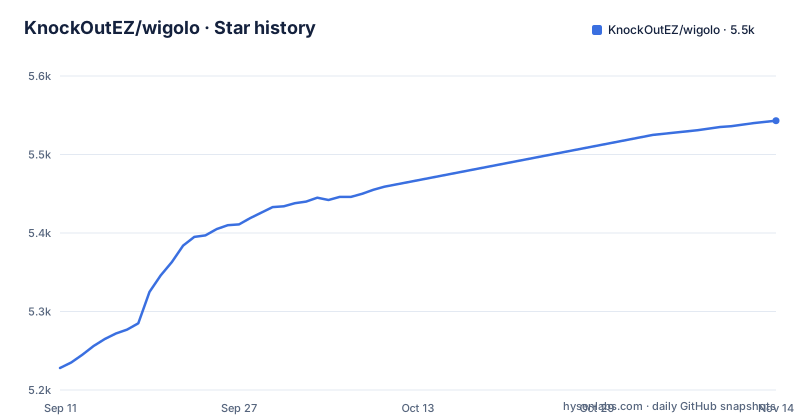
Star history
- KnockOutEZ/wigolo5,543 ★ · +315
| Repository | 2026-09-11 | 2026-11-14 |
|---|---|---|
| KnockOutEZ/wigolo | 5.2k | 5.5k |
315 Stars in the last 64 days, measured from the daily GitHub snapshot. Compare with other projects
Editorial analysis
The gap wigolo fills between an agent and the open web
A coding agent that needs a current fact has three bad options. It can call a hosted search API, which means an account, a key, and a bill that scales with how much the agent thinks. It can be handed a URL and asked to fetch it, which usually means the agent improvises with curl and gets HTML it cannot cite. Or it can be given a retrieval corpus that someone else assembled, which is stale the moment it is built. wigolo targets the first and third of those. The README describes it as giving an agent "one surface for everything web-related: search, fetch, crawl, extract, cache, find-similar, research, and autonomous gather loops." The intended user is someone running Claude Code, Cursor, Codex, Gemini CLI, OpenCode, VS Code, Windsurf, Zed or Antigravity locally, or running a self-hosted agent framework such as LangChain, CrewAI, LlamaIndex, the Vercel AI SDK or n8n. The claim that matters is the storage boundary: nothing it touches leaves ~/.wigolo/.
How the MCP tool surface and the evidence payload fit together
wigolo runs as an MCP server, so the agent sees tools rather than a search box. The README lists search, fetch, crawl, extract, cache, find-similar and research as distinct tools, and the installation guide gives a config block per client. The output shape is the part worth studying. Each result carries a verbatim excerpt, a citation_id such as src-1, a source_span with byte offsets (the README example shows start 1042 and end 1305), and an evidence_score object with final, semantic, lexical and engine_consensus fields. A separate citations array maps ids back to URLs, and a freshness_signal carries a published date. That structure is what separates this from handing an agent raw HTML: the agent can quote a span and point at where in the document it came from. The engine_consensus field implies results are merged across more than one upstream search engine, which matches the README's description of multi-engine search with rank fusion.
What the keyless tier actually covers, and where the LLM boundary sits
This is the distinction most likely to cause a surprise. Search, fetch, crawl, extract, cache and find-similar are described as fully keyless. The research tool, the agent tool, and search with format=answer are not: they use an LLM to write the synthesized, cited answer. Without a provider configured, the README states they hand back a raw brief and evidence for your agent to assemble. So the phrase no API keys is accurate for the retrieval layer and conditional for the synthesis layer. A free Gemini key is the documented path to a finished answer, set through WIGOLO_LLM_PROVIDER=gemini and GEMINI_API_KEY. Anthropic, OpenAI and Groq are named as alternatives, and WIGOLO_LLM_PROVIDER=ollama keeps the whole loop local. The README also mentions a keyless local-model ladder in the configuration guide, which suggests a fallback chain.
Installing it: the two commands and the disk cost
Setup is a single npx invocation. `npx wigolo init` sets up the local engine on any system; `npx wigolo init --agents=claude-code,cursor` also writes the MCP config for the named agents in the same run. The --agents flag accepts a comma-separated list from claude-code, cursor, codex, gemini-cli, opencode, vscode, windsurf, zed and antigravity. Any other MCP client registers `npx -y wigolo` in its own config instead. Requirements are Node 20 or later and roughly 1.5 GB of free disk on macOS, Linux or Windows, because init downloads a browser engine and on-device models. Two flags change the shape of that download: --no-warmup defers it until first use, and --interactive or --wizard swap the unattended flow for a prompt or a TUI. The README states that a failed component download never fails setup, and that init reports what is not ready with the exact fix. `npx wigolo doctor` re-checks health at any time, and `npx wigolo config --uninstall --yes` removes everything.
The 1.5 GB download and the beta label are the real adoption costs
The disk requirement is not incidental. Downloading a browser engine and on-device models means init is a multi-minute, network-heavy operation, and it is the step most likely to fail behind a corporate proxy or on a locked-down CI runner. The --no-warmup flag exists precisely because that cost is unwelcome in some environments, but deferring it moves the failure to the agent's first tool call instead of setup. The second constraint is the status: the repository labels itself a public beta. The README says new features ship steadily and points at a personal X account for updates, which tells you the release cadence is real but the interface is not frozen. The third is the licence. The GitHub metadata reports NOASSERTION, and the repository ships LICENSE alongside LICENSING.md and TRADEMARK.md. Treat the licence as unverified until you read the actual licence file.
Where a hosted search API is still the better answer
The obvious alternative is a hosted search API such as Brave Search or Tavily, wired into the agent as a tool. The difference is not quality, it is where the work happens and who pays. A hosted API returns ranked results from one engine, already deduplicated and maintained by the vendor, with an SLA and a per-query price. wigolo instead runs the retrieval locally, merges engines, and keeps a cache under ~/.wigolo/, which is why the marginal cost per query is zero and why nothing leaves the machine. The trade is operational: you own the 1.5 GB, the model downloads, the browser engine, and the upgrade path. If your agents run in ephemeral containers where a persistent home directory is not available, the local-first model works against you unless you use the full Docker target, which the Dockerfile describes as ideal for ephemeral `--rm` runs with no persistent volume. If your queries are few and your tolerance for per-query billing is high, the same conclusion holds.
Maintenance, release cadence and what NOASSERTION means for you
The release history shows a binary-v0.2.1-sd507.1 build in September 2026, then v0.3.0 and v0.3.1 in October 2026, and the repository's last push is 2026-10-10. Two version numbers on the same underlying release implies a separate binary distribution channel tracked alongside the npm package, which the README confirms by listing Docker, Homebrew and single-file-binary options. Practically, that means upgrades arrive as npm version bumps plus periodic binary rebuilds, and the uninstall path (`npx wigolo config --uninstall --yes`) is documented, so backing out is cheap. The licence question is the one to settle before adoption. A NOASSERTION value in repository metadata usually means the licence file is non-standard or unparsed. That is not legal advice, and the only reliable move is to read the licence file in the repository and confirm it with whoever handles compliance on your side.
Editorial conclusion
Adopt wigolo if your agent needs web evidence and you want the fetch, crawl and extract path to stay on your machine with no metered key. Do not adopt it if you need a finished cited answer out of the box and will not configure an LLM provider, or if the terms in its LICENSE and LICENSING.md files are incompatible with how you distribute your product. Before wiring anything, run npx wigolo init and read the per-component report, then confirm the actual licence text in the repository rather than the repository metadata.
Frequently asked questions
Does wigolo need an API key to search the web?
No for the core surface: search, fetch, crawl, extract, cache and find-similar are described as fully keyless. Research, agent and `search format=answer` use an LLM, so without one they hand back a raw brief and evidence. You can supply a Gemini, Anthropic, OpenAI or Groq key, or stay keyless with `WIGOLO_LLM_PROVIDER=ollama` or any OpenAI-compatible URL.
What does `npx wigolo init` download, and what does it need?
It needs Node 20 or newer and roughly 1.5 GB of free disk on macOS, Linux or Windows. It downloads the browser engine and the on-device models, runs a health check and reports each component. `--no-warmup` defers those downloads to first use, and a failed component download never fails setup: init reports what is not ready with the exact fix and still completes.
Which coding agents can `wigolo init --agents` wire up?
It takes a comma-separated list of `claude-code`, `cursor`, `codex`, `gemini-cli`, `opencode`, `vscode`, `windsurf`, `zed` and `antigravity`, writing the MCP config and, where supported, instructions for each. Any other MCP client, agent framework or self-hosted agent registers `npx -y wigolo` in its own MCP config, with the exact block in docs/installation.md.
Where does wigolo store its data, and how do I remove it?
Nothing it touches leaves `~/.wigolo/`, so state lives in your home directory rather than in your project. `npx wigolo doctor` reports health at any time, and `npx wigolo config --uninstall --yes` removes everything cleanly.
Is wigolo stable enough to install from npm in CI?
It is a public beta. The Makefile says beta releases carry a `-beta.N` suffix and are flagged `--prerelease`, although package.json is at 0.3.1 and the latest releases are tagged v0.3.0 and v0.3.1; npm still publishes to the `latest` dist-tag, so `npm install wigolo` gives you the beta build. Release tags are not gpg signed, because the release targets set `tag.gpgsign` and `commit.gpgsign` to false.
Official sources
Add this badge to your README
If you maintain this project, the badge below links readers to this analysis and shows its maintenance status from the daily GitHub snapshot. Paste the markdown into your README; add ?metric=license or ?metric=stars to the image URL for a different field.

[](https://hysenlabs.com/projects/knockoutez-wigolo)Star history chart for your README
[](https://hysenlabs.com/projects/knockoutez-wigolo)Was this useful?