Two modes, one unauthenticated UART, and an install path the tree does not match
authenticate, sudo, login with your fingerprint wire(less)ly without having to spend $149 at the cost of some security
At a glance
- What is it?
- tinytouch is a fingerprint login key for macOS built on an ESP and a cheap sensor, sold as the $149 alternative. Its README spends most of its length on what the device cannot protect, and its HID install commands point at a directory the repository root does not list.
- Who is it for?
- tinytouch is worth building if you enjoy the hardware and understand that the fingerprint match happens on a sensor that talks to the microcontroller over an unauthenticated serial line, and that no software change in this repository closes that gap. Choose HID for reach and accept that your real password is typed into whatever window has focus, or choose PIV/PAM to keep the password off the wire and lose keychain, general settings and remote SSH in exchange.
- Can I use it commercially?
- Yes. MIT is a permissive licence: you can use, modify and sell software built on it, as long as you keep its copyright and licence notices.
- Is it still maintained?
- Yes. The repository last received commits 43 days ago.
- What is it written in?
- Mainly Python, according to GitHub's language statistics.
Answers come from the project's GitHub data, last synced on November 15, 2026, and from our analysis. They are not legal advice.
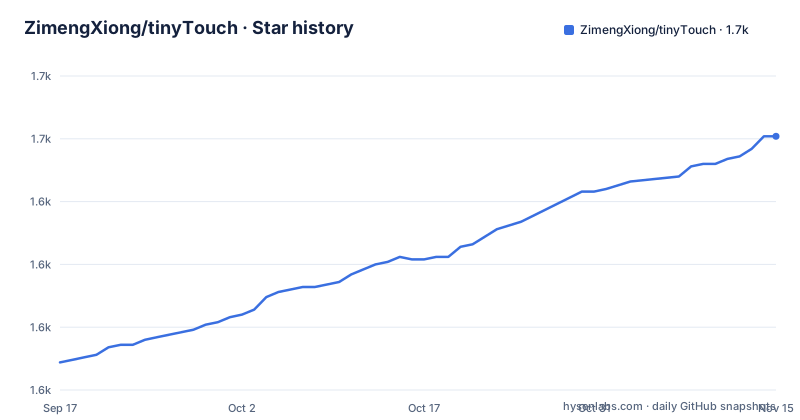
Star history
- ZimengXiong/tinyTouch1,651 ★ · +90
| Repository | 2026-09-17 | 2026-11-15 |
|---|---|---|
| ZimengXiong/tinyTouch | 1.6k | 1.7k |
90 Stars in the last 59 days, measured from the daily GitHub snapshot. Compare with other projects
Editorial analysis
The install commands name software/macos-helper, the tree names macos
The HID path is a virtualenv and two helper calls:
python3 -m venv .venv
. .venv/bin/activate
pip install -r software/macos-helper/requirements.txt

pairing_key="$(openssl rand -hex 32)"
.venv/bin/python software/macos-helper/tinytouch_helper.py --set-pairing-key "$pairing_key"
.venv/bin/python software/macos-helper/tinytouch_helper.py --set-password 'your-password-here'

cp firmware/tiny_touch_keyboard/secrets.example.h firmware/tiny_touch_keyboard/secrets.h
Every path in that block sits under `software/macos-helper/`, and so does the launchd plist the next paragraph asks you to edit, `software/macos-helper/launchd/com.tinytouch.helper.plist`. The top level of the repository holds `.github/`, `.gitignore`, `LICENSE`, `README.md`, `VERSION`, `docs/`, `firmware/`, `hardware/`, `macos/`, `release/`, `scripts/`, `tests/` and `tools/`. There is no `software/` entry in that list. Whether the helper was moved under `macos/` and the installation block was left behind is not something the file listing settles, and it is the first thing to check before spending an evening on it. The second half of the guide is thinner still: the blue pill section opens with "use this if you w" and stops there, so the smart card install path is not written out. Release tags move quickly, with v0.1.34, v0.1.34-dev.1 and v0.1.34-dev.2 all landing on 2026-10-02 and 2026-10-03, and the branch was last pushed on 2026-10-02.
A 32 byte key is generated as hex and hand carried into a header
The pairing key is the seam between the Mac helper and the firmware, and it is transferred by hand. `openssl rand -hex 32` produces 32 random bytes rendered as a 64 character hex string, and that string is what gets handed to `--set-pairing-key`. Three steps later, the firmware is told to hold the same key as bytes inside `firmware/tiny_touch_keyboard/secrets.h`, which is why the example header is copied into place first so there is something to edit. Nothing in the flow converts the hex text into raw bytes for you, so that conversion happens on the person doing the build. The sketch itself is `firmware/tiny_touch_keyboard/tiny_touch_keyboard.ino`, flashed with the Arduino IDE, and the only two board settings written down are:
usb cdc on boot: enabled
usb mode: usb-otg
Those two lines decide whether the ESP enumerates as the device type the chosen mode needs. Anything else about the board, the sensor or the wiring lives in `hardware/` and `docs/`, plus a video build guide linked from the top of the page.
The password is handed to the helper as a command line argument
The second helper call takes the password the same way it takes the key, `--set-password 'your-password-here'`, which puts it into the shell history and into the process argument list for as long as the command runs. The later invocation of the same script takes no arguments at all:
.venv/bin/python software/macos-helper/tinytouch_helper.pyThe HID write-up says the helper keeps the real password encrypted and stored on the Mac, and that an attacker cannot extract it from the ESP alone, which is a claim about the device rather than about where the helper keeps its copy. The launchd instructions add one more manual step: edit the paths inside `software/macos-helper/launchd/com.tinytouch.helper.plist`, then copy it into `~/Library/LaunchAgents/`. Whether that agent reads the password back out of a keychain entry or a file on disk is not stated, and neither is how the helper is protected once it runs at login on every session.
The one red mark that sits in both columns
Three tables sit side by side: what each mode can do, where each link in the chain is sound, and what an attacker can try. One row is marked as a risk in both columns. The link between the fingerprint sensor and the ESP is unauthenticated UART, and the author names it as the major security issue with the device, because every authentication decision happens inside the sensor and the sensor reaches the microcontroller over a channel nobody authenticates. The basic countermeasure offered is filling the insides of the device with black epoxy; the proper fix is a more secure fingerprint sensor. The rows around it disagree. ESP to computer negotiation is marked sound in HID, with shared key MAC and encryption, and unsound in PIV, which speaks plain USB CCID and APDU. Authentication then flips the other way: unsound in HID because the password is typed over HID, and sound in PIV because it rests on PIV challenge and response. Two modes, one shared weak link, and a different weakness each.
PIV still types six zeroes over HID, and only where macOS takes smart cards
In PIV mode the ESP presents itself as a USB smart card. macOS sends normal PIV commands over CCID and, when it needs to authenticate, asks the card to use its PIV private key, which the ESP permits only immediately after a fingerprint match. macOS also insists on a PIV PIN, so the firmware keeps a small HID side path that types the dummy value `000000`. The footnote under the tables is explicit about what that is not: the PIN is not the macOS password, and in this scenario it is not treated as sensitive, because authorization sits behind the fingerprint gate around the key. What this buys is that your real password is never typed. What it costs is reach, because the mode works only where macOS accepts smart cards, namely login and sudo with PAM. The feature table marks general settings and keychain or Apple passwords as unavailable in this mode, and everywhere your password is accepted, remote SSH sessions among them, as depending but probably not.
HID works everywhere and ends with your password typed into whatever has focus
The HID path is the one that behaves like a plain keyboard. The Mac helper keeps the real password encrypted, the ESP holds only the shared pairing key, and after a fingerprint match the ESP sends a signed request, the helper checks it, encrypts the password for that one request and sends it back, and the ESP decrypts it into RAM, types it, then wipes it. The write-up names both halves of that in consecutive sentences: it works almost everywhere, and the final step is still your real password being typed into whatever has focus. The mitigations on offer are a nonce and a MAC on each request so old requests cannot be replayed, and a one-time encrypted response from the helper. The attack table then spells out the consequence in two rows that are both marked no for PIV: a wrong focused field, and a malicious password field. A third row says a USB keylogger can reveal the password under HID, where under PIV it cannot reveal the key.
Flash dumping has three rows and the modes differ in only one of them
The attack table handles flash dumping across three configurations: secure boot and flash encryption off, then on, then with a secure element. With both turned off, the shared key is exposable under HID and the PIV key is exposable under PIV, so neither mode buys anything. With them on, both keys are non-exportable in both columns. With a secure element, both are non-exportable again. That leaves the first row as the only place where the mode choice changes the outcome, and the remedy for it is a platform setting or an added piece of hardware rather than a change to anything in this repository. The adjacent row follows the same shape: USB command injection is handled by rejecting bad MACs and replays under HID, while under PIV the device may receive APDUs but authentication still needs the fingerprint gated key use.
The decision list asks whether you are wanted by a government agency
Before recommending either mode, the page asks the reader to weigh five things: security tolerance, environment, current or future criminal background, relations with family and roommates, and the technical skill of anyone else using the machine. The questions that follow are blunt about physical exposure: will the device ever leave the desk, can a roommate do a flash dump in half an hour, do family members have anything against you that would create a motive, are you wanted by any government agency, are you protecting sensitive or classified information, is it a company device, and would you be personally implicated if you leaked company secrets. The stated answer is that if any of those is yes, the $149 magic keyboard is worth the added security, and if none is, a slightly insecure method is fine. The baseline offered for reassurance is that every attack described needs physical access to both the device and the Mac.
Editorial conclusion
tinytouch is worth building if you enjoy the hardware and understand that the fingerprint match happens on a sensor that talks to the microcontroller over an unauthenticated serial line, and that no software change in this repository closes that gap. Choose HID for reach and accept that your real password is typed into whatever window has focus, or choose PIV/PAM to keep the password off the wire and lose keychain, general settings and remote SSH in exchange. Before you start, verify that the helper actually lives where the commands say: the install block names software/macos-helper while the repository root lists macos, and the smart card half of that install guide stops mid sentence.
Frequently asked questions
What does tinytouch do in HID mode?
The ESP behaves as a USB keyboard while the Mac helper holds the encrypted real password. After a fingerprint match the ESP sends a signed request, the helper returns a one-time encrypted response, and the ESP decrypts it into RAM, types it and wipes it.
What dummy PIN does tinytouch type in PIV mode?
The value 000000. It is not the macOS password: the page states that the PIV PIN is not considered sensitive in this scenario, and that authorization is still gated by the fingerprint around the PIV key.
Which security weakness does the tinytouch author call out first?
The link between the fingerprint sensor and the ESP, which runs over unauthenticated UART and is marked as a risk in both HID and PIV modes. All authentication happens inside the sensor, so it can be spoofed; the stated basic countermeasure is black epoxy and the proper fix is a more secure sensor.
Does tinytouch work for remote SSH sessions?
HID does, according to the feature table, which marks it available everywhere a password is accepted and names remote SSH sessions as an example. The PIV/PAM column for that same row is listed as depending, but probably not.
Where does the tinytouch macOS helper live?
The install commands reference software/macos-helper/requirements.txt, software/macos-helper/tinytouch_helper.py and a launchd plist under software/macos-helper/launchd/. The top level of the repository lists a macos directory and no software directory.
What licence is tinytouch released under?
MIT. The most recent tags are v0.1.34, published 2026-10-03, alongside the v0.1.34-dev.1 and v0.1.34-dev.2 prereleases from the day before, and the default branch was last pushed on 2026-10-02.
Official sources
Add this badge to your README
If you maintain this project, the badge below links readers to this analysis and shows its maintenance status from the daily GitHub snapshot. Paste the markdown into your README; add ?metric=license or ?metric=stars to the image URL for a different field.

[](https://hysenlabs.com/projects/zimengxiong-tinytouch)Star history chart for your README
[](https://hysenlabs.com/projects/zimengxiong-tinytouch)Was this useful?