Editing an employee YAML does not reseed an existing catalog
UniEmployee: an enterprise platform for building and running AI digital employees - Employee to Workflow/SOP to Skill to Connector to Tool, with HITL approvals, long-term memory, and full traceability. Built with FastAPI, Vue 3, and LangGraph.
At a glance
- What is it?
- UniEmployee is an enterprise platform for building AI digital employees in five layers, from an employee persona down to atomic tools, with human approval, persistent memory and a replayable trace. Two operational details dominate a first deployment: the YAML employee files are a seed source rather than live configuration, and switching to the production environment makes startup fail on a database that still carries seed data.
- Who is it for?
- UniEmployee fits an organisation that wants a fixed procedure executed by a model with a human in the approval loop, since the state-machine workflow and the human-in-the-loop interruption are the parts this platform is actually organised around. It does not fit a team that wants a stateless assistant, because memory is isolated per user and employee and persisted by design.
- Can I use it commercially?
- Yes. MIT is a permissive licence: you can use, modify and sell software built on it, as long as you keep its copyright and licence notices.
- Is it still maintained?
- Yes. The repository last received commits 1 day ago.
- What is it written in?
- Mainly Python, according to GitHub's language statistics.
Answers come from the project's GitHub data, last synced on October 22, 2026, and from our analysis. They are not legal advice.
Star history
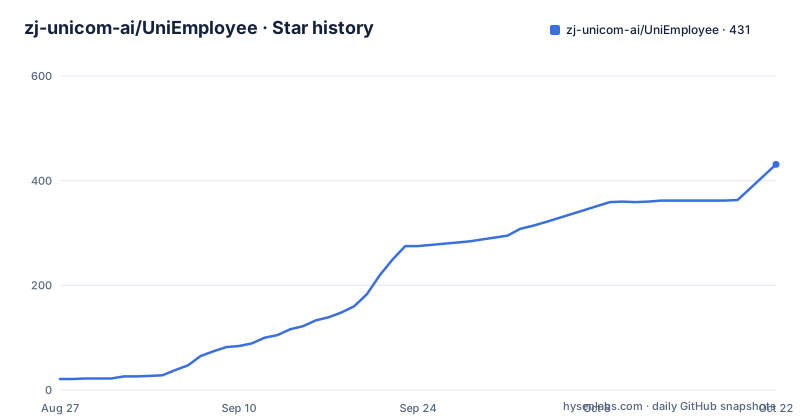
- zj-unicom-ai/UniEmployee431 ★ · +410
| Repository | 2026-08-27 | 2026-10-22 |
|---|---|---|
| zj-unicom-ai/UniEmployee | 21 | 431 |
410 Stars in the last 56 days, measured from the daily GitHub snapshot. Compare with other projects
Editorial analysis
The employee YAML files are a seed source, not live configuration
This is the detail that will cost you an afternoon if nobody tells you, and the documentation does tell you, in a note attached to the employee management feature. Employee definitions live as YAML files in a backend directory, and those files are the seed source. An existing catalog in the database does not automatically fully reseed when you edit the YAML. The runtime treats the catalog as authoritative, not the files, so a change to a persona file is invisible until you take an explicit step to reseed. That design is defensible, because a catalogue is data and letting a file edit silently overwrite a running agent's configuration is worse than requiring an explicit action, but it is a two-system design and you have to know which one you are editing. The same distinction reappears on the configuration side. Changing a persona, a tool or a connector through the resource centre interface usually requires restarting the service so that already-cached agents get recompiled, while skill bodies and knowledge-base content are read dynamically at runtime and take effect immediately. The install path is a clone, a copied environment file, and a locked dependency install, which is what makes a rebuilt environment reproduce the running one:
git clone https://github.com/zj-unicom-ai/UniEmployee.git
cd UniEmployee
cp .env.example .envpython3 -m venv .venv
.venv/bin/pip install -r backend/requirements.lock.txt # 完全可复现The service then runs as a single process with the frontend static files built in, which is the shortest path to a working install.
Compaction fires on a window ratio when it can, and on a token count when it cannot
The long-conversation handling has a two-tier trigger and a two-stage response, and both are specified with numbers. Compaction is built on the summarisation middleware that ships with the agent framework. The trigger is a proportion of the model's context window when a context profile is available for that model, at 85 percent of the window, and a fixed count otherwise, at 170,000 tokens. The two-stage part is the interesting engineering. Before it summarises, it first trims old tool arguments, which is the cheaper intervention and the one that usually suffices. When the model reports that it is over budget, the run compacts and retries automatically, so the conversation neither overflows nor breaks. The full history is written to a per-thread markdown file and can be read back at any time, which means compaction loses the working context without losing the record. That combination, automatic folding plus a durable transcript, is what makes a long-running agent conversation auditable after the fact.
SQL has four separate guards, and none of them is the allowlist
The data-analysis workbench is the part of this platform that touches a real database, and its access control is layered rather than singular. Queries are validated at the abstract syntax tree level for read-only-ness, which is a stronger check than pattern matching for a statement that has already been parsed. On top of that there is a table allowlist, a row count limit, and a server-side timeout. Four controls, four different failure modes: the tree check stops writes, the allowlist stops access, the row limit stops an accidental full-table export, and the timeout stops a query that would otherwise hold a connection. The workbench also accepts attachment spreadsheets, the knowledge base and connector data sources alongside the database, and reports render through a pair of marker constants into a downloadable HTML dashboard that can be opened in a new window. The design intent is visible in the naming: the analyst employee owns an end-to-end path from question to chart, with the query layer as the only place where untrusted text becomes privileged action.
Production mode refuses to start over leftover demo data instead of ignoring it
One environment variable changes what the platform is willing to do, and the behaviour is a hard failure rather than a downgrade. In the production environment, demo ontology seeding is switched off and mock CRM connectors are forbidden. The configuration file states the consequence for existing databases: if an old database still carries seed data under the default tenant, or still has experimental connector assignments, startup fails and asks for manual review. That is the right call and it is unusual. The failure modes it prevents are the ones that matter in production: a demo knowledge ontology quietly answering real questions, and a mock connector quietly returning fabricated customer records into a business report. A softer design would warn and continue, and you would find out from a customer. The related comment about the initial administrator follows the same logic, noting that the account is created only on the first start against an empty database and is never reset afterwards, so a default password left in place is caught by forcing a change at first login rather than by a later audit.
The container waits for a healthy database, and probes a different endpoint than the manual check
The compose file is worth reading as documentation of intent, because two details in it answer operational questions you would otherwise have to guess at. The application service declares a dependency on the database with the condition that the database is healthy, not merely started, so the application does not race the initialisation script. That script runs on first start only, when the data directory is empty, and it creates seven separate business databases rather than one schema. The health story is split in two as well. The manual verification step in the quick start curls the health endpoint and expects a specific status document, while the container's own healthcheck probes a readiness endpoint on a thirty second interval with a twenty-five second start period, which is long enough for the first-boot database creation to finish. Two endpoints, two jobs: one for a person confirming an install, one for an orchestrator deciding whether traffic should arrive. The database service is a pinned major version of PostgreSQL on Alpine, with its own readiness check on a five second interval.
Sandbox isolation for the network operations employee is optional and falls back silently
Execution backends are chosen per employee, with four options covering a state-machine runtime, a local shell, a standard runtime and a sandbox. The network-operations employee can be routed per session into an OpenSandbox container, and this is the one place in the platform where a security boundary is conditional. When the sandbox is not enabled, the configuration falls back to the local backend, which means the same employee runs shell commands on the host with the service's own privileges. The dataset it needs is mounted read-only inside the sandbox, which is the right treatment, and it depends on a browser automation connector that needs a one-off browser install before it will run. Nothing in the project stops you from running that employee on the local backend in production; the fallback is a convenience, and a convenience in a shell-execution path is a decision to make deliberately rather than inherit from a default. The MCP connectors, by contrast, come in two shapes, a standard input/output one and a package-runner one, which is why the docs mention both when adding external systems.
Eight shipped employees are domain-shaped, not generic assistants
The built-in employee set is the clearest statement of what this platform is for, because none of them is a general assistant. There is a pre-sales support employee backed by a retrieval knowledge base, a data analysis expert that owns the analyst workbench, an account manager that reads and writes against a customer relationship connector, an HR business partner whose skills include writing facts back into the ontology, a business analysis and decision adviser, a network operations expert that routes procedures through state machines, a market intelligence analyst wired to a news feed and browser automation, and an insurance business analyst with premium, loss ratio, renewal and channel metrics. That spread tells you the intended unit of work is a named job with a procedure attached, not a chat window. The design makes that concrete: skills are written as markdown procedure files with trigger conditions and execution steps, seeded into a store the model consults on demand rather than reciting from memory, and multi-step business processes can be fixed as explicit state machines with human approval nodes. Memory is isolated per user and employee and persisted, so an employee accumulates context about the people it works with.
Editorial conclusion
UniEmployee fits an organisation that wants a fixed procedure executed by a model with a human in the approval loop, since the state-machine workflow and the human-in-the-loop interruption are the parts this platform is actually organised around. It does not fit a team that wants a stateless assistant, because memory is isolated per user and employee and persisted by design. Before your first production start, empty the demo data and resolve any experimental connector assignments, because the production environment refuses to boot over them rather than quietly ignoring them, and remember that changing an employee's persona in the interface usually needs a service restart before the cached agent is recompiled.
Frequently asked questions
What does it take to run UniEmployee?
Python 3.12 or later, Docker for the PostgreSQL instance unless you already have one, Node.js 18 or later for frontend development mode, and any OpenAI Chat Completions-compatible model endpoint with a key. The application itself needs no GPU, so the hardware requirement follows from the model service you pick rather than from the platform.
Why do my changes to an employee YAML file not take effect?
Because those files are the seed source, and the database catalog is what the runtime treats as authoritative. An existing catalog does not automatically fully reseed when you edit the YAML. Separately, changing a persona, a tool or a connector through the resource centre usually needs a service restart before already-cached agents are recompiled, while skill bodies and knowledge-base content are read dynamically.
How does UniEmployee restrict what an AI employee can do to a database?
With four separate controls on SQL: abstract syntax tree level validation that the query is read-only, a table allowlist, a row count limit, and a server-side timeout. They address different failures, since one stops writes, one stops access, one stops an accidental full export and one stops a long-running query holding a connection. High-risk actions additionally interrupt mid-flow for human approval.
What happens when UniEmployee starts in production mode on an existing database?
It can fail on purpose. Production mode disables demo ontology seeding and forbids mock CRM connectors, and if the database still holds seed data under the default tenant or experimental connector assignments, startup errors and asks for manual review rather than continuing with the leftovers.
How long a conversation can UniEmployee hold before it summarises?
Compaction triggers at 85 percent of the model's context window when a context profile exists for that model, and at a fixed 170,000 tokens otherwise. It first trims old tool arguments, then folds older messages into a summary and retries if the model reports being over budget, while the full history is written to a per-thread markdown file that can be read back later.
Official sources
Add this badge to your README
If you maintain this project, the badge below links readers to this analysis and shows its maintenance status from the daily GitHub snapshot. Paste the markdown into your README; add ?metric=license or ?metric=stars to the image URL for a different field.

[](https://hysenlabs.com/projects/zj-unicom-ai-uniemployee)Star history chart for your README
[](https://hysenlabs.com/projects/zj-unicom-ai-uniemployee)