HyperQwen serves Qwen3.8-27B on one 24 GB card, and the repo is still named for the card
Qwen3.8-27B on a single RTX 3090 with vLLM: ~1,000 tok/s at 64 concurrent (int8 tensor-core GEMMs, fp16 DeltaNet state), ~114 tok/s single-user at default sampling / ~124 greedy (MTP drafts, own-output draft vocab, calibrated int4 lm_head, split-KV verify attention), 150k-262k context; patches, requant scripts, benchmarks
At a glance
- What is it?
- A patch series against a pinned vLLM plus a model preparation pipeline, wrapped in five serving profiles you pick with three questions about your traffic. The container binds all interfaces with no authentication unless you set a key, so that is the first thing to know.
- Who is it for?
- This suits someone who owns a single 24 GB consumer card, wants an OpenAI compatible endpoint at a few hundred tokens per second, and is willing to read PATCHES.md before upgrading vLLM. Five things to check first, in this order.
- Can I use it commercially?
- Yes. Apache-2.0 is a permissive licence: you can use, modify and sell software built on it, as long as you keep its copyright and licence notices.
- Is it still maintained?
- Yes. The repository last received commits 13 days ago.
- What is it written in?
- Mainly Python, according to GitHub's language statistics.
Answers come from the project's GitHub data, last synced on November 23, 2026, and from our analysis. They are not legal advice.
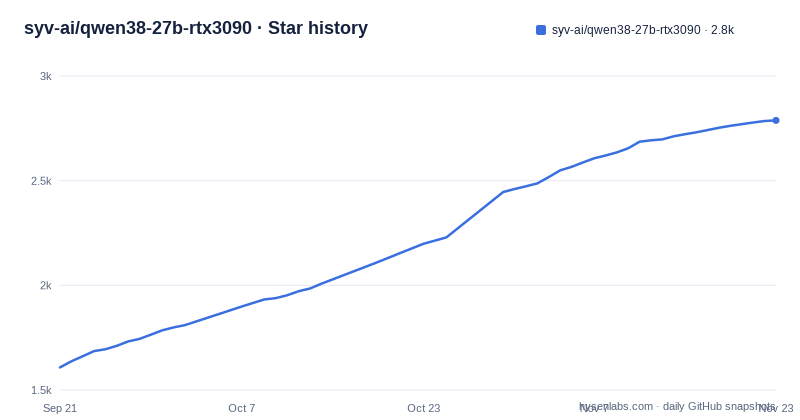
Star history
- syv-ai/qwen38-27b-rtx30902,788 ★ · +1,180
| Repository | 2026-09-21 | 2026-11-23 |
|---|---|---|
| syv-ai/qwen38-27b-rtx3090 | 1.6k | 2.8k |
1,180 Stars in the last 63 days, measured from the daily GitHub snapshot. Compare with other projects
Editorial analysis
The container binds 0.0.0.0 with no auth until you set a key
The security note comes before the install commands, and the difference it describes is the kind that gets missed. In a container the server binds 0.0.0.0, with no authentication unless you set a key. Outside a container, no key means it binds 127.0.0.1 only. So the same command, with the same empty environment, exposes the model to your whole network or to nothing at all, depending on whether Docker is in the picture.
The fix is one line, and the project prints it for you:
echo "VLLM_API_KEY=$(openssl rand -hex 24)" >> .envThere are two other ways to get the same result. A Makefile target named keygen appends a fresh key to .env without clobbering it, and it is safe to run repeatedly because it checks for a non empty VLLM_API_KEY line first and reports presence without showing the value. A script named resolve_api_key.sh sits in the root next to resolve_config.sh, so the resolution order is code rather than convention.
The rest of the exposure surface is small and worth knowing anyway. The service is an OpenAI compatible API with key auth serving on port 18020, the health endpoint is /health, and the Makefile has a ps target that curls it from inside the WSL or network namespace. The .env file is ignored by git specifically so local keys and tuning changes stay out of commits, and the file is passed straight into the container.
Two defaults in that file are worth reading rather than accepting. SPEC is set to dflash2 and PREFIX_CACHE to 1, with a comment saying this is the recommended default for best speed when the card is yours alone, and a second comment noting the launcher's own default is SPEC=mtp. So the template overrides the launcher's default, deliberately, and says so.
VLLM_WSL2_ENABLE_PIN_MEMORY=1 is switched on in the template too, with the reason given: on native Linux it is a no op, because platforms/cuda.py reads it only inside the WSL detected branch.
The repository is named for the card, the project is called HyperQwen
There are two names in play and the project explains why. The repository is qwen38-27b-rtx3090 under the syv-ai organisation. Everything inside it is called HyperQwen: the heading, the container image at ghcr.io as hyperqwen, the CI workflow links, and the Makefile, which filters docker ps on the name hyperqwen.
The explanation is in the roadmap section and it is a statement about scope rather than branding. It started as Qwen3.8-27B on one RTX 3090, the name changed because the scope did, and the readme still reflects the original pair because that is the combination measured properly. The stated plan is to widen both axes, more Qwen models and more classes of card.
That dual naming is a real friction point for anyone automating against it. A docker ps filter, a package pull, a link in a bug report and a URL in a bookmark all use different strings, and the repository name is the one that says 27B and 3090 when the project is explicitly trying to stop being about that pair.
There is a second naming mismatch, in the numbers. The repository description gives about 114 tokens per second single user at default sampling and about 124 greedy, and quotes 150k to 262k of context. The readme's own table gives 127 tokens per second for the single stream profile, with 121 on the older MTP path, and describes 240k of context for the huge profile with a 268k token pool. So the description's single user figures are lower than the readme's, and its upper context figure does not match either profile.
Treat the readme tables as the current numbers and the description as a summary written at a different time. The gap is small enough not to change any decision, and it is the kind of thing that makes a reader wonder which of the two they are quoting.
Five profiles come out of three questions about your traffic
The configuration is presented as three questions whose answers are the whole of your .env, and the answers map to five named modes.
The questions are: who is sending the requests, whether an API backend or pipeline sending eight or more at once or one or a few people chatting; what the longest prompt you will send is, under 64k, up to 150k, or 200k and beyond; and whether the answers quote the prompt back, which is the normal chat case or the copy, edit, quote case of code edits, retrieval and translation.
The table that follows gives the change and the result for each. Mode A is batch with no edit at all, giving about 1,035 tokens per second aggregate at 64 concurrent. Mode B is the default single profile, 127 tokens per second with 64k context. Mode C adds DFLASH_TOKENS=15 and gives 381 tokens per second while quoting, at 4 slots and 56k. Mode D sets SPEC=mtp and CTX=long for 150k of context at roughly 95 to 100 tokens per second. Mode E adds CTX=huge for 240k of context at 67 tokens per second mixed and 164 while quoting.
The guidance between the modes is where the real guidance is. B is the safe default and C only pays off when the output really does repeat the input, because it trades request slots and context headroom for the speed, which is why C drops from eight slots to four and from 64k to 56k. D falls back to MTP speculation on purpose, because DFlash2 past 64k is worth it only for reproduction and loses to SPEC=mtp with CTX=long by about two to one on everything else. At E the KVarN cache buys the context instead, so DFlash2 stays on.
One asymmetry to note: batch ignores SPEC entirely and says so on startup, so the speculation settings in your .env have no effect in that profile rather than being silently applied.
Batch and single are two different machines, not two settings
The comparison table is the most useful page in the repository, and it is worth reading as two separate serving designs rather than as one engine with two flags.
At 64 concurrent requests with 128 input and 512 output tokens, batch decodes at about 1,035 tokens per second end to end at 948, and about 1,222 with every layer int8. A single stream in that same profile gets 46 tokens per second, and so does the same request quoting its own prompt. Prefill at 1k input runs at about 1,810 tokens per second. The mechanism is 16 bit recurrent state with int8 tensor core GEMMs.
The single profile reverses every one of those. A single stream gets 127 tokens per second, or 121 on the older MTP path, and 381 tokens per second when the answer quotes its own prompt at 25k of context. Prefill is lower at about 1,440, or 1,850 to 1,940 with INT8_ACT=int8. The mechanism is speculative decoding: 7 drafts proposed per pass, 15 tokens verified per step, drafted off the context.
So the two designs optimise opposite things. Batch amortises one forward pass over 64 requests and wins on aggregate throughput while giving a single request a fraction of the speed. Single spends seven extra passes per token to make one stream fast, and pays for it in prefill.
There is a crossover, and it is stated as below roughly 8 concurrent users speculation wins and above that plain batching does. The reason it used to be worse on long sessions is specific: a speculating request reserves recurrent state pages that the pool has few of, and there is a separate document on long context measurements for that case.
Both modes share one install, so the choice is made per run rather than per machine. One GPU runs one mode at a time.
The int8 prefill kernel is gated on one checkpoint's head geometry
The roadmap separates portable work from model specific work with unusual honesty, and the model specific list starts with a hard gate.
The int8 QK prefill attention kernel is gated on this checkpoint's exact geometry: num_heads equal to 24, num_kv_heads equal to 4, head_size equal to 256. Anything else falls back to FA2, which the page describes plainly: a new model gets correctness for free and none of the prefill win until the gate is generalised. That means the 1,810 tokens per second prefill figure in batch mode is a number for one model shape, and a different model on the same card would be running a different attention path.
Three more items are model specific. The 40k token draft vocabulary is calibrated on this model's own output distribution, so a different model's drafts would be proposed from the wrong token frequencies. The DFlash2 drafter is a per model checkpoint rather than a trained once artifact. And the prepare directory assumes a head layout that, in the project's words, only just learned to handle heads in different shards, with an open issue referenced.
The portable list is the vLLM patch series, one line each in PATCHES.md, the KVarN long context backend, int8 Marlin GEMM layer selection, the SSE keep alive, and the engine stall sentinel. These are described as vLLM fixes that happen to have been written here, which is the right framing: they will apply to a different model because they are not about models.
The practical consequence for a second model is a specific work estimate rather than a vague risk. Correctness is automatic, prefill performance is not, speculation quality is not, and the quantisation pipeline has an open issue attached to head layout. Anyone planning to serve two Qwen models from this setup should read that section as a to do list.
Patches are applied in a declared order with fuzz zero
The container applies every compatible patch to vLLM at build time, and how it applies them is stated in a comment in the Dockerfile because the obvious approach is wrong.
patches/apply.sh reads the apply order from patches/series and applies it with fuzz zero. The reason given: a few patches carry hunk context that an earlier patch adds, so the glob order of patches/*.patch is wrong. A build that took a different order would either fail or, with a fuzzier apply, succeed and produce a tree nobody tested.
The pinned stack is equally specific. Python 3.12 in a venv at /app/venv, vLLM 0.30.0 with torch 2.13, cu130 and Triton 3.7.1, the KVarN KV cache installed by its own script, and verify.sh run with --install at build time so the image is checked before it is ever started.
The base image is CUDA base plus nvcc rather than devel, with a reason: vLLM's wheels bring their own CUDA libraries, but FlashInfer JIT compiles its fp8 KV attention kernel with nvcc on first use, in batch mode with CTX=long, and Triton needs a C compiler for its launchers. The consequence is managed rather than ignored, since the compiled kernels and the torch.compile cache live in a /cache volume so the compilation happens once. HOME is also a volume, carrying the torch.compile cache, the Triton cache, the FlashInfer JIT cache and the HuggingFace hub cache.
Multi GPU is configured by two separate variables, and the distinction matters. GPU_COUNT is how many cards the container is given, EXTRA_ARGS is how many the engine actually uses, with the example pairing GPU_COUNT=2 and EXTRA_ARGS="--tensor-parallel-size 2". GPU_COUNT defaults to 1, which the compose file spells out as the first GPU the runtime enumerates, that is GPU 0, and it adds that this is not the card you meant if the box has mixed hardware. There is a warning workflow for patch integrity among the CI links as well.
First boot pulls 9.5 GB, requantizes 20 GB, then compiles for minutes
The path from clone to endpoint is three commands, and the size of what happens behind them is the thing to plan for.
git clone https://github.com/syv-ai/HyperQwen && cd HyperQwen
cp .env.example .env                      # PowerShell: Copy-Item .env.example .env

docker compose --profile single up -d     # one or a few people chatting
docker compose --profile batch  up -d     # API backend, many concurrent requests
The first start pulls a 9.5 GB image and requantizes the model, about 20 GB, once, into ./models, then serves on port 18020. The .env.example file notes that models live in ./models by default, the same layout as the venv install, so the container and a native install can share one download. The Makefile adds the part that surprises people: first boot compiles, and the estimate printed after up-single and up-batch is 2 to 15 minutes.
One GPU runs one mode at a time, so --profile single and --profile batch are not two services in one compose file. There are also two one-shot targets, prepare for downloading and requantizing without serving, and verify to run verify.sh inside the container.
The Makefile is unusually disciplined about this: every target delegates to docker compose or to a checked-in script, with no hidden flags, and make help lists them. The targets are up-single, up-batch, down, logs, ps, verify, verify-install, shell, keygen and doctor. verify-install runs bash verify.sh --install with no GPU, no model and no server, which is the check to run on a machine that cannot host the model. shell gives a throwaway shell in the server image with the patches and venv present but no GPU boot, which is how you inspect what the patch series did.
If you have no Docker at all, or no compose file, the page points at docs/docker.md for a plain Docker path and docs/install.md for a native venv install.
Editorial conclusion
This suits someone who owns a single 24 GB consumer card, wants an OpenAI compatible endpoint at a few hundred tokens per second, and is willing to read PATCHES.md before upgrading vLLM. Five things to check first, in this order. Authentication, because the container binds 0.0.0.0 with no auth unless you set VLLM_API_KEY, and the page says so in bold before showing you the command. Whether your card is in the measured set, since the headline numbers are one RTX 3090 at 250 W and the project's own roadmap separates what is portable from what is specific to this checkpoint's geometry. Whether your workload quotes its prompt, because the 381 tok/s figure and the 127 tok/s figure are the same build under two profiles. Which profile you actually need, since the mode you pick changes context length from 64k to 240k and slots from eight to four. And what a vLLM upgrade costs you, since the patches are applied with fuzz zero and the container pins vLLM 0.30.0.
Frequently asked questions
What is HyperQwen and what is the qwen38-27b-rtx3090 repository?
They are the same project at two stages of its life. The repository is named qwen38-27b-rtx3090, and everything inside it is called HyperQwen, including the container image. The project says the name changed because the scope did: it started as Qwen3.8-27B on one RTX 3090 and the plan is to support more Qwen models and more classes of card.
How do I secure the HyperQwen server?
In a container the server binds 0.0.0.0 with no authentication unless you set a key, while outside a container an unset key means it binds 127.0.0.1 only. Set one with echo "VLLM_API_KEY=$(openssl rand -hex 24)" >> .env, or run make keygen, which appends a key without overwriting an existing one. resolve_api_key.sh in the root handles the resolution.
What throughput does HyperQwen reach on one RTX 3090?
The page gives about 1,035 tokens per second aggregate decode at 64 concurrent requests in batch mode, 127 tokens per second for a single stream in single user mode, and 381 tokens per second when the answer quotes its own prompt. It also states the card was run at 250 W, and that the prefill rate is about 1,810 tokens per second in batch.
How much context can HyperQwen serve?
Four profiles, chosen by longest prompt. The default single profile is 64k, the reproduction profile is 56k with four slots, the long profile reaches 150k at roughly 95 to 100 tokens per second, and the huge profile reaches 240k using the KVarN 4/2 bit KV cache, which is 268k tokens of pool, at 67 tokens per second mixed and 164 while reproducing.
Can HyperQwen serve models other than Qwen3.8-27B?
The pages say a new model gets correctness for free but none of the performance win. The int8 QK prefill kernel is gated on this checkpoint's geometry of 24 heads, 4 KV heads and head size 256, falling back to FA2 otherwise. The 40k draft vocabulary is calibrated on this model's own output distribution, the DFlash2 drafter is a per model checkpoint, and the patch series itself is described as portable.
Official sources
Add this badge to your README
If you maintain this project, the badge below links readers to this analysis and shows its maintenance status from the daily GitHub snapshot. Paste the markdown into your README; add ?metric=license or ?metric=stars to the image URL for a different field.

[](https://hysenlabs.com/projects/syv-ai-qwen38-27b-rtx3090)Star history chart for your README
[](https://hysenlabs.com/projects/syv-ai-qwen38-27b-rtx3090)Was this useful?