MarkdownDisplayView ships one library under two names with two different parsers
A view for display markdown text.support markdown streaming like gpt&claude&gemini&deepseek
At a glance
- What is it?
- MarkdownDisplayView is a native UIKit Markdown renderer for iOS built on TextKit 2, with its own LaTeX and chemistry typesetting engine and no WebView anywhere. The trap for anyone integrating it is packaging: the Swift Package Manager product and the CocoaPods pod have different names and resolve to different Markdown parsers, and the checked-in example needs a far newer Xcode than the library does.
- Who is it for?
- MarkdownDisplayView fits an iOS app that has to render model output, and STEM output in particular, where a LaTeX block arriving in pieces has to stay stable while the stream is still open. It does not fit a team that wants a thin wrapper over an existing parser, because you are adopting a Markdown parser, a LaTeX engine and a chemistry engine at once.
- Can I use it commercially?
- Yes. Apache-2.0 is a permissive licence: you can use, modify and sell software built on it, as long as you keep its copyright and licence notices.
- Is it still maintained?
- Yes. The repository last received commits 30 days ago.
- What is it written in?
- Mainly Swift, according to GitHub's language statistics.
Answers come from the project's GitHub data, last synced on October 22, 2026, and from our analysis. They are not legal advice.
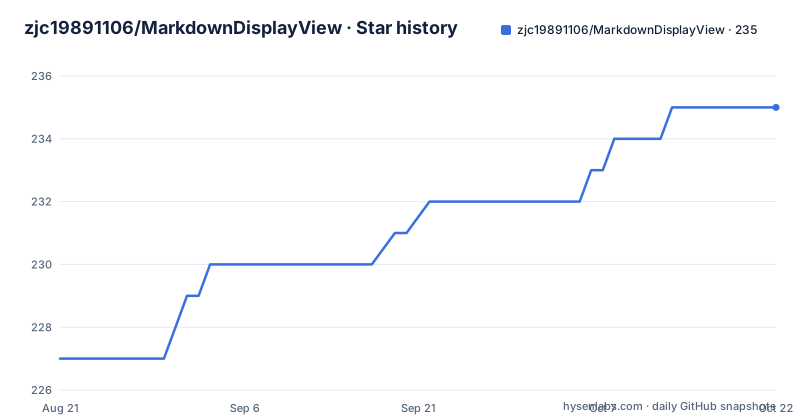
Star history
- zjc19891106/MarkdownDisplayView235 ★ · +8
| Repository | 2026-08-21 | 2026-10-22 |
|---|---|---|
| zjc19891106/MarkdownDisplayView | 227 | 235 |
8 Stars in the last 62 days, measured from the daily GitHub snapshot. Compare with other projects
Editorial analysis
The pod is MarkdownDisplayKit, and it parses Markdown differently from the package
The same library is published under two names, and the two paths are not equivalent underneath. Swift Package Manager exposes the product `MarkdownDisplayView`, imported as `import MarkdownDisplayView`, and resolves `swift-markdown` for parsing along with Kingfisher for images. CocoaPods exposes `MarkdownDisplayKit`, imported as `import MarkdownDisplayKit`, and its podspec declares `AppleSwiftMDWrapper` for Markdown parsing with `Kingfisher (~> 8.9.0)` for image loading. So the public Swift API is the same, but the Markdown parser underneath is not. That is a real fork in behaviour for anything that depends on parser edge cases, and it is the reason a bug report against one path may not reproduce on the other. The CocoaPods entry is pinned in the example as:
pod 'MarkdownDisplayKit', '~> 2.2.3'The Swift Package route names a starting version instead, and the product reference has to match the package name exactly.
Memory is the number to check, and it is given for three different states
The performance claims are stated as memory figures for specific situations rather than as a general speed claim, which is more useful and harder to hand-wave. A 16 KB sample document covering most of the available styles loads and scrolls in roughly 60 to 70 MB on an iPhone 14 Pro. Streaming is the expensive case: handling random-length chunks peaks around 140 MB, drops back to about 70 MB once the stream finishes, and sits near 40 MB in real multi-turn conversations. Three numbers, three different regimes, and the one that matters is the peak, since that is what determines whether a chat screen survives alongside a model request on the same device. Rendering itself is described as sub-millisecond, which is a claim about the typesetting step rather than about a whole frame, and the architecture explains the rest: background parsing, first-screen-first ordering, and incremental UI updates rather than a full re-render per delta.
Zero WebView means owning a LaTeX engine and a chemistry engine too
The no-WebView claim is the project's identity, and the price of it is visible in the feature list. There is an in-house recursive-descent LaTeX parser, a two-dimensional geometric typesetting engine drawing through CoreGraphics and CoreText, and 20 bundled KaTeX vector fonts that register themselves at runtime and separate math italics from roman operators. On top of that sit two chemistry extensions: support for inorganic reaction equations through `\ce`, with automatic subscripts, charges and equilibrium arrows, and organic structural formulas through `\chemfig`, drawing benzene and aromatic rings, TNT and toluene structures and substituents as vectors. Read as an integration decision, adopting this library means adopting three substantial pieces of parsing and layout work, not one. The payoff is that a formula is a first-class text object with theme colours and selectable glyphs, and the cost is that you now own whatever those engines do not yet implement.
The example project needs a newer Xcode than the library declares
The requirements table separates the package from the example on purpose, and the gap is wide. The deployment target is iOS 15.0 or later, the Swift tools version is 5.9 or later, and Xcode 15.0 or later is what the package needs. The checked-in example project, however, uses the Xcode 26 project format. Those are not the same floor, and a developer on Xcode 16 opening the example will hit a project file they cannot read before they compile a single line of the library. This is a common shape of friction in Swift packages where the example is maintained on the author's machine and the package is versioned conservatively, and it costs an afternoon the first time. The API documentation points at a specific view controller as the working layout reference, which is where you should look for real usage, since the README's quick start deliberately stops at adding the view to a hierarchy.
Streaming a half-written LaTeX block is the actual hard problem
AI output arrives in chunks that respect token boundaries, not block boundaries, so a formula can start in one delta and finish four deltas later. A renderer that parses eagerly either flickers as the expression is rebuilt, or holds the whole document back waiting for a terminator. The streaming row claims to solve this with safe module buffering, ordered deltas, typewriter output, height caching and optional haptics, and it makes a specific promise about the hard case: zero-flicker streaming for complex STEM formulas. The design detail that makes it possible is the split between parsing and display, with parsing on a background queue and only finished modules reaching the text layout, so a partial construct is buffered rather than rendered. The cost is that height is no longer known in advance for an in-flight block, which is what the height caching and the height callback exist to absorb. If your screen reflows on every delta, that cache is the part to measure first.
Two Markdown parsers, one extension point, and four callback families
The extension surface is broader than a renderer usually offers, which matters if your app needs behaviour the built-in set does not cover. Extensions are custom parsers, view providers, action handlers and fenced-code renderers, so a block type the library does not know can be given its own view rather than being flattened to text. Callbacks come in four families covering link taps, image taps, table-of-contents events, height changes and streaming steps, and the examples show the first two as closures assigned on the view. Navigation is generated rather than authored, with a table of contents built from the headings, heading navigation, and internal anchors. Standard Markdown coverage includes headings, lists, tables, blockquotes, images, footnotes, the details element, and horizontally scrollable code blocks, with built-in syntax highlighting for more than twenty languages. Supporting `details` is worth noting because it is why this project's own README can collapse a hundred lines of installation instructions behind a summary line.
The live AI demo needs an untracked Config.local.json you have to write
The streaming examples in the repository are not self-contained, and the reason is worth knowing before you spend an hour wondering why nothing arrives. The real AI chat demo requires an untracked `Config.local.json` in the example target, and the documented structure points at a chat completions endpoint with a host, a path, an API key, a model name, a system prompt, a temperature, a stream flag and a timeout in seconds. The file is untracked on purpose, so a fresh clone has no key and the streaming demo silently does nothing until you supply one. That is the correct design for a credential, and it does mean the streaming path is the least verifiable part of the project out of the box. If you want to exercise it without an account, the deterministic route is to append markdown deltas yourself, which is the same code path the stream drives and costs nothing.
Editorial conclusion
MarkdownDisplayView fits an iOS app that has to render model output, and STEM output in particular, where a LaTeX block arriving in pieces has to stay stable while the stream is still open. It does not fit a team that wants a thin wrapper over an existing parser, because you are adopting a Markdown parser, a LaTeX engine and a chemistry engine at once. Before you commit, open the example project and check your Xcode against it, because the package itself only needs Xcode 15 while the checked-in example is in the Xcode 26 project format, and pick your package manager deliberately since the two paths do not share a parser.
Frequently asked questions
What are the iOS requirements for MarkdownDisplayView?
A deployment target of iOS 15.0 or later, Swift tools 5.9 or later, and Xcode 15.0 or later for the package itself. The checked-in example project is a separate constraint: it uses the Xcode 26 project format, so opening the example needs a much newer Xcode than the library does.
How do I install MarkdownDisplayView with Swift Package Manager?
Add the package URL `https://github.com/zjc19891106/MarkdownDisplayView.git` in Xcode under File, Add Package Dependencies, or add `.package(url: "https://github.com/zjc19891106/MarkdownDisplayView.git", from: "2.1.1")` to Package.swift and reference the product `MarkdownDisplayView`. Swift Package Manager resolves swift-markdown and Kingfisher automatically.
Why is the CocoaPods pod called MarkdownDisplayKit?
The CocoaPods distribution is named MarkdownDisplayKit and is imported as MarkdownDisplayKit, while Swift Package Manager exposes MarkdownDisplayView. The podspec declares AppleSwiftMDWrapper for Markdown parsing where the Swift package resolves swift-markdown, so the two paths share an API but not a parser.
How much memory does MarkdownDisplayView use?
A 16 KB sample document covering most styles loads and scrolls in roughly 60 to 70 MB on an iPhone 14 Pro. Streaming random-length chunks peaks around 140 MB, falls back to about 70 MB once streaming finishes, and sits near 40 MB in real multi-turn AI conversations.
How do I enable the live AI chat demo in the example?
Create an untracked Config.local.json in the example target, with a host, path, API key, model, system prompt, temperature, stream flag and timeout in seconds. The file is untracked by design, so a fresh clone has no credentials and the streaming demo does nothing until you supply one.
Official sources
Add this badge to your README
If you maintain this project, the badge below links readers to this analysis and shows its maintenance status from the daily GitHub snapshot. Paste the markdown into your README; add ?metric=license or ?metric=stars to the image URL for a different field.

[](https://hysenlabs.com/projects/zjc19891106-markdowndisplayview)Star history chart for your README
[](https://hysenlabs.com/projects/zjc19891106-markdowndisplayview)