codex-claude-academic-skills: three skill packs and a placeholder install path
Three Skills for academic researchers covering the full research workflow from reading papers and writing to scientific computing: office-academic-skill generates paper reading reports and academic PPT/Word documents; research-writing-skill assists with paper writing, polishing and reviewer response; scientific-toolkit-skill combines MATLAB/Python scientific computing with journal-quality chart generation. Designed for Chinese-speaking researchers, usable with one click in Claude Code and Codex.
At a glance
- What is it?
- zLanqing's repository bundles three Chinese-first skill packs for paper writing, academic Office documents and optoelectronics computation, loadable in Claude Code and Codex. The install section still carries a placeholder username, and the scientific scope is narrower than the name promises.
- Who is it for?
- Adopt these packs if you write in Chinese, need editable .docx and .pptx produced from a reading report, and work in optics, photonics or optical communication. Pass on them if you submit to English venues, need a general science toolchain beyond the listed libraries, or cannot patch an install path by hand.
- Can I use it commercially?
- Yes. MIT is a permissive licence: you can use, modify and sell software built on it, as long as you keep its copyright and licence notices.
- Is it still maintained?
- Activity is slowing. The repository last received commits 6 months ago.
- What is it written in?
- Mainly Python, according to GitHub's language statistics.
Answers come from the project's GitHub data, last synced on November 24, 2026, and from our analysis. They are not legal advice.
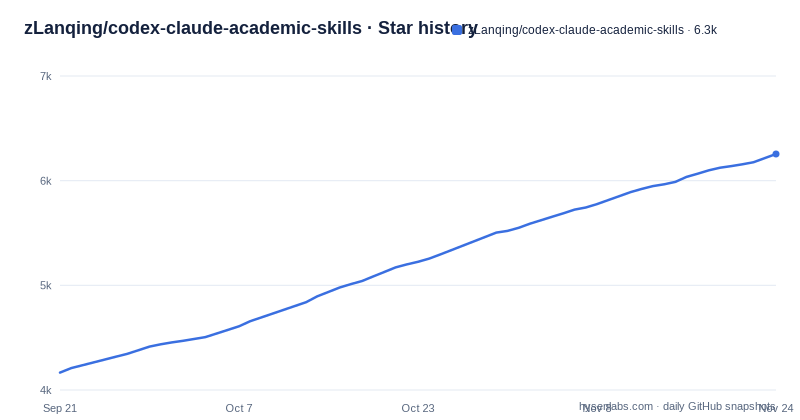
Star history
- zLanqing/codex-claude-academic-skills6,255 ★ · +2,089
| Repository | 2026-09-21 | 2026-11-24 |
|---|---|---|
| zLanqing/codex-claude-academic-skills | 4.2k | 6.3k |
2,089 Stars in the last 64 days, measured from the daily GitHub snapshot. Compare with other projects
Editorial analysis
Three sibling directories, one SKILL.md contract
The repository holds exactly three top-level skill directories beside the README: research-writing-skill, office-academic-skill and scientific-toolkit-skill. Each one follows the same three-part shape, a SKILL.md definition, an agents/ folder for subagent configuration and a references/ folder holding documents, scripts and templates. That uniformity is the point. Because the loaders on both platforms read the same layout, the same three directories work under Claude Code and under Codex, and a user can install one, two or all three without resolving conflicts between formats.
The split is by deliverable rather than by topic. research-writing-skill handles section drafting, revision, rebuttal letters and argument planning, with reference material under paper-writing/section_rhetorical_moves/, paper-writing/writing_checklists/, paper-writing/figure_templates/ and paper-writing/brainstorming_guide.md. office-academic-skill owns the Word and PowerPoint output, including an office-docx/ folder that works at the OOXML level with an XSD schema library and an office-pptx/ folder doing the same for slides. scientific-toolkit-skill holds the computation side, with more than twenty submodules of reference documents and script templates.
The README describes a chained workflow rather than three isolated tools. In the paper writing scenario it puts scientific-toolkit-skill first for data analysis and figures, then research-writing-skill for the body text, then office-academic-skill for the defense slides. In the reading scenario, office-academic-skill converts a PDF into a Word report and then into a group meeting deck. Whether a given model agent actually follows that order is a matter of how you prompt it, and the README says nothing about enforcing it.
The install commands still name a placeholder account
The documented install is a clone followed by a copy of each skill directory into a global skills folder. The catch is visible in the first line of that block: the URL is not the repository URL. It reads claude-academic-skills.git under the placeholder 你的用户名, which is the Chinese phrase for your username, not a real account. Copying these lines as printed fails at the clone step.
# 克隆仓库
git clone https://github.com/你的用户名/claude-academic-skills.git

# 安装到全局 skills 目录
cp -r claude-academic-skills/research-writing-skill ~/.claude/skills/
The same placeholder recurs in both one-line plugin commands, and the Codex copy commands use the same claude-academic-skills directory name. A reader has to substitute zLanqing as the owner and codex-claude-academic-skills as the directory name, and the repository name itself differs from the name in the clone command. That mismatch is not cosmetic: if you follow the README literally, the copy targets a directory that never gets created.
For Codex the README offers a second route that skips the copy entirely, loading the packs in the current session from a plugin URL. Here too the owner segment is a placeholder.
codex --plugin-url https://github.com/你的用户名/claude-academic-skillsA third option needs no command. Project-level installation means putting a skill directory under .claude/skills/ or .codex/skills/ at the project root, which scopes it to that repository alone instead of the whole machine.
office-academic-skill edits OOXML, not a running Office app
Most document generators drive an application through a macro or a headless LibreOffice conversion. This one works on the package itself. The office-docx/ folder checks and edits DOCX at the OOXML level and carries an XSD schema library, and office-pptx/ does the same for PPTX. Validation against the schema is the interesting part, because a malformed Word file is a defect a user discovers by opening it.
Around that base sit scripts under thesis-defense-pptx/scripts/ for thesis context extraction, template cloning, slide export and overflow checking. Template cloning matters for the stated use cases: opening, midterm and defense presentations are supposed to match an existing university template, including its master slide, rather than arrive in generic layouts. Overflow checking is the mechanism that keeps a title from spilling out of a text box once real Chinese text replaces a placeholder.
The quality rules are written as constraints rather than advice. One core claim per slide, carried by an action title that states the conclusion instead of naming a topic. Charts and formulas carry the technical argument in place of text blocks. Axes, units, legends, formulas and data sources have to stay scientifically accurate, and backgrounds stay white or restrained. A default report skeleton and evidence annotation format live in report-structure.md, which gives the reading report a fixed shape instead of whatever prose the model produces.
Chinese by default, English preserved only where the paper needs it
Every one of the three packs writes in Chinese and says so. Explanation, body text and slide production are Chinese; paper titles, formulas, variable names, model names, software commands and reference entries stay in English. A student working toward a Chinese master's thesis or a domestic journal paper gets output in the language they need.
Two rules do more work than the rest. The first forbids invention: no fabricated data, DOI, author, journal, experimental value, figure number or page number. The second splits every claim into four categories, text taken from the source, content confirmed by the user, inference, and suggested extension. That split is operational rather than decorative, because a literature reading report has to say which sentences came from the PDF and which the model supplied.
The writing principles also push back on a habit in Chinese academic prose. Vague intensifiers such as 显著, 先进 and 有效 are to be replaced by measurable conditions and a stated comparison baseline, and terminology and citation accuracy are treated as consistency problems across a revision rather than as polish at the end. For revision work the skill claims section-by-section rewriting, terminology consistency and citation checking, plus rebuttal letters answering reviewer comments.
Worth noting is what the packs do not cover. There is no LaTeX build, no BibTeX database manager, no journal submission formatting, and no journal matching. LaTeX and Overleaf manuscripts are named as a target format, and DOI to BibTeX conversion is listed, but the writing happens as prose that you then compile yourself.
scientific-toolkit-skill is an optoelectronics kit wearing a general name
Read the library table and it looks general: NumPy, SciPy, pandas, matplotlib, seaborn, scikit-learn, statsmodels, SymPy, pymoo, simpy, QuTiP, pymatgen, TimesFM, NetworkX, Astropy. Read the domain section and it is narrow. The stated field is optical information science and engineering, with attention to optics, optoelectronics, optical communication, fibre sensing, BOTDR, BOTDA, BGS, SPM, dispersion, noise and deconvolution, plus spectroscopy, detector data, sensor time series, calibration and uncertainty.
The table ties some of these to optics: QuTiP is listed for quantum optics and open quantum systems, and Astropy for astronomical and optical imaging data, while pymatgen covers crystal structure, band structure and density of states.
The MATLAB side is the more opinionated half. Code keeps its original structure, key parameters get centralised rather than scattered, and comments have to carry physical meaning rather than restating the operation. That is a convention, not an enforced refactor, and applying it to a large inherited simulation means editing the script rather than asking for a new one. Paper figure export is part of the same module, with matplotlib templates, a guide for choosing a statistical test and a scikit-learn classification pipeline among the bundled references. The README does not include a single pip or conda command for any of these libraries, so the environment is the reader's problem to solve.
Terms differ between this repository and the scripts it reuses
The permissions here are MIT, yet the README states that parts of the external resources under scientific-toolkit-skill/references/scientific-skills/ follow their own original terms, which means redistributing a copy of that directory inherits obligations the top-level LICENSE file does not spell out, with no listing telling you which side of the line any given script sits on.
The last push to the default branch landed on 2026-05-14, roughly five months before this writing.
Provenance is stated plainly in the acknowledgements. The design drew on five public skill projects, including zouchenzhen/thesis-defense-pptx-skill for the defense slide workflow described above, K-Dense-AI/scientific-agent-skills for the scientific library modules, tfriedel/claude-office-skills for the Office document structure, Gabberflast/academic-pptx-skill for the slide quality rules and SNL-UCSB/paper-writing-skill for the writing principles. Local folder names borrowed from those projects make it easy to see which parts to compare against upstream when behaviour surprises you.
Skills that instruct a model, and will not correct it on their own
Everything here runs as instructions inside Claude Code or Codex. There is no test suite, no validator binary and no CI; the top-level entries are the README and the three skill directories. A broken reference path inside a skill surfaces as worse output from the model, not as a failed command. That is the central failure mode of this design and it applies equally to all three packs.
The second failure mode is the language default. Chinese-first output is correct for the audience the packs target and a poor fit for anyone submitting to an English venue. Chasing the fourth category of claims, suggested extensions, through a document that will be read as finished work takes review effort that the skill was supposed to save.
The third is scope. Asking research-writing-skill for English journal formatting, asking office-academic-skill for a spreadsheet or asking scientific-toolkit-skill for a discipline outside optics lands outside what the packs cover, and the README does not describe a fallback. A real alternative for the computation half alone is K-Dense-AI/scientific-agent-skills, a collection of 134 or more scientific agent skills covering MATLAB/Octave, Matplotlib and signal processing and scientific visualisation. For defense slides alone, zouchenzhen/thesis-defense-pptx-skill targets Windows and PowerPoint and adds per-slide PNG export and overflow checking, which suits a presenter who wants to inspect rendered output rather than edit XML. Neither replaces the combination here.
Editorial conclusion
Adopt these packs if you write in Chinese, need editable .docx and .pptx produced from a reading report, and work in optics, photonics or optical communication. Pass on them if you submit to English venues, need a general science toolchain beyond the listed libraries, or cannot patch an install path by hand. Before the first run, check three things: that you have replaced the placeholder username in the clone command with zLanqing, that the vendored scripts under scientific-toolkit-skill/references/scientific-skills/ come with terms you accept, and that your Python environment already holds the libraries the tool expects, because the README installs none of them.
Frequently asked questions
Can Codex read Claude skills?
The three packs here use the same directory structure and SKILL.md format for both platforms, and the README gives an identical copy step into ~/.claude/skills/ and ~/.codex/skills/. For Codex it also documents loading them in the current session through the --plugin-url flag.
Is there a Codex skill for academic writing?
research-writing-skill is the writing pack: it covers drafting sections such as abstract, introduction, method and experiments, revising and polishing existing text, answering peer reviewers, and planning an argument from a rough idea. It defaults to Chinese while keeping English titles, formulas, variable names and references.
Does scientific-toolkit-skill come with its Python dependencies installed?
No. The README lists libraries such as NumPy, SciPy, pandas, matplotlib, scikit-learn, QuTiP and pymatgen by purpose, but gives no pip or conda command for any of them. You supply the environment yourself before the skill can run those modules.
Official sources
Add this badge to your README
If you maintain this project, the badge below links readers to this analysis and shows its maintenance status from the daily GitHub snapshot. Paste the markdown into your README; add ?metric=license or ?metric=stars to the image URL for a different field.

[](https://hysenlabs.com/projects/zlanqing-codex-claude-academic-skills)Star history chart for your README
[](https://hysenlabs.com/projects/zlanqing-codex-claude-academic-skills)Was this useful?