react-native-permissions puts one permission gate in front of three native APIs
An unified permissions API for React Native on iOS, Android and Windows.
At a glance
- What is it?
- zoontek's react-native-permissions gives iOS, Android and Windows builds a single JS call surface for permission requests, but the native manifest work still has to be done by hand in each project's Podfile, AndroidManifest.xml or appxmanifest. Good fit for teams already shipping a bare or Expo React Native app across platforms; poor fit for anyone who wants permissions resolved at runtime.
- Who is it for?
- Adopt react-native-permissions if you ship one React Native codebase to iOS, Android or Windows and want one JavaScript API instead of three native permission paths. Skip it if your app is single platform, because the Podfile, AndroidManifest.xml and appxmanifest edits stay manual either way.
- Can I use it commercially?
- Yes. MIT is a permissive licence: you can use, modify and sell software built on it, as long as you keep its copyright and licence notices.
- Is it still maintained?
- Yes. The repository last received commits 30 days ago.
- What is it written in?
- Mainly Objective-C++, according to GitHub's language statistics.
Answers come from the project's GitHub data, last synced on November 14, 2026, and from our analysis. They are not legal advice.
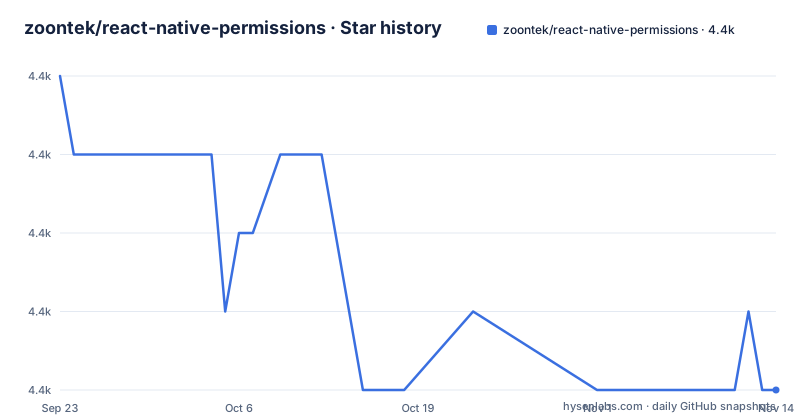
Star history
- zoontek/react-native-permissions4,373 ★ · -4
| Repository | 2026-09-23 | 2026-11-14 |
|---|---|---|
| zoontek/react-native-permissions | 4.4k | 4.4k |
-4 Stars in the last 52 days, measured from the daily GitHub snapshot. Compare with other projects
Editorial analysis
One JS call in front of three different native permission systems
Camera and location prompts work nothing alike on iOS, Android and Windows, yet most React Native permission code branches on Platform.OS to reach for each native module separately. react-native-permissions collapses that branching into one call surface, and the repository description states the scope plainly: a unified permissions API for React Native on iOS, Android and Windows, with Windows restricted to builds 18362 and later.
The audience is narrow and specific. If you maintain one JavaScript codebase and ship it to more than one of those three platforms, the duplicated native permission modules are a real maintenance tax, and this package exists to remove them. If you ship to one platform only, the tax is small and this library buys you little.
What the library does not do is decide permissions for you at runtime. Nothing here discovers which permissions your app needs or requests them implicitly. Everything is declared up front, per platform, in build configuration files. That design choice pushes all the work to install time and leaves the runtime surface small, which is a good trade for App Store review compliance and a poor one for apps that discover capabilities late.
setup_permissions decides what the Podfile ever compiles
The mechanism worth understanding sits in the CocoaPods hook, not in JavaScript. By default no permission is available at all. Requiring the setup script in the Podfile and calling setup_permissions with an explicit array is what makes each permission real, because only the entries listed there are added.
setup_permissions([
  # 'AppTrackingTransparency',
  # 'Bluetooth',
  # 'Calendars',
  # 'CalendarsWriteOnly',
  # 'Camera',
  # 'Contacts',
  # 'FaceID',
  # 'LocationAccuracy',
  # 'LocationAlways',
  # 'LocationWhenInUse',
  # 'MediaLibrary',
  # 'Microphone',
  # 'Motion',
Uncomment what you need, leave the rest commented. App Tracking Transparency, Bluetooth and the three location variants all sit in the same list, so the granularity is per platform permission string rather than a coarse category toggle.
The same file still needs a node_require helper defined above it, which the README spells out as a diff against the stock Podfile. Until you paste that in, the setup call itself does not resolve.
Android gets no build hook, so the manifest stays yours to prune
The Android path is asymmetric with iOS and worth knowing before you ship one. There is no equivalent of setup_permissions. You add the Android permission strings you want to your app's android/app/src/main/AndroidManifest.xml by hand, alongside your other manifest content.
<uses-permission android:name="android.permission.ACCEPT_HANDOVER" />
<uses-permission android:name="android.permission.ACCESS_BACKGROUND_LOCATION" />
<uses-permission android:name="android.permission.ACCESS_COARSE_LOCATION" />
<uses-permission android:name="android.permission.ACCESS_FINE_LOCATION" />
<uses-permission android:name="android.permission.ACCESS_MEDIA_LOCATION" />
Note the pairing that trips people up: background location, coarse location and fine location are three separate entries, and asking for background location in the prompt does not add it to your manifest. Google Play also weighs what the manifest declares, so an over-broad manifest gets you a review question regardless of what your code requests.
Windows is the thinnest path of the three. You open the solution file in the windows folder, open Package.appxmanifest in the app project, and tick the capabilities there. There is no list of capability names to copy, and no code sample in the setup instructions, so a Windows developer is left reading the manifest itself.
One npm command, then the pod install that has to be repeated
Installation itself is two lines. Pick whichever package manager you already use; both are given in the setup instructions.
$ npm i -S react-native-permissions
# --- or ---
$ yarn add react-native-permissions
After the install comes the part that costs people an afternoon. On iOS you run pod install inside the ios directory, and the README attaches a note to that command: it must be re-executed each time you update the setup_permissions config. Change the permission array, run pod install again, rebuild. Forget that step and your JS still calls a permission the native side never compiled.
For first use you still need the Info.plist usage descriptions, one NS-prefixed key per permission you enabled, each with your own reason string. The README warns to keep only the keys matching your setup_permissions entries. An empty or generic reason string passes the library and still gets your app rejected by review.
Expo takes the native files out of the picture: the previous sections do not apply, and you set iosPermissions, the Info.plist keys and the android permissions array in app.config.js or app.json instead. A comment inside that config notes that iosPermissions takes the place of adding setup_permissions to your Podfile (iOS setup steps 1, 2 and 3).
The exports map is the real public surface, and it lists what is missing
The repository root tells you more than the README does. The package manifest exposes entry points including the root, ./expo for the config plugin, ./mock for tests, ./app.plugin.js, and ./scripts/setup.rb. That last export is the one to notice, because it means the CocoaPods helper is shipped as a file inside the package rather than copied by hand into your project. It also explains why the Podfile setup asks you to require a script before calling setup_permissions.
The ./mock entry exists for tests, so a suite can exercise permission branches without a native binary. If you are evaluating this library, check that your test setup can import react-native-permissions/mock, because permission logic that only runs on device tends to break silently in unit tests otherwise.
Licence is MIT, so shipping it inside a closed-source app is not a separate negotiation. The last release, 5.6.3, went out on 2026-10-16, and the project states it follows the React Native releases support policy by supporting the latest version plus the two previous minor series. That is the real upgrade cost: this library moves when React Native moves, so it is version-coupled rather than version-independent.
Where this setup path stops being the right tool
Two failure modes deserve naming plainly. The first is the repeat-pod-install trap: the permission list lives in your Podfile, but the compiled native module list lives in Pods. They are two files that must agree, and nothing enforces that at build time. A CI machine that runs pod install only when the lockfile changes will silently ship a binary missing the permission a feature was just added for.
The second is Expo managed workflow versus Expo prebuild. The config plugin path removes direct manifest editing, and the plugin's iosPermissions array feeds the same native gate. If your pipeline regenerates the ios directory on every build, that setup_permissions call has to be reproducible from your config, or every clean build produces a different permission set.
There is a third, softer limit. Every permission must be known before the build. An app whose feature set depends on a plugin installed at runtime cannot use this design, because the native symbol for that permission never existed at compile time. For that shape of app, a platform-native module you call directly, with permissions declared in the app you own, is the more honest structure.
What Expo's own permissions module changes about the decision
Expo ships its own permissions package, and that is the comparison worth making because the difference is architectural rather than cosmetic. Expo's module writes into the native project through the same prebuild and config pipeline an Expo app already uses, with no CocoaPods hook required. react-native-permissions deliberately reaches one step lower: it hooks the Podfile so the native code is compiled in only when you name it, and it ships that hook as scripts/setup.rb inside the package.
That lower reach buys precision. You get exactly the permission set you listed, which matters for review and for store scrutiny of undeclared capabilities. It also means you own the failure mode. Nothing reconciles the Podfile array with the AndroidManifest entries for you, so a permission can be enabled on one platform and missing on another without any tool complaining.
If you are on bare React Native or React Native Windows, Expo's module is not in scope at all and the choice is this library or per-platform native modules. If you are on Expo and comfortable with prebuild output being a build artifact, weigh whether this library earns its keep before adding it.
Editorial conclusion
Adopt react-native-permissions if you ship one React Native codebase to iOS, Android or Windows and want one JavaScript API instead of three native permission paths. Skip it if your app is single platform, because the Podfile, AndroidManifest.xml and appxmanifest edits stay manual either way. Before installing, open your Podfile and check that the permissions your feature needs are listed in the setup_permissions array, since anything you leave commented out never reaches the binary. Then run pod install in the ios directory, and re-run it each time you change that list.
Frequently asked questions
How do you install react-native-permissions?
The setup instructions give one command, npm i -S react-native-permissions, and the yarn add equivalent. After that, iOS needs the setup script required in your Podfile, a setup_permissions call listing each permission, a pod install run in the ios directory, and matching usage descriptions in Info.plist.
Which permissions does react-native-permissions support?
The setup_permissions array in the Podfile lists AppTrackingTransparency, Bluetooth, Calendars, CalendarsWriteOnly, Camera, Contacts, FaceID, the LocationAccuracy, LocationAlways and LocationWhenInUse variants, MediaLibrary, Microphone, Motion, Notifications, PhotoLibrary, PhotoLibraryAddOnly, Reminders, Siri, SpeechRecognition and StoreKit, and others listed in the README.
Does react-native-permissions work with Expo?
Yes, but through a different path. The Podfile and AndroidManifest sections do not apply; instead you pass iosPermissions, the Info.plist keys and the android permissions array in your app config file, using the dynamic app.config.js or app.config.ts form or the static app.json form.
Does react-native-permissions work on Windows?
Windows is supported for builds 18362 and later. There is no configuration script for it: you open the solution file in the windows folder, open Package.appxmanifest in the app project, and select the capabilities there.
How do you test permission logic without a device?
The package exposes a ./mock entry point in its exports map, alongside the root, ./expo, ./app.plugin.js and ./scripts/setup.rb entry points. That mock export exists so permission branches can be exercised in tests rather than only on a device.
Official sources
Add this badge to your README
If you maintain this project, the badge below links readers to this analysis and shows its maintenance status from the daily GitHub snapshot. Paste the markdown into your README; add ?metric=license or ?metric=stars to the image URL for a different field.

[](https://hysenlabs.com/projects/zoontek-react-native-permissions)Star history chart for your README
[](https://hysenlabs.com/projects/zoontek-react-native-permissions)Was this useful?