SpaceRadar disk and memory visualization review
Fast Disk And Memory Space Visualization App for Mac, Windows and Ubuntu
At a glance
- What is it?
- SpaceRadar is an Electron desktop application for inspecting disk usage and memory through sunburst, treemap, and flamegraph views. It suits users who need interactive directory drilldown on macOS, Windows, and Linux, though its remote-file workflow requires preparation with `du`.
- Who is it for?
- SpaceRadar is a reasonable choice for desktop users who prefer exploring storage visually and need cross-platform disk and memory views. It is less suitable for automated reporting, unattended monitoring, or remote hosts that cannot provide a `du` output file.
- Can I use it commercially?
- Yes. MIT is a permissive licence: you can use, modify and sell software built on it, as long as you keep its copyright and licence notices.
- Is it still maintained?
- Yes. The repository last received commits 164 days ago.
- What is it written in?
- Mainly TypeScript, according to GitHub's language statistics.
Answers come from the project's GitHub data, last synced on November 6, 2026, and from our analysis. They are not legal advice.
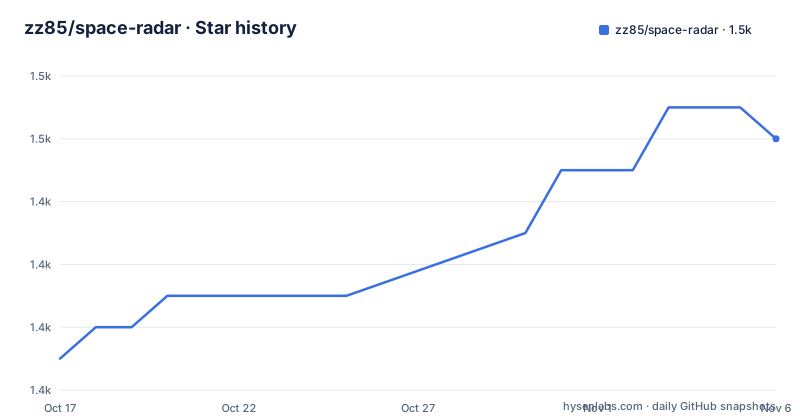
Star history
- zz85/space-radar1,450 ★ · +7
| Repository | 2026-10-17 | 2026-11-06 |
|---|---|---|
| zz85/space-radar | 1.4k | 1.5k |
7 Stars in the last 20 days, measured from the daily GitHub snapshot. Compare with other projects
Editorial analysis
SpaceRadar's local disk analysis use case
SpaceRadar addresses the problem of finding what occupies a disk when directory listings and size totals do not explain where the space has gone. It targets desktop users on macOS, Windows, and Linux who want to inspect storage interactively rather than read a static report. The application can scan selected disk contents, present free space, and let users move from broad regions into individual directories through drilldown and breadcrumbs. It can also open selected files or directories in the operating system's file manager.
The visual formats serve different inspection needs. Sunburst charts expose a hierarchy through nested regions, while treemaps represent entries as sized areas. SpaceRadar also supports flamegraphs, although the V5 notes label flamegraphs as BETA. Memory usage has its own cross-platform breakdown, so the application is not limited to storage. The README lists real-time counts, scan speed, and errors during a scan, which gives users feedback while the result is still being assembled.
Partial results remain useful when a scan is paused or cancelled. That is an important constraint for large file trees because the interface can display what has been discovered without requiring the entire traversal to finish. Preview visualization during scanning is listed as a feature, but the README does not document retention limits, filesystem consistency guarantees, or how partial totals behave after cancellation.
Electron architecture and Canvas rendering in SpaceRadar
SpaceRadar is a TypeScript-primary repository with an Electron application whose package entry point is `app/main.js`. The package scripts launch Electron directly, while the development script enables Electron with `DEBUG=1`. The V6 release moved the sunburst implementation to Canvas 2D. That detail matters because the visualization can represent large hierarchical collections without requiring one interactive HTML element for every displayed entry.
The project history documents a deliberate separation between scanning and interface work. Earlier versions moved disk scanning into a separate headless renderer process, passed JSON over IPC, and later used LocalStorage plus FileSystem IPC for communication. Those entries describe historical implementation decisions rather than a complete current architecture, but they explain why the repository has application and tooling directories and why UI responsiveness was a central design concern.
The result data can come from local scanning or from a previously generated size file. For direct analysis, SpaceRadar builds a hierarchy and assigns that data to chart views. For imported data, it reads the file format produced by `du`. Symlinks are skipped, hardlinks are deduplicated, and selected problematic paths such as OneDrive caches and system files are excluded in V6. Those rules can improve scan accuracy and avoid cycles or inflated totals, but they also mean the chart represents SpaceRadar's selected filesystem semantics rather than an unfiltered sum of every directory entry.
Installing SpaceRadar and completing a first scan
End users should obtain the appropriate installer or archive from the repository's releases page. The README states that builds are available for Mac, Windows, and Linux. It also identifies native Apple Silicon arm64 support, while the package configuration exposes macOS, Windows, and Linux build targets. The documentation does not give exact filenames or operating-system minimum versions, so those details must be checked on the selected release before installation.
For development from a checkout, the repository specifies `npm install`. Its `postinstall` script changes into `app` and installs that subproject's dependencies, so both root and application dependencies are installed through this one command. The README then offers `npm run debug` for development and `npm start` as the simpler launch path.
After dependencies are installed, start the application with:
npm startThis invokes Electron from the repository root. The README does not document the exact scan-selection controls or menu sequence, so it would be misleading to invent them. A first local use should begin by choosing the disk or target content in the interface, then inspect the hierarchy in one of the supported views. Users can drill down through directories, pause or cancel the scan if needed, and open a selected item in the system file manager.
Developers can format the listed application JavaScript, CSS, and tool files with:
npm run formatDistribution artifacts are generated with `npm run build` for the current platform. Platform-specific commands are also documented for macOS, Windows, and Linux.
SpaceRadar remote disk imports require du-generated files
SpaceRadar can analyze a remote server's disk contents, but it does not document a remote SSH workflow. Instead, the server administrator must generate a file locally on that server and transfer it to the computer running SpaceRadar. The documented source command is `du -ak`, either writing plain text or compressing the output with gzip.
For compressed output, use:
du -ak /var/log /usr | gzip -c > /tmp/sizes.txt.gzThe destination filename ends in `.gz`, which is the documented signal for SpaceRadar to detect the compressed format. For an uncompressed file, the repository gives this command:
du -ak /opt /home /tmp > /tmp/sizes.txtThis approach makes collection controllable and avoids requiring direct network access from the visualization application. It also separates two tasks: generating the size hierarchy on the remote filesystem and rendering it on the local desktop. The trade-off is that the file represents the state at collection time and does not continuously update. The documentation does not state whether SpaceRadar verifies that the imported file matches a particular host or automatically transfers it over SSH.
SpaceRadar limitations for reports and monitored servers
SpaceRadar is an interactive Electron application, not a documented storage-monitoring service. It supports auto-updates and shows live scan statistics, but the README does not describe scheduled snapshots, thresholds, alerts, historical retention, or an API for exporting chart data. Users who need recurring capacity planning or compliance evidence would therefore need a different tool or an additional scripted pipeline.
The memory view also has a narrow documented scope. The README confirms cross-platform memory visualization, but it does not identify the metrics, sampling interval, interpretation guidance, or process-level attribution. This is enough to establish that memory inspection is included, but not enough to promise parity with a dedicated performance monitor.
Experimental and beta status should influence adoption. The V6 notes call 3D mode experimental, while V5 identifies flamegraphs as BETA. Neither label explains compatibility guarantees or known failure cases. Performance comparisons in the README, such as scanning faster than `du`, are claims from project documentation and not an independently established result. Adoption decisions should therefore focus on platform artifacts, data import compatibility, permissions, and the application's treatment of excluded paths rather than treating those comparative statements as guarantees.
MIT release work and SpaceRadar upgrade considerations
SpaceRadar is distributed under the MIT license. The package metadata also declares `MIT`, and the repository includes a `LICENSE` file. That permits use, modification, distribution, and sublicensing under the license's conditions, subject to retaining the required copyright and license notice. This summary does not replace the license text or legal advice.
The latest documented release is v6.0.1 from 2026-02-22. It followed the major V6 release on 2026-02-05, while the preceding listed V5 release dates to 2017-09-29. V6 changes several layers rather than just adding a chart: Electron moved from version 28 to version 40, the package now specifies Electron `^40.1.0`, the sunburst renderer changed to Canvas 2D, scanning gained pause and cancellation, and platform CI/CD plus update-file generation were introduced.
Those upgrades can increase adoption cost because existing preferences, operating systems, or workflows may behave differently after a major desktop-framework change. The repository is not archived, and its last push was on 2026-05-28. Release review should nevertheless include the notes for the exact downloaded version, especially if relying on imported files, memory data, auto-updates, or experimental chart modes.
SpaceRadar versus du-based reporting and browser tools
The closest documented alternative is a direct `du` workflow. Unix users can run `du` when they need immediate totals, inspect them on a terminal, connect the output to other shell tools, or archive generated text. SpaceRadar takes the same general inventory concept and turns it into drillable charts, adds free-space context, and provides a desktop interface for opening selected locations. The README's `du -ak` examples also make SpaceRadar compatible with a familiar collection mechanism rather than requiring a proprietary remote agent.
`du` is the better fit for automation, constrained terminals, and pipelines where text output is more useful than a visual hierarchy. SpaceRadar is the better fit when the goal is interactive exploration, comparing large regions visually, or moving through directory levels without reading numeric output. Its GUI also has an acquisition cost because it is an Electron application with platform-specific builds and an update mechanism.
Browser-based disk analyzers can offer similar treemap concepts, but SpaceRadar has a documented desktop application with local scans, memory visualization, file-manager integration, remote-file import, pause and cancellation, and releases for three desktop operating systems. The repository does not claim server-side deployment, browser-only operation, or centralized fleet monitoring, so those capabilities should not be inferred from its visualization model.
Editorial conclusion
SpaceRadar is a reasonable choice for desktop users who prefer exploring storage visually and need cross-platform disk and memory views. It is less suitable for automated reporting, unattended monitoring, or remote hosts that cannot provide a `du` output file. Before adoption, verify that its releases support the target operating systems and CPU architectures, then confirm that the scan exceptions for hardlinks, symbolic links, system files, and cloud caches produce acceptable results for the directories you need to inspect.
Frequently asked questions
Which operating systems does SpaceRadar support?
SpaceRadar provides downloads for macOS, Windows, and Linux. The V6 notes also identify native arm64 builds for M1, M2, and M3 Macs.
How do I import remote disk usage into SpaceRadar?
Generate a file with `du -ak` on the remote server, then make that file available to the computer running SpaceRadar. Compressed files must end in `.gz` so SpaceRadar can detect the format.
Can SpaceRadar monitor memory usage on Windows and Linux?
Yes. The README lists cross-platform memory usage visualization for macOS, Windows, and Linux, although it does not specify the displayed metrics or sampling method.
Official sources
Add this badge to your README
If you maintain this project, the badge below links readers to this analysis and shows its maintenance status from the daily GitHub snapshot. Paste the markdown into your README; add ?metric=license or ?metric=stars to the image URL for a different field.

[](https://hysenlabs.com/projects/zz85-space-radar)Star history chart for your README
[](https://hysenlabs.com/projects/zz85-space-radar)Was this useful?