Stump is a Rust and React OPDS library server whose install patches node_modules
A free and open source comics, manga and digital book server with OPDS support
At a glance
- What is it?
- stumpapp's stump serves comics, manga and digital books over OPDS with built in readers, OIDC login and per user access control, built as four applications in one repository. Two things to know before you trust it with a library: the project calls itself beta software with no guarantee against data loss, and one yarn install applies committed dependency patches and installs git hooks.
- Who is it for?
- Stump is a sensible self hosted shelf for a comic or manga collection, and the parts that are finished are finished well: OPDS on two spec versions, readers for every format it claims, real per user access control, and a release script that keeps the Rust and JavaScript versions on the same number. Three things to weigh first.
- Can I use it commercially?
- Yes. MIT is a permissive licence: you can use, modify and sell software built on it, as long as you keep its copyright and licence notices.
- Is it still maintained?
- Yes. The repository received new commits within the last day.
- What is it written in?
- Mainly TypeScript, according to GitHub's language statistics.
Answers come from the project's GitHub data, last synced on November 15, 2026, and from our analysis. They are not legal advice.
Star history
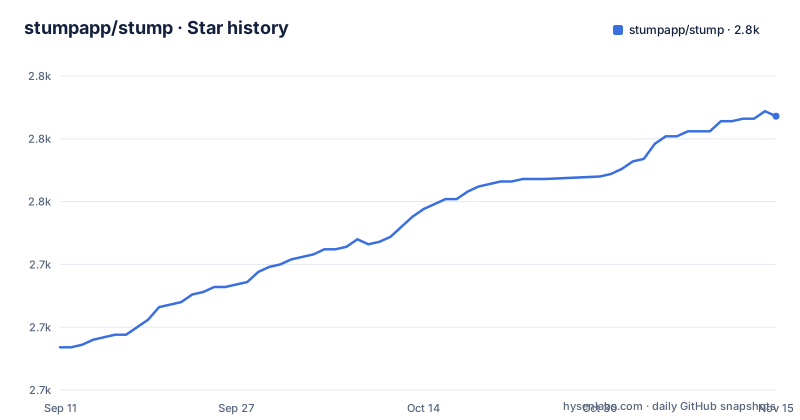
- stumpapp/stump2,784 ★ · +92
| Repository | 2026-09-11 | 2026-11-15 |
|---|---|---|
| stumpapp/stump | 2.7k | 2.8k |
92 Stars in the last 65 days, measured from the daily GitHub snapshot. Compare with other projects
Editorial analysis
The disclaimer calls it beta software with no data loss guarantee
The first section of the page is a disclaimer, and it is unusually direct. Stump should be treated as beta software until it reaches a stable 1.0 release, and although the author says they try to avoid breaking changes or changes that might cause data loss, there are no guarantees. The same section adds that the work happens in the author's free time, that this is not their job, and that there is no timeline for features or bug fixes. The version line backs that up: 0.1.10 appears in both the JavaScript package manifest and the Rust workspace manifest, and the newest release is v0.1.10 from 21 September 2026, with two more releases on 19 September. The last commit on the default branch is dated 3 October 2026.
One repository, three licenses, and a manifest that says SEE README.md
The license section states the rule first: a package or subfolder with its own license file takes precedence over the repository level license, and then lists what is exempt. The Expo application is GPL-3.0. The wifi-ssid native module under the Expo app was sourced from Streamyfin and is MPL-2.0. Everything else in the repository is MIT. Icons in the web and mobile applications come from the Spacedrive asset repository under FSL-1.1-ALv2, and the native Readium Expo modules were adapted from Storyteller. The JavaScript manifest sidesteps the question entirely by putting SEE README.md in its license field, which is the honest answer for a monorepo with three answers in it. The practical consequence is specific: the server, the web UI and the desktop shell are MIT, while anything you build on the Expo application inherits GPL-3.0.
yarn and cargo workspaces run side by side under lerna
The layout is documented as a yarn workspace plus a cargo workspace, and the manifests confirm both. The JavaScript side covers apps/*, docs and packages/*, with apps/expo listed under nohoist so the React Native tree keeps its own dependency resolution instead of being hoisted. The Rust workspace members are the Tauri desktop crate, the Axum server, core and everything under crates, including nested macro and integration directories, with two of those excluded from the outer workspace because they are separate workspaces themselves. Task running sits on top with lerna and scoped names such as @stump/web, @stump/desktop, @stump/expo, @stump/browser, @stump/client and @stump/graphql. The repository structure, as the page lays it out:
# The primary applications all grouped together
apps/
  desktop/   # Tauri wrapping the web UI
  expo/      # React Native app
  server/    # Axum server
  web/       # UI served by the server
# The primary internals, like file processing etc
core/
# Supporting Rust crates (cli, graphql, integrations, etc)
crates/
  migrations/  # Database migrations
  models/      # Database models
  docs/
# Shared TypeScript packages
packages/
The surrounding configuration files show how wide that toolchain is: a .rustfmt.toml for Rust, prettier.config.js and eslint.config.mjs for the JavaScript side, a graphql.config.ts with a GraphQL language server in the development dependencies, tsconfig.options.json shared as the base that tsconfig.json and tsconfig.eslint.json extend, and a .npmrc alongside yarn.lock and Cargo.lock. A single setup script chains a full install with a web build, which is the shortest path from a fresh clone to a served UI.
Every install applies committed patches and arms git hooks
The JavaScript manifest has two lifecycle scripts that shape what an install does to your machine. The prepare script runs husky, which is why a .husky directory sits at the top level: installing dependencies installs git hooks. The postinstall script runs patch-package, and a patches directory sits at the top level beside it, which means the patches applied to node_modules are committed to the repository rather than generated locally. So the dependency tree you end up with is the published tree with this project's edits applied on top, and the edits are only as good as their patch files. Version bumping has its own script, node scripts/release/bump-version.mjs, which is how the same 0.1.10 number ends up in both the JavaScript and Rust manifests.
Development runs the Rust server and a JavaScript app as two named processes
The dev scripts make the two language stacks run together explicitly. The desktop pair uses concurrently with the process names server and desktop and two colours, running cargo run -p stump_server next to yarn desktop start, in one variant for start and one for dev. The web and Expo pairs swap the cargo invocation for bacon run-server --headless and pair it with yarn web dev or yarn expo dev. That is why a bacon.toml and a rust-toolchain.toml both sit at the root, alongside flake.nix and flake.lock for Nix and a .cargo directory. The Rust workspace pins rust-version 1.97.1. One gap is visible in the scripts: the type check task runs across the workspace but explicitly ignores @stump/expo, so the React Native application is the one package whose types are not checked by the standard command.
Password hashing, keychain secrets and scheduled jobs all live in the Rust table
The shared Rust dependency table is where the server's real dependencies show. Password hashing is bcrypt. Secret storage goes through keyring with three platform backends enabled: apple-native, windows-native and sync-secret-service, meaning credentials are held by the operating system keychain rather than by a file. Outbound email is lettre with default features off and smtp-transport, rustls-tls, hostname and tracing turned on. Scheduled work is a stack of apalis with limit and tracing, apalis-cron, croner and english-to-cron, which together cover job queues and cron expressions. Two entries are worth a second look: http-cache-reqwest is pinned at 1.0.0-alpha.6 with a moka manager, an alpha release in the shared table, and async-graphql is configured with dynamic-schema and dataloader, so the schema can be assembled per request rather than compiled once.
Access control is per user, and devices read through OPDS instead of the UI
The feature list is short and specific about what is implemented. Multi user account management carries permissions, age restrictions and other access control, which for a comics and manga server is the feature that decides whether a shared instance is usable at all. Authentication is OIDC, with themes built in and translations run through Weblate. On the reading side, OPDS is supported at v1.2 including the PSE extension, and separately at v2.0, and there are sync integrations for Kobo e readers and for KoReader. Those two integrations matter because they reach a library over OPDS rather than through the web interface, so the same endpoint serves both your browser and your e reader. Formats covered are EPUB, PDF, CBZ/ZIP and CBR/RAR, with built in readers for all of them, and annotations plus highlights for EPUB. The roadmap section, by contrast, holds no features at all: it points at GitHub project boards for what is being worked on and invites issues or discussions for anything else.
The README holds no install command, and the nearest alternative is named
There is no installation command on the page. Getting started points at the documentation site and, for people who prefer the source, at the mdx file in the repository, and says outright that this is to avoid maintaining two copies of the same information. The developer guide is deferred the same way. Installation families are named only as Docker and pre built binaries, and the container image referenced in the header lives under a personal namespace rather than the organisation. The comparison list is honest about the field: audiobookshelf for audiobooks and podcasts, Codex, Kavita, Komga and Storyteller. Storyteller appears there and also in the attribution, since the native Readium Expo modules were adapted from it, alongside the wifi-ssid module sourced from Streamyfin.
Editorial conclusion
Stump is a sensible self hosted shelf for a comic or manga collection, and the parts that are finished are finished well: OPDS on two spec versions, readers for every format it claims, real per user access control, and a release script that keeps the Rust and JavaScript versions on the same number. Three things to weigh first. The project describes itself as beta until a stable 1.0 and says outright that breaking changes or data loss are possible without guarantees, so keep your originals and expect your schema to move. The Expo application is GPL-3.0 while the rest is MIT, which matters the moment you ship a client. And every install runs patch-package against node_modules from the repository's own patches directory, so your dependency tree is not what npm resolved.
Frequently asked questions
Is Stump stable enough to point a real comic library at?
The project says to treat it as beta software until a stable 1.0 release, states that there are no guarantees against breaking changes or changes that cause data loss, and notes that maintenance happens in the author's free time with no timeline for features or fixes. The current version line is 0.1.10.
Which license applies to the Stump Expo application?
The Expo application is GPL-3.0, and a subfolder license takes precedence over the repository level MIT license. The wifi-ssid native module inside it is MPL-2.0, sourced from Streamyfin, and the JavaScript manifest does not name a license at all, pointing at the README instead.
Which file formats can Stump open and annotate?
EPUB, PDF, CBZ/ZIP and CBR/RAR, with built in readers for every supported format. Annotations and highlights are listed for EPUB specifically, not for the image based archives or PDFs.
Does Stump expose OPDS for e readers?
Yes, at v1.2 including the PSE extension and separately at v2.0, and there are sync integrations for Kobo e readers and for KoReader. Those devices read through the OPDS endpoints rather than the web interface.
How does Stump handle passwords and stored secrets?
The Rust dependency table carries bcrypt for password hashing and keyring with the apple-native, windows-native and sync-secret-service features, so secrets are held in operating system keychains on those platforms. The server also offers OIDC authentication, and accounts carry permissions and age restrictions.
Where do I find Stump installation instructions?
Not in the README, which points at the documentation site and at the mdx source under the docs content path to avoid keeping two copies. The installation methods it names are Docker and pre built binaries, and the container image it references is published under the aaronleopold namespace.
Official sources
Add this badge to your README
If you maintain this project, the badge below links readers to this analysis and shows its maintenance status from the daily GitHub snapshot. Paste the markdown into your README; add ?metric=license or ?metric=stars to the image URL for a different field.

[](https://hysenlabs.com/projects/stumpapp-stump)Star history chart for your README
[](https://hysenlabs.com/projects/stumpapp-stump)Was this useful?