Helmor: A Local-First Workbench for Running Many Coding Agents in Parallel
Open-source local workbench for multi-agent software development.
At a glance
- What is it?
- Helmor is an open-source desktop app that orchestrates multiple coding agents in isolated git workspaces, with a CLI and MCP server for scripting. It targets developers who want to review, test, and merge agent-generated code without leaving one window, but its local-only model and agent dependencies shape who should adopt it.
- Who is it for?
- Adopt Helmor if you are a developer or team that already relies on CLI-based coding agents and wants a local, scriptable way to run many tasks in parallel without mixing branches or leaving a single interface. Skip it if you need cloud collaboration, a built-in agent, or a GUI-only workflow.
- Can I use it commercially?
- Yes. Apache-2.0 is a permissive licence: you can use, modify and sell software built on it, as long as you keep its copyright and licence notices.
- Is it still maintained?
- Yes. The repository last received commits 77 days ago.
- What is it written in?
- Mainly TypeScript, according to GitHub's language statistics.
Answers come from the project's GitHub data, last synced on November 6, 2026, and from our analysis. They are not legal advice.
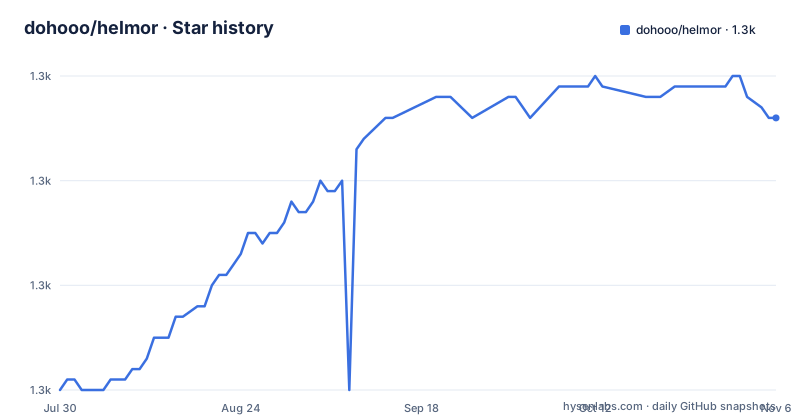
Star history
- dohooo/helmor1,306 ★ · +26
| Repository | 2026-07-30 | 2026-11-06 |
|---|---|---|
| dohooo/helmor | 1.3k | 1.3k |
26 Stars in the last 99 days, measured from the daily GitHub snapshot. Compare with other projects
Editorial analysis
What Helmor Actually Solves
Helmor addresses a specific pain: when you run several coding agents on the same repository, they collide. Each agent writes to the same working directory, steps on uncommitted changes, and produces diffs that are hard to attribute. Helmor's answer is isolation by construction. Every task gets its own git worktree and branch under ~/helmor/workspaces/. The README states that agents 'never step on each other.' That is the core value proposition: parallel agent execution without the usual branch chaos. The intended user is a developer who already uses agent CLIs like Claude Code or Codex and wants to scale from one prompt at a time to many. It is not for someone who expects Helmor to provide the agent itself. The app bundles agent CLIs, but you still sign in with your own credentials and providers.
The Workflow: From Repository to Merged PR
The documented flow is a loop: add a repository, create a workspace, prompt an agent, review and ship, then repeat in parallel. Concretely, you link a local clone or clone from a URL. Creating a workspace triggers a fresh git worktree and branch under ~/helmor/workspaces/. You describe a task and let the agent run. Review happens in the same window: diffs, a Monaco editor, and terminals sit beside the conversation. When ready, you create a PR or MR, merge, fix CI, or resolve conflicts. The loop is designed for parallelism: you can have many workspaces active at once, each with its own agent conversation. The README's flowchart shows the repeat arrow, meaning you are expected to run multiple tasks concurrently rather than sequentially. That is the operational model: a task queue that is actually a set of isolated git branches.
Running Helmor: The CLI and the GUI
Helmor is a desktop application for macOS (Apple Silicon and Intel) and Windows (x64). The README does not mention Linux support, which is a notable gap for many developers. On first launch, you connect GitHub or GitLab and sign in to your first agent. Agent CLIs are bundled, so there is nothing else to install. The GUI is the primary interface, but the CLI is a first-class citizen. You install it from Settings → Experimental → Command Line Tool. It works against the same local database as the app, even while the app is running. The commands are straightforward: helmor repo add /path/to/repo, helmor workspace new --repo myapp, helmor workspace list, helmor send --workspace myapp/feature-x "your prompt", helmor workspace status, and helmor workspace run-action to create a PR, merge, or fix CI. Every command supports --json, which makes scripting and integration with other tools practical. The CLI also exposes an MCP server over stdio with helmor mcp, meaning another agent or a terminal can drive Helmor. This is a key differentiator: the tool is not just a GUI, it is a programmable orchestrator.
The Review and Ship Experience
Helmor tries to keep you in one window. The README mentions 'diffs, Monaco editor, and terminals beside the conversation.' That is a concrete design choice: you do not need to switch to a separate diff viewer or terminal to test the agent's changes. The review panel shows the diff, you can edit files in Monaco, and you can run tests in a terminal that is part of the workspace. The shipping actions are one-click: create a PR/MR, merge, fix CI, resolve conflicts, and even stacked PRs. GitHub and GitLab are supported. This is a workflow that reduces context switching, which is often the hidden cost of using coding agents. However, the README does not describe how conflicts are resolved or how stacked PRs are managed. That is a thin area. The feature list is clear, but the mechanics are not documented in the README. If you rely on complex PR strategies, you will need to test those actions yourself.
Scripting and Automation: The MCP Server and Quick Panel
Helmor's scriptability is a strong point. The CLI is not an afterthought; it is a parallel interface to the same local database. The MCP server over stdio means another agent, such as Claude Code or Codex, can create workspaces and send prompts on your behalf. The README gives an example where an agent ships a fix: helmor workspace new --repo myapp --name fix-auth, then helmor send, then helmor workspace status, then helmor workspace run-action. That is a complete automation loop. The Quick Panel, triggered by Shift+Option+Space, opens a floating window to start a workspace and chat from anywhere. That is a convenience feature, but the real power is the CLI. For engineers who want to build their own orchestration scripts, the --json output and the MCP server are the hooks. The documentation says 'your terminal or another agent can drive Helmor,' which is a clear statement of intent. This is not a toy CLI; it is a control plane for agent tasks.
Limitations and When Helmor Is the Wrong Tool
Helmor has several limitations. First, it is local-first. Everything lives under ~/helmor/. That means no built-in collaboration or cloud sync. If your team needs a shared view of agent tasks, this is not it. Second, the README lists Linux as absent from the download options. That excludes a large segment of developers. Third, the mobile companion is experimental and relies on a Cloudflare tunnel, which introduces a network dependency and potential security considerations. Fourth, the agent support is limited to Claude Code, Codex, Cursor, OpenCode, and Kimi Code. If you use a different agent, Helmor will not work. Fifth, the 'Skills' feature is installed from onboarding or Settings → Helmor Components, but the README does not explain what skills are or how they extend the tool. That is a gap. Finally, the CLI is marked 'Experimental' in Settings, which suggests it may change. For a tool that is meant to be scripted, that is a risk. If you need a cloud-hosted solution, a built-in agent, or a stable scripting API, Helmor is the wrong choice.
Alternatives and How They Differ
The most direct alternative is to use the agents' own CLIs directly, without an orchestrator. For example, you could run Claude Code or Codex in separate terminal tabs, each with its own working directory. That approach gives you the same isolation but requires manual branch management and offers no unified review interface. Helmor's difference is that it automates the git worktree creation and provides a single window for diffs, editor, and terminals. Another alternative is a task runner like Task or Make, but those do not integrate with agent CLIs or provide PR actions. There are also cloud-based agent orchestration platforms, but they are not local-first and typically require sending code to a remote service. Helmor's local-first model is a deliberate contrast: your code and conversations stay on your machine. That is a meaningful difference for teams with strict data residency requirements. The README does not name any competitors, so the comparison is based on the described features. If you need a GUI for reviewing agent output, Helmor is ahead of raw CLI usage. If you need a cloud dashboard, it is behind.
Maintenance, Upgrade, and License Considerations
Helmor is under active development. The latest release is v0.46.0, dated 2026-07-24, with two prior releases in the same month. That indicates a rapid release cadence, which is good for bug fixes but also means the tool is evolving. The CLI is experimental, so upgrades may change command syntax or behavior. The project is licensed under Apache-2.0, which is permissive for commercial use, but you should review the license terms yourself for any specific obligations. The README mentions that agent CLIs are bundled, which raises a question about how updates to those CLIs are handled. The README does not specify whether Helmor updates them automatically or requires manual intervention. For maintenance, the project provides an AGENTS.md file that describes architecture and test layout, and the README suggests asking Helmor itself how to contribute. That is an unusual but interesting approach to onboarding. For users, the main cost is keeping up with releases and re-verifying that your automation scripts still work. The local database and CLI are stable enough for scripting, but the experimental label is a warning. If you build a complex workflow on top of the CLI, you should pin a version and test upgrades in a staging environment.
Editorial conclusion
Adopt Helmor if you are a developer or team that already relies on CLI-based coding agents and wants a local, scriptable way to run many tasks in parallel without mixing branches or leaving a single interface. Skip it if you need cloud collaboration, a built-in agent, or a GUI-only workflow. Before adopting, verify that your preferred agents (Claude Code, Codex, Cursor, OpenCode, Kimi Code) are supported and that your git workflow tolerates per-task worktrees under ~/helmor/workspaces/. Also confirm the experimental mobile companion and stacked PR features meet your needs, as they are not yet stable.
Frequently asked questions
What is Helmor and what does it do?
It is an Apache-2.0 local-first desktop workbench for orchestrating coding agents. It runs many agents in parallel, each in its own isolated git worktree and branch, with the conversation, diffs, a code editor, and terminals in one window. Everything lives locally under a directory in your home folder.
Which coding agents does Helmor support?
Claude Code, Codex, Cursor, OpenCode, and Kimi Code, with your own logins, API keys, and custom providers. The agent command line tools are bundled with the application, so nothing else has to be installed separately.
How do I install Helmor?
Download it from the releases page. Builds are published for macOS on Apple Silicon and Intel, and for Windows on x64. On first launch you connect GitHub or GitLab and sign in to your first agent. No Linux binary is listed in the download section.
How does the Helmor command line tool work?
You install it from inside the application under an experimental settings heading, and it operates on the same local database as the running app. Workspaces are addressed by repository name and directory name, every command supports a JSON output flag, and there is an MCP server over stdio so a terminal or another agent can drive it.
What can Helmor's mobile companion do?
It is labelled experimental and works by opening a tunnel from your desktop so you can start tasks from your phone's browser. That means the phone reaches your desktop directly, which is worth understanding before enabling it, since the desktop holds your repository clones and agent credentials.
How does Helmor keep multiple agents from conflicting?
Each task gets its own git worktree and branch under a workspaces directory, so agents do not step on each other. Shipping from one button covers creating a pull or merge request, merging, fixing CI, resolving conflicts, and stacked pull requests, on GitHub and GitLab.
Official sources
Add this badge to your README
If you maintain this project, the badge below links readers to this analysis and shows its maintenance status from the daily GitHub snapshot. Paste the markdown into your README; add ?metric=license or ?metric=stars to the image URL for a different field.

[](https://hysenlabs.com/projects/dohooo-helmor)Star history chart for your README
[](https://hysenlabs.com/projects/dohooo-helmor)Was this useful?