Open Science: A local-first research workbench that ties AI agents to provenance
Open Science is an open-source, local-first, model-agnostic AI research workbench for scientific discovery.
At a glance
- What is it?
- Open Science is an open-source, model-agnostic desktop app that runs scientific AI agents with Python and R execution, local data storage, and traceable artifact provenance. It suits researchers who want reproducibility, but its dependence on third-party agent runtimes and providers demands careful setup.
- Who is it for?
- Adopt Open Science if you are a researcher or data scientist who needs a local-first, model-agnostic workspace that can run Python and R code, manage scientific data connectors, and keep an audit trail from prompts to figures. Do not adopt it if you require a fully managed cloud service, if you cannot meet the first-run environment checks, or if your institution forbids connecting to third-party model providers.
- Can I use it commercially?
- Yes. Apache-2.0 is a permissive licence: you can use, modify and sell software built on it, as long as you keep its copyright and licence notices.
- Is it still maintained?
- Yes. The repository received new commits within the last day.
- What is it written in?
- Mainly TypeScript, according to GitHub's language statistics.
Answers come from the project's GitHub data, last synced on November 14, 2026, and from our analysis. They are not legal advice.
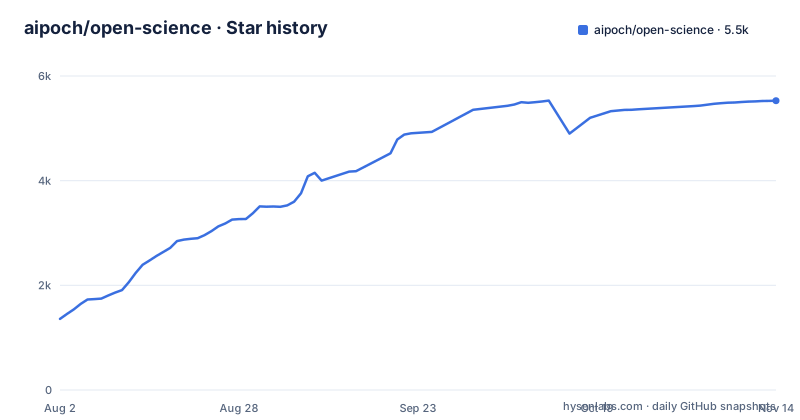
Star history
- aipoch/open-science5,528 ★ · +4,170
| Repository | 2026-08-02 | 2026-11-14 |
|---|---|---|
| aipoch/open-science | 1.4k | 5.5k |
4,170 Stars in the last 104 days, measured from the daily GitHub snapshot. Compare with other projects
Editorial analysis
What problem it solves and who it is for
Open Science targets a specific pain: scientific research that involves AI assistance often ends up as a chaotic pile of chat logs, scripts, figures, and half-remembered decisions. The README frames it as a workspace where you can create a project, describe a research goal in plain language, and let agents read files, search the web, run code, and query scientific data sources, all while producing reports, tables, and figures with traceable provenance. The intended user is a scientist or researcher who works across disciplines like machine learning, statistics, life sciences, chemistry, materials science, physics, and environmental science. It is not a general-purpose chatbot. It is a structured environment that ties each output back to the evidence that produced it. The local-first aspect matters: the README describes the workbench as local-first, and Windows reinstalls preserve research data. That design appeals to researchers who handle sensitive or unpublished data and who need to control where their work lives.
How the architecture delivers provenance
The core mechanism is the project-session model. You create a project, open a session, describe your research goal, inputs and expected outputs, attach files, and select a model and approval mode. You then review tool activity and any approval requests, and check the available evidence for results in Provenance. Completed sessions can be exported as `.science` packages with selected conversation branches, file versions, Notebook records and verification evidence. The design principle is inspectability. The provenance view can connect outputs to recorded evidence. Reproducibility still depends on the completeness of captured inputs, code, environments and external data, which should be independently checked.
Getting it running: installers and first-run setup
Installation is straightforward but not a single command. You download an installer from the official download page. The README lists platform-specific assets: macOS DMG for Apple Silicon or Intel, a code-signed Windows x64 installer, and Linux x64 or ARM64 AppImage or Debian package. Homebrew and an npm package for a standalone CLI and Web UI are also listed. After installation, the first launch runs five guided steps. The wizard order is Environment, Data location, Agent runtime, Model provider and Notebook runtime. The environment step covers host compatibility, storage and network checks, and the model provider step validates the provider, API key, endpoint and model. The README says to complete the required environment and agent-runtime checks and test your model connection. Notebook execution is optional, and settings can be changed later. For developers, the repository is TypeScript under Apache-2.0, and there is a nightly release that tracks main.
The agent runtime dependency is a real constraint
Open Science does not bundle its own AI agent. It relies on agent frameworks chosen in the Agent runtime setup step; v1.0.7 added Pi as a fifth. You are dependent on the availability and stability of those tools. If your organization restricts which agent CLIs you can install, or if a runtime breaks after an update, Open Science cannot function. The README lists the Windows x64 installer as code-signed and links a download verification guide in SECURITY.md. This is not a zero-friction tool. The setup process is explicit about checks, and that rigidity is a trade-off: it ensures a working environment, but it also means you cannot skip steps or use a runtime that is not on the list.
Model-agnosticism and the provider ecosystem
The README emphasizes model-agnostic design. This flexibility is useful for researchers who have institutional agreements with specific vendors or who want to avoid vendor lock-in. However, the model connection must pass validation during setup, so not every provider will work out of the box.
Limitations and cases where it is the wrong tool
Open Science is not a replacement for a full laboratory information management system or a distributed computing platform. It is a desktop workbench, and the README also documents a standalone CLI and Web UI installed from npm. If your team needs shared project access across machines or cluster execution, verify the current integration and deployment options; the README does not establish those workflows as turnkey capabilities. Another limitation is the reliance on the agent runtime's capabilities. If the agent cannot execute a particular library or if the scientific data connector does not support your data source, you are stuck. Also, the first-run environment checks can fail on locked-down corporate machines that restrict network access or storage locations.
Alternatives and how they differ
A direct alternative is JupyterLab with an AI extension like jupyter-ai. JupyterLab is also open-source and local-first, and it supports Python and R kernels. The difference is in the agent orchestration and provenance. JupyterLab gives you notebooks and cells, but it does not have the same concept of a research project with branching message revisions and artifact provenance views. You would manage your own version control and experiment tracking. Another alternative is a general-purpose AI coding assistant like GitHub Copilot in VS Code, which can run code and answer questions, but it lacks the scientific data connectors and the structured project-session model. Open Science is closer to a purpose-built research environment. The trade-off is that JupyterLab is more flexible for custom workflows, while Open Science provides guardrails and traceability out of the box. If you already have a Jupyter-based pipeline, migrating to Open Science might not be worth it unless you need the provenance features.
Maintenance, license, and upgrade cost
The project is under active development. The last push was on 2026-11-02, with v1.0.7 released the same day and a nightly build. That cadence means frequent updates, which is good for bug fixes but also means you need to keep up with releases. The license is Apache-2.0, which is permissive for both academic and commercial use, but you should read the license text for specifics on patent grants and disclaimer of warranty. The upgrade cost is moderate: because the app is installed as a desktop application, updates are likely to be manual downloads unless the app has an auto-update mechanism. You should plan to check the releases page periodically or subscribe to release notifications. The nightly release is for users who want the latest features but it comes with higher risk of instability.
Editorial conclusion
Adopt Open Science if you are a researcher or data scientist who needs a local-first, model-agnostic workspace that can run Python and R code, manage scientific data connectors, and keep an audit trail from prompts to figures. Do not adopt it if you require a fully managed cloud service, if you cannot meet the first-run environment checks, or if your institution forbids connecting to third-party model providers. Before adopting, verify that your chosen agent runtime is supported on your OS, that the model provider you intend to use passes the connection test, and that the data location for large artifacts meets your storage and privacy requirements. The project is under active development with frequent releases, so also check the latest release notes for changes to security and packaging.
Frequently asked questions
What is AIPOCH Open-Science and what does it run on?
It is an Apache-2.0 desktop workbench for AI-assisted scientific research, described as open-source, local-first and model-agnostic. It is distributed for macOS 12 and newer on both Apple Silicon and Intel, for Windows x64 as a code-signed installer, and for Linux x64 as an AppImage or a Debian package. The macOS cask installs with `brew install --cask open-science`.
What is the current version of AIPOCH Open-Science?
The README announces v1.0.7 as released (last updated November 2026), and the package manifest carries version 1.0.7 with a productName of Open-Science. The repository's newest release is v1.0.7, published 2026-11-02.
What does AIPOCH Open-Science need before the first research session?
The setup wizard runs through Environment, Data location, Agent runtime, Model provider and Notebook runtime. Environment and agent runtime checks are required, and the model provider stage validates the API key, endpoint and model with a connection test. Python or R Notebook setup is optional, and both Notebook and data-location settings can be changed later.
How does AIPOCH Open-Science export a research session?
Completed sessions export as portable `.science` packages for review, handoff and archiving. The package carries selected conversation branches, file versions, Notebook records and verification evidence. Inside a session, results' available evidence can be checked in Provenance.
Are the compute job integration tests run in CI?
No. The example environment file states that gated integration tests running against a real SSH host are skipped in continuous integration by default. They are run locally with RUN_COMPUTE_JOBS set and an SSH alias supplied through COMPUTE_TEST_SSH_ALIAS, which must already exist in the user's or the system's SSH configuration.
Official sources
Add this badge to your README
If you maintain this project, the badge below links readers to this analysis and shows its maintenance status from the daily GitHub snapshot. Paste the markdown into your README; add ?metric=license or ?metric=stars to the image URL for a different field.

[](https://hysenlabs.com/projects/aipoch-open-science)Star history chart for your README
[](https://hysenlabs.com/projects/aipoch-open-science)Was this useful?