Archify is a skill file that makes your coding agent emit a standalone HTML diagram
GitHub describes it as Agent skill for beautiful, verifiable architecture, workflow, sequence, data-flow, and lifecycle diagrams, self-contained HTML with motion and crisp export.. The repository metadata lists HTML as its primary language. The metadata lists the MIT license. This article stays within the project description and details documented in the GitHub repository README.
At a glance
- What is it?
- A MIT-licensed agent skill that turns a sentence of description, or a repository, into a self-contained HTML diagram with the interaction state encoded in the URL. The mechanism is small and inspectable, and the evidence for it is a proof lab of eleven scenarios the project chose to check in.
- Who is it for?
- Archify suits a team that wants a diagram committed next to the code and readable without a server, because the output is one HTML file and the view state travels in the fragment, so a link to a focused node works in any browser and survives a move.
- Can I use it commercially?
- Yes. Apache-2.0 is a permissive licence: you can use, modify and sell software built on it, as long as you keep its copyright and licence notices.
- Is it still maintained?
- Yes. The repository last received commits 5 days ago.
- What is it written in?
- Mainly HTML, according to GitHub's language statistics.
Answers come from the project's GitHub data, last synced on October 25, 2026, and from our analysis. They are not legal advice.
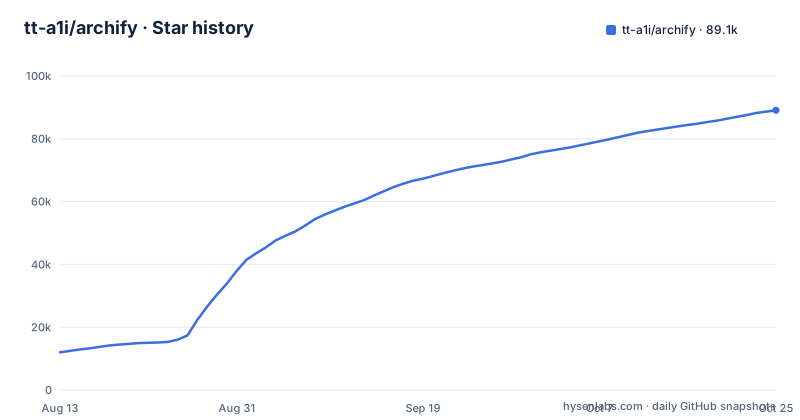
Star history
- tt-a1i/archify89,088 ★ · +77,075
| Repository | 2026-08-13 | 2026-10-25 |
|---|---|---|
| tt-a1i/archify | 12k | 89.1k |
77,075 Stars in the last 73 days, measured from the daily GitHub snapshot. Compare with other projects
Editorial analysis
The install is one npx command and the payload is a skill file
Archify is not an application you start. It is a skill that a coding agent loads, and the documented install is a single line:
npx skills add tt-a1i/archify -gThe README names four agents it works with: Cursor, Claude Code, Codex CLI and OpenCode, and points to a separate page for choosing among them and for installation details and update checks. The skill itself lives in an archify/ directory at the repository root, with archify/SKILL.md as the entry point, and the global flag in the command installs it for the current user rather than one project.
Once installed, the interaction is a prompt rather than a menu. The README's example asks the agent to diagram a web request where the browser calls the API, the API checks Redis, and a cache miss queries PostgreSQL and fills the cache. After that comes a follow-up sentence: add authentication, highlight the cache-miss path, or switch to the light theme. Nothing in that sequence is a command Archify parses. The agent reads the skill, writes the HTML, and rewrites it when you ask for a change, which is why the output format matters more here than any runtime.
View state lives in the URL, which is what makes a diagram linkable
The example links in the README expose the interaction model without any prose explaining it. Each carries query parameters theme and present, and each carries a fragment that selects something: focus and reach on the agent tool call workflow, route on the cache miss sequence, lens on the production deployment architecture.
The descriptions attached to those links define the terms. Trace everything downstream of one step is what focus and reach do. Highlight the path from web app to database is what a route does. Focus on authored backend and database connections is what a lens does. In the cache-miss case the route value names both endpoints, web and db, in one fragment, so the highlighted path is a pair rather than a single node.
This is the design decision that separates Archify from a picture generator. Because the state is in the address, a link to one focused node can be pasted into a review, a ticket or a chat message and will open in the same state on someone else's machine, and because the artefact is standalone HTML with no server behind it, that link keeps working after the file is moved. A diagram that only responds to clicks is a screenshot with extra steps. A diagram whose state is addressable can be cited.
Every checked-in example is a JSON source beside its HTML output
The examples directory is the part of the repository that explains how the thing works, because the files are paired. rag-pipeline, maka-architecture, archify-repo and archify-repo-grid each appear twice, once as a .architecture.json and once as the .html it produces. The JSON is the editable source; the HTML is the built artefact, and both are committed.
Some entries are output only. checkout-platform-delta.html ships alongside checkout-platform-delta.receipt.json, which is a different file type from the .architecture.json sources and is named for what it is, a receipt. dataflow-product-analytics.html, lifecycle-agent-run.html, sequence-cache-miss-request.html, web-app.html and workflow-agent-tool-call.html have no JSON pair at all, and two of them, web-app-rendered.html and workflow-agent-tool-call-rendered.html, are variants of the pair that already has one.
Naming a file .receipt.json and committing it is a small thing that says a lot. It implies the build can be checked rather than trusted, and it implies someone intends to check. The repository root reinforces the habit: REVIEWING.md, DESIGN.md, PRODUCT.md, ROADMAP.md, SECURITY.md, AGENTS.md, CLAUDE.md, CONTRIBUTING.md and THIRD_PARTY_NOTICES.md sit alongside benchmarks/, experiments/, journal/, integrations/, tools/, scripts/, docs/ and a checked-in archify.zip. Whatever the review process is, the artefacts of it are in the tree.
The Proof Lab is eleven scenarios the project selected itself
The verification claim rests on a page the README calls the Proof Lab, described as containing all 11 checked-in scenarios, their JSON sources, and validation receipts. Eleven is the number to hold in mind when reading the phrase verifiable in the project's description. It is a small, curated set, chosen by the project, covering the diagram types the README advertises: architecture, workflow, sequence, data flow and lifecycle.
The three shown in the README's Show what matters table are an agent tool call workflow, a cache miss sequence and a production deployment architecture, each linked with a specific view state already applied. One further case is presented differently, under Understand a real repository, where the claim is that Archify traced the mco-org/mco repository at commit 9f1a1cf and produced a checked map, with a link to the typed source at docs/cases/mco-runtime.architecture.json.
That single repository case is the most useful thing in the README and also the limit of what it demonstrates. One repository, at one commit, is a case study rather than a benchmark, and the benchmarks/ directory at the repository root is not described anywhere in the text available here. Nothing in the README states a success rate, a failure mode, or what Archify does when it cannot find a connection in the source. A reader deciding whether to trust an automatic diagram of their own codebase is being shown the project's best example and not its error rate.
No repository is required, which is both the pitch and the hazard
The README makes a point of removing an obstacle: no repository is required. You can start from a description, or you can ask your agent to read a repository for what is called a source-backed architecture diagram. The first path is what makes the tool usable for the cases the README opens with, travel itineraries and learning maps, where there is no codebase to read and the diagram is an explanation rather than a claim about existing software.
The hazard is that the two paths produce artefacts that look the same. A diagram generated from a single sentence and a diagram generated by reading every file both arrive as a polished standalone HTML page with focusable nodes, traceable paths and a source link in the interface. Nothing in the output says which one you are looking at. The follow-up prompts make this worse rather than better, because adding authentication or highlighting a path is something you can do to a diagram the model invented just as easily as to one it derived from source.
So the discipline has to live outside the tool. Decide before you generate whether the diagram is a teaching aid or an engineering document, and if it is the second, generate it from the repository, then open the typed JSON and check that the connections you are about to act on correspond to files that exist. The README's own vocabulary, source-backed and checked, is the right vocabulary to insist on, and there is no automatic way for a reader of the HTML to tell whether those words earned their place.
Four sponsors appear in the README, and two of them sell model access
The sponsor section is longer than the section explaining how the skill works, which is worth knowing before you weigh the project's recommendations. Kimi Work is described as carrying Archify in its plugin store under the name Interactive Architecture Diagram. Supercode sponsors the project, works on Codex and Cursor, and lists Archify as its Editor's Choice skill. EverMind sponsors it and builds memory infrastructure for agents, with its Raven harness supporting Archify as a skill for verified, interactive system maps.
The fourth is different in kind. OpenLux is presented as an all-in-one AI platform offering base pricing for Claude, OpenAI and Gemini models at percentages of official rates, with a referral arrangement giving Archify users a discount on credit top-ups. That is a commercial offer to buy model tokens, and it sits in the same table as three integrations.
None of this makes the project worse, and sponsorship of an open-source tool is ordinary. It does mean the README is partly a partner page, and that a reader looking for a neutral description of the output format will find a sponsor table first. The technical claims and the commercial claims are interleaved in one document with no marker distinguishing them, so the useful discipline is to read the install section, the example links and the Proof Lab, and skip everything between them.
Version 3.0 landed on 2026-09-28 and the branch moved again the next day
The release history is recent and fast. v2.16.0 shipped on 2026-08-30. v3.0.0, titled Archify 3.0 with the subtitle Clearer diagrams, verified delivery, followed on 2026-09-28 at 11:32, and v3.0.1 landed the same day at 15:33. The repository's last push was on 2026-09-29, and the CHANGELOG.md link in the README points at an anchor for 3.0.1 dated 2026-09-28.
A patch release four hours after a major one is normal for a project that ships a single HTML artefact and wants to fix a generation problem, and it is worth reading the changelog before installing rather than after. The major version subtitle pairs two things, clearer diagrams and verified delivery, and the second of those is the claim that matters for anyone planning to use the output as documentation rather than as an illustration.
The cadence also cuts the other way. Releases measured in weeks mean the checked-in examples, the Proof Lab contents and the URL parameters can all change between one version and the next, so a diagram generated by one version of the skill is not guaranteed to behave the same way under the next. Pin the version if you intend to commit the output, and record which one produced each file, because nothing in the HTML itself appears to carry that.
Editorial conclusion
Archify suits a team that wants a diagram committed next to the code and readable without a server, because the output is one HTML file and the view state travels in the fragment, so a link to a focused node works in any browser and survives a move. It does not suit a reader who needs a diagram whose accuracy is established, since nothing in the output distinguishes a source-backed map from one the model inferred from a sentence, and the eleven checked-in scenarios are the project's own selection. Before trusting an Archify diagram of your own repository, generate it from the repository rather than from a description, then open the typed JSON source and check that the connections you care about came from files rather than from the model's imagination.
Frequently asked questions
What is Archify?
Archify is an agent skill for architecture, workflow, sequence, data-flow and lifecycle diagrams, released under the MIT licence and written primarily in HTML. Describe a system in one sentence, or point your agent at a repository, and the output is a standalone HTML file you can explore, customise and share.
Is Archify free to use?
The repository is MIT licensed and installed with a single npx skills add command, so the skill itself carries no licence fee. The README does list commercial partners separately, including Kimi Work, Supercode, OpenLux and EverMind, and the OpenLux entry in particular is an offer to buy model access at a discount, which is a separate paid service from Archify.
How do I install Archify and which agents does it work with?
Run npx skills add tt-a1i/archify -g to install it globally. The README names Cursor, Claude Code, Codex CLI and OpenCode as working agents, and points to a separate start page for per-agent installation details and update checks. No repository is required: you can start from a description alone.
Official sources
Where developers are discussing it
Posts on Hacker News, dev.to and Lobsters that link to this repository, found by our scan of those communities. 1 in the last 30 days; newest first.
- Build without limits - SDLC Briefing, #2dev.to · Oct 19, 2026 · 8 points · 0 comments
Add this badge to your README
If you maintain this project, the badge below links readers to this analysis and shows its maintenance status from the daily GitHub snapshot. Paste the markdown into your README; add ?metric=license or ?metric=stars to the image URL for a different field.

[](https://hysenlabs.com/projects/tt-a1i-archify)
[](https://hysenlabs.com/projects/tt-a1i-archify)Star history chart for your README
[](https://hysenlabs.com/projects/tt-a1i-archify)Was this useful?