AIGuide: three files in the repository and a library of articles on a site
A guide to AI application development, hands-on AI programming and interviews, covering core technologies and engineering practices such as LLM, Agent, RAG, MCP, Claude Code and Codex.
At a glance
- What is it?
- Snailclimb's AIGuide is a Chinese-language guide to AI application development, written for backend, frontend, testing and product engineers rather than for algorithm researchers. The repository itself holds almost nothing: a .gitignore, a README that is an index of links, and a skills directory containing two installable agent skills. The articles live on javaguide.cn, so the prose is versioned by the website and only the skills are versioned by git.
- Who is it for?
- Use this if you are a working engineer moving into AI application work and want a reading order that starts from fundamentals rather than from framework news, since the RAG-before-agents sequence is the deliberate choice here. Skip it if you want the content in the repository, because three top-level entries means every article is a link to someone else's server.
- Can I use it commercially?
- Not without permission. GitHub finds no licence file in the repository, and without a licence all rights are reserved by default: you may read the code but not reuse it. Check the README, or ask the authors, before using it.
- Is it still maintained?
- Yes. The repository last received commits 9 days ago.
- What is it written in?
- GitHub does not report a main language for this repository.
Answers come from the project's GitHub data, last synced on November 14, 2026, and from our analysis. They are not legal advice.
Star history
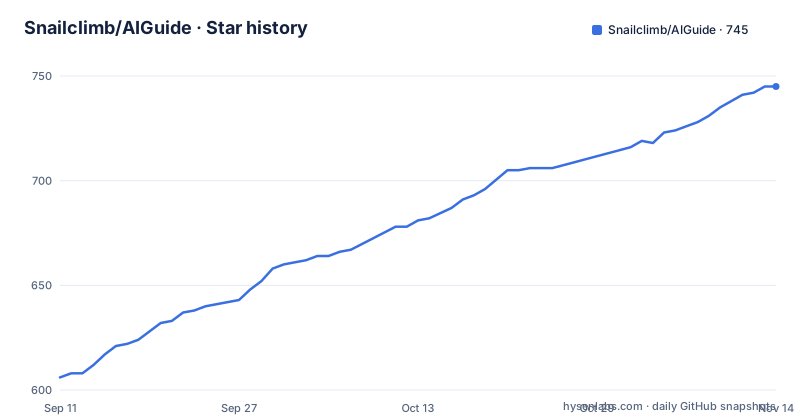
- Snailclimb/AIGuide745 ★ · +139
| Repository | 2026-09-11 | 2026-11-14 |
|---|---|---|
| Snailclimb/AIGuide | 606 | 745 |
139 Stars in the last 64 days, measured from the daily GitHub snapshot. Compare with other projects
Editorial analysis
The repository holds two skills and every article lives on a website
The top level of this repository is three entries: a .gitignore, the README, and a skills directory. That is the whole tree.
It is not a mirror of the content, it is an index. The README is a list of links to javaguide.cn, and the articles themselves are served from that site rather than committed here. The AI application development section, the agent section, the RAG section, the system design section and the interview question section are all link tables pointing at absolute URLs on the documentation site.
So there are two artefacts here with different lifecycles. The prose is published and versioned by the website, which also handles the search and the navigation. The skills are versioned by git, which is why they are the only thing in the tree.
The author is the author of JavaGuide, and the positioning is explicit: this is written for people who want to learn AI application development and engineering without first moving into algorithm work or learning training frameworks and paper formulae.
Two install routes, and the second one runs a script out of the Codex home directory
The two skills are installed with one of two commands, and the second one is not a package manager.
npx skills add Snailclimb/AIGuide --path skills/drawio-chart

python3 ~/.codex/skills/.system/skill-installer/scripts/install-skill-from-github.py \
  --repo Snailclimb/AIGuide \
  --path skills/drawio-chart
The first is the generic route: npx skills add with the repository and a path pointing at the skills/drawio-chart directory. The second is specific to Codex and invokes a Python installer script that lives inside the Codex system directory, passing the repository and the same path.
The Codex route is worth reading closely because it reaches into another tool's internal layout. The path to the installer script is written out in full, under the home directory in a dot-codex folder, in a system subfolder, under skill-installer/scripts. That path is not a stable public interface, so this route breaks if Codex reorganises its own directory.
Both commands name drawio-chart specifically rather than installing both skills at once, so the second skill has to be requested by path too.
drawio-chart covers four diagram types and three export formats
The first skill generates draw.io diagrams from a requirement description. The listed diagram types are flowcharts, architecture diagrams, sequence diagrams and ER diagrams, and the output can be exported to PNG, SVG or PDF.
That is the whole description. There is no statement about which model produces the file, whether the diagram description is validated, or how the skill handles a requirement that needs more than one diagram type in a single output.
It is the more generally useful of the two skills, and it is the one used as the worked example in both install commands, which is why it is the one the page demonstrates.
Being an installable skill rather than an article is the point. The same content exists as a write-up in the AI coding practice section, but the skill form is the part you can hand to an agent.
java-coding-standards targets Spring Boot and covers seven concerns
The second skill supplies engineering standards for Java and Spring Boot projects. The concerns named are layered architecture, coding style, transactions, exceptions, logging, performance and testing.
Seven concerns is a much broader surface than a diagram generator, and the difference in kind matters. A diagram skill produces an artefact, while a standards skill has to be applied as a judgement on code that already exists, which means it either contradicts an existing house style or gets ignored.
The two skills share a directory and nothing else. They are described independently, there is no stated relationship between them, and the README does not say whether more are planned or whether these two are the complete set.
This is the part of the repository that is genuinely versioned by git, so a change to either one is a commit you can see, unlike the articles.
The reading order puts RAG second and system design last
There is an explicit four-stage path for anyone learning this systematically. Stage one is large model fundamentals: tokens, the context window, sampling parameters, API calls, structured output and evaluation. Stage two is RAG. Stage three is AI agents, weighted towards tool calling, memory, MCP, skills and the workflow, graph and loop distinction. Stage four is AI system design, covering the gateway, rate limiting, fallback, cost, observability, security and gradual rollout.
RAG going before agents is the choice worth noting. Most treatments put agents first because they are the more fashionable topic, but this one treats retrieval as the more commonly needed thing and says so, calling enterprise knowledge base question answering the most common case and the one with the most pitfalls.
AI coding is explicitly kept out of that sequence. It is described as an upgrade to the daily development workflow rather than a separate track, with the advice to practise it alongside using tools like Claude Code, Codex, Cursor and Trae.
There is also a self-assessment path for backend developers considering a move, framed as deciding whether the transition suits you before comparing Java AI and Python AI or what roles to target.
System design is the thinnest of the five topic sections
The guide is organised into topic hubs, and the sizes are uneven. The agent hub carries the most, with eight entries covering core concepts, memory, prompt engineering, context engineering, skills, MCP, harness engineering and the workflow, graph and loop distinction.
The RAG hub has seven: a basics page, document processing and chunking, vector index algorithms and vector database choice, knowledge base updating, GraphRAG, and an optimisation page covering query rewriting, hybrid search, reranking, context compression and failure sample location.
The large model fundamentals hub has five, and the system design hub has four: the architecture page from prompt demo to production, the model gateway page covering multi-provider routing, fallback, rate limits, token budget, cost attribution and audit, and a voice page on ASR, TTS, VAD, interruption handling, low latency and real-time voice agents.
That last hub being the smallest is the interesting shape. The guide's own fourth stage is system design, and it is also the stage with the least material, which suggests the production layer is where the author has the least to draw on so far.
No licence, no language, no releases and three top-level entries
The recorded metadata is sparse. Both the language and the licence fields are empty, there are no releases, and there is no homepage field recorded against the repository itself.
The homepage that does exist is a property of the documentation site rather than the code, and the repository description positions the project as a guide covering LLM, agent, RAG, MCP, Claude Code and Codex.
What is recorded is the popularity: 661 stars, 74 forks and 0 open issues. Zero open issues on a repository whose entire content is a README is a signal about how issues get handled here, and the README does mention that feedback and recommendations arrived after publication.
The last recorded push is 2026-07-07 and the repository is not archived. Given that the content is a link index, the cadence of commits reflects updates to the skills and to the index rather than to the articles themselves.
Editorial conclusion
Use this if you are a working engineer moving into AI application work and want a reading order that starts from fundamentals rather than from framework news, since the RAG-before-agents sequence is the deliberate choice here. Skip it if you want the content in the repository, because three top-level entries means every article is a link to someone else's server. Before you install the skills, note that the Codex route reaches into that tool's own directory layout and the second skill has to be requested by path, and check the licence yourself, since the repository records none.
Frequently asked questions
what is ai guide
An open source Chinese-language guide to AI application development and engineering, written for backend, frontend, testing, architecture, technical management and product engineers. It covers LLM fundamentals, RAG, AI agents, AI system design and AI coding practice, and is published on javaguide.cn with the GitHub repository holding only the index and two installable agent skills.
How do I install the AIGuide skills?
Two routes. The generic one is npx skills add Snailclimb/AIGuide with a path pointing at the skill directory. The Codex-specific one runs a Python installer script from the Codex home directory with a repository and a path argument. Both examples name drawio-chart, so the second skill has to be requested by path as well.
What skills does the AIGuide repository provide?
Two. drawio-chart generates draw.io diagrams from a requirement, covering flowcharts, architecture diagrams, sequence diagrams and ER diagrams, and exporting to PNG, SVG or PDF. java-coding-standards supplies engineering standards for Java and Spring Boot projects covering layered architecture, coding style, transactions, exceptions, logging, performance and testing.
What order should I read the AIGuide material in?
Four stages. Large model fundamentals first, covering tokens, context window, sampling parameters, API calls, structured output and evaluation. Then RAG, placed second because enterprise knowledge base question answering is described as the most common case. Then AI agents, weighted to tool calling, memory, MCP, skills and workflow, graph and loop. Then AI system design, covering the gateway, rate limiting, fallback, cost, observability, security and gradual rollout.
Does the AIGuide repository contain the articles themselves?
No. The top level of the repository is a .gitignore, the README and a skills directory. The README is an index of links to javaguide.cn, where the articles are published, so the prose is versioned by the site and only the skills are versioned by git.
Official sources
Add this badge to your README
If you maintain this project, the badge below links readers to this analysis and shows its maintenance status from the daily GitHub snapshot. Paste the markdown into your README; add ?metric=license or ?metric=stars to the image URL for a different field.

[](https://hysenlabs.com/projects/snailclimb-aiguide)Star history chart for your README
[](https://hysenlabs.com/projects/snailclimb-aiguide)Was this useful?