11notes/docker-netbird: A Rootless, Distroless Single-Image NetBird
run netbird rootless and distroless.
At a glance
- What is it?
- This image runs NetBird's full stack (management, embedded IdP, dashboard) in one rootless, distroless container. It trades the official multi-image setup for a smaller, read-only, no-shell footprint, but you must adapt to its config and update model.
- Who is it for?
- Adopt 11notes/docker-netbird if you run NetBird self-hosted and want a single container that is rootless, distroless, read-only, and small (73MB vs 337MB for official images). Avoid it if you need armv7 support, which the official images provide but this image does not.
- Can I use it commercially?
- Yes. MIT is a permissive licence: you can use, modify and sell software built on it, as long as you keep its copyright and licence notices.
- Is it still maintained?
- Yes. The repository last received commits 20 days ago.
- What is it written in?
- Mainly Go, according to GitHub's language statistics.
Answers come from the project's GitHub data, last synced on October 4, 2026, and from our analysis. They are not legal advice.
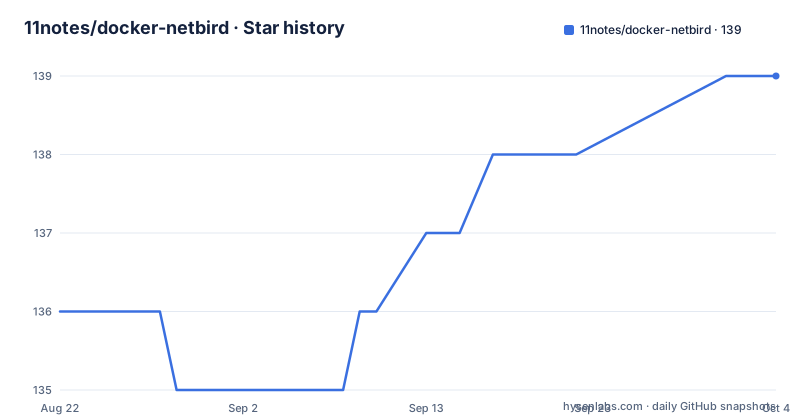
Star history
- 11notes/docker-netbird139 ★ · +3
| Repository | 2026-08-22 | 2026-10-04 |
|---|---|---|
| 11notes/docker-netbird | 136 | 139 |
3 Stars in the last 43 days, measured from the daily GitHub snapshot. Compare with other projects
Editorial analysis
What this image actually changes
NetBird itself is a WireGuard-based overlay network with Zero Trust Network Access. The official distribution splits the components across several images, each running as root. 11notes/docker-netbird compresses the whole stack into one image that runs as UID/GID 1000, has no shell, is read-only, and is distroless. The README claims a size of 73MB on disk against 337MB for the netbirdio images. That size difference is the concrete payoff. The trade-off is that you lose armv7 support, which the official images still offer. If you run on Raspberry Pi-class hardware, this image is not for you.
The single-image architecture and its init binary
Unlike the official multi-image setup, this container runs NetBird from a single image. The dashboard component needs a custom command entry in the compose file because the image supports all NetBird images as one. The init binary performs two jobs. First, it replaces environment variables in the default.yml config file, accepting either ${VAR} or $VAR syntax. Second, it generates random values for unset keys and hashes from the default config. That means you do not have to pre-generate secrets for authSecret or sessionCookieEncryptionKey. The default config uses the embedded IdP, so you can start without an external identity provider. The README warns that post tag 0.70.5 the image runs the embedded IdP by default and uses the unified management binary. If you were on an external IdP, you must follow NetBird's migration guide.
Getting it running: compose and config keys
The compose example pins the image to 11notes/netbird:0.77.1 and applies a lockdown anchor that sets read_only: true and no-new-privileges: true. The server service depends on a postgres service with a healthcheck. Environment variables include TZ, NETBIRD_FQDN, and POSTGRES_PASSWORD. The config file lives in /netbird/etc and dynamic data in /netbird/var. The default.yml snippet shows server.listenAddress :8080, metricsPort 9090, healthcheckAddress :9000, and exposedAddress https://${NETBIRD_FQDN}:443. You can override the whole config with your own file or an inline config. The README points to a separate RTFM document for changing the default UID/GID, so that is not covered in the repository itself.
The no-latest tag policy and update model
There is no :latest tag. The maintainer deliberately avoids it because breaking changes would propagate to everyone using :latest. Instead you use short semver tags like :0 or :0.77, which update to the latest minor or major version within that range. The README argues this is identical to :latest but fixed to a version boundary. There is also a :rolling tag for the bleeding edge, with a warning that you will get the newest release and potentially breaking changes. For a security-focused image, this is a sensible update policy, but it means you must actively decide which tag to track. If you want reproducible deployments, pin a full version like :0.77.1. If you want automatic patch updates, :0.77 gives you that within the same minor.
Security posture and its limits
The image is rootless, distroless, read-only, and has a health check. It is automatically scanned for CVEs before and after publishing. The CI/CD process is pinned and secure, according to the README. These are strong guarantees for a container image. But distroless means no shell, so debugging inside the container is harder. If something breaks, you cannot exec into a shell to inspect the filesystem. You must rely on logs and the health check. Also, read-only mode means all writable state must go to the named volumes /netbird/etc and /netbird/var. The compose example mounts a volume for server.etc. If you forget a writable path, the container may fail at runtime. That is a real operational constraint.
A genuine limitation: the config format shift
The most disruptive change is the switch from management.json to yml config. The README issues a caution that post tag 0.70.5 the image uses the yml config and not the management.json anymore. Any existing setup that relied on the old JSON format will break. You must convert your configuration. The default config embeds the IdP, so if you were using an external IdP like Keycloak, you need to follow NetBird's migration guide. This is not a trivial update. It is a breaking change that the maintainer flags clearly, but it means you cannot treat this image as a drop-in replacement for an older NetBird deployment. Verify your IdP setup before upgrading.
Alternative: official netbirdio images
The direct alternative is the official netbirdio images, which the README compares against. Those images run as root (init default 0:0), are not distroless, and are larger at 337MB. They support amd64, arm64, and armv7, whereas this image only supports amd64 and arm64. The official images also use the standard NetBird distribution, which may follow a different config evolution. If you need armv7 or prefer to stay close to the upstream packaging, the official images are the safer choice. If you value the security hardening and smaller footprint, this image is the trade. The choice hinges on whether you can accept the config migration and the loss of armv7.
Maintenance and license implications
The repository is under the MIT license, which is permissive for reuse. The image is auto-updated via CI/CD to the latest NetBird version, so you do not have to manually rebuild. Releases are frequent, with v1.36.1 pushed on 2026-08-22, about a week after v1.36.0. That cadence means you need to track updates if you want security patches. The no-latest policy forces you to choose a tag, which is good for stability but requires you to bump the tag manually when you want a new major or minor. The README mentions Terraform deployment scripts and Helm charts in the repository, but the details are not in the provided material. For licensing, the MIT license applies to the container image project itself, not to NetBird, which is under its own license. You should check NetBird's license separately if that matters to your use case.
Editorial conclusion
Adopt 11notes/docker-netbird if you run NetBird self-hosted and want a single container that is rootless, distroless, read-only, and small (73MB vs 337MB for official images). Avoid it if you need armv7 support, which the official images provide but this image does not. Before adopting, verify your current NetBird config against the post-0.70.5 switch to the yml format and embedded IdP, and confirm your external IdP migration path with the linked NetBird guide. Also pin a minor tag like :0.77 rather than :rolling to avoid unexpected breaking changes.
Frequently asked questions
What is NetBird used for?
The readme describes NetBird as combining a WireGuard-based overlay network with zero trust network access, giving a unified open source platform for connectivity, and the point of it is to create your own self-hosted mesh for that kind of access. This repository packages that platform as a container image rather than adding features to it.
Can NetBird be self-hosted?
Yes, and self-hosting is the stated purpose of the project, which is a container packaging that runs the server and the dashboard from one image. The compose example brings its own database alongside them and wires the two together, and the readme points at a Helm chart and a Terraform script for other deployment styles.
How does NetBird compare to WireGuard?
The readme does not make a comparison, and its description is more useful than a comparison would be: NetBird is built on a WireGuard-based overlay network and adds zero trust network access on top of it. WireGuard is the substrate here rather than an alternative being weighed against it, and this repository only packages the platform as a container image.
Why is there no latest tag for the 11notes NetBird image?
The author argues a floating tag is a bad habit, because many projects introduce breaking changes between releases and anyone tracking it would get them silently. The advice is to pin the short form of the version, 0 or 0.79 rather than 0.79.0, which track the newest release within that major or minor line, and to use the rolling tag only if you want the newest build regardless.
What changed in the 11notes NetBird image after the 0.70.5 tag?
Two things, both flagged as breaking in a caution block near the top of the readme. The image started running the embedded identity provider by default, so anyone relying on an external one has to follow the upstream migration guide, and the configuration moved from a JSON management file to YAML, so existing configuration has to be converted.
Official sources
Add this badge to your README
If you maintain this project, the badge below links readers to this analysis and shows its maintenance status from the daily GitHub snapshot. Paste the markdown into your README; add ?metric=license or ?metric=stars to the image URL for a different field.

[](https://hysenlabs.com/projects/11notes-docker-netbird)Star history chart for your README
[](https://hysenlabs.com/projects/11notes-docker-netbird)