AndroidLiquidGlass: A Compose Multiplatform Backdrop Library Without the Widgets
Compose Multiplatform Liquid Glass effect
At a glance
- What is it?
- Kyant0's AndroidLiquidGlass (Backdrop) brings the Liquid Glass effect to Compose Multiplatform, but it ships no ready-made components. This review covers what the library actually provides, how to run the demo, and where the trade-offs lie.
- Who is it for?
- Adopt AndroidLiquidGlass if you are building a Compose Multiplatform app and want a customizable backdrop effect without being locked into a widget set. Do not adopt it if you expect drop-in UI controls; the README is explicit that you must create your own components, so budget time for that.
- Can I use it commercially?
- Yes. Apache-2.0 is a permissive licence: you can use, modify and sell software built on it, as long as you keep its copyright and licence notices.
- Is it still maintained?
- Yes. The repository last received commits 58 days ago.
- What is it written in?
- Mainly Kotlin, according to GitHub's language statistics.
Answers come from the project's GitHub data, last synced on October 21, 2026, and from our analysis. They are not legal advice.
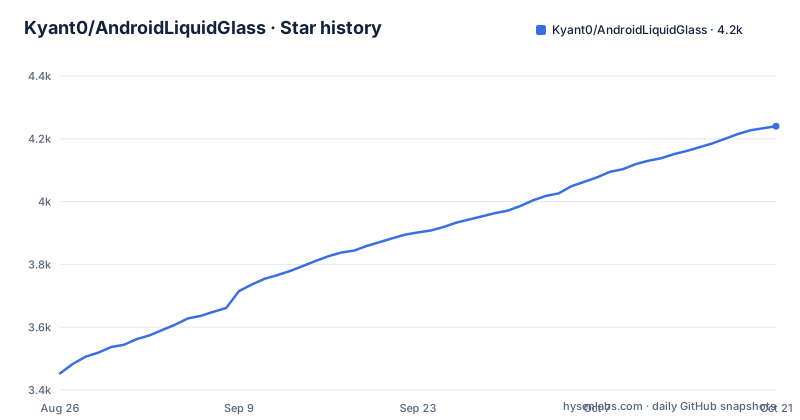
Star history
- Kyant0/AndroidLiquidGlass4,240 ★ · +787
| Repository | 2026-08-26 | 2026-10-21 |
|---|---|---|
| Kyant0/AndroidLiquidGlass | 3.5k | 4.2k |
787 Stars in the last 56 days, measured from the daily GitHub snapshot. Compare with other projects
Editorial analysis
What This Library Actually Solves
AndroidLiquidGlass, also called Backdrop, addresses a narrow problem: applying a Liquid Glass effect inside a Compose Multiplatform application. This is the frosted, translucent, shape-shifting visual style popularized by recent mobile OS designs. The library does not provide buttons, toggles, sliders, or tab bars. The README states this plainly: "The library does not include any high-level components; you will need to create your own." So the target user is a Compose Multiplatform developer who wants the visual effect and is willing to build the surrounding UI. The library gives you the backdrop mechanism, and you supply the widgets. That is a specific trade-off. For an app that needs a consistent custom design language, this is an advantage. For a team that wants quick adoption, it is a barrier.
The Mechanism: Backdrop as a Primitive
The repository name is AndroidLiquidGlass, but the artifact and docs use the name Backdrop. That naming hints at the core idea: the library renders a backdrop layer behind your content, and that layer reacts to the shapes and positions of the components you place on top. The README does not describe the internal algorithm, but the absence of high-level components suggests the library exposes a low-level composable or modifier that applies the glass effect. The demo catalog includes LiquidButton, LiquidToggle, LiquidSlider, and LiquidBottomTabs, but those are example components, not part of the library itself. So the data flow is likely: you draw your UI, wrap it or apply a modifier, and the library samples the content behind it to produce the refraction and blur. Because it is Compose Multiplatform, the effect must work across Android, iOS, and desktop, but the README does not specify which targets are supported. That is a gap you should verify before relying on it.
Getting It Running: Artifact and Demo
The library is published on Maven Central under io.github.kyant0:backdrop, with version 2.0.1 as the latest release. The README links to the Sonatype page, so you can add it as a dependency in your build.gradle.kts file with implementation("io.github.kyant0:backdrop:2.0.1"). The full documentation is at https://kyant.gitbook.io/backdrop, which is where you would find the exact API usage. The repository also includes an Android demo app. The README points to a release APK at androidApp/release/androidApp-release.apk, so you can install it on a device or emulator to see the effect without building from source. The demo catalog source files are in app/src/commonMain/kotlin/com/kyant/backdrop/catalog/components/, so you can read how each example component is built. That is your best reference for creating your own components, because the library itself will not teach you.
A Real Limitation: No Components Means More Work
The most obvious failure mode is that you must design and implement every interactive element yourself. The README gives four example components, but they are not shipped as part of the library. If you need a standard button, you cannot just add a dependency and get one. You have to write the interaction logic, the state handling, and the visual styling. That is not trivial for a glass effect, because the backdrop must update when the component moves or changes shape. The documentation may cover the low-level API, but the README does not show any usage example. So a developer new to Compose Multiplatform could struggle to get the effect working correctly across platforms. Also, the default branch is named kmp, which suggests the project is oriented toward Kotlin Multiplatform, but the README does not list supported targets. That is a concrete thing to check before committing.
Alternative Approach: High-Level Component Libraries
A direct alternative is to use a UI library that includes ready-made glass or frosted components, such as those found in Material 3's experimental APIs or in third-party Compose libraries like Compose-Frosted or similar. The difference in approach is significant. Those libraries give you a set of widgets with the effect baked in, so you can assemble a screen quickly. AndroidLiquidGlass gives you only the effect, forcing you to build the widgets. The trade-off is control versus speed. With AndroidLiquidGlass, you can make every component match your exact design, but you pay for that with development time. With a component library, you get speed but may fight the library's default styling. The README's decision to exclude components is a deliberate design choice, not an oversight. It positions the library as a low-level tool, similar to how a physics engine is not a game.
Maintenance and License Implications
The project is licensed under Apache-2.0, which is permissive. You can use it in commercial projects, modify it, and distribute it, as long as you retain the license notice. That is a low-legal-friction choice. The repository was last pushed on 2026-08-26, and version 2.0.1 was released the same day, so it is actively maintained. The release history shows a steady progression from 2.0.0-rc01 in May to 2.0.0 in late May, then 2.0.1 in August. That cadence suggests the maintainer is fixing issues and adding features. However, the README is sparse; it does not list a changelog or migration guide. If you upgrade from 1.x to 2.x, you will need to check the documentation site. The artifact name changed from AndroidLiquidGlass to Backdrop, so any existing dependency coordinates may have changed. That is a maintenance cost you should plan for.
Who Should Adopt It and What to Verify First
Adopt AndroidLiquidGlass if you are building a Compose Multiplatform app and want a customizable backdrop effect without being locked into a widget set. Do not adopt it if you expect drop-in UI controls; the README is explicit that you must create your own components, so budget time for that. Before adopting, verify that the 2.0.1 release works with your Compose Multiplatform version, check the Sonatype artifact for your target platforms, and review the demo APK's behavior on your devices. The library's value is the effect itself, not the components, so confirm your team can build and maintain those. The documentation at kyant.gitbook.io/backdrop is the place to start, and the example components in the repository are the best reference. If you are not prepared to write your own LiquidButton or LiquidSlider, this library is not for you. If you are, it offers a rare combination of cross-platform reach and visual control.
Editorial conclusion
Adopt AndroidLiquidGlass if you are building a Compose Multiplatform app and want a customizable backdrop effect without being locked into a widget set. Do not adopt it if you expect drop-in UI controls; the README is explicit that you must create your own components, so budget time for that. Before adopting, verify that the 2.0.1 release works with your Compose Multiplatform version, check the Sonatype artifact for your target platforms, and review the demo APK's behavior on your devices. The library's value is the effect itself, not the components, so confirm your team can build and maintain those.
Frequently asked questions
How do I get a liquid glass effect on Android with this library?
For a Compose app you add the published artifact, io.github.kyant0.backdrop from Maven Central, and build your own components on top of it, because the library ships no high level components. To see the effect first, the repository contains a prebuilt catalog APK you can install directly.
Does this liquid glass library include ready-made buttons and sliders?
No, it states that it does not include any high-level components and that you need to create your own. The four examples it links, a button, a toggle, a slider and bottom tabs, live in the sample app module rather than in the published library.
Where is the API documentation for this Compose effect library?
On a GitBook space linked from the readme, at kyant.gitbook.io/backdrop. The repository itself has no docs directory, and its readme carries no API listing, install snippet or compatibility statement.
What license does Kyant0's backdrop library use?
Apache-2.0, with a LICENSE file at the root of the repository.
Does the backdrop liquid glass effect work on iOS as well?
The project is described as a Compose Multiplatform effect and the tree contains an iosApp module next to androidApp. It is published as one Maven Central coordinate, io.github.kyant0.backdrop, rather than as an Android only artifact.
Official sources
Add this badge to your README
If you maintain this project, the badge below links readers to this analysis and shows its maintenance status from the daily GitHub snapshot. Paste the markdown into your README; add ?metric=license or ?metric=stars to the image URL for a different field.

[](https://hysenlabs.com/projects/kyant0-androidliquidglass)Star history chart for your README
[](https://hysenlabs.com/projects/kyant0-androidliquidglass)