ManimGL: The Original Math Animation Engine, Still Worth a Look
Animation engine for explanatory math videos. Create a conda environment using conda create -n manim python=3.9.
At a glance
- What is it?
- ManimGL is the original animation engine behind 3Blue1Brown videos, distinct from the community edition. This review covers its installation, usage, and the trade-offs of choosing it.
- Who is it for?
- Adopt ManimGL if you want to replicate 3Blue1Brown's exact visual style and are comfortable with an engine that evolves alongside the videos it serves. Do not adopt it if you need stability, extensive documentation, or a large community; choose Manim Community instead.
- Can I use it commercially?
- Yes. MIT is a permissive licence: you can use, modify and sell software built on it, as long as you keep its copyright and licence notices.
- Is it still maintained?
- Yes. The repository last received commits 66 days ago.
- What is it written in?
- Mainly Python, according to GitHub's language statistics.
Answers come from the project's GitHub data, last synced on November 13, 2026, and from our analysis. They are not legal advice.
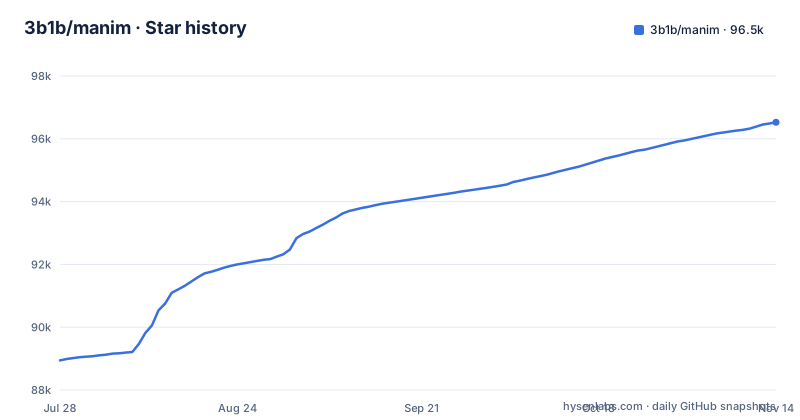
Star history
- 3b1b/manim96,486 ★ · +7,543
| Repository | 2026-07-28 | 2026-11-13 |
|---|---|---|
| 3b1b/manim | 88.9k | 96.5k |
7,543 Stars in the last 108 days, measured from the daily GitHub snapshot. Compare with other projects
Editorial analysis
A Fork in the Road: ManimGL vs. Manim Community
The repository you are looking at is not the Manim most people use today. It is the original engine written by Grant Sanderson for 3Blue1Brown, and it is now called ManimGL. In 2020, a separate group forked it into Manim Community, which is maintained with a focus on stability, testing, and community contributions. The README warns you not to mix installation instructions between the two. That warning matters because the package name is different: this version installs as manimgl, not manim or manimlib. If you follow a tutorial for the community edition, you will end up with the wrong tool. For an engineer evaluating which to adopt, the first decision is not technical but philosophical: do you want the engine that powers a specific YouTube channel, or the one designed for broader use?
What ManimGL Actually Solves
ManimGL solves a narrow but demanding problem: creating precise, programmatic animations for explanatory math videos. It is not a general-purpose animation tool. Its strength is in rendering mathematical objects like graphs, axes, and geometric shapes with fine control over motion and timing. The target user is someone who wants to produce videos in the style of 3Blue1Brown, or who needs to animate mathematical concepts with pixel-level precision. The repository includes example scenes that demonstrate the syntax for objects and animations. If your need is for data visualization or UI animation, this is the wrong tool. The engine assumes you are comfortable writing Python code to describe every visual element, rather than clicking through a GUI.
Installation: More Than Just pip
Getting ManimGL running requires more than a simple pip install. The README lists system requirements: FFmpeg, OpenGL, and optionally LaTeX for text rendering. On Linux, you also need Pango and its development headers. For Ubuntu, the instructions include sudo apt install ffmpeg python3-pip libpango1.0-dev. LaTeX is optional, but if you want it, the recommended lightweight setup is texlive-science texlive-fonts-extra texlive-latex-extra, which is smaller than texlive-full. On macOS, you use Homebrew to install ffmpeg and mactex, and if you have an ARM-based processor, you also need arch -arm64 brew install pkg-config cairo. Windows users install FFmpeg and MiKTeX separately. The core installation is then pip install manimgl or, if you clone the repo, pip install -e . in the repository directory. The README also suggests a conda environment: conda create -n manim python=3.10, followed by conda activate manim. This is a real setup cost, especially if you have never installed LaTeX or Pango.
Running Your First Scene: CLI Flags and Workflow
Once installed, you run a scene with a command like manimgl example_scenes.py OpeningManimExample. This pops up a window playing the scene. The CLI offers practical flags: -w writes the scene to a file, -o writes and opens the result, -s skips to the final frame, -so saves that final frame as an image, -n <number> jumps to the nth animation, and -f makes the window fullscreen. There is also a manim-render command that does the same as manimgl for rendering. The README points to example scenes as a way to learn the syntax. It also mentions a custom_config.yml file that lets you set output directories, where to look for images and sounds, and defaults for style and video quality. You can edit that file or create your own in the directory where you run manim. This is a command-line-driven workflow, which suits engineers who prefer scripted rendering over interactive tools.
The Trade-Off: Precision at the Cost of Stability
ManimGL is not a stable API in the way that a mature library might be. The README notes that code from older 3Blue1Brown videos may not be compatible with the most recent version of manim. That is a direct warning about breaking changes. The documentation is described as 'in progress', which is a polite way of saying it is incomplete. For an engineer who values long-term stability, this is a significant limitation. The community edition was created precisely to address these issues, so if you need a reliable, well-documented API, ManimGL is likely the wrong choice.
Alternatives: Manim Community and the Videos Repo
The most direct alternative is Manim Community, the fork mentioned in the README. It aims to be more stable, better tested, and quicker to respond to contributions. The package name is manim, and its documentation is at docs.manim.community. The core difference is in governance and release philosophy: Community is a community-driven project with a focus on stability, while ManimGL is driven by one person's video production. If you want to see how ManimGL is used in practice, the 3b1b/videos repository contains all the code for actual 3Blue1Brown videos. That repo is a real alternative source of examples, but the README warns that older video code may not work with the latest ManimGL. So you have two paths: use Manim Community for a stable foundation, or use ManimGL and accept that you are following a moving target.
Maintenance and Licensing: What the Repo Shows
The latest release is v1.7.2 from December 13, 2024, and the last push was on September 9, 2026. The license is MIT, which is permissive for commercial use. There is no homepage, and the documentation is still a work in progress. The maintenance cost for you as a user is the need to track releases and update your code accordingly. The license is a positive: you can use ManimGL in your own projects, even commercial ones, without concern. Before adopting, check the release notes for the version you plan to use, and test your scenes after any upgrade.
Final Verdict: Who Should and Shouldn't Use ManimGL
ManimGL is for you if you want to create math videos that look exactly like 3Blue1Brown's, and you are willing to invest time in learning a less documented, evolving API. It is not for you if you need a stable, well-supported library for production work. The community edition is a safer default. If you do choose ManimGL, start by running the example scenes to verify your environment, then build a small scene using the custom_config.yml to set your output paths. Verify that your LaTeX setup works if you need text rendering. And be prepared to pin your ManimGL version to avoid unexpected changes. The engine is precise and powerful, but it comes with strings attached.
Editorial conclusion
Adopt ManimGL if you want to replicate 3Blue1Brown's exact visual style and are comfortable with an engine that evolves alongside the videos it serves. Do not adopt it if you need stability, extensive documentation, or a large community; choose Manim Community instead. Before committing, verify that your Python version (3.10+) and system dependencies (FFmpeg, OpenGL, optional LaTeX) match, and check that the example scenes in your target version still run, as older video code may not be compatible.
Frequently asked questions
What is a Manim?
Manim is an engine for precise programmatic animations, designed for creating explanatory math videos. This repository is ManimGL, the original engine, and it is published on PyPI under the package name manimgl rather than manim.
Did 3b1b make Manim?
This repository began as a personal project by the author of 3Blue1Brown, for the purpose of animating those videos, with the video-specific code kept in a separate 3b1b/videos repository. In 2020 a group of developers forked it into the community edition at ManimCommunity/manim.
How do I install Manim?
Run pip install manimgl, which is the package name for this repository, not manim or manimlib. ManimGL runs on Python 3.10 or higher, and needs FFmpeg and OpenGL on the system, with Pango and its development headers on Linux.
How do I install Manim on Windows?
The README gives three steps for Windows: install FFmpeg, install a LaTeX distribution with MiKTeX recommended, then clone the repository and run pip install -e . in it. The MacTeX and BasicTeX instructions in the README are for macOS, not Windows.
Is Manim difficult to use?
The README states that Manim runs on Python 3.10 or higher and that you can try it with manimgl example_scenes.py OpeningManimExample, which should pop up a window playing a simple scene. It also warns that code from older 3Blue1Brown videos may not be compatible with the most recent version of manim, which is the main source of friction when you copy an example.
Official sources
Where developers are discussing it
Posts on Hacker News, dev.to and Lobsters that link to this repository, found by our scan of those communities. 1 in the last 30 days; newest first.
- Penmentor - Claude marks up your handwritten math like a teacherdev.to · Oct 25, 2026 · 5 points · 0 comments
- How I built a realtime editor for ManimGLdev.to · Oct 12, 2026 · 5 points · 0 comments
Add this badge to your README
If you maintain this project, the badge below links readers to this analysis and shows its maintenance status from the daily GitHub snapshot. Paste the markdown into your README; add ?metric=license or ?metric=stars to the image URL for a different field.

[](https://hysenlabs.com/projects/3b1b-manim)Star history chart for your README
[](https://hysenlabs.com/projects/3b1b-manim)Was this useful?