WashData for Home Assistant: smart-plug appliance cycle monitoring
Home Assistant integration for smart-plug appliance monitoring: detects cycles, matches programs, estimates time remaining. Supports washing machines, dryers, dishwashers and more.
At a glance
- What is it?
- WashData turns smart-plug power readings into Home Assistant appliance states, program matches, time estimates, and cycle energy data. It is useful for owners of several appliance programs, but plug safety and distinguishable power curves are essential constraints.
- Who is it for?
- Adopt WashData if the appliance uses a suitably rated, sufficiently frequent power sensor and you can record or label several real cycles. Do not adopt it until electrical safety, update frequency, and program separation have been checked.
- Can I use it commercially?
- Yes, with strict conditions. AGPL-3.0 is a network copyleft licence: if people use a modified version over a network, for example as a hosted service, you must offer them its source code under the same licence.
- Is it still maintained?
- Yes. The repository received new commits within the last day.
- What is it written in?
- Mainly Python, according to GitHub's language statistics.
Answers come from the project's GitHub data, last synced on October 23, 2026, and from our analysis. They are not legal advice.
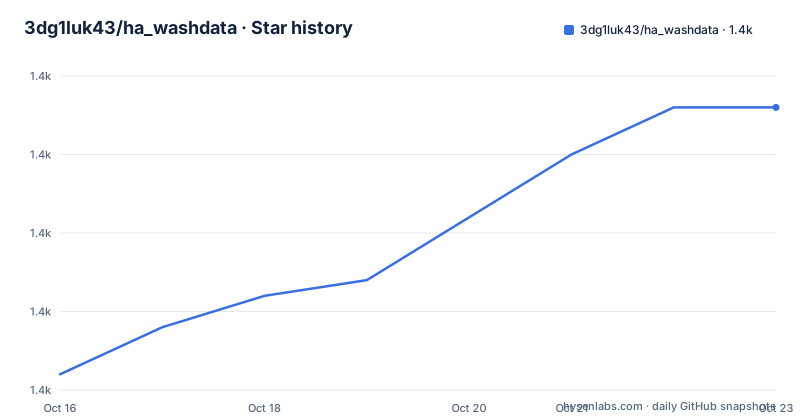
Star history
- 3dg1luk43/ha_washdata1,383 ★ · +17
| Repository | 2026-10-16 | 2026-10-23 |
|---|---|---|
| 3dg1luk43/ha_washdata | 1.4k | 1.4k |
17 Stars in the last 7 days, measured from the daily GitHub snapshot. Compare with other projects
Editorial analysis
What WashData adds to smart-plug monitoring
WashData solves a specific Home Assistant problem. A smart plug usually exposes an instantaneous power reading, but a washing machine, dryer, dishwasher, air fryer, bread maker, or pump needs a higher-level interpretation. A power reading might represent heating, tumbling, pumping, standby, or an active cycle depending on the appliance. WashData watches the sequence of readings and converts it into appliance state, running status, recognized program, progress, current phase, estimated time remaining, and cycle count.
The intended users are Home Assistant administrators who already monitor a high-load appliance through a smart plug or hardwired power module. The integration does not ship with universal appliance profiles. Program recognition depends on profiles recorded from the user's own machine, so setup involves observation and correction rather than selecting a manufacturer catalog.
WashData also reports energy and cost per cycle, with support for dynamic tariffs according to the README. A lifetime kWh sensor can feed Home Assistant's Energy dashboard. Cycle count and maintenance entities can support condition-based reminders, while notifications can use WashData's prepared messages or custom automations built around its events.
This is inference from appliance power, not a direct connection to the appliance controller. WashData interprets a trace produced by the plug. Program identification, phase names, remaining time, pause handling, and completion states are model results derived from observed behavior and configured profiles.
How the WashData power trace becomes entities
The core data flow begins with a Home Assistant power sensor configured in watts. WashData applies a Minimum Power setting to decide when the appliance is effectively off. The README documents a default of `2 W`. The configured Device Type supplies detection defaults for how the integration should interpret start, pause, and end behavior.
As readings arrive, WashData detects cycles and tracks their state. The state entity can report `off`, `idle`, `starting`, `running`, `paused`, `user_paused`, `ending`, `finished`, `anti_wrinkle`, `interrupted`, `force_stopped`, `clean`, `delay_wait`, or `unknown`. These values have operational distinctions. `idle` means the appliance is on between cycles, while `clean` means a cycle has finished but the load still appears to be inside.
Program matching comes from learned power curves. A user can start Manual Recording from the Overview tab, run an appliance program, stop the recording, and save it as a profile. The alternative is less supervised. WashData can retain each cycle as unlabeled, after which the user opens it under Cycles and assigns it to a profile.
Once profiles exist, WashData attempts to match later cycles automatically. Uncertain results enter a review queue where the user can confirm or correct them. Programs that differ only in temperature or spin may look alike in the electrical trace. The README says WashData may mix those programs initially and can learn from three to five corrections.
Remaining time and phase reporting depend on the selected or matched profile, including any phases defined for that program. The repository places the Python integration under `custom_components/ha_washdata`. The README states that operation runs inside Home Assistant, while the optional Community Store is the only online feature and is disabled by default.
Installing WashData and adding the first appliance
The README recommends installation through HACS and states that WashData is included in the HACS default list. From a Home Assistant repository view, open WashData, select Download, and restart Home Assistant. The README does not give a shell installation command, so this tutorial does not invent one.
For manual installation, copy `custom_components/ha_washdata` from the latest release into the Home Assistant `custom_components` folder and restart Home Assistant. The repository provides release artifacts, but its README does not document a universal operating-system path for the configuration directory.
After the restart, go to Settings > Devices & Services > Add Integration > WashData. Enter a Name, select the Device Type, choose the smart plug's Power Sensor, and set the Minimum Power threshold. The power entity must report watts. If it reports a different unit or samples too slowly to preserve the appliance's transitions, WashData will not receive the trace shape needed for reliable detection and matching.
The first result to inspect is an entity based on the configured device name. For a machine called `Washing Machine`, the documented state entity is `sensor.washing_machine_state`. Also locate `binary_sensor.<name>_running`, `sensor.<name>_program`, `sensor.<name>_time_remaining`, and `sensor.<name>_progress`.
The sidebar panel provides status, cycles, programs, settings, and a Playground described as a what-if interface. The README does not document a required sample rate, so there is no justified universal polling value to recommend for a particular smart plug.
Recording appliance profiles and checking the first matches
Profile creation is the first substantial use of WashData. Open the WashData panel and go to the Overview tab. Under Manual Recording, select Start Recording, run one complete appliance program, stop the recording, and save it as a profile. Repeat the process for the two or three programs used most often.
Programs should have separate profiles when their duration or power curve is distinguishable. A quick cycle and a cotton cycle may fit that condition, as may wash-only and combined wash-and-dry operations. Programs differing only through temperature or spin may produce curves that are too similar for dependable identification. A washer-dryer needs separate profiles for wash-and-dry combinations that must be distinguished.
The labeling path is useful when supervising every run is inconvenient. WashData can retain a cycle as unlabeled, and the user can open Cycles afterward and assign that cycle to a profile. This places the correction where the complete power trace is available.
A useful first check is to run each saved program once and compare `sensor.<name>_program`, `sensor.<name>_current_phase`, `sensor.<name>_total_duration`, and `sensor.<name>_time_remaining`. If a result appears uncertain, inspect the review queue linked from Overview. The README says matching learns from corrections, but it does not guarantee that every program can be separated if the electrical traces are effectively identical.
After validation, `sensor.<name>_cycle_count` and `sensor.<name>_energy_total` can support maintenance and Energy dashboard reporting. The `mark_unloaded` action confirms removal of a load after WashData reaches `clean`.
Electrical ratings and sampling constraints
The largest limitation is outside the Python matching logic. The README warns that a smart plug on a washing machine, dryer, or dishwasher carries the appliance's full heating load, often above `2500 W`. It states that `16 A` is `3680 W` at `230 V`, while `15 A` at `120 V` is only `1800 W`. The plug must be rated for peak power at the relevant mains voltage, or a hardwired module must be used.
The README explicitly warns that an under-rated or inexpensive plug can overheat and start a fire. This is not a software exception that WashData can handle. A user should verify the plug's rating and electrical suitability before connecting a high-load appliance.
Sampling quality also matters. WashData depends on a smart plug reporting often enough to preserve the appliance's power curve. A plug that updates too slowly can erase transitions that distinguish programs, pauses, or phases. The README refers readers to the project's Smart plugs documentation but does not promise compatibility with every plug, sampling rate, or power entity.
Program matching also has an information limit. Temperature or spin changes may not produce enough electrical variation for reliable identification. The statement about learning from three to five corrections does not guarantee perfect matching for identical-looking programs.
Threshold Device is the fallback for appliances that only need on and off detection. Other (Advanced) offers full program matching. Neither option creates information that the available power signal does not contain.
WashData compared with a Home Assistant power threshold
A direct alternative is a Home Assistant automation that compares the smart plug's power sensor with a fixed cutoff and treats the appliance as active while it remains above that value. That approach is simpler and can support a narrow notification such as an appliance running or finishing. It does not require a learned profile for every program.
WashData takes a different approach. It interprets a complete power trace, distinguishes multiple cycle states, matches that trace against learned profiles, estimates remaining time, exposes named phases, tracks energy and cost, and sends uncertain results to a review queue. It also exposes actions for pause, resume, force end, and mark unloaded.
The trade-off is configuration and input quality. A threshold automation needs one cutoff and some Home Assistant automation logic. WashData needs reliable readings, correct units, an appropriate Device Type, and profiles recorded from the actual appliance. The README explicitly says that programs with similar curves may require repeated correction, which makes learning an ongoing configuration task for those appliances.
A user who only needs an on and off alert may prefer the simpler threshold design. A user who needs completion notifications, program recognition, progress, phases, and per-cycle energy should inspect WashData's larger entity model. WashData is a Home Assistant custom integration under `custom_components/ha_washdata`, and the README states that its main operation is local.
Maintenance, upgrades, configuration transfer, and licensing
The repository is not archived, and the last push was on 2026-10-08. The release history lists `v0.5.8` on 2026-10-08, `v0.5.7` on 2026-09-26, and `v0.5.6` on 2026-09-17. These dates document recent changes, but the README does not provide a formal Home Assistant compatibility matrix or a policy for preserving learned profiles during every upgrade.
Configuration upkeep is relevant because the appliance model and learned curves are specific to each machine. The documented `ha_washdata.export_config` and `ha_washdata.import_config` services back up or restore one device and are available to administrators. The README does not say that a configuration can be moved between different appliance models, so a backup should not be assumed to transfer useful profiles to another machine.
Updates may affect custom integration compatibility, entity behavior, or stored profiles. The repository includes `CHANGELOG.md`, `CHANGELOG-archive.md`, tests, and release entries, but the README does not state whether every profile survives an upgrade or whether migrations run automatically. Users who depend on learned profiles should consult the release notes for the installed version before updating.
The repository identifies its license as `AGPL-3.0`. Distribution or modification of the software may trigger license obligations that depend on how it is used and shared. Anyone redistributing a modified copy or running a modified version over a network should review the applicable terms with qualified legal advice. This review does not interpret specific legal duties.
Editorial conclusion
Adopt WashData if the appliance uses a suitably rated, sufficiently frequent power sensor and you can record or label several real cycles. Do not adopt it until electrical safety, update frequency, and program separation have been checked. First configure the power entity in watts, record two or three common programs, and verify the resulting `running`, `program`, and `time_remaining` entities.
Frequently asked questions
How do I install WashData in Home Assistant?
The README says to install it through HACS, select Download in the WashData repository view, and restart Home Assistant. Manual installation copies `custom_components/ha_washdata` from the latest release into Home Assistant's `custom_components` folder.
Does WashData support my appliance program automatically?
WashData ships no programs. Users record or label real cycles as local profiles, after which matching is automatic, although programs with similar power curves may require review and correction.
Can WashData estimate how long a washing machine cycle has left?
Yes. `sensor.<name>_time_remaining` reports estimated minutes left, and its usefulness depends on a representative appliance program profile.
Does WashData need internet access?
The README states that normal operation runs locally inside Home Assistant. Its optional Community Store is the only stated online feature and is disabled by default.
What power sensor does WashData require?
The configured Power Sensor must report in watts. Its updates must also be frequent enough to capture the appliance's power curve, as explained by the project's Smart plugs documentation.
Official sources
Add this badge to your README
If you maintain this project, the badge below links readers to this analysis and shows its maintenance status from the daily GitHub snapshot. Paste the markdown into your README; add ?metric=license or ?metric=stars to the image URL for a different field.

[](https://hysenlabs.com/projects/3dg1luk43-ha-washdata)Star history chart for your README
[](https://hysenlabs.com/projects/3dg1luk43-ha-washdata)Was this useful?