go-size-analyzer reads ELF, Mach-O and PE binaries to show which Go packages bloat them
A tool for analyzing the size of compiled Go binaries, offering cross-platform support, detailed breakdowns, and multiple output formats.
At a glance
- What is it?
- Zxilly's gsa command breaks a compiled Go binary down by package and section, then renders the result as text, JSON, HTML, SVG, a web treemap or a terminal UI. Stripped binaries, the WebAssembly build and the AGPL license each carry a catch.
- Who is it for?
- Run gsa when a Go release binary is larger than expected and you need to know which vendor package or section accounts for the bytes, or when a toolchain upgrade grows a binary and you want the diff. Do not rely on it for stripped binaries, where the README itself warns about inaccurate results, and read the AGPL-3.0 license before embedding it in a product.
- Can I use it commercially?
- Yes, with strict conditions. AGPL-3.0 is a network copyleft licence: if people use a modified version over a network, for example as a hosted service, you must offer them its source code under the same licence.
- Is it still maintained?
- Yes. The repository last received commits 3 days ago.
- What is it written in?
- Mainly Go, according to GitHub's language statistics.
Answers come from the project's GitHub data, last synced on November 25, 2026, and from our analysis. They are not legal advice.
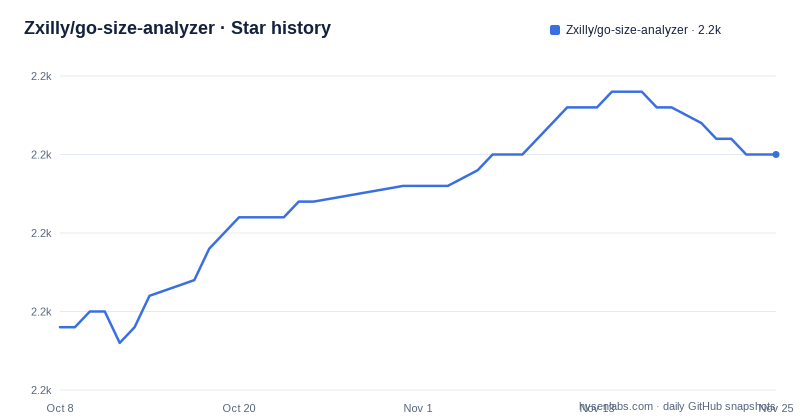
Star history
- Zxilly/go-size-analyzer2,195 ★ · +11
| Repository | 2026-10-08 | 2026-11-25 |
|---|---|---|
| Zxilly/go-size-analyzer | 2.2k | 2.2k |
11 Stars in the last 48 days, measured from the daily GitHub snapshot. Compare with other projects
Editorial analysis
One binary in, a size table by package and section out
gsa takes a compiled Go binary and reports where its bytes go. The README lists four supported formats: ELF, Mach-O, PE and WebAssembly, the last marked experimental. The breakdown runs by packages and by sections, so the same table can show `k8s.io/api` as an 11 MB vendor entry at 17.37 percent and `.rodata` at 15.52 percent in the README's docker-compose sample.
The default output is text. A table has four columns, PERCENT, NAME, SIZE and TYPE, and the TYPE column separates vendor code from other entries. Switching to `-f json`, `-f html` or `-f svg` changes only the rendering of the same analysis.
The command help describes the purpose as determining the extent to which dependencies contribute to the bloated size of compiled Go binaries, which is narrower than a general binary inspector: it is built around Go's package structure.
Four ways to install, one of which needs a very new Go
Prebuilt binaries are on the releases page. Homebrew and scoop packages carry the name `go-size-analyzer`, and the module can also be installed through Go:
brew install go-size-analyzerscoop install go-size-analyzergo install github.com/Zxilly/go-size-analyzer/cmd/gsa@latestThe executable is named `gsa`, which is why the install path ends in `cmd/gsa`. The README adds a note that building from source requires Go 1.27 or later because the project uses `encoding/json/v2`, and `go.mod` declares `go 1.27.0`. A machine with an older toolchain can still download a release binary, but `go install` will not work there.
The latest release in the list is v1.14.1 from 2026-09-27, preceded by v1.14.0 on 2026-08-21 and v1.13.1 on 2026-08-07.
Web mode binds to localhost until you tell it otherwise
The web view is the main exploration tool. Pass `--web` with the binary path:
gsa --web golang-compiled-binaryIt starts a server at `http://127.0.0.1:8080`, reachable only from your own machine. To let others see the report, add `--listen 0.0.0.0:8080`, which exposes the analysis to anyone who can reach that port. Do that on a trusted network.
The page shows a treemap in which you click a package to expand its details. For terminal users, `gsa --tui golang-compiled-binary` opens an interactive terminal UI instead, built on the Bubble Tea v2 libraries listed in `go.mod`. Both modes are interactive views over one analysis, so pick the web page for sharing screenshots and the TUI for an SSH session.
The browser build is ten times slower and meant for small apps
A WebAssembly version runs at gsa.zxilly.dev, the project homepage, so you can drop a binary into the page without installing anything. The README is specific about the cost: because of browser limits, it normally takes about 10x the time of the native version for the same binary, and it is only recommended for applications under 30 MB.
That threshold rules out many server and CLI builds. The docker-compose sample in the README already breaks packages into multi-megabyte entries, so a typical large Go service will exceed the comfortable range for the browser. Use the native `--web` mode for those.
The browser path is also the one case where your binary is loaded into a page rather than read by a local process. The README does not say what the page does with the file, so check the hosting before uploading a proprietary build.
Diff mode compares two builds, and only in text or JSON
Give gsa two arguments and it switches to comparison. The help text calls them `<file>`, a binary or a result JSON, and an optional `<diff file>`, the new binary or result JSON to compare.
$ gsa bin-linux-1.21-amd64 bin-linux-1.22-amd64
┌────────────────────────────────────────────────────────────────┐
│ Diff between bin-linux-1.21-amd64 and bin-linux-1.22-amd64     │
├─────────┬──────────────────────┬──────────┬──────────┬─────────┤
│ PERCENT │ NAME                 │ OLD SIZE │ NEW SIZE │ DIFF    │
├─────────┼──────────────────────┼──────────┼──────────┼─────────┤
│ +28.69% │ runtime              │ 801 kB   │ 1.0 MB   │ +230 kB │
│ +100%   │ internal/chacha8rand │          │ 3.1 kB   │ +3.1 kB │
│ +5.70%  │ <autogenerated>      │ 18 kB    │ 19 kB    │ +1.0 kB │
│ +8.59%
The sample compares builds named for Go 1.21 and 1.22 and shows the runtime package growing by 230 kB. Because a result JSON is accepted as input, you can store a JSON report per release in CI and diff against it later without keeping old binaries. The README lists only `json` and `text` as diff outputs, so no HTML or SVG diff exists.
Skip flags exist for three analysis passes, and stripped binaries lose accuracy
The full options list includes `--no-disasm` to skip the disassembly pass, `--no-symbol` to skip the symbol pass and `--no-dwarf` to skip the DWARF pass. `--verbose` adds output, and `-f` selects text, json, html or svg. The listing in the README is cut off after `-o, --outpu`, so the remaining flags have to come from `gsa --help`.
The SVG route combines flags:
gsa cockroach-darwin-amd64 -f svg -o data.svg --hide-sectionsThe caution box is the one limit that changes how you use it: the tool can work with stripped binaries, but it may lead to inaccurate results. Stripping removes the symbol and DWARF information the passes read, so analyse the unstripped build from the same compile and treat numbers from a stripped release artifact as approximate.
The disassembly pass is also unfinished, since one TODO item reads add more patterns for disassembling the binary.
The TODO list and the license set the edges
Open items in the README TODO list are more disassembly patterns, extra charts such as a flame graph or pie chart, and C++ or Rust symbol demangling in cgo. If your binary links native code through cgo, expect those symbols to appear undemangled. Done items include DWARF extraction, counting symbol size toward the package, the TUI and the browser build.
The license is AGPL-3.0, with the full text in the repository's LICENSE file. For internal use as a command-line tool that is a point to note and not an obstacle. If you plan to bundle or host a modified version for others, read the license text first.
The last push to the repository was on 2026-10-25 and the project is not archived. The README links a Development Guide in `DEVELOPMENT.md` for contributors, and a Simplified Chinese README sits beside the English one.
Editorial conclusion
Run gsa when a Go release binary is larger than expected and you need to know which vendor package or section accounts for the bytes, or when a toolchain upgrade grows a binary and you want the diff. Do not rely on it for stripped binaries, where the README itself warns about inaccurate results, and read the AGPL-3.0 license before embedding it in a product. The first check is to analyse one unstripped build of your own service and see whether the top package matches what you expected.
Frequently asked questions
How large is the Go runtime in a compiled binary, according to go-size-analyzer?
The README's diff example shows the runtime package at 801 kB in a Go 1.21 build and 1.0 MB in a Go 1.22 build, a +230 kB change. The figure depends on your binary, so run gsa on it.
Which binary formats does go-size-analyzer support?
It analyses ELF, Mach-O and PE binaries, and WebAssembly, which is marked experimental.
What does go-size-analyzer need to build from source?
Go 1.27 or later, because the project uses encoding/json/v2. Release binaries, Homebrew and scoop packages avoid that requirement.
Official sources
Add this badge to your README
If you maintain this project, the badge below links readers to this analysis and shows its maintenance status from the daily GitHub snapshot. Paste the markdown into your README; add ?metric=license or ?metric=stars to the image URL for a different field.

[](https://hysenlabs.com/projects/zxilly-go-size-analyzer)Star history chart for your README
[](https://hysenlabs.com/projects/zxilly-go-size-analyzer)Was this useful?