EngineerCMS for Engineering Project Documentation
工程师知识管理系统:基于golang语言(beego框架),支持分布式文件存储minio集群部署。engineercms为土木工程师基于web的知识管理系统。管理个人、工程项目资料,业主—设计—监理—施工方均从平台获得资料。支持提取码分享文件、onlyoffice实时文档协作,在线利用mindoc创作你的书籍,阅览PDF文件。手机端配套小程序,微信搜索“设计与管理”即可呼出小程序。
At a glance
- What is it?
- EngineerCMS is a Go and Beego web system for organizing engineering project files, drawings, articles, review workflows, and document collaboration. It suits civil engineering teams that need a shared project repository with role-based access, MinIO storage, PDF and Office document support, and a mobile client.
- Who is it for?
- EngineerCMS is a reasonable choice for a civil engineering organization that needs project directories, controlled document access, PDF review, and shared engineering records rather than a general-purpose website CMS. It is a poor fit for a team that needs a current, dependency-clean source tree without first resolving repository issues or that does not want to operate external services such as MinIO, ONLYOFFICE, Tika, or Elasticsearch.
- Can I use it commercially?
- Yes. Apache-2.0 is a permissive licence: you can use, modify and sell software built on it, as long as you keep its copyright and licence notices.
- Is it still maintained?
- Yes. The repository last received commits 34 days ago.
- What is it written in?
- Mainly Go, according to GitHub's language statistics.
Answers come from the project's GitHub data, last synced on November 7, 2026, and from our analysis. They are not legal advice.
Star history
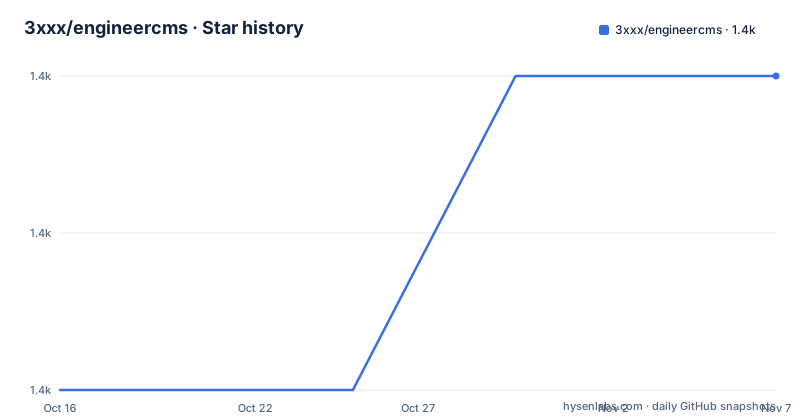
- 3xxx/engineercms1,425 ★ · +2
| Repository | 2026-10-16 | 2026-11-07 |
|---|---|---|
| 3xxx/engineercms | 1.4k | 1.4k |
2 Stars in the last 22 days, measured from the daily GitHub snapshot. Compare with other projects
Editorial analysis
Engineering project records in one directory
EngineerCMS addresses a specific document-management problem: engineering design and construction organizations often have project material spread across shared disks, personal folders, meeting records, drawings, contracts, approval documents, and revisions. The repository describes support for owners, designers, supervisors, and contractors accessing project information through the same platform. Its intended users are civil engineers and the organizations that manage engineering projects, rather than developers looking for a general blog engine.
The central object is a project with a hierarchical directory tree. The README says that administrators can predefine project directory types and hierarchy levels, create unlimited directory levels, and use lazy loading. A new project can copy the directory structure and permissions of an existing project or use a predefined project type. Results can be placed at any directory level, and permissions can be assigned to directories and individual results. This model is more relevant than a flat attachment list because engineering records are normally organized by project, discipline, phase, document type, and revision.
The repository also distinguishes project visibility as public or private and describes access control based on users, roles, and permissions. One documented feature manages permissions according to file extension. That can be useful when PDF design files, office documents, and other attachments need different handling, although the README does not provide a complete permission matrix. The project documentation gives the intended operating model, but an administrator still needs to inspect the configuration and test access from each project role.
Document review, revisions, and collaboration
EngineerCMS connects documents with later engineering actions instead of treating each uploaded file as an isolated record. The documented example is a drawing followed by a modification notice. Linking the notice to the drawing allows a user viewing the drawing to see that a modification exists. This is a concrete design choice for engineering projects, where the latest revision and the relationship between a base document and a change record matter.
The system includes configurable document workflows. The README names document approval, document review, contract review, and drawing review. It also describes project calendars and milestone timelines, along with statistics intended to help produce weekly or monthly progress reports. These features make the project broader than a document repository, although the README does not document workflow state names, approval transitions, notification behavior, or audit retention rules.
Office collaboration depends on a modified ONLYOFFICE Document Server integration. The documented scope includes DOCX, XLSX, PPTX, WPS, ET, and DPS formats, as well as document history comparison and format conversion such as Word to PDF. Collaboration permissions use Casbin. This approach is different from uploading a final office file and hoping every participant downloads it. It requires a reachable ONLYOFFICE service and compatible document conversion behavior, so the deployment must verify service availability and the document formats used by the organization.
Mindoc is integrated for creating, reading, sharing, importing, and exporting electronic books. This is useful for manuals, technical references, meeting guidance, or other long-form material that does not fit the project directory model. It also adds another application layer to deployment and security review.
MinIO storage, full-text search, and external services
EngineerCMS supports MinIO distributed file storage so that project files are not tied to one application server's local disk. The go.mod file includes the MinIO client dependency, and the README identifies MinIO cluster deployment as a supported architecture. This is the appropriate direction when several application instances need access to the same stored files, but the documentation does not provide a complete MinIO bucket policy, endpoint configuration example, credential setup, or failure-recovery procedure. Those details must be established from the deployment configuration and service documentation.
Full-text search is implemented by extracting content from uploaded Office and PDF documents with Tika, storing the result in Elasticsearch, and using Chinese segmentation through IK according to the README. Search therefore depends on more than the Go binary. Tika parsing and Elasticsearch indexing introduce separate services, processing queues or storage behavior that the repository documentation does not fully explain. A failed extraction or index operation could make a document searchable later but unavailable immediately, so users should verify the failure behavior before depending on search for compliance or project delivery work.
The system also mentions SupaMapus for map collaboration and location information, a WeChat mini-program for mobile access, WebSocket chat, LDAP support through dependencies, JWT packages, and FFmpeg-related dependencies. These features indicate a broad application scope, not a single self-contained binary. The README's statement that the compiled binary avoids a language runtime is accurate for the Go application itself, but it does not remove the operational need for databases, object storage, document servers, search services, or mobile-related configuration.
Installing EngineerCMS from source for a first run
The README provides a source-oriented first run. Clone the repository, enable Go modules, and run main.go. The following commands are copied from the README. Go will download declared dependencies while preparing the application.
git clone https://github.com/3xxx/engineercms.git
go run main.go
The README also documents module and vendor maintenance. These commands update dependencies and the vendor directory. The README warns that go mod vendor deletes and recreates the existing vendor directory, so it should not be applied to a customized vendor tree.
go env -w GO111MODULE=on
go env -w GOPROXY=https://goproxy.io,direct
go mod tidy
go mod vendor
For a compiled Linux deployment, configure conf/app.conf before initialization, build with CGO available because SQLite requires it, and run the install command. The repository does not state the exact output of installation, so the first visible result should be the created application and initialized database rather than an invented message.
go build -ldflags "-w"
./engineercms install
The Dockerfile exposes port 8088 and copies configuration files into /root/engineercms/conf. Its entrypoint runs./engineercms. The port must match the httpport setting in conf/app.conf, as the Dockerfile comments state. The Dockerfile also contains a build step with CGO_ENABLED=1 and a cross-compilation setup for linux and amd64. The build should not be considered reliable until the source state and dependencies are inspected, because the displayed go.mod contains unresolved conflict markers.
Deployment upgrades and repository maintenance
The documented Linux upgrade path is operational rather than database-version oriented. It instructs administrators to stop the engineercms process, replace the executable and the swagger files, make the new executable runnable, and start it again. The README gives these commands:
killall engineercms
chmod +x engineercms
nohup ./engineercms &
It also refers to copying swagger.yml and swagger.json into the corresponding server folders. The documentation does not explain database migrations, rollback, backup sequencing, or compatibility between old database contents and a new binary. That is a significant limitation for a project repository containing project records and workflow history.
The repository is not archived, and the last push was on 2026-10-04. Recent releases include v2.0.5 on 2026-05-17, v1.1.0 on 2021-08-01, and v1.03 on 2018-12-14. The release list shows a substantial gap between versions, so operators should not assume that every release is equally documented or that upgrading is a small package update.
The license is Apache-2.0. That license identifies the project's stated licensing model, but organizations still need to review license notices, bundled dependencies, external services, and their own deployment obligations. The repository includes a SECURITY.md file, but no specific security policy or disclosure process is established here.
When EngineerCMS is the wrong tool
EngineerCMS is a poor choice for a simple personal note system or a small team that only needs shared files and ordinary browser uploads. Its project directories, roles, review workflows, document conversion, search indexing, object storage, and mobile client add operational complexity that a lighter storage service may avoid.
It is also unsuitable when the organization cannot maintain external services or resolve the source build cleanly. MinIO is optional in the described architecture, but cluster file storage, ONLYOFFICE collaboration, Tika parsing, Elasticsearch indexing, Mindoc, and the WeChat client expand the deployment surface. SQLite is convenient for a simple setup, yet it embeds database responsibilities in the application deployment and does not provide the same operational separation as an independently managed database service.
The clearest adoption blocker in the repository data is the go.mod file. It visibly contains conflict markers around two dependency entries, including github.com/dlclark/regexp2 and github.com/dsoprea/go-exif/v3. A source build cannot be treated as reproducible until those markers are resolved and the module graph is checked. The README also contains older Beego migration instructions and references to different branches, so an engineer should follow the current source and configuration rather than copying every historical command without checking its context.
EngineerCMS versus a general-purpose CMS
A general-purpose CMS usually begins with publishing pages, posts, users, and media. EngineerCMS begins with engineering projects, nested result directories, document revision relationships, review processes, project schedules, milestone records, and access rules for engineering participants. That difference is substantial. A blog CMS may store a PDF as an attachment, while EngineerCMS is designed to place multiple result types at a chosen project level and associate a later modification notice with an earlier drawing.
The project also integrates domain-specific services rather than treating collaboration as an optional add-on. ONLYOFFICE handles office document editing and conversion, MinIO can provide distributed file storage, Tika and Elasticsearch provide extracted full-text search, and Mindoc supports book-like technical content. A general-purpose CMS would require separate integrations or custom development to reach the same workflow, while EngineerCMS already exposes these capabilities in its stated feature set.
The trade-off is maintenance. EngineerCMS combines several external systems and has a broad feature scope. Its source history and upgrade notes also show old and new Beego paths, including the documented distinction between adapter and non-adapter context packages. A general-purpose CMS may be easier to select for ordinary publishing, but it is less aligned with the stated needs of civil engineering project teams.
Editorial conclusion
EngineerCMS is a reasonable choice for a civil engineering organization that needs project directories, controlled document access, PDF review, and shared engineering records rather than a general-purpose website CMS. It is a poor fit for a team that needs a current, dependency-clean source tree without first resolving repository issues or that does not want to operate external services such as MinIO, ONLYOFFICE, Tika, or Elasticsearch. Before adoption, verify the actual build path, especially the SQLite and CGO requirements, the MinIO configuration, the unresolved conflict markers in go.mod, and the upgrade procedure for the deployed binary and swagger files.
Frequently asked questions
How do I install and run EngineerCMS?
The README gives `git clone https://github.com/3xxx/engineercms.git` followed by `go run main.go` for a source run. It also documents `go mod tidy`, `go mod vendor`, building with `go build -ldflags "-w"`, and running `./engineercms install` after configuring `conf/app.conf`.
Does EngineerCMS support distributed file storage?
Yes. The repository description and README state that EngineerCMS supports MinIO distributed file storage and cluster deployment. The repository documentation does not include a complete bucket, endpoint, or credential configuration example.
Can EngineerCMS provide full-text search for PDFs and Office documents?
The README states that uploaded Office documents and PDFs are parsed with Tika and stored in Elasticsearch, with Chinese segmentation through IK. This feature depends on those external components being available and is not explained as part of the Go binary alone.
Official sources
Add this badge to your README
If you maintain this project, the badge below links readers to this analysis and shows its maintenance status from the daily GitHub snapshot. Paste the markdown into your README; add ?metric=license or ?metric=stars to the image URL for a different field.

[](https://hysenlabs.com/projects/3xxx-engineercms)Star history chart for your README
[](https://hysenlabs.com/projects/3xxx-engineercms)Was this useful?