WubiLex: replacing the Microsoft Wubi code tables on Windows
WIN10/11 自带微软五笔码表与短语替换与管理工具( 可将系统五笔一键替换为郑码、小鹤音形、表形码等 ),软件仅792KB( 绿色免安装 ),已自带郑码、小鹤音形、表形码、五笔86、98、091、新世纪等输入法的各种流行码表。
At a glance
- What is it?
- WubiLex is a 792KB portable aardio utility that rewrites the Microsoft Wubi code tables and phrase library shipped with Windows 10 and 11, so you can type with Zhengma, Xiaohe Yinxing, Bixingma or the other bundled schemes instead of the default one.
- Who is it for?
- WubiLex is worth trying if you type Chinese on Windows every day and the stock Microsoft Wubi tables do not match your habits, especially if you want Zhengma or Xiaohe Yinxing without hunting for separate installers. It is the wrong tool for macOS or Linux users, for anyone who needs a standalone input method, or for people who want the super hotkey feature that the current version dropped.
- Can I use it commercially?
- Yes. MIT is a permissive licence: you can use, modify and sell software built on it, as long as you keep its copyright and licence notices.
- Is it still maintained?
- Yes. The repository last received commits 23 days ago.
- What is it written in?
- GitHub does not report a main language for this repository.
Answers come from the project's GitHub data, last synced on November 7, 2026, and from our analysis. They are not legal advice.
Star history
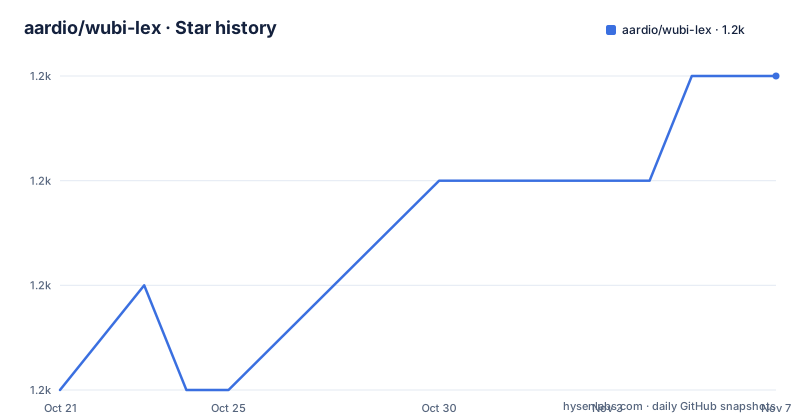
- aardio/wubi-lex1,195 ★ · +3
| Repository | 2026-10-21 | 2026-11-07 |
|---|---|---|
| aardio/wubi-lex | 1.2k | 1.2k |
3 Stars in the last 17 days, measured from the daily GitHub snapshot. Compare with other projects
Editorial analysis
The system tables WubiLex overwrites on Windows 10 and 11
Windows 10 and 11 arrive with the Microsoft Wubi input method already installed, and its code table and phrase library are fixed as part of the system. Switching to a different Wubi scheme normally means installing a separate input method, which changes the behaviour of every application on the machine. WubiLex takes a narrower path. It is a small aardio program that replaces the built-in Microsoft Wubi tables in place, so the input method stays the one Windows already knows how to drive. The project bundles the popular alternatives: Wubi 86, Wubi 98, Wubi 091, Wubi 092, the Xinshiji edition, Xiaohe Yinxing, Zhengma and Bixingma. That makes it a fit for a Windows user whose typing habits follow one of those schemes and who would rather not install and maintain a second input method. The licence is MIT, so the code can be read, changed and redistributed under the usual MIT terms, and the whole program is a 792KB archive rather than an installed service.
Table formats the editor reads, writes and imports
The useful part of WubiLex is not the bundled tables, it is the editing layer around them. The tool accepts many of the table formats that circulate for Wubi users, including word before code, code before word, one code per line and several codes on a single line. Tables can be imported and exported as CSV, as JSON, and in LZMA compressed form, so a table that already exists somewhere on your disk can usually be brought in without rewriting it by hand. The phrase library that Microsoft Wubi ships with can be edited directly, and WubiLex extends the built-in phrase behaviour, accepting the various phrase library formats that circulate and providing a convenient way to define custom special character arrays. The practical consequence is that a custom scheme is a file you can edit, export, keep in version control and move between machines, rather than a set of clicks inside the Windows language options panel.
Building a phrase library with empty-code completion
A Wubi installation is only as good as its phrase library, and hand editing thousands of entries is the point where most custom setups get abandoned. WubiLex answers this with a one-click intelligent word creation feature. The idea is to lean on the empty code: the editor completes the code for you as you type, and the word you intend lands in the library without you assembling the code by hand. The README puts the expected scale at over a hundred thousand popular words added this way. The catch is that this is a lookup and completion aid rather than a curated dictionary, so the result is broad coverage with less control over which entries end up in your library. If you want a small, hand-tuned phrase set, the direct editing path is the one to use, and the automatic completion is there for the long tail.
Reverse lookup and the deliberately sparse virtual keyboard
Looking a code up is the other half of the problem, and WubiLex treats it as a first-class feature rather than a side utility. Pressing Ctrl + F2 opens a reverse lookup, and pressing Ctrl + F2 again returns you to the window you came from, so the interruption does not break a half typed sentence. The lookup works for single characters and for phrases, and it draws a detailed decomposition diagram of the character rather than printing a bare code. A virtual keyboard shows where the keys sit, and hovering a key shows the root characters that live on it. The stroke order animation follows the standard writing order, and clicking after the animation finishes replays it. What is unusual here is the shape of the keyboard itself. Full root charts put every root on every key, and the author argues that a wall of characters lowers memory efficiency, so the keyboard is drawn in a stripped down form with fewer visible roots.
A 7z archive, not an installer
There is no installation step, and there is no package manager entry either. The project page points at a 7z archive of the program, and the size of that download is 792KB. The whole application and its interface are written in aardio, and the author notes that the aardio development environment is only 6.5MB, which is the sort of arrangement that makes a small utility practical to read and modify. Because the program is portable, the usual friction of a Windows utility, an installer, a service, a registry key, does not apply. The trade-off is that a portable program also has no updater of its own, so you have to fetch a newer archive yourself. The project has no GitHub releases, which means there is no published changelog to read before you replace anything.
The super hotkey feature moved to a separate tool
One capability was removed, and the project says so directly. Newer versions of WubiLex no longer provide the super hotkey function. For users who relied on it, the recommended replacement is ImTip, a separate utility of roughly 800KB that takes over the shortcut work: opening financial uppercase amounts, date and time uppercase forms, and arithmetic expressions through a key combination such as Ctrl+$. This is a sensible split, since hotkey handling sits outside the job of a code table editor, but it does mean the download you end up running is not the single archive the project page first points at. WubiLex still covers the input method side of the job: it switches quickly between the English keyboard, Microsoft Wubi and Microsoft Pinyin, and it switches Microsoft Shuangpin schemes, with Xiahe Shuangpin appearing in the candidate list even when it is not installed so that checking it triggers the install.
What WubiLex cannot do, and what it does not promise
Three boundaries are worth stating plainly. First, this is a Windows 10 and 11 tool for replacing the Microsoft Wubi tables, and the project describes no path for macOS or Linux, so a user on either of those systems has to look elsewhere. Second, WubiLex edits and extends the Microsoft phrase feature and its own table formats, but it is not a standalone input method, and it does not add the kind of layout configuration that a separate IME exposes. Third, the README describes no backup, export-before-write or restore step for the system tables it replaces, which means the operation is effectively one-way unless you keep your own copy of the table and phrase files first. The help pages collect the common Microsoft Wubi shortcuts and usage notes, and the project notes that Windows 10 build 2004 and later can turn off the Shift and Ctrl+Space shortcuts that WubiLex's own documented tricks assume.
Editorial conclusion
WubiLex is worth trying if you type Chinese on Windows every day and the stock Microsoft Wubi tables do not match your habits, especially if you want Zhengma or Xiaohe Yinxing without hunting for separate installers. It is the wrong tool for macOS or Linux users, for anyone who needs a standalone input method, or for people who want the super hotkey feature that the current version dropped. Before you replace the system tables, take a copy of your own phrase library, because the README describes no backup or restore step.
Frequently asked questions
Does WubiLex install like a normal Windows program?
No. It ships as a 792KB 7z archive linked from the project homepage and is described as portable with no installation needed, and its entire interface is written in aardio.
Which input method schemes can WubiLex switch to?
It bundles Wubi 86, Wubi 98, Wubi 091, Wubi 092, the Xinshiji edition, Xiaohe Yinxing, Zhengma and Bixingma, and it can also switch between the English keyboard, Microsoft Wubi, Microsoft Pinyin and Microsoft Shuangpin schemes.
What happened to the super hotkey feature?
Newer versions of WubiLex no longer provide it. The project points users to the separate ImTip utility, around 800KB, for hotkeys such as Ctrl+$ for financial uppercase, date and time uppercase and arithmetic.
Can WubiLex show me the code for a character I cannot type?
Yes. Ctrl + F2 opens a reverse lookup that works for single characters and phrases, shows a decomposition diagram, a virtual keyboard and a standard stroke order animation, and pressing Ctrl + F2 again returns to the window you started in.
Official sources
Add this badge to your README
If you maintain this project, the badge below links readers to this analysis and shows its maintenance status from the daily GitHub snapshot. Paste the markdown into your README; add ?metric=license or ?metric=stars to the image URL for a different field.

[](https://hysenlabs.com/projects/aardio-wubi-lex)Star history chart for your README
[](https://hysenlabs.com/projects/aardio-wubi-lex)Was this useful?