BatUtil is a directory of 32 Windows batch scripts, not a toolkit
Collection of batch scripts utilities for Windows
At a glance
- What is it?
- abbodi1406/BatUtil collects standalone batch and VBScript utilities for installing Windows updates, assembling ISO images and rebuilding Office sources. Each script is self-contained and individually versioned by target OS, and the repository publishes no releases, so distribution happens through file hosting mirrors.
- Who is it for?
- Adopt BatUtil if you build Windows deployment media regularly and want one script per target release rather than a maintained framework; do not adopt it as a dependency, because the repository publishes no releases, states no licence, and documents no command line for any of its 32 scripts. Verify first by opening the script for your exact Windows or Office version in the scripts directory and reading it end to end before you run it on a build machine.
- Can I use it commercially?
- Not without permission. GitHub finds no licence file in the repository, and without a licence all rights are reserved by default: you may read the code but not reuse it. Check the README, or ask the authors, before using it.
- Is it still maintained?
- Yes. The repository last received commits 5 days ago.
- What is it written in?
- Mainly VBScript, according to GitHub's language statistics.
Answers come from the project's GitHub data, last synced on November 7, 2026, and from our analysis. They are not legal advice.
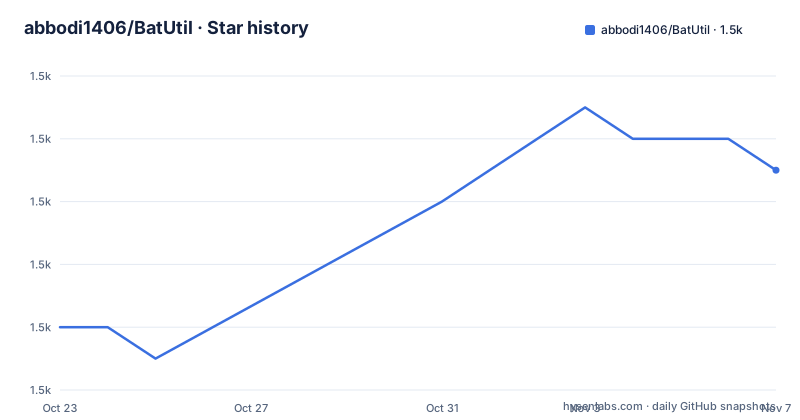
Star history
- abbodi1406/BatUtil1,501 ★ · +5
| Repository | 2026-10-23 | 2026-11-07 |
|---|---|---|
| abbodi1406/BatUtil | 1.5k | 1.5k |
5 Stars in the last 15 days, measured from the daily GitHub snapshot. Compare with other projects
Editorial analysis
Thirty-two directories, each a standalone script
BatUtil has no build system, no package manager entry and no shared library. The top level is a flat list of 32 directories, one per utility, and the repository description calls it a collection of batch scripts utilities for Windows. The primary language is recorded as VBScript, which tells you the scripts lean on Windows Script Host for the parts batch handles badly.
What you get instead of an API is a convention. Each directory holds a self-contained installer that works against a local source directory rather than a network share, and the README's only documentation is a two-column table with a project name and a one-line description. There are no usage examples anywhere in the visible documentation, no parameter tables, and no supported or tested Windows version matrix.
That thinness is the main thing to weigh. Each script is short enough to read in full before you trust it, which is a genuine advantage over an opaque installer framework. The cost is that nothing tells you what a script does when a step fails, or what it expects to find already on disk.
The update installers ship as matched per-version twins
The clearest signal in the table is repetition. Windows NT 10.0 Updates Installer, W10UI, sits beside WHD-W8.1UI and WHD-W7UI, the same job for Windows 8.1 and Windows 7. Multilingual distribution follows the same pattern with W10MUI, W8.1MUI and W7MUI. Extended Security Updates get the same treatment: W81ESUI covers Windows 8.1, Embedded and Server 2012 R2, and W7ESUI covers Windows 7, Embedded and Server 2008 R2.
Read together, those rows describe a maintenance strategy. When the product lifecycle turns over, this author forks the script rather than generalising it, so a change for Windows 10 never breaks a Windows 7 media build. The duplication is deliberate, and it means you pick the directory that matches your target exactly.
It also means the count overstates the variety. Of the 32 entries, nine are the same few jobs aimed at different releases. A team supporting several Windows versions inherits nine scripts to audit, not nine problems.
Two entries extend the same pattern beyond the OS itself. WinDLS installs and changes the UI language for non-multilingual SKUs, and Win81Bing converts Windows 8.1 with Bing OEM images to another language. Both exist because OEM and language-limited SKUs block the normal path, which is a good sign about how the author reads user reports.
Image assembly is where wimlib does the real work
Five entries deal with Windows image formats, and they form the most coherent cluster in the repository.
uup-converter-wimlib assembles segmented UUP files into a usable WIM or ISO. esd-decrypter-wimlib decrypts and converts a complete ESD file into WIM or ISO. ESD2CAB-CAB2ESD converts Windows 10 and 11 package ESD files to CAB and back, while ESD2WIM-WIM2ESD converts solid-compressed ESD to maximally compressed WIM and the reverse. The naming of the last two is itself the documentation: the project name states the direction.
Two more work on update packaging. PSFX_MSU builds a Windows 11 LCU MSU file out of UUP update files, and PSFX_Repack extracts psf and cab archives from PSFX format and repackages them into a full cab or esd.
The common thread is compression and container juggling on files measured in gigabytes. Every one of these scripts shells out to external tooling, wimlib among them, and the README does not say where that dependency comes from or whether the script checks for it. You are expected to supply the toolchain yourself.
ActionListUUP sits at the edge of the cluster. It creates an ActionList.xml used with WindowsUpdateBox.exe to upgrade or install directly from a Windows 10 UUP set, which makes it a bridge to another script rather than a standalone tool.
Office Click-to-Run takes up more room than the OS scripts
Nine of the 32 entries target Microsoft Office, and the group covers the whole source-building chain rather than a single install path.
YAOCTRI is the offline installer: it installs from an offline source without using the Office Deployment Tool. YAOCTRU is its counterpart, generating the download links for the installation source files, so the two are designed to be used together when you want an offline package assembled from freshly downloaded media.
OfficeScrubber removes an Office installation, MSI or Click-to-Run, across versions from 2003 to 2024. OfficeMSPs extracts and prepares msp update files out of global exe and cab update files into a folder with meaningful names. OfficeUpdates installs MSI 2010, 2013 and 2016 updates straight from exe, cab or msp files. Office2007UpdtDowloader downloads and arranges Office 2007 SP3 and update files. OfficeUpsourcer slipstreams patches for MSI Office 2007 through 2016 and rebuilds the setup source files.
Two remaining entries sit closer to licensing than packaging. OfficeC2R-R2V converts Click-to-Run licensing from Retail to Volume, and OfficeC2R_Extender is described as extending Click-to-Run to Windows 7 and 8.1 to bypass the version restriction. Both change what a licence is allowed to cover rather than what a file contains. The MIT licence that many similar repositories carry does not appear here, and the repository licence is recorded as unknown, so there is no stated permission to redistribute Office media. Check your own licensing position before using the converter on anything you ship.
Distribution rides on file hosts because there are no releases
The repository has no GitHub releases at all, and the README does not tell you to fetch anything from a release page. Instead it lists five download mirrors at the top: a GitHub folder in the author's WHD repository, then Box, MEGA, Google Drive and Download.ru.
That arrangement is the price of a collection rather than a product. Script authors in this space usually host their output on whichever file service their users already use, and mirrors exist because those services rate-limit or disappear. The result is convenient for the reader and hard to verify: there is no tag to pin, no checksum published in the documentation, and no way to tell from the README whether the mirror copies match the repository.
The scripts themselves do live in version control, which is the better copy. Each directory in the top-level listing is tracked on the master branch, so you can read the source, follow its history, and see exactly what a script does before running it. Pin your fork to a commit rather than to a mirror download.
The last push was on 2026-10-02, so the collection is actively being worked on. Whether a specific script is maintained is a separate question that the README does not answer, since no per-script dates are given.
Old runtimes and a browser installer fill the long tail
The remaining entries are single-purpose installers for components that Microsoft stopped shipping the usual way.
dotNetFx48-W8 installs .NET Framework 4.8 on Windows 8 Client, and dotNetFx48-W10_1507_1511 installs or updates it on the first two Windows 10 feature updates, 1507 and 1511. WMF30_Vista is an online installer for Windows Management Framework 3.0, patch KB2506146, on Vista. Tel_W10_Block disables related Windows 10 telemetry settings on Windows 7 and 8.1 and turns off the end-of-support notification.
EdgeChromiumInstaller is an offline installer for Microsoft Edge Chromium with a working Edge Update, and DirectX_Redist is an INF-based installer and uninstaller for the June 2010 DirectX End-User Runtime redistributable.
Each of these is narrow by design, and that narrowness is the collection's strength. A June 2010 DirectX redistributable is not something a general-purpose package manager still handles well, and nobody is going to upstream these scripts into a toolchain. The weakness is the mirror image: because each is a single-purpose script with no test suite and no documented rollback, a failure leaves you reading the script to work out what it already changed.
When a package manager is the wrong answer and when it is not
There is a real alternative for most of what BatUtil does, and it approaches the same problem from the other direction. The repository names several tools and utilities that may serve as alternatives, but it does not document how they compare with these scripts.
YAOCTRI explicitly positions itself as an alternative that does not use the Office Deployment Tool. Whether that is a benefit or a limitation depends on why you want offline sources in the first place.
The case for BatUtil is narrower than the table suggests: a machine with no working Windows Update access, an OEM image to fix, a format conversion that no mainstream tool covers, or a deployment where you want a readable script rather than an opaque installer. The case against it is that scripts here are unaudited, per-version, and shipped through third-party file hosts.
Treat every directory as a file you are about to run with administrator rights and read it first. If you cannot tell what a step does before it executes, it is not ready for your build pipeline.
Editorial conclusion
Adopt BatUtil if you build Windows deployment media regularly and want one script per target release rather than a maintained framework; do not adopt it as a dependency, because the repository publishes no releases, states no licence, and documents no command line for any of its 32 scripts. Verify first by opening the script for your exact Windows or Office version in the scripts directory and reading it end to end before you run it on a build machine.
Frequently asked questions
How do I install or run a script from BatUtil?
The README documents no command line or parameters for any script. It points to five download mirrors for the scripts, including a `scripts` folder in the author's WHD repository, and each utility is tracked as its own top-level directory on the master branch.
Does BatUtil provide a single installer or command for all its utilities?
No. The repository is a collection of 32 standalone directories, and the README is a table listing each project name with a one-line description, with no shared installer, build step or library.
Which Windows versions does BatUtil support?
Scripts target Windows Vista through Windows 11, with separate entries for Windows 7, Windows 8.1 and Windows 10 rather than one script covering all of them. Office coverage runs from Office 2003 to Office 2024 across MSI and Click-to-Run.
Official sources
Add this badge to your README
If you maintain this project, the badge below links readers to this analysis and shows its maintenance status from the daily GitHub snapshot. Paste the markdown into your README; add ?metric=license or ?metric=stars to the image URL for a different field.

[](https://hysenlabs.com/projects/abbodi1406-batutil)Star history chart for your README
[](https://hysenlabs.com/projects/abbodi1406-batutil)Was this useful?