BlueTeamTools: one analyst's blue-team scripts folded into a single Java desktop toolbox
蓝队分析研判工具箱,功能包括内存马反编译分析、各种代码格式化、网空资产测绘功能、溯源辅助、解密冰蝎流量、解密哥斯拉流量、解密Shiro/CAS/Log4j2的攻击payload、IP/端口连接分析、各种编码/解码功能、蓝队分析常用网址、java反序列化数据包分析、Java类名搜索、Fofa搜索、Hunter搜索等。
At a glance
- What is it?
- BlueTeamTools bundles memory-horse decompilation, webshell traffic decryption, pcap analysis and encoding helpers into one Swing application built by a single analyst. It is broad and actively updated, but the repository ships no source tree, no build file and no license.
- Who is it for?
- BlueTeamTools fits analysts who repeatedly handle Java webshell traffic, Shiro and Log4j2 deserialization payloads and pcap files, and who would rather stay inside one Swing window than stitch four decompilers together by hand.
- Can I use it commercially?
- Not without permission. GitHub finds no licence file in the repository, and without a licence all rights are reserved by default: you may read the code but not reuse it. Check the README, or ask the authors, before using it.
- Is it still maintained?
- Yes. The repository last received commits 106 days ago.
- What is it written in?
- GitHub does not report a main language for this repository.
Answers come from the project's GitHub data, last synced on November 7, 2026, and from our analysis. They are not legal advice.
Star history
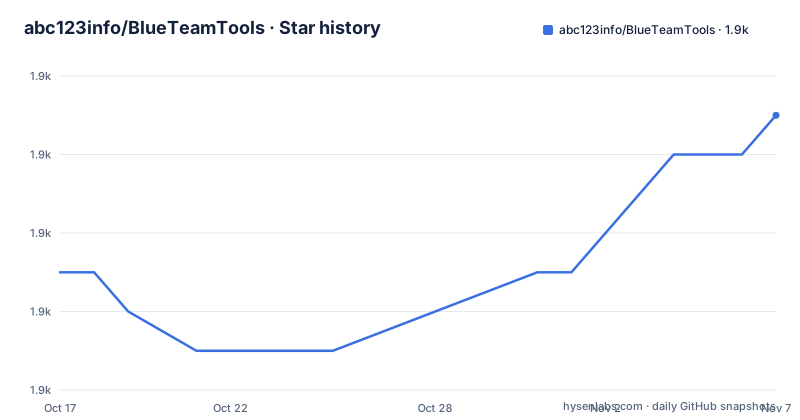
- abc123info/BlueTeamTools1,893 ★ · +4
| Repository | 2026-10-17 | 2026-11-07 |
|---|---|---|
| abc123info/BlueTeamTools | 1.9k | 1.9k |
4 Stars in the last 21 days, measured from the daily GitHub snapshot. Compare with other projects
Editorial analysis
A toolbox assembled from one analyst's own scripts, not from a design document
BlueTeamTools describes itself as a collection of small blue-team tools that the author wrote for himself and later gathered into one package to remove the friction of his daily analysis work. That origin explains the shape of the thing. The first version was finished on 2020.05.25 with a single capability, Shiro deserialization packet decryption, and the project did not begin its large rewrite until 2022.05.04. Everything since has been appended in the same way: a Log4j2 payload deobfuscation pass in 2025.04.07, a pcap import with a progress bar on 2025.04.09, an IP topology drawing routine on 2026.06.22, credential extraction from traffic packets on 2026.06.21.
For an incident responder this matters. There is no architecture document to argue with, and no plugin API to learn. There is a long list of panels that each solve a narrow problem well, in one window, on the same JDK. The latest tag is v4.36, dated 2026-07-24, and the last push was on 2026-07-25. The repository is not archived. The cost of this approach is equally visible: features are uneven in depth, and the project is the personal workflow of one person, with support by Jiyu Tian acknowledged in the project description.
The Swing rewrite that left no build file in the repository root
The interface is a hand-written Swing application, and the history explains why it looks the way it does. On 2015.02.01 the author abandoned the NetBeans drag-and-drop designer and retyped every screen in Swing by hand. The layout classes were rewritten again on 2025.02.06 to clear long-standing interface bugs, and on 2023.07.16 both the skin and the bundled dependency jars were moved to versions compatible with JDK 8 through JDK 20.
The consequence for an adopter is in the repository layout. The top-level listing holds a single file, README.md. There is no build script, no module descriptor, no dependency manifest and no license file at the root, so you cannot produce a build of your own from what the repository exposes. You take the packaged artifact from the tagged releases, v4.36, v3.58 and v3.37 being the ones listed.
No installation command is documented anywhere, so there is nothing to copy here and nothing to compile. In practice the setup is a download of the packaged build from one of those release tags, and a JDK 8 to JDK 20 runtime on the machine, since that is the range the dependency jars and the skin were moved to. Expect to have to pick the build that matches your Java version yourself. The project also points at a twenty part tutorial series recorded by the author, hosted on Bilibili, which is the fastest way to see what each panel expects in the way you will actually use it.
Decryption happens before decompilation, which is why the webshell panels exist
The most distinctive part of the toolbox is the layer that sits between raw traffic and a decompiler. Behinder 4.x traffic decryption arrived on 2025.07.01. Godzilla traffic for versions 3.x through 4.x was handled in request and response form, and on 2023.10.14 the project added detection of class file format inside decoded Godzilla output, writing the result as GodzillaDecode.class. AntSword support came later still: a dedicated algorithm for PHP, JAVA and ASPX traffic on 2025.04.05, an algorithm for AntSword traffic polluted with junk around the Base64 payload on 2025.04.06, and automatic AntSword webshell decryption on 2025.04.13. The Tianxie webshell was added for Java, PHP, NET and ASP on 2024.06.14.
Details like these are where the real work sits. A Behinder key calculation bug caused by a missing leading zero in the md5 produced values that were not 16 characters, and it was fixed on 2024.07.08. Decrypted Chinese text came out garbled, so the tool now lets you select the encoding manually, added 2024.07.18. This is a layer you do not get from a general purpose decompiler, and it is the layer an analyst on a Java webshell incident actually needs.
Six decompilers behind one panel, and a class name search for injected jars
Java decompilation was added on 2022.10.30 by calling Fernflower, CFR, Procyon and JD-GUI, four mainstream engines in one panel. Jadx was added as a fifth engine on 2024.07.31, and on 2024.08.03 the author worked around errors from the engine through Java reflection, a method that generates temporary Jadx support library files in the temp directory, which the project describes as harmless. Krakatau was brought in the same way on 2025.04.26, and QuiltFlower joined the memory-horse decompilation path on 2025.12.07.
The approach differs from running a decompiler on its own. Here the bytes usually arrive from a traffic capture or a memory sample, get unwrapped and deobfuscated first, and only then reach an engine, and the engines sit side by side so you can compare output when one mangles a constructor. A related feature, added 2023.03.15, searches a jar for a given class name, aimed at finding injected class files in a web application lib directory. That search had multiple bugs fixed on 2024.08.23, and a utf-7 encoding class name lookup bug on 2025.07.06, which suggests the encodings here are a persistent source of trouble.
PCAP analysis with a GeoIP cache, topology drawing and protocol parsing
Packet analysis grew into the second large pillar of the toolbox. The pcap panel appeared on 2025.04.09 with an import speed pass and a progress bar, and the charting work was extended on 2025.04.11. Thread safety bugs in the analysis path were addressed on 2025.04.23 and 2025.04.24. Format handling has been a long repair job: on 2025.06.18 automatic recognition of pcap packages was added and an error when opening files with nanosecond precision was fixed, and on 2025.06.19 a set of pcapng files that would not open was fixed along with the pcapng conversion path. A GeoIP query cache added on 2025.06.16 to speed up analysis.
The 2026 additions are the ones worth noting. On 2026.06.22 the tool began drawing an IP address network topology graph from a capture and moving HTTP requests into their own tab, and on 2026.06.21 it began extracting account and password credentials from traffic. Application layer parsing covers ftp, telnet, smtp, rdp, pop3, redis, mysql and postgresql from 2025.06.22, and tftp, NTP, NetBIOS and DHCP over UDP from 2025.06.23. A DGA judgment model in the DNS tab arrived 2026.06.20, backed by a GPU trained XGBoost model added 2026.01.09.
The port connection panel takes netstat output, and turns it into a chart
Not every panel works on live data. The IP and port connection analysis feature works by ingesting the output of the netstat command, and the project made that path graphical on 2025.11.19. Earlier, on 2023.04.02, foreign addresses in the results of netstat -an were highlighted so a domestic console session stands out from outbound connections, and on 2023.10.06 IPv6 support was added with physical location lookup for IPv6 addresses. On 2022.10.28 the lookup path was tuned for speed, with the project claiming results appear in seconds, and on 2024.06.15 batch lookup was added for lists of IP addresses. The offline IP database was refreshed on 2023.07.21 and again on 2024.07.24.
So the workflow is deliberate and worth understanding. You run the operating system command yourself, paste the result, and the toolbox adds the enrichment and the visual summary that a plain terminal cannot give you. That is a narrower and more honest integration than a live sensor, and it also means no data leaves the machine during this particular step.
The command the panel expects is the standard one:
netstat -anThe output carries the remote and local endpoints the panel then resolves and charts, with foreign addresses highlighted.
The AI features call out to a DeepSeek interface and load an opaque model
Two additions place this project outside a purely local toolkit. On 2026.02.28 the author added a DeepSeek interface for judging memory-horse samples, webshell traffic and deserialization packets, and on 2026.03.01 AI recognition was attached to the memory-horse, Java serialization, Shiro and CAS analysis features. Separately, the DGA module of 2026.01.09 loads an XGBoost model trained with GPU compute, and the 2026.06.20 DNS tab entry is described as the author's own model.
No configuration guidance exists for any of it. The project files do not describe how the DeepSeek endpoint is addressed, what a key looks like, whether results are cached, or what happens when the service is unreachable, and the same silence applies to how the trained model is validated or how many false positives to expect on a domain list. Treat those panels as uncertain ground. A judgment returned by a remote model is also not the same kind of finding as a key computed by the tool, and a report that mixes the two without saying which is which is harder to defend later.
The offline side has its own gaps. A search module lists Fofa, Hunter, Quake, Zoomeye, Censys, Shodan and VirusTotal integrations, and the API parsing was corrected on 2024.07.28, but no setup steps for API keys or accounts are given.
A bundled toolbox against separate specialist tools
The realistic alternative is not one product. It is the set of tools BlueTeamTools absorbs: a standalone Jadx or QuiltFlower for decompilation, a separate pcap reader for captures, a dedicated encoder for the obfuscation work, and a console for netstat. The difference in approach is where the bytes get their context. A standalone decompiler takes a jar or a class and gives you source. BlueTeamTools takes a captured request, decrypts the AntSword or Godzilla body, recognises the embedded class file, and hands it to one of those engines inside the same window, with the decoded output written to disk as a named file. The value is not that the decompilation is better. It is that the steps between capture and readable code sit in one place.
The cost is the usual one with bundled tools. Every included engine is a dependency the project maintains on a schedule set by one maintainer, and the JDK 8 to JDK 20 compatibility promise is the main platform commitment on offer. A team that wants to pin versions, review the code that touches traffic and run a reproducible build will not get that from this repository, which exposes a README and releases rather than a source tree.
Editorial conclusion
BlueTeamTools fits analysts who repeatedly handle Java webshell traffic, Shiro and Log4j2 deserialization payloads and pcap files, and who would rather stay inside one Swing window than stitch four decompilers together by hand. It is the wrong choice for teams that need a reproducible build, an auditable licence, offline-only operation or a supported toolchain, and for anyone who cannot read Chinese, since the interface and the twenty-part tutorial series are in that language. Before you adopt it, check three things in the release you intend to ship: that the version tag you use has a published licence file, that your platform opens the window without the JavaFX problems the project has been patching, and that the DGA model and the DeepSeek call behave the way you expect when your traffic leaves the machine. The last push was on 2026-07-25, with the v4.36 release dated 2026-07-24, so the code is moving, but the packaging around it is the part that needs checking first.
Frequently asked questions
What is BlueTeamTools and who is it built for?
It is a Java desktop toolbox for blue-team analysts, collecting utilities the author wrote for his own work: memory-horse decompilation, Shiro, CAS and Log4j2 payload decryption, webshell traffic decryption, pcap analysis, encoding and decoding helpers, asset mapping and search engine lookups. The interface is hand-written Swing and the project targets JDK 8 through JDK 20.
Does BlueTeamTools decrypt Behinder, Godzilla and AntSword traffic?
Yes. Behinder 4.x decryption was added on 2025.07.01, Godzilla request and response decryption covers versions 3.x through 4.x and can write the decoded class file out as GodzillaDecode.class, and AntSword traffic for PHP, JAVA and ASPX is handled with an algorithm for payloads carrying junk around the Base64 body.
Does BlueTeamTools run on Linux and macOS?
The project has been working on that. The DJ Native Swing browser module was temporarily removed on 2025.03.11 to resolve Linux and Mac compatibility problems, a JavaFX reflection fallback was added on 2025.04.08 so the program opens where JavaFX is unsupported, and a Mac display blur fix landed on 2023.10.09.
Does BlueTeamTools need an API key or a network connection?
The project does not document any setup for API keys. It ships search integrations for Fofa, Hunter, Quake, Zoomeye, Censys, Shodan and VirusTotal, adds a DeepSeek interface for AI judgment, and a GeoIP cache speeds up offline address lookups, but no configuration steps are given for the networked parts.
What license does BlueTeamTools use?
No license identifier is published. The top-level listing of the repository contains only README.md, with no license file visible, so the terms of use for the packaged jar are not stated there.
How current is BlueTeamTools?
The repository is not archived, the last push was on 2026-07-25, and the release tags listed include v4.36 dated 2026-07-24, v3.58 dated 2025-11-29 and v3.37 dated 2025-11-03.
Official sources
Add this badge to your README
If you maintain this project, the badge below links readers to this analysis and shows its maintenance status from the daily GitHub snapshot. Paste the markdown into your README; add ?metric=license or ?metric=stars to the image URL for a different field.

[](https://hysenlabs.com/projects/abc123info-blueteamtools)Star history chart for your README
[](https://hysenlabs.com/projects/abc123info-blueteamtools)Was this useful?