WinPaletter: a portable editor for Windows appearance
Advanced Windows Appearance Editor
At a glance
- What is it?
- WinPaletter is a portable C# tool that rewrites Windows colors, visual styles, metrics, LogonUI, cursors and terminal schemes outside the Settings app, and after its archiving it has returned as a cleanup release with limited developer availability.
- Who is it for?
- WinPaletter suits Windows users who want to reach classic colors, metrics, LogonUI and terminal schemes that the Settings app hides, and it is a poor fit for anyone who needs a steady release cadence or unattended managed deployment, because the developer commits to one or two days a week and ships beta builds.
- Can I use it commercially?
- Check first. The repository uses a licence we do not classify automatically, so read its LICENSE file before any commercial use.
- Is it still maintained?
- Yes. The repository last received commits 7 days ago.
- What is it written in?
- Mainly C#, according to GitHub's language statistics.
Answers come from the project's GitHub data, last synced on November 7, 2026, and from our analysis. They are not legal advice.
Star history
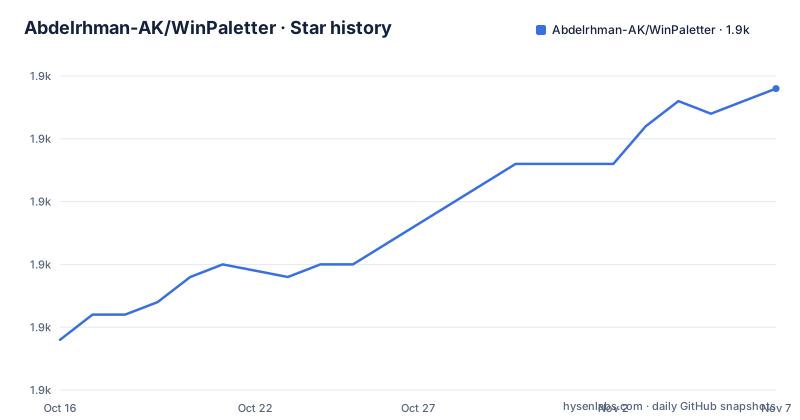
- Abdelrhman-AK/WinPaletter1,919 ★ · +20
| Repository | 2026-10-16 | 2026-11-07 |
|---|---|---|
| Abdelrhman-AK/WinPaletter | 1.9k | 1.9k |
20 Stars in the last 22 days, measured from the daily GitHub snapshot. Compare with other projects
Editorial analysis
The Settings app stops at accent color, so WinPaletter keeps going
WinPaletter covers a broad range of Windows appearance settings. WinPaletter exists to push past it. The list it claims to cover includes Windows Colors, Visual Styles, Classic Colors, the lock screen LogonUI, cursors, metrics and fonts, terminals and consoles, wallpaper, sounds, screen savers, Windows tweaks and icons. That list matters because each of those areas sits in a different corner of the system, and most of them are still backed by registry values and system resources rather than by a documented modern API.
The target audience is narrow and obvious: people who want a Windows 11 or Windows 10 desktop that looks deliberately different from the one Microsoft ships, and who have already found that the Settings app will not let them get there. Designers and developers appear in the README's own framing of who should use it. The scope is a desktop customization utility, not a build tool or a provisioning system, and nothing in the repository layout suggests it is meant to run on a managed fleet.
A solution that ships an .sln, a sound submodule and a theme Store
The repository is laid out as a Visual Studio solution, WinPaletter.sln, with the main application under the WinPaletter directory. Beside it sit a handful of directories that say more about how the project is assembled than any marketing copy would. There is Languages/, holding localization files, and Store/, which matches the WinPaletter Store the README points people to for community themes. UpdatesConfig/ suggests the application checks for its own updates. References/ collects what the build depends on, and.gitmodules means at least one component arrives as a submodule rather than vendored source.
That submodule is WinPaletter.SysEventsSounds, a separate project for system event sounds, which confirms that sound changes are handled as their own area rather than as a checkbox inside the color editor. A CHANGELOG.md sits at the root, so changes are tracked per release.
Themes are the unit of exchange. A theme bundles the palette decisions across colors, styles, metrics and terminals, can be imported and exported, and can be downloaded from the Store through GitHub integration built into the application. The README warns that unofficial builds circulate and that the official build is the safe one specifically because of that GitHub integration for uploading and managing themes. The warning is worth reading: the app has GitHub integration for uploading and managing themes.
winget and Chocolatey install it; Windows 7 needs a repack
There is no build-from-source recipe in the README. The project distributes through releases and package managers, which for a portable C# tool is the normal arrangement. The releases page is the first source to be updated, so treat it as authoritative over any package feed that lags behind it. Microsoft WinGet installs it with a single command, after which the executable is launched by typing its name in Terminal:
winget install Abdelrhman-AK.WinPaletterChocolatey is offered for people who already run that feed, and it accepts an explicit version pin when a specific build is wanted rather than the latest one:
choco install WinPaletterThe support table is where installation gets messy. Windows 11 and Windows 10 accept any version, though Windows 10 builds lower than 1709 might need .NET Framework 4.8 updated by hand. Windows 8.1 and Windows 7 need 1.0.5.0 or newer plus the framework installed from Microsoft. Windows 8 needs 1.0.9.5 or newer and a custom install method the README links to a wiki page for. Vista and XP both need 1.0.7.1 or newer, and both need a repacked build, with XP additionally requiring OneCoreAPI. That is the clearest statement in the whole document about what the tool actually reaches into: the oldest supported systems are handled by redistributing components into the executable itself.
Real-time preview across colors, metrics and terminals
The mechanism users notice first is real-time preview, which renders the effect of a color choice before it is committed. For a tool whose entire job is writing system-level color values, that matters more than it would in a normal settings dialog, because the cost of a bad palette is a system that looks wrong until someone changes it back.
The preview covers the categories the tool edits rather than a single preview pane. Colors, visual styles and classic colors each have their own rendering, metrics and fonts change sizing across the shell, and terminals and consoles get their own scheme, which is why Windows Terminal and Command Prompt appear in the repository topics alongside logonui and windows-classic. The lock screen is treated as a first-class target instead of a wallpaper setting, which is unusual for this class of utility.
The theme import and export path is the practical one for repeat users. Build a palette once, export it, then apply it on another machine or after a Windows feature update resets something. The Store provides the community distribution path, and the GitHub integration handles upload and management from inside the app.
The return release is a maintenance promise, not a feature roadmap
The most consequential facts about WinPaletter are in the warning blocks at the top of the README, not the feature list. The project was archived and has returned. The stated scope of the return is cleanup of legacy issues and getting into a stable, workable condition, and the author says significant new features are not anticipated.
Development availability during this phase is limited to one or two days a week, or every two weeks, and not for a full day. Progress will therefore be slower than during the more active development period before archiving. That is a schedule statement from the author, and it is the single most useful thing to know before depending on the project.
The archive history does not look alarming in the repository data: the repository is not archived now, and the last push was on 2026-10-15. But the release list tells the real story. v1.0.9.7 was tagged Stable on 2025-10-10, v1.0.9.8 came as Beta on 2026-03-05, and v1.0.9.9 arrived as v1.0.9.9-Beta on 2026-07-23. Two of the last three published builds carry a beta label, which is consistent with a stabilization effort that has not yet produced a new stable tag.
Where WinPaletter is the wrong tool
There are honest cases for not using it. If you manage Windows images across an organization, a GUI utility that writes system appearance state is the wrong category of tool, and the repository layout gives no sign of an unattended deployment path, a configuration file format or a documented command line for scripted theme application. The only commands the README gives are package installs.
The rollback story is thin. The README does not document how to revert a theme, and it does not document which registry keys or system resources are touched. Creating a restore point before applying changes is the only precaution available from what is written.
Older systems carry extra weight. If you are on Vista or XP, the documented path requires a repacked build, and XP additionally needs OneCoreAPI, which is a compatibility shim rather than a supported configuration. That is a signal about where the project's engineering attention is not.
On antivirus false positives, the project keeps a dedicated wiki page, which is an admission that the executable is flagged often enough to need an explanation.
Customizer versus registry editing, and the licence
The realistic alternative is doing it by hand: editing the registry values behind accent colors, visual styles and LogonUI yourself, or shipping a theme through a policy mechanism. The difference in approach is the reason WinPaletter exists. Hand editing gives exact control over each value and leaves no application in charge, but it requires knowing where each value lives, offers no preview, and no bundled way to move a palette between machines. WinPaletter puts a preview, a palette editor, theme files and a distribution store in front of those same underlying values.
The other comparison is with Windows themes in general.
Licensing is a point to check before any organizational use. The license field on the repository reads Other, a custom license GitHub cannot classify. The README badge reads MIT AND CPOL, and License.md is a file at the repository root. Those two statements are not identical, and the README does not explain how they combine, so read License.md rather than relying on the badge.
Editorial conclusion
WinPaletter suits Windows users who want to reach classic colors, metrics, LogonUI and terminal schemes that the Settings app hides, and it is a poor fit for anyone who needs a steady release cadence or unattended managed deployment, because the developer commits to one or two days a week and ships beta builds. Anyone adopting it should first check the releases page for the newest tag against the support table, confirm the machine runs a supported Windows build with .NET Framework 4.8, and create a restore point, since the tool writes registry-backed system state that the README does not describe a rollback for.
Frequently asked questions
Is WinPaletter free and safe to download?
The README states WinPaletter is completely free and does not require a paid license. It also warns that unofficial builds appear on GitHub and advises using the official build, because the app has GitHub integration for uploading and managing themes.
Which Windows versions does WinPaletter support?
Any version runs on Windows 11 and Windows 10, with Windows 10 builds below 1709 possibly needing .NET Framework 4.8 updated manually. Windows 8.1 and Windows 7 need version 1.0.5.0 or newer, Windows 8 needs 1.0.9.5 or newer, and Vista and XP need 1.0.7.1 or newer with a repacked build, with XP additionally requiring OneCoreAPI.
How do I install WinPaletter without downloading a file by hand?
Microsoft WinGet installs it with `winget install Abdelrhman-AK.WinPaletter`, and Chocolatey supports `choco install WinPaletter` with an optional `--version` pin. The README says the GitHub releases page is the first source to be updated, so it is the authoritative one when feeds lag.
Is WinPaletter still being actively developed?
The project was archived and has returned with a cleanup-focused scope. The developer states availability is limited to one or two days a week, or every two weeks, and the two most recent releases, v1.0.9.8 and v1.0.9.9, are labeled Beta while v1.0.9.7-Stable dates from 2025-10-10.
Official sources
Add this badge to your README
If you maintain this project, the badge below links readers to this analysis and shows its maintenance status from the daily GitHub snapshot. Paste the markdown into your README; add ?metric=license or ?metric=stars to the image URL for a different field.

[](https://hysenlabs.com/projects/abdelrhman-ak-winpaletter)Star history chart for your README
[](https://hysenlabs.com/projects/abdelrhman-ak-winpaletter)Was this useful?