DeskBox: WinUI 3 desktop widgets that sit on your existing folders
A free, open-source Windows desktop organizer with native-feeling WinUI 3 widgets.
At a glance
- What is it?
- DeskBox puts WinUI 3 widgets on top of ordinary Windows folders instead of replacing Explorer, so shell drag and drop keeps its usual copy-or-move logic. The costs are a separate Everything install for file search, unsigned installers, and a closed door on outside pull requests.
- Who is it for?
- DeskBox suits Windows 10 and 11 users who want a tidier desktop without giving up Explorer's own file handling, and who can install Everything separately and check a hash by hand. It does not suit anyone who needs file search on first launch, a signed installer, or a working route for outside code: verify the .sha256 sidecar for the 1.5.9 build you pick, and read the CHANGELOG in the repository before you upgrade over a working setup.
- Can I use it commercially?
- Yes, with conditions. GPL-3.0 is a copyleft licence: if you distribute software that includes it, you must release that software's source code under the same licence. Running it internally without distributing it does not trigger that obligation.
- Is it still maintained?
- Yes. The repository last received commits 4 days ago.
- What is it written in?
- Mainly C#, according to GitHub's language statistics.
Answers come from the project's GitHub data, last synced on November 14, 2026, and from our analysis. They are not legal advice.
Star history
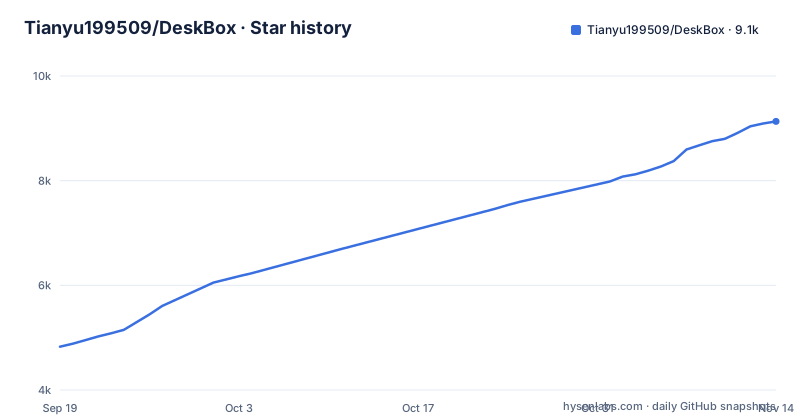
- Tianyu199509/DeskBox9,133 ★ · +4,306
| Repository | 2026-09-19 | 2026-11-14 |
|---|---|---|
| Tianyu199509/DeskBox | 4.8k | 9.1k |
4,306 Stars in the last 56 days, measured from the daily GitHub snapshot. Compare with other projects
Editorial analysis
Real folders behind every file widget
DeskBox does not take the desktop over. A file widget is a panel bound to an ordinary Windows folder: you can create a managed widget or map a folder that already exists, in which case nothing moves out of it. Inside a widget you choose an icon or a list layout, a title style, whether detail columns and the path show, sorting that is manual or rule-based, compact display density, a per-widget icon size, and one-line, two-line, or hidden file names. Widgets resize down to 50×50, so a panel can shrink to a tile instead of staying a window. Items reorder by dragging, move or copy into a folder item, and the manual order comes back after a restart. The stated alternative is Stardock Fences, and the difference claimed for DeskBox is that the folders underneath keep behaving the way Windows already made them behave.
Stacks open as a 3×3 or 5×5 popover
You stack files by hand, or turn on automatic grouping as a separate switch, so the decision to group stays yours. A stack either expands inside the widget or opens as an Adaptive, 3×3, or 5×5 popover that keeps the grid's icon size, density, selection, and Ctrl+mouse-wheel behavior, and stays within the screen edges. Several file widgets can be merged into a group without changing the backing folders, and members then cycle from the title, the mouse wheel, or a cyclic Ctrl+Tab shortcut:
Ctrl+TabA member can be detached or the group dissolved, and grouped and standalone widgets keep the same views, settings, menus, sorting, drag and drop, and QuickLook behavior. Space previews a supported file only when a QuickLook instance is already running, which is a separate program you install yourself. Copy and move operations report per-item progress, and the source, destination, and receiving folders are held still during the transfer so nothing collides mid-copy.
Todos and Quick Capture sit in the same widgets
The same widget that holds files also holds a task list. Todo and Quick Capture switch between single-pane and dual-pane layouts, with an adjustable master pane on wide widgets. Tasks carry due dates, reminders, recurrence, color markers, Markdown notes, attachments, filters, and batch actions. Quick Capture holds reusable text, links, images, and files, with pinning, paper styles, Markdown editing and preview, removable attachments, and a focused editing mode. Attachments are a genuine fork in the road: keep them linked to their original location, or copy them into storage DeskBox manages itself. The storage model is local-first throughout, with files, notes, tasks, settings, and layouts remaining on the PC. Thirteen languages are selectable, and all thirteen share the same resource-key and formatting-placeholder coverage.
The tidy-up preview names every transfer it refused
Before it moves anything, DeskBox can lay out your desktop by category so you read the plan first, and you choose per category whether it creates a folder or reuses a widget that already exists. The pass can be told to include folders it would otherwise retain, large files, and items beyond the quick batch. The failure handling matters more than the sorting: access-denied, in-use, changed, unavailable, and failed transfers are each explained separately rather than collapsing into a silent skip, which means a mass tidy tells you what it left behind instead of pretending the desktop is clean. A separate option organizes new desktop files after downloads, extractions, and same-path replacements reach a stable state. Drag and drop defers to Windows for the copy-or-move decision, including cross-volume behavior, and modifier keys create shortcuts instead. You can also drop content in from Explorer, WeChat, or a browser, or download a remote image or file URL straight into a widget.
File search hands off to an Everything install you supply
This is where the dependency bites. File results come from Everything's existing local index over IPC, and DeskBox no longer maintains a duplicate file index of its own, so the file half of search is only as current as the Everything install on the machine. Everything is not bundled. Settings detects it or launches it, lets you choose its executable, shows connection and permission status, opts you into advanced syntax, and filters low-value system and cache paths, but you install it separately first. A reader who skips that step gets a popup that still finds applications, settings, notes, and todos and comes up short on files. The rest of the surface is real: configurable filters, sortable detail columns, result limits, history, favorites, a global search hotkey, Ctrl or Shift row selection, a selection rectangle with edge auto-scroll, and batch actions over the result set. Providers stay isolated, so one failing source does not take the window down.
Two unsigned AOT installers, and no outside pull requests
Installation is a download, not a build. DeskBox 1.5.9 ships two Full Native AOT packages, one for x64 and one for ARM64, each carrying the matching private Windows App Runtime 2.5.1 so it installs offline with no separate .NET 10 or Windows App Runtime package. The x64 build is aimed at Intel and AMD PCs, the ARM64 one at Snapdragon and Surface Pro X machines.
https://github.com/Tianyu199509/DeskBox/releases/download/v1.5.5/DeskBox_Setup_1.5.5_x64.exe
https://github.com/Tianyu199509/DeskBox/releases/download/v1.5.5/DeskBox_Setup_1.5.5_arm64.exe
Pick the one that matches your processor, run it, and DeskBox installs for the current user by default. Every release publishes a .sha256 sidecar for each installer, and the installers are currently unsigned, so verifying that hash is the only check offered before you run one. Version 1.5.9 landed on 2026-10-23, 1.5.8 on 2026-10-14 and 1.5.7 on 2026-10-13, which is a fast cadence. The build side is visible in the repository, where a C# solution sits beside a Rust layer and the installer scripts:
DeskBox.sln
Directory.Build.props
global.json
rust-toolchain.toml
installer/
native/
src/
tests/
docs/
scripts/
CHANGELOG.md
CONTRIBUTING.md
SECURITY.md
External pull requests are not being merged at this time, with bug reports, ideas, and discussions routed to Issues and Discussions instead, so a patch from outside lands as a report rather than as code. The license is GPL-3.0-only.
Editorial conclusion
DeskBox suits Windows 10 and 11 users who want a tidier desktop without giving up Explorer's own file handling, and who can install Everything separately and check a hash by hand. It does not suit anyone who needs file search on first launch, a signed installer, or a working route for outside code: verify the .sha256 sidecar for the 1.5.9 build you pick, and read the CHANGELOG in the repository before you upgrade over a working setup.
Frequently asked questions
What is DeskBox, the Windows desktop organizer?
DeskBox is a free, open-source Windows desktop organizer built on C#, WinUI 3, .NET 10 Native AOT, and a Rust native Shell layer. Its file widgets are backed by ordinary folders, so a folder can be mapped without being moved.
Does DeskBox file search work straight after install?
Not for files. File results come from Everything's existing local index over IPC, and Everything is not bundled, so you install it separately. Settings can detect or launch it and lets you choose its executable and permission status.
Can I verify a DeskBox installer before running it?
Every release publishes a matching .sha256 sidecar for each installer, one for x64 and one for ARM64. The installers are currently unsigned, so that hash is the only verification step the project offers.
Can outside contributors send DeskBox a pull request?
Not at this time. External pull requests are not being merged, and the project asks for bug reports, ideas, and discussions through Issues and Discussions instead. The license is GPL-3.0-only.
Official sources
Add this badge to your README
If you maintain this project, the badge below links readers to this analysis and shows its maintenance status from the daily GitHub snapshot. Paste the markdown into your README; add ?metric=license or ?metric=stars to the image URL for a different field.

[](https://hysenlabs.com/projects/tianyu199509-deskbox)Star history chart for your README
[](https://hysenlabs.com/projects/tianyu199509-deskbox)Was this useful?