node-resque: a Redis-backed job queue for Node.js
Node.js Background jobs backed by redis.
At a glance
- What is it?
- node-resque is an opinionated Node.js implementation of Resque that stores background jobs in Redis and processes them with workers and a scheduler. It suits teams that already run Redis and need delayed jobs, priority queues, locking and retries.
- Who is it for?
- Adopt node-resque when you run Node.js and Redis and need delayed, prioritised background work with locking and retry plugins. Skip it when you cannot operate Redis or your stack is not Node-based.
- Can I use it commercially?
- Yes. Apache-2.0 is a permissive licence: you can use, modify and sell software built on it, as long as you keep its copyright and licence notices.
- Is it still maintained?
- Yes. The repository last received commits 2 days ago.
- What is it written in?
- Mainly TypeScript, according to GitHub's language statistics.
Answers come from the project's GitHub data, last synced on October 23, 2026, and from our analysis. They are not legal advice.
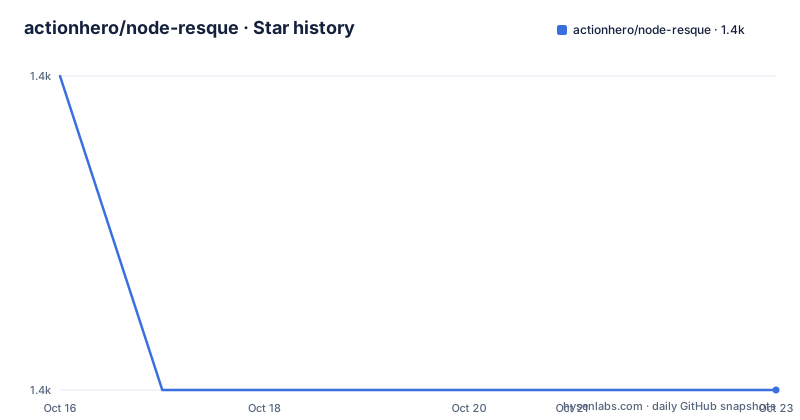
Star history
- actionhero/node-resque1,414 ★ · -1
| Repository | 2026-10-16 | 2026-10-23 |
|---|---|---|
| actionhero/node-resque | 1.4k | 1.4k |
-1 Stars in the last 7 days, measured from the daily GitHub snapshot. Compare with other projects
Editorial analysis
What node-resque solves and who it is for
node-resque is an opinionated implementation of Resque for Node.js. It moves work out of the request path by storing job definitions in Redis and letting separate worker processes perform them. A job has two parts: instructions in the form of a perform function, and the inputs needed to carry them out. The project targets engineers who already operate Redis and want background processing with priority queues, delayed jobs, locking and retries without building a queue from scratch. It is API-compatible with Resque and Sidekiq, with documented caveats, so teams familiar with those systems can map their mental model across. It is not a general task runner for environments without Redis, and it does not remove the need to run and monitor a Redis instance.
How the factory moves jobs through Redis
The documentation describes the system as a Kanban style factory. Queues act like conveyor belts that hold jobs in order until a worker picks them up. There are three queue types: regular work queues, delayed job queues, and the failed job queue. Workers are the heart of the factory. Each worker handles one job at a time, pulling from one or more assigned queues. After taking a job it attempts to complete it. On success it returns to polling. On failure it records the job and its inputs in the failed job queue before continuing. The scheduler is a specialised worker that never executes jobs. It manages the delayed job queue, checking whether any delayed job is ready to run, and when one becomes ready it places a new instance of that job into its defined queue. Plugins such as JobLock can wrap a job, with options like reEnqueue, to add locking or retry behaviour on top of this flow.
Starting a worker and a scheduler
The README teaches by example. You first create a connection details object, then define your jobs, then start a worker and a scheduler. A minimal worker looks like this:
  const worker = new Worker(
    { connection: connectionDetails, queues: ["math", "otherQueue"] },
    jobs,
  );
  await worker.connect();
  worker.start();
The connection object uses the ioredis package and points at a Redis host and port, with optional password, database and namespace. Jobs are defined as an object whose keys are job names and whose values contain a perform function plus optional plugins and pluginOptions. The scheduler is created with the same connection details, connected, and started. Workers and schedulers emit events such as start, end, poll, job, success, failure and error, which you can listen to for logging or metrics. The example also shows a JobLock plugin configured with reEnqueue set to true.
Delayed and failed jobs
Delayed jobs are not worked immediately. They are added to the delayed job queue with a time at which they become available. The scheduler constantly checks for readiness and, when a job is ready, enqueues a fresh instance into the target work queue. Failed jobs are not retried automatically by the core worker. Instead they are placed in the failed job queue with their inputs, leaving recovery to an operator or a plugin such as the retry plugin the project implements. Because the scheduler is the only component that promotes delayed jobs, a missing or stopped scheduler means delayed work stalls even while workers are healthy. Running at least one scheduler process is therefore part of operating the system, not an optional extra.
When node-resque is the wrong tool
node-resque requires Redis version 2.6.0 or newer, because it relies on Lua scripting for custom atomic operations. If you cannot operate Redis, or your organisation standardises on another broker, this is not the right fit. Each worker processes one job at a time, so throughput comes from running more workers or processes rather than from concurrency inside one worker. The documentation does not promise exactly-once delivery or automatic retry in the core worker, since failed jobs land in the failed queue for later handling. Teams that need those guarantees, or that run outside Node.js, should look at the systems node-resque mirrors rather than adopting it and fighting the runtime.
Compatibility with Resque and Sidekiq
The project states that it is API-compatible with Resque and Sidekiq, with caveats tracked in issue 311. It also implements popular Resque plugins, including resque-scheduler and resque-retry. The practical difference is runtime. Resque and Sidekiq run in Ruby, while node-resque runs in Node.js and uses ioredis as its client. If your application and its libraries are in Node.js, node-resque keeps job definitions in the same language and deployment unit. If your estate is Ruby-based, the original Resque or Sidekiq remains the natural choice, and node-resque is better treated as a port you read for design ideas than as a drop-in.
Maintenance, runtime requirements and licence
The repository is not archived, and its last push was on 2026-10-12. Recent releases include v9.7.1 on 2026-07-24, v9.7.0 on 2026-06-01 and v9.6.0 on 2026-05-28. The package requires Node.js 12.0.0 or newer and Redis 2.6.0 or newer, and depends on ioredis. Version 6 and above are written in TypeScript, with JavaScript transpiled code still shipped in npm releases, and functionality between v5 and v6 is intended to be the same. Version 5 and above use async and await, with no upgrade path from earlier versions. The licence is Apache-2.0. Type documentation is generated with TypeDoc from src/index.ts and published at node-resque.actionherojs.com. Upgrading across the v5 boundary means rewriting callback based job code to async and await, which is a real migration cost even though later versions keep behaviour stable.
Editorial conclusion
Adopt node-resque when you run Node.js and Redis and need delayed, prioritised background work with locking and retry plugins. Skip it when you cannot operate Redis or your stack is not Node-based. Before adopting, verify your Redis version is at least 2.6.0, that a scheduler process will run alongside your workers, and review caveat issue 311 for Resque and Sidekiq compatibility.
Frequently asked questions
Does node-resque need Redis?
Yes. node-resque is backed by Redis version 2.6.0 or newer, which it needs for Lua scripting used in custom atomic operations.
How do I define a job in node-resque?
Jobs are defined as an object whose keys are job names and whose values contain a perform function plus optional plugins and pluginOptions, as shown in the README example.
Which Node.js versions does node-resque support?
The package engines field requires Node.js 12.0.0 or newer.
Official sources
Add this badge to your README
If you maintain this project, the badge below links readers to this analysis and shows its maintenance status from the daily GitHub snapshot. Paste the markdown into your README; add ?metric=license or ?metric=stars to the image URL for a different field.

[](https://hysenlabs.com/projects/actionhero-node-resque)Star history chart for your README
[](https://hysenlabs.com/projects/actionhero-node-resque)Was this useful?