mcptoon: One CLI to Manage MCP Servers for Every Agent
Token-efficient MCP CLI client. 99.87% less tokens on tool discovery. Zero deps. Cross-platform. Works with every AI agent.
At a glance
- What is it?
- mcptoon is a zero-dependency Python CLI that centralizes MCP server configuration and cuts tool discovery tokens by up to 99.8%. It targets developers juggling multiple AI agents, but its manifest-based approach trades schema detail for token savings.
- Who is it for?
- Adopt mcptoon if you manage multiple AI agents (Claude Code, Cursor, Codex) and want a single source of truth for MCP servers, or if token costs on tool discovery are a real pain. Skip it if you prefer native MCP JSON, need full schema fidelity in every context, or cannot tolerate the extra hop of a proxy.
- Can I use it commercially?
- Yes. Apache-2.0 is a permissive licence: you can use, modify and sell software built on it, as long as you keep its copyright and licence notices.
- Is it still maintained?
- Yes. The repository last received commits 18 days ago.
- What is it written in?
- Mainly Python, according to GitHub's language statistics.
Answers come from the project's GitHub data, last synced on October 4, 2026, and from our analysis. They are not legal advice.
Star history
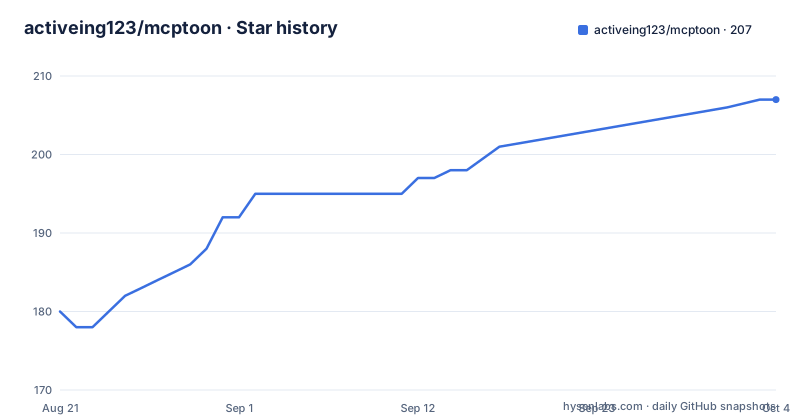
- activeing123/mcptoon207 ★ · +27
| Repository | 2026-08-21 | 2026-10-04 |
|---|---|---|
| activeing123/mcptoon | 180 | 207 |
27 Stars in the last 44 days, measured from the daily GitHub snapshot. Compare with other projects
Editorial analysis
The Problem: MCP Configuration Fragmentation
The core idea is simple: `~/.mcptoon/config.json` holds all your MCP server definitions. The `sync` command writes that configuration into each agent's native config file. It merges instead of overwriting, so servers you configured manually stay put. You can target one agent with `--agent cursor`, preview changes with `--dry`, and run `--watch` to poll config files and keep every agent aligned. Drift detection catches external edits, and there are merge and strict modes. This is a configuration management tool, not a runtime proxy, for the sync path.
Token Efficiency: Pay for Names, Not Schemas
The `manifest` output is meant to be fed to the agent via a command, not a config file. The README shows an interaction: the agent runs `mcptoon manifest --compact` to get a name index, then calls `mcptoon call fetch fetch '{"url":"https://example.com"}'`. This works because mcptoon is a program the agent already knows how to run. No `mcpServers` entry, no plugin API, nothing to register. You can add one line to your agent's instruction file, like CLAUDE.md or AGENTS.md, and that is prompting, not configuration. This approach extends MCP to environments where native MCP cannot reach: shell scripts, CI pipelines, cron jobs, aider, and terminal-only environments.
The `serve` Proxy: One Door for Every Server
The `serve` approach is a trade-off. It adds a layer between your agent and the actual MCP servers. The README says this is a proxy, and proxies introduce latency and a potential single point of failure. If the `serve` process crashes, all agents lose access to all tools. The 30-second timeout is a hard limit: any server that legitimately needs longer than 30 seconds for a call will fail. The README does not mention a configurable timeout for the proxy itself, only for calls. This is a real limitation for long-running operations.
Getting Started: Commands and Configuration
The configuration file is `~/.mcptoon/config.json`, which acts as the single source of truth. The README does not show the schema of this file, but it is implied to hold server definitions and possibly tool schemas. The `sync` command reads this file and writes to agent-specific configs. The `manifest` command reads it to produce the name index. The `serve` command reads it to compose the proxy. This centralization is the core value proposition.
Limitations: When mcptoon Is the Wrong Tool
Another limitation is the lack of support for agents that do not allow command execution. The README lists aider and terminal-only environments as targets, but those are exactly the environments where an agent might be a plain script. If your agent cannot run `mcptoon` commands, the whole approach falls apart. Also, the token counts are measured with a specific tokenizer (tiktoken cl100k_base) on a specific config. Your mix will differ, as the README itself notes. The 99.8% reduction is not a universal guarantee.
Alternatives: Native MCP vs. Proxy vs. Manifest
The README references `docs/comparison.md` for a breakdown of setup cost, token cost, and safety. That file is not in the provided material, but the README's own table gives a hint: native MCP has no setup cost if you already have configs, but it has high token cost and high drift risk. mcptoon has a one-time setup cost (install and `sync`), low token cost, and lower drift risk. The trade-off is that mcptoon requires the agent to trust a shell command, which is a security consideration. The README claims `call` results default to plain text and are security-checked, but the details are not in the provided material.
Maintenance and Upgrade Cost
The upgrade cost is low for a CLI tool: you reinstall with `pip install --upgrade mcptoon`. The main risk is that `sync` behavior might change between versions, as seen in the v0.5.5 release focusing on `--watch`. The README mentions merge and strict modes, but the exact semantics may evolve. The `serve` proxy is a moving target, and the 30-second timeout might be adjusted in future releases. Check the CHANGELOG before upgrading if you rely on specific `sync` merge behavior.
Editorial conclusion
Adopt mcptoon if you manage multiple AI agents (Claude Code, Cursor, Codex) and want a single source of truth for MCP servers, or if token costs on tool discovery are a real pain. Skip it if you prefer native MCP JSON, need full schema fidelity in every context, or cannot tolerate the extra hop of a proxy. Before adopting, verify that your agents can execute arbitrary shell commands and that your MCP servers tolerate a 30-second call timeout. Check the CHANGELOG and DEVELOPERS.md for recent sync changes, and test `mcptoon sync --dry` on a copy of your config to ensure merge behavior matches your expectations.
Frequently asked questions
What is MCP and what is it used for?
MCP is the protocol the project targets. Its point in this context is that every MCP agent loads the full description of every tool and every skill into its context window before doing any work, and re-sends it every turn, which the project measures at 71,929 tokens on a 255-tool sample.
How is MCP different from API?
The project does not make that comparison. The benchmarks it cites contrast MCP against direct CLI invocation, where the same task cost 1,365 tokens through a CLI against 44,026 through MCP, and where CLI is reported as 10 to 32 times cheaper.
Is Copilot a MCP client?
VS Code Copilot is named as one of the agents mcptoon registers itself in, alongside Claude Desktop, Claude Code, Codex, Cursor, Windsurf and Cline. You write nothing in any agent config yourself.
Official sources
Add this badge to your README
If you maintain this project, the badge below links readers to this analysis and shows its maintenance status from the daily GitHub snapshot. Paste the markdown into your README; add ?metric=license or ?metric=stars to the image URL for a different field.

[](https://hysenlabs.com/projects/activeing123-mcptoon)Star history chart for your README
[](https://hysenlabs.com/projects/activeing123-mcptoon)