qwen-audio-agent: stable two days after open-sourcing, five API keys for one voice
A realtime voice runtime that keeps Agents talking, working, and present. Real-time Voice Runtime for AI Agents
At a glance
- What is it?
- A realtime voice runtime for agents whose first stable tag landed two days after its open-sourcing tag, whose nine voice frontends come from five different key vendors, whose default web search is a keyless Bing HTML adapter, and whose npm package exports its own internal file paths as its public API.
- Who is it for?
- qwen-audio-agent is a wide surface built quickly, and the release history says so. Take it if you already run one of the coding agents it names in its keywords and want that agent to stay audible while it works, because the integration story is reuse of an existing model configuration rather than a second stack.
- Can I use it commercially?
- Yes. Apache-2.0 is a permissive licence: you can use, modify and sell software built on it, as long as you keep its copyright and licence notices.
- Is it still maintained?
- Yes. The repository last received commits 2 days ago.
- What is it written in?
- Mainly JavaScript, according to GitHub's language statistics.
Answers come from the project's GitHub data, last synced on November 13, 2026, and from our analysis. They are not legal advice.
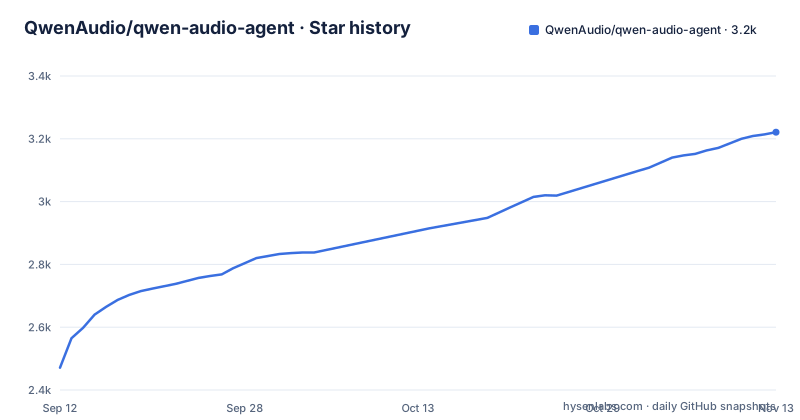
Star history
- QwenAudio/qwen-audio-agent3,221 ★ · +750
| Repository | 2026-09-12 | 2026-11-13 |
|---|---|---|
| QwenAudio/qwen-audio-agent | 2.5k | 3.2k |
750 Stars in the last 62 days, measured from the daily GitHub snapshot. Compare with other projects
Editorial analysis
v1.0.0 shipped two days after the open-sourcing tag
The release history is written into the page rather than left to the releases list, and it reads like a sprint. v0.9.0 on 2026-07-28 is the tag where the project was officially open-sourced and backend agents were unified under the ACP architecture. v1.0.0, described as the first stable release, is dated 2026-07-30, two days later. Everything after it moves on odd minor numbers: 1.3.0 on 2026-08-03, 1.5.0 on 2026-08-05, 1.7.0 on 2026-08-07, 1.9.0 on 2026-08-13, 1.11.0 on 2026-08-20, then a jump to 2.0.0 on 2026-09-23 and 2.0.1 on 2026-09-26. There is no 1.1.0 or 1.2.0 on that list, and the last commit is dated 2026-09-28, so the declared 2.0.1 in the package manifest is current with the branch rather than behind it.
The architecture section is a table with nothing written in it
The architecture heading is followed by a two-column table whose cells contain no text, and then three sentences. Those sentences carry the whole design claim: questions that can be answered directly are answered immediately, and when tools or sustained processing are needed the task is delegated to the backend agent, with the user always facing the same assistant throughout. Everything else is one link away, to a deep-dive document under docs/architecture. The delegation idea is what the rest of the page keeps returning to, and it is also what the feature list turns into product behaviour: frontend conversation and background tasks run in parallel, you can ask about progress or cancel, multiple independent tasks execute asynchronously with continuous status tracking, and results return into the current conversation where follow-up questions and modifications are allowed.
Nine voice frontends, five key vendors, three blank feature cells
The frontend table is the densest part of the page, and it separates cleanly by deployment. Seven rows are cloud services and two are local: Hugging Face Speech-to-Speech, where you start the service and set its URL, and MiniCPM-o 4.5, which accepts a compatible service URL and is the only row that explicitly says it has no tool calling. The setup column names five different vendors, since Qwen Audio 3.0 Realtime, Qwen3.5-Omni Realtime and Qwen3.8 Omni Flash Realtime all take a Bailian key, GPT-Live takes an OpenAI key, Google Gemini Live takes a Google key, Doubao Seeduplex 3.0 takes a Volcengine Speech key and StepAudio 3 takes a StepFun key. Three rows carry an em dash in the features column, meaning nothing is claimed for them. The two Qwen Omni rows share one documentation page, and the 3.8 row adds a requirement the others do not have: a workspace-specific endpoint on top of the key.
The default web search is a keyless Bing HTML adapter
The example configuration settles the search backend in a comment rather than in prose. Web search defaults to a simple Bing HTML adapter that needs no key and is reachable inside China, and the comment then gives three ways to change it: select Bailian explicitly after enabling its search MCP, switch it off, or point it at a custom MCP by supplying a URL, a token and a tool name. So out of the box the agent's web search is an adapter that reads a search engine's HTML rather than a documented API. Provider credentials follow the same candid pattern, with a note that provider-owned credentials remain supported and that only the selected provider uses its key, which is why two key variables sit commented out next to a single active provider line.
QWEN_AUDIO_REALTIME_PROVIDER=dashscope
# QWEN_AUDIO_SCHEDULE_TOOL_ENABLED=false
# QWEN_AUDIO_WEB_TOOLS_ENABLED=false
The gateway can share one DashScope realtime model across frontends, chosen among five named variants with a fourth and fifth as flash and plus tiers of the 3.0 audio line, and changing it needs a gateway restart.
One active line in the example config and five tool switches
Only one line of the shipped example is not commented out, the provider selector set to dashscope, and everything else is an example waiting to be uncommented. Five optional frontend tools are toggled individually, for scheduling, web tools, knowledge, notes and recall, and the comment explains that they default on according to the configured provider and runtime capability, with each one hideable by setting it to false. Voice selection is per model family rather than global: the file names the defaults as longanqian for Audio, Ethan for Omni 3.5 and Tina for Omni 3.8, and notes that desktop settings store preferences per model family separately. Omni models accept live JPEG frames from the web interface once capability negotiation agrees, and the same comment says desktop and the terminal interface do not capture frames yet.
The example config is annotated in Chinese and the README is bilingual
The repository ships two readme files, one Chinese and one English, linked side by side at the top, and the example configuration is annotated only in Chinese. A developer reading the English page gets variable names and defaults but not the reasoning attached to them, since every explanation of why a setting exists, what a disabled tool does and which endpoint a workspace needs is written in the other language. The compliance surface is unusually complete for a project at version 2: a LICENSE, a NOTICE file, third-party notices, a privacy policy and a security policy all sit at the root next to the two readmes. Two continuous integration configurations exist, one under GitHub and one under GitLab, and two files pin the Node version, a .node-version and an .nvmrc.
The package publishes its own internal paths as its API
The manifest declares itself an ES module and then exports around twenty subpaths, nearly all of which point at implementation files rather than at a public surface: a gateway protocol module under the server tree, and shared modules for gateway setup, process control, a lease helper, runtime paths, realtime and gateway event modules, a client protocol, a client SDK, client and connection profiles, an access client, remote access and a file credential store. One export, the electron host, resolves to a CommonJS file inside that ES module package, so the two module systems meet at one entry point. The homepage field points at the readme anchor on the repository rather than at the documentation site, which is a different address from the one the repository metadata carries.
The keyword list names the agents it expects to sit on top of
Alongside its own name, the manifest keywords list seven other agent tools by name, and the feature list explains why: integration is one-click with your preferred agent, reusing its model configuration, its tools, its MCP setup, its skills and its authentication. So the runtime is positioned as a voice and presence layer for an agent you already run, not as an agent itself, and the examples directory is organised as scenarios rather than as features, with customer service, smart cockpit, digital human, an AI passport, a local retrieval setup, voice memory, a WebRTC example and an Omni example beside two readmes. The demo table higher up labels its two scenarios Office and Smart Cockpit, and only the second has a matching directory.
Editorial conclusion
qwen-audio-agent is a wide surface built quickly, and the release history says so. Take it if you already run one of the coding agents it names in its keywords and want that agent to stay audible while it works, because the integration story is reuse of an existing model configuration rather than a second stack. Budget for keys: the default provider needs one, and each additional frontend needs its own from a different vendor. Read the example configuration before you rely on the search tool, since the default is an HTML adapter rather than an API. Expect the frontend to change shape, the desktop and terminal surfaces still lag the web one on video, and the package's export map to move, since it publishes internal paths rather than a curated API.
Frequently asked questions
Which voice frontends does qwen-audio-agent support?
Nine are listed. Seven are cloud services from Qwen Audio, GPT-Live, Google Gemini Live, Qwen3.5-Omni, Qwen3.8 Omni Flash, Doubao Seeduplex and StepAudio, and two are local or self-hosted, Hugging Face Speech-to-Speech and MiniCPM-o 4.5. MiniCPM-o 4.5 is the one row marked as having no tool calling.
Does qwen-audio-agent need an API key to run?
Yes for the cloud frontends. The example configuration ships with the provider selector set to dashscope and every key variable commented out, and the frontend table names five different key vendors across its nine rows. Web search is the exception, since its default needs no key.
How does qwen-audio-agent handle a task that takes a long time?
Questions answerable directly are answered immediately, and work needing tools or sustained processing is delegated to the backend agent while the conversation continues. The feature list adds that progress can be asked about at any time, that tasks can be cancelled, and that results return into the current conversation for follow-up.
Which interfaces does qwen-audio-agent ship?
A web interface, a terminal interface, and a desktop floating orb for macOS, Windows and Linux, with mobile access added in version 2.0.0. The repository carries a separate directory for each, plus a mobile one, and the desktop application keeps its data directory isolated from the command line.
Does the qwen-audio-agent desktop app support video input?
Not yet. The example configuration states that Omni models can receive live JPEG frames from the web interface after capability negotiation, and that the desktop and terminal interfaces do not capture frames at present.
Official sources
Add this badge to your README
If you maintain this project, the badge below links readers to this analysis and shows its maintenance status from the daily GitHub snapshot. Paste the markdown into your README; add ?metric=license or ?metric=stars to the image URL for a different field.

[](https://hysenlabs.com/projects/qwenaudio-qwen-audio-agent)Star history chart for your README
[](https://hysenlabs.com/projects/qwenaudio-qwen-audio-agent)Was this useful?