i3-starterpack: 140 lines of Debian tiling config with no build step
A simple guide (and example of configuration) about how to install i3 & its and essentials packages, then make them look eye candy, also contains my dotfiles of Debian 12 (Bookworm) setup
At a glance
- What is it?
- addy-dclxvi/i3-starterpack is a personal dotfiles repository for Debian 12 that doubles as an install guide for i3 and its companion packages. It ships a single ~140 line i3 config using only main-repository packages, so there is nothing to compile, but also nothing to parameterise.
- Who is it for?
- Adopt this repository if you are setting up i3 on Debian 12 by hand and want a working reference you can read in one sitting, and copy the files individually rather than the recursive deploy. Do not adopt it as a maintained base for a fleet of machines, or as a source of statusline or keybinding decisions you intend to keep, because it is one person's desktop dated 31 July 2018 with no releases and no license file.
- Can I use it commercially?
- Not without permission. GitHub finds no licence file in the repository, and without a licence all rights are reserved by default: you may read the code but not reuse it. Check the README, or ask the authors, before using it.
- Is it still maintained?
- Yes. The repository last received commits 22 days ago.
- What is it written in?
- Mainly Scheme, according to GitHub's language statistics.
Answers come from the project's GitHub data, last synced on November 7, 2026, and from our analysis. They are not legal advice.
Star history
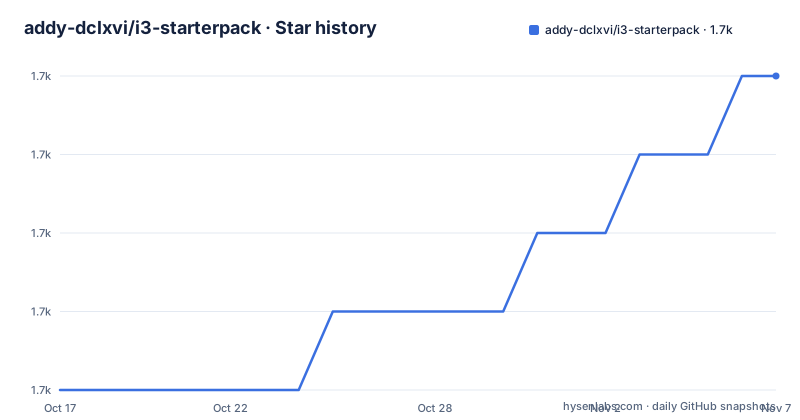
- addy-dclxvi/i3-starterpack1,665 ★ · +4
| Repository | 2026-10-17 | 2026-11-07 |
|---|---|---|
| addy-dclxvi/i3-starterpack | 1.7k | 1.7k |
4 Stars in the last 21 days, measured from the daily GitHub snapshot. Compare with other projects
Editorial analysis
A dotfiles snapshot, not a distribution
The top level of this repository is a home directory: `.Xresources`, `.config/`, `.local/`, `.urxvt/`, `.vimrc`, plus image assets named `.wallpaper.png`, `.lock.png` and their `.xcf` originals. That layout is the honest description of the project. It is the daily configuration of one Debian user, published as a starting point for other people, and the guide that describes how the author assembled it. The author is explicit about this: the configuration is described as "my daily i3 configuration" and the README opens by calling it a guide and an example of configuration rather than a tool.
The first commit dates to 10 March 2018 and the last documentation update noted in the README is 31 July 2018. The repository itself received a push on 2026-09-29, so it is not archived, but nothing in the guide has been revisited since 2018. The primary language GitHub reports is Scheme.
That framing matters for adoption. There is no installer script, no dotfiles manager such as chezmoi or stow, no test, no release, and no GitHub releases page. You copy files. The README makes the one-line recursive option available but advises against it:
git clone https://github.com/addy-dclxvi/i3-starterpack.git && cp -a i3-starterpack/. ~The stated reason to avoid this is control. Copying `.config/i3/config` to `~/.config/i3/` one file at a time means you can see exactly what you are overwriting. Overwriting an existing i3 config without reading it first is the most common way to end up with a desktop that has no keybindings.
Everything comes from the Debian main repository
The design constraint the author chose is package availability. No AUR, no PPA, no `xbps-src`, and no `sudo make install`. Every dependency in this setup resolves through `apt-get`, which is why the guide is written against Debian commands and Debian package names and why the dotfiles are described as Debian 12 (Bookworm) setup files.
The install sequence is three commands. The first pulls the window manager and its companions:
sudo apt-get install i3The README states this yields i3-wm, dunst, i3lock, i3status and suckless-tools, and that if any of those are missing you should install them directly. The second adds the pieces i3 itself does not ship:
sudo apt-get install hsetroot rxvt-unicode xsel lxappearance scrotThe third is optional and personal: cmus, ranger, vim and fish, matching the applications the author configured in the same repository. Activating fish as the login shell changes your account entry, so it is the one command here that is not trivially reversible by deleting a config file:
sudo chsh -s /usr/bin/fish addyYou replace `addy` with your own username, and the shell only becomes active after the next login. That ordering matters: if you copy the dotfiles first and then change your shell, you have both at once and less idea which change broke your terminal.
Each package earns its place through a specific gap
i3 draws no wallpaper and ships no clipboard tool, which is why hsetroot and xsel appear in that install line rather than being optional garnish. hsetroot is the wallpaper handler; xsel is what makes Alt+C and Alt+V work inside URxvt. rxvt-unicode is the terminal emulator, and the README notes it is part of i3-sensible-terminal, which is one of the i3 metapackages. lxappearance handles GTK theme, icon and font preferences, and the guide marks it unnecessary if you are running Xfce, whose settings daemon already covers that. scrot is bound to the Print Screen key in the i3 config so a screenshot opens in whatever image viewer is installed.
The author recommends starting from Xfce rather than an empty X session. The stated reason is that a desktop environment guarantees the presence of Xorg, a display manager, a sound mixer and a network manager, and that Xfce contributes a file manager, text editor, power manager, clipman and a task manager you can borrow. i3 replaces the window manager, not the rest of the desktop, so a bare session leaves gaps that i3 has no opinion about.
The i3 statusline has one trap: two lists to edit
`~/.config/i3status/config` is the file most users will change first, because the shipped configuration loads a large number of modules by default and the README compares the result unfavourably to a decorated tree. The shipped block is:
order += "load"
order += "cpu_temperature 0"
order += "wireless wlp2s0"
order += "volume master"
order += "battery 0"
order += "time"
Two things follow from it. First, `wireless wlp2s0` names a specific interface. On a machine whose wireless device enumerates differently, that module silently reports nothing until you substitute your own interface name. Second, and this is the actual trap, `order` is not the only place a module appears. Each module also needs a matching block further down the file that configures it, and the README is explicit: change the variable in both the `order` list and the function list, or you will be editing one half of a pair.
The one update the guide carries, dated 31 July 2018, adds that i3status supports Pango Markup, with few customization options but enough to be worth using.
Copying the dotfiles leaves two manual steps behind
The copy procedure is either a clone followed by manual copying, or the zip download button followed by the same manual work. The rule the author gives is uniform: for a file that lives at `i3-starterpack/.config/i3/config`, put it at `~/.config/i3/config`, create the directory if it is missing, and repeat for every file. There is no merging step and no conflict handling.
Two loose ends survive the copy. The repository contains a font, and fontconfig will not pick it up until the cache is rebuilt:
fc-cache -fvThe second is the `.Xresources` file, which is where X resource settings such as URxvt appearance live, and which only reaches the running session after a login cycle. Neither is mentioned as a failure mode; both are simply part of the procedure.
The README does not document how to update these files after i3 itself upgrades, and does not describe a rollback if the copied config turns out to break your session. If you overwrite `~/.config/i3/config` without a backup, you may have no local copy to restore.
Where this stops and something else begins
The author's own reasoning about alternatives is about sequencing rather than feature comparison. i3 is described as the easiest tiling window manager to learn and configure, chosen because its documentation includes example commands and troubleshooting, and because the community is large enough that customization examples are easy to find. The stated path is: learn i3 first, then move to more advanced window managers once you can handle i3. i3 is the author's first tiling window manager.
That makes the difference with a heavier approach clear. A dotfiles framework with templating, per-host conditionals and an update command would suit a person who configures several machines and needs the same setup to converge. This repository does none of that: one config file, one user's layout, no variables, no host branching. Conversely, a bare i3 install gives you a working tiling window manager and none of the companion package choices, the Xfce starting point, the screenshot binding or the statusline layout.
The licensing picture is thin. GitHub reports no license identifier for the repository, and the README does not state one. Copying a file into your own home directory for personal use is a different act from redistributing the repository or folding it into a configuration you share, and nothing in the repository answers the second case.
Editorial conclusion
Adopt this repository if you are setting up i3 on Debian 12 by hand and want a working reference you can read in one sitting, and copy the files individually rather than the recursive deploy. Do not adopt it as a maintained base for a fleet of machines, or as a source of statusline or keybinding decisions you intend to keep, because it is one person's desktop dated 31 July 2018 with no releases and no license file. Before you commit, verify three things yourself: that `sudo apt-get install i3` still resolves the same metapackage set on your Debian release, that the i3status `order` list matches the wireless interface name and temperature zone you actually have, and that the font you copy includes the glyphs your statusline renders.
Frequently asked questions
Does i3-starterpack work on anything other than Debian?
The guide is written entirely in Debian commands and package names, and the dotfiles are described as a Debian 12 (Bookworm) setup. Every dependency is chosen to exist in the Debian main repository, so on another distribution you would have to map each package yourself.
How do I install i3-starterpack itself?
There is nothing to install. You clone the repository or download it as a zip, then copy the configuration files from inside the i3-starterpack folder into your home directory one by one, creating target folders where they do not exist.
Why does my i3status wireless module show nothing?
The shipped line is `order += "wireless wlp2s0"`, which names one specific interface. If your wireless device has a different name you must change it, and you must change it in both the `order` list and the matching module block further down the file.
Do the copied fonts appear immediately?
No. The guide ends the copy step with `fc-cache -fv`, because fontconfig needs its cache rebuilt before the new font is usable.
Is i3-starterpack a maintained project?
The repository is not archived and its last push was on 2026-09-29, but the guide itself records an initial commit on 10 March 2018 and its last documented update on 31 July 2018. It has no GitHub releases.
Official sources
Add this badge to your README
If you maintain this project, the badge below links readers to this analysis and shows its maintenance status from the daily GitHub snapshot. Paste the markdown into your README; add ?metric=license or ?metric=stars to the image URL for a different field.

[](https://hysenlabs.com/projects/addy-dclxvi-i3-starterpack)Star history chart for your README
[](https://hysenlabs.com/projects/addy-dclxvi-i3-starterpack)Was this useful?