learn-workbuddy: a 24-chapter Python course that rebuilds a desktop agent harness
Rebuild a WorkBuddy-style desktop AI assistant harness from scratch: a 24-chapter Python tutorial covering the agent loop, tool calling, memory systems, sidecar processes, sandbox auditing, and DeepSeek/OpenAI evaluation traces.
At a glance
- What is it?
- learn-workbuddy is a Chinese-language teaching repository that walks from a bare agent loop to a sidecar-based desktop assistant across 24 chapters, with a standard-library mini harness you can run offline. It is a curriculum, not a product: the value is in the progression contract, and the cost is that every chapter is a teaching artifact rather than production code.
- Who is it for?
- Adopt learn-workbuddy if you already have a working CLI agent and keep hitting desktop-specific walls: long-lived sessions, tool output that will not fit in a context window, permission design, and where memory gets injected. Skip it if you want a library to import into a product, or if you need production-grade code, since the README describes 24 chapters of original teaching code and the repository is a course rather than a package.
- Can I use it commercially?
- Yes. MIT is a permissive licence: you can use, modify and sell software built on it, as long as you keep its copyright and licence notices.
- Is it still maintained?
- Yes. The repository last received commits 17 days ago.
- What is it written in?
- Mainly Python, according to GitHub's language statistics.
Answers come from the project's GitHub data, last synced on November 14, 2026, and from our analysis. They are not legal advice.
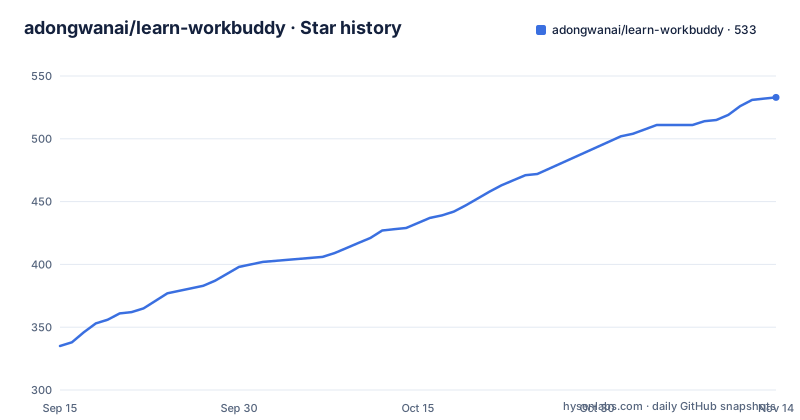
Star history
- adongwanai/learn-workbuddy533 ★ · +198
| Repository | 2026-09-15 | 2026-11-14 |
|---|---|---|
| adongwanai/learn-workbuddy | 335 | 533 |
198 Stars in the last 60 days, measured from the daily GitHub snapshot. Compare with other projects
Editorial analysis
The wall learn-workbuddy is built around
The README opens with a specific complaint: you can write a CLI agent that runs `while True` plus tool calling, and then desktop work multiplies the engineering complexity by roughly ten. The listed symptoms are concrete. Sessions must stay resident, resume and reconnect rather than run once and exit. Tool schemas and outputs blow the context window before the model does any work. Tool results of several megabytes cannot go into context at all. Long-term memory has no obvious home, so privacy and cost both drift. An agent that can execute commands needs a permission design that does not become a backdoor. Six layers (front end, sidecar, runtime, model, tools, and the surrounding plumbing) have to be decoupled.
The intended reader is therefore not someone learning what an agent is. It is someone who has already shipped or prototyped a terminal agent and now wants to understand how a desktop harness is assembled. The README calls the result a teaching blueprint rather than product source code, and the framing line is blunt: the model is the brain, the harness is the operating system. Chapters s01 through s24 each add one mechanism on top of the previous chapter, and the repository documents that rule in docs/progression-contract.md, so the sequence is meant to be read in order rather than sampled.
How the harness is layered, and why the layers are responsibility boundaries
The architecture diagram in the README is a data flow, not a marketing picture. A desktop UI (renderer, chat, tasks) talks through a preload and IPC bridge to a main process that owns window, auth and config. That main process reaches a local app server handling routing and connector proxying, which talks to a sidecar manager responsible for spawn, reconnect and lifecycle. The sidecar fronts a session runtime speaking HTTP or an ACP-like protocol, and only then does the agent loop run: model, tools, result. Tool registry, memory system, persistence and safety hang off the agent loop rather than sitting inside it.
The README states the six layers exist as product engineering responsibility boundaries, and the constraints are explicit: the UI does not execute world actions directly, the agent does not bypass permissions, tool output does not flood context, memory is not dumped into the prompt unconditionally, extensions are not trusted by default, and high-risk actions leave evidence behind. That last point is where the audit chapter comes from. The repository also ships mini_workbuddy, a standard-library implementation of a minimal harness, described as a way to see the complete request chain without the full chapter stack.
The three tensions the course keeps returning to are worth quoting because they explain why so many chapters exist: finite context against infinite information, autonomous execution against safety control, and model cost against task complexity. Every chapter maps to one of those three, which is a cleaner organising principle than a feature list.
Installing learn-workbuddy and running the offline tour first
The README gives a four-command path using a virtual environment. Run these from the repository root; the first three set up Python and dependencies, and the fourth executes the full harness tour.
python3 -m venv .venv
source .venv/bin/activate
pip install -r requirements.txt
python3 examples/full_tour/code.py
According to the README, that last command runs the complete harness tour offline: provider adapter, session, memory, tools, permissions, output externalization, JSONL, HTTP, audit and artifacts all execute in sequence. requirements.txt pins the four teaching dependencies (anthropic, openai, python-dotenv, pyyaml) plus pytest, and notes that SDKs are imported lazily but installing them up front keeps the documented provider paths working.
If you manage Python with Conda and dependencies with uv, the README gives a second path and a note about where the interpreter comes from.
conda env create -f environment.yml
conda activate learn-workbuddy
uv sync --python "$CONDA_PREFIX/bin/python" --no-python-downloads
uv run python examples/full_tour/code.py
The README states that dependencies land in .venv while the Python interpreter comes from the Conda environment, and that an existing environment can be refreshed with `conda env update -f environment.yml --prune` before repeating the uv sync step. For a real provider call, copy .env.example and fill a key. The file documents PROVIDER values of deepseek, anthropic, openai, openai-chat, offline and auto, where auto picks anthropic, then deepseek, then openai, then openai-chat, and falls back to offline. The offline value needs no key and runs a deterministic mock provider, which is the reason the tour works without credentials.
Where the course stops being useful
The README is explicit that this is not product source code, and that single sentence carries most of the limitations. Code in each chapter is written to isolate one mechanism, which means it is shaped for readability and for the progression contract rather than for reuse. If you want a library to import, this repository does not present itself as one; there is no published package in the repository, and the installation path is cloning the repository and running chapter scripts.
Language is the second boundary. The README badges the project as Chinese, and the chapter titles, architecture explanations and learning guide are written in Chinese. An English-only reader can still execute the code and read the comments, but the explanatory prose, which is the actual product here, is not translated in the repository.
The third boundary is scope. The chapters cover Electron shell layout, sidecar lifecycle, session management, model routing, memory tiers, context compression, skills, MCP connectors, SQLite persistence, an automation scheduler and an audit sandbox. That breadth is the point, but it also means no single chapter is a deep treatment of any one of those topics. If your problem is specifically retrieval quality or specifically sandboxing on Linux, a course that spends one chapter on each will not settle it. The repository does point to docs/code-quality-review.md for the trade-offs made against learn-claude-code, which is the honest place to check before assuming the code style suits you.
learn-workbuddy against learn-claude-code and against reading WorkBuddy itself
The README includes a comparison table, and the useful part is the axis it chooses: positioning, coverage depth, code visibility, provider support, offline execution, and intended audience. learn-claude-code is described as a CLI agent starting point with single-process, terminal and MCP coverage, Anthropic as the provider, and partial offline support. learn-workbuddy is described as a desktop agent engineering system covering sidecar, memory, audit and automation, with DeepSeek, OpenAI and Anthropic as providers and the claim that all demos run without a key.
The difference in approach is not quality, it is where the complexity lives. A CLI agent course can keep everything in one process and teach tool calling, dispatch and context handling. A desktop harness course has to introduce process separation, a sidecar manager with reconnect logic, a session runtime with a protocol, and a governance layer that leaves an audit trail, because those are the things that break when the agent stops being a short-lived script. Reading WorkBuddy directly gives you the product behaviour as a black box, since it is closed source according to the table. The README frames the two repositories as complementary, describing them together as a complete engineering lineage from CLI agent to desktop agent, and that framing is fair: they answer different questions rather than competing on the same one.
Maintenance, licence and what running it costs you
The repository is MIT licensed, with a LICENSE file, a NOTICE.md, a THIRD_PARTY_NOTICES.md and a SECURITY.md at the top level. MIT is permissive, so reuse in your own work is straightforward, but the third-party notices file exists for a reason: the teaching dependencies and any bundled assets carry their own terms, and the NOTICE files are where to look rather than assuming the MIT header covers everything in the tree. Nothing in the repository suggests a dual licence or a commercial restriction.
Maintenance signals are thin in a specific way. The last push was on 2026-09-14, and the repository is not archived, so the code is current. The repository has no published GitHub releases, which means there is no versioned artifact to pin and no changelog to read for upgrade impact. Upgrades therefore mean pulling from main and re-reading the affected chapter, and because the progression contract states each chapter adds exactly one mechanism on top of the previous one, a change in an early chapter can ripple through later ones. The pyproject.toml contains only pytest configuration (pythonpath set to the repository root, testpaths pointing at tests, quiet output), so there is no packaging metadata to signal a stable public interface. Budget for reading diffs rather than for a dependency bump.
Editorial conclusion
Adopt learn-workbuddy if you already have a working CLI agent and keep hitting desktop-specific walls: long-lived sessions, tool output that will not fit in a context window, permission design, and where memory gets injected. Skip it if you want a library to import into a product, or if you need production-grade code, since the README describes 24 chapters of original teaching code and the repository is a course rather than a package. Before committing time, run examples/full_tour/code.py with PROVIDER=offline to confirm the chain works on your machine, then read docs/progression-contract.md to check that the one-mechanism-per-chapter structure matches how you actually want to learn.
Frequently asked questions
Does learn-workbuddy require an API key to run?
No. The README states the full tour runs offline, and .env.example documents a PROVIDER=offline value that needs no key and uses a deterministic mock provider. Keys are only needed when you want to exercise a real provider path such as DeepSeek, Anthropic or OpenAI.
Which model providers does learn-workbuddy support?
The provider adapter covers deepseek, anthropic, openai and openai-chat, plus offline and auto. The auto setting picks anthropic, then deepseek, then openai, then openai-chat, and falls back to offline if none is configured.
Is learn-workbuddy a library I can install with pip?
The README describes it as an open teaching blueprint rather than product source code, and the documented setup is cloning the repository and running chapter scripts after pip install -r requirements.txt. No published package is mentioned in the repository.
What do the 24 chapters of learn-workbuddy actually cover?
The chapter map runs from the agent loop, tool dispatch, deferred loading and permission hooks, through the Electron shell, sidecar server, session management, model routing and JSONL transcripts, then memory tiers, output externalization, context compaction and prompt assembly, and finally skills, MCP connectors, experts, visualization, SQLite, automation, audit sandbox and a comprehensive version.
Is learn-workbuddy written in English?
The README badges the language as Chinese, and the chapter explanations and learning guide are written in Chinese. The Python code and commands are readable regardless, but the explanatory text is not translated in the repository.
Official sources
Add this badge to your README
If you maintain this project, the badge below links readers to this analysis and shows its maintenance status from the daily GitHub snapshot. Paste the markdown into your README; add ?metric=license or ?metric=stars to the image URL for a different field.

[](https://hysenlabs.com/projects/adongwanai-learn-workbuddy)Star history chart for your README
[](https://hysenlabs.com/projects/adongwanai-learn-workbuddy)Was this useful?