envalid turns process.env into a typed object and refuses to start without it
Environment variable validation for Node, Bun, and other compatible JS runtimes
At a glance
- What is it?
- envalid is a zero-dependency TypeScript library that validates environment variables at startup, converts them to real types, and hands back an immutable object. The details that decide whether it fits are the four kinds of default and a Node 22 floor in version 9.
- Who is it for?
- Adopt envalid if you run a Node or Bun service whose configuration lives in environment variables and you want the process to refuse to start rather than discover a missing key at 3am, because `cleanEnv` validates once and returns an immutable object typed by your validator definitions.
- Can I use it commercially?
- Yes. MIT is a permissive licence: you can use, modify and sell software built on it, as long as you keep its copyright and licence notices.
- Is it still maintained?
- Yes. The repository last received commits 14 days ago.
- What is it written in?
- Mainly TypeScript, according to GitHub's language statistics.
Answers come from the project's GitHub data, last synced on November 7, 2026, and from our analysis. They are not legal advice.
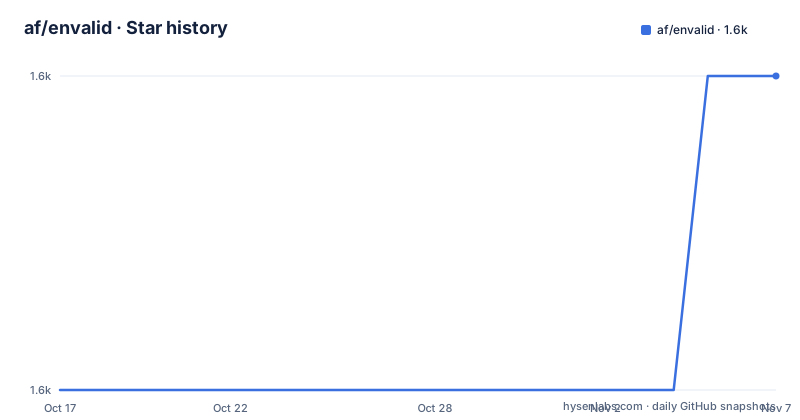
Star history
- af/envalid1,590 ★ · +1
| Repository | 2026-10-17 | 2026-11-07 |
|---|---|---|
| af/envalid | 1.6k | 1.6k |
1 Stars in the last 21 days, measured from the daily GitHub snapshot. Compare with other projects
Editorial analysis
cleanEnv takes three positional arguments and one of them is your process.env
The whole library in its common use is one function call:
import { cleanEnv, str, email, json } from 'envalid'

const env = cleanEnv(process.env, {
  API_KEY: str(),
  ADMIN_EMAIL: email({ default: '[email protected]' }),
  EMAIL_CONFIG_JSON: json({ desc: 'Additional email parameters' }),
  NODE_ENV: str({ choices: ['development', 'test', 'production', 'staging'] }),
})

env.ADMIN_EMAIL  // -> '[email protected]'
The signature is `envalid.cleanEnv(environment, validators, options)`. The first argument is any object containing env vars, `process.env` in the usual case. The second is an object specifying the format of required vars. The third is optional and currently supports one key, `reporter`, which is a function replacing the default error handling and console output; the default implementation lives in `src/reporter.ts`.
The default failure behaviour differs by environment: it logs an error message and exits in Node, or throws in the browser. That split is a design decision worth noticing, since it means the same validation code behaves like a deployment gate on a server and like an exception in a client bundle.
The return value is described as a sanitized, immutable environment object. Immutability is one of the three stated aims: ensuring the program only runs when its environment dependencies are met, giving executable documentation about the expected environment, and giving an immutable API so variables do not change from under you while the program runs. The third aim is the one that distinguishes it from simply calling `JSON.parse(process.env.SOMETHING)` at the point of use.
NODE_ENV is checked for you and becomes three booleans
One detail in the example above is doing more work than it appears. The README notes that envalid checks for `NODE_ENV` automatically and provides shortcut boolean properties for checking its value: `env.isProduction` is true if `NODE_ENV === 'production'`, `env.isTest` for `test`, and `env.isDev` for `development`.
So you do not declare a `NODE_ENV` validator to get this behaviour, and you do not compare strings yourself. The library special-cases that one variable.
That special case is also load-bearing for the defaults, because `devDefault` and `testDefault` both key off it. The `devDefault` is a fallback used only when `NODE_ENV` is explicitly set and not `production`, described as handy for variables that are required in production but optional for development and testing. `testDefault` applies only when `NODE_ENV=test`.
The precedence between them is spelled out and has one subtlety. `testDefault` takes priority over both `devDefault` and `default` in test environments, which lets you supply three distinct values for production, development and test. The README contrasts this with the `testOnly()` helper, which is wrapped around a `devDefault` and therefore cannot coexist with a separate dev value. So there are two ways to express the test/prod split, and only one of them lets you keep a dev value as well.
A consequence to be aware of: these shortcuts only fire if `NODE_ENV` is actually set. A deployment that leaves it unset gets none of the three booleans and none of the dev or test defaults, which is a difference between your laptop and production that is easy to miss.
Eight validators, and defaults are output values not inputs
The motivation for the validators is stated plainly: Node's `process.env` only stores strings, but sometimes you want other types such as booleans and numbers, or you want to know a value is a specific format.
The list is `str()`, `bool()`, `num()`, `email()`, `host()`, `port()`, `url()` and `json()`. `bool()` parses the strings `"1", "0", "true", "false", "t", "f", "yes", "no", "on", "off"`. `num()` parses values such as `42`, `0.23` and `1e5` into a Number. `host()` accepts a domain name or an IPv4 or IPv6 address, `port()` a TCP port from 1 to 65535, `url()` a URL with a protocol and hostname, and `json()` runs `JSON.parse`.
The subtlety in `str()` is worth its own line: it passes string values through and ensures a value is present unless a `default` is given, but an empty string is not considered a valid value. In practice that means `FOO=` in a deployment environment fails validation rather than passing as an empty string, which is usually what you want and occasionally surprising when a variable is templated to empty.
Every validation function accepts an options object, and one of those options has a name that understates its behaviour. `default` is documented as a fallback value present in the output if the variable was not specified, providing a default effectively makes the variable optional, and the README adds that default values are not passed through validation logic, they are default output values. So a `default` is not validated, it is trusted.
The rest: `choices` lists admissible parsed values, `desc` is a description string, `example` is an example value, and `docs` is a URL for fuller documentation. `requiredWhen` is a function taking env and returning a boolean, so you can express conditional requirements.
Three validator factories, and the difference between narrow and wide
Custom validators come from `makeValidator`, and the TypeScript API offers two variants alongside it, with the choice turning on whether the output type is narrowed or widened.
`makeValidator<BaseT>` narrows the output down to a subtype of `BaseT`. The example is an integer validator:
const int = makeValidator<number>((input: string) => {
  const coerced = parseInt(input, 10)
  if (Number.isNaN(coerced)) throw new EnvError(`Invalid integer input: "${input}"`)
  return coerced
})
const MAX_RETRIES = int({ choices: [1, 2, 3, 4] })
The declared output type here is narrowed to `'1 | 2 | 3 | 4'`, a subtype of `number`, because `choices` restricts the set of possible values and the type system follows.
`makeExactValidator<T>` widens the output to `T` instead. Given the same function body, the output is `number` rather than the narrowed union, which is the right choice when you do not want choices to constrain the type.
The third is `makeStructuredValidator`, and the README says to pick between the three depending on the use case without going into its shape in the visible documentation.
Any factory takes a function as its only parameter, and that function either returns a cleaned value or throws. The basic JavaScript version looks like this:
import { makeValidator, cleanEnv } from 'envalid'
const twochars = makeValidator((x) => {
  if (/^[A-Za-z]{2}$/.test(x)) return x.toUpperCase()
  else throw new Error('Expected two letters')
})

const env = cleanEnv(process.env, {
  INITIALS: twochars(),
})
Note that the transform is part of the validator, not a separate option. `twochars` both checks the shape and uppercases the result, and that uppercased value is what lands in `env.INITIALS`.
Node 22, engine strict, and version 9 in beta
The package manifest is where the adoption risk lives. Version is `9.0.0-beta`, the previous stable line includes v8.2.0 from 2026-06-10 and v8.1.0 from 2025-07-12, and v9.0.0-beta was published on 2026-09-20 with the last push on 2026-09-20 as well.
The engine requirement is stated twice, which is unusual and deliberate:
"engines": { "node": ">=22" },
"engineStrict": true
The manifest declares Node `>=22` and `engineStrict` true, so Node 18 or 20 is outside the declared support range. That is a defensible choice for a small library and a real constraint for anyone on Node 18 or 20 who cannot move yet, because npm will refuse the install rather than letting you discover the incompatibility later.
Two other manifest details are worth noting. `publishConfig` sets `provenance: true`, which is the npm setting for publishing with build provenance attestations, a supply-chain practice worth having in a package that reads your secrets configuration. And the package is ESM only: `"type": "module"`, exports map pointing at `dist/index.js` with types at `dist/index.d.ts`, and a `./package.json` subpath export. The `check-exports` script runs `@arethetypeswrong/cli` with `--pack.` and the rule `cjs-resolves-to-esm` ignored, which is a deliberate acknowledgement that CommonJS consumers will resolve to the ESM build.
The keywords list `.env`, `dotenv`, `env` and variations, which tells you the intended comparison set. The library does not read a `.env` file for you; it validates the object you hand it, so dotenv stays a separate concern in your bootstrap.
The repo is small and conventional: `src/`, `tests/`, `docs/`, `example/`, `biome.json` for formatting and linting, `vitest.config.ts`, `bun.lock`, and a tsconfig. The author is Aaron Franks and the licence is MIT. `sideEffects: false` means a bundler can drop the import entirely if unused.
Where envalid sits against dotenv and against a schema library
Envalid takes an existing environment object, `process.env` in the common case, and validates it. It does not document loading or merging `.env` files.
Because the first argument is an environment object, the API is not tied to one documented file-loading mechanism.
The other comparison is with a general schema or validation library, where you would declare an object schema and validate `process.env` against it. The difference is that a general schema library validates a shape, while envalid produces a typed accessor object as its output, and that object is what you import and use for the rest of the program's life. The immutability claim follows from that design: the validated values are captured once, so a later mutation of `process.env` by some third-party library cannot change what your code sees.
The costs are correspondingly narrow. envalid is not a configuration management system, it has no notion of layered config files, no support for secrets redaction, and no schema composition features beyond what the validators and `requiredWhen` provide. If your configuration problem is reading and merging many files, this is not that tool. If your configuration problem is that you want typed access and a startup gate, it is exactly the right size, and its zero dependencies are a genuine advantage in a package that runs before your application code does.
Editorial conclusion
Adopt envalid if you run a Node or Bun service whose configuration lives in environment variables and you want the process to refuse to start rather than discover a missing key at 3am, because `cleanEnv` validates once and returns an immutable object typed by your validator definitions. Do not adopt it if you are still on Node below 22 and not ready to move, since package.json sets `engines.node` to `>=22` with `engineStrict` true, and treat version 9 as beta rather than stable because it is published as `9.0.0-beta`. Verify first that every validator you declare has a matching variable in your deployment environment, that your `devDefault` and `testDefault` values are acceptable substitutes for real production values, and that your CI runner actually respects `NODE_ENV=test` before you rely on `env.isTest`.
Frequently asked questions
What Node version does envalid require?
package.json declares `engines.node` as `>=22` along with `engineStrict: true`, so an install on an older Node fails rather than warns. Version 9.0.0-beta is the current published line, with v8.2.0 as the previous stable release.
How do I use envalid?
Call `cleanEnv(process.env, validators)`. The validators object maps variable names to validator calls such as `str()`, `num()` or `json()`, optionally with `choices`, `default`, `devDefault`, `testDefault`, `desc`, `example`, `docs` or `requiredWhen`. The result is a typed, immutable object.
What happens when a required environment variable is missing?
By default `cleanEnv` logs an error message and exits in Node, or throws in the browser. You can override that by passing a `reporter` function in the options argument, with the default implementation in `src/reporter.ts`.
What is the difference between default, devDefault and testDefault in envalid?
`default` supplies a value when the variable is unset and is not itself validated. `devDefault` applies only when `NODE_ENV` is explicitly set and not `production`. `testDefault` applies only when `NODE_ENV=test` and takes priority over both `devDefault` and `default` there.
Does envalid read a .env file?
No. `cleanEnv` takes an environment object as its first argument, normally `process.env`, and validates that. Loading .env files is a separate concern handled by whatever bootstraps your program.
Official sources
Add this badge to your README
If you maintain this project, the badge below links readers to this analysis and shows its maintenance status from the daily GitHub snapshot. Paste the markdown into your README; add ?metric=license or ?metric=stars to the image URL for a different field.

[](https://hysenlabs.com/projects/af-envalid)Star history chart for your README
[](https://hysenlabs.com/projects/af-envalid)Was this useful?