fanyi runs three translation sources side by side in one terminal
A 🇨🇳 and 🇺🇸 translator in your command line
At a glance
- What is it?
- fanyi is a Node CLI that queries the iciba and youdao dictionaries and an LLM at the same time, printing all three results in one view. The LLM path works with no API key through a built-in proxy, which is convenient and also the part to think about before using it at work.
- Who is it for?
- Use fanyi if you read Chinese and English daily and want a dictionary gloss and a model explanation in one command, and set your own LLM_API_BASE_URL before you rely on it for anything sensitive. Do not use it for other language pairs, since the README states only Chinese and English are supported, and do not paste confidential strings into the default no-key mode, which routes them through a proxy the project hosts.
- Can I use it commercially?
- Yes. MIT is a permissive licence: you can use, modify and sell software built on it, as long as you keep its copyright and licence notices.
- Is it still maintained?
- Yes. The repository last received commits 62 days ago.
- What is it written in?
- Mainly JavaScript, according to GitHub's language statistics.
Answers come from the project's GitHub data, last synced on November 7, 2026, and from our analysis. They are not legal advice.
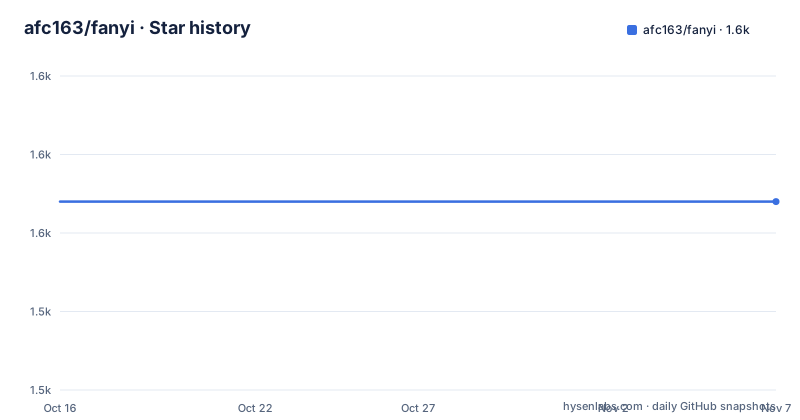
Star history
- afc163/fanyi1,554 ★ · +0
| Repository | 2026-10-16 | 2026-11-07 |
|---|---|---|
| afc163/fanyi | 1.6k | 1.6k |
0 Stars in the last 22 days, measured from the daily GitHub snapshot. Compare with other projects
Editorial analysis
Three sources, one screen, no API key by default
The design decision that defines fanyi is concurrency rather than quality. A dictionary lookup and a language model answer different questions: iciba and youdao give you senses, part of speech and example sentences, while an LLM explains usage in context. fanyi queries all three and prints the results stacked, with the source label on each block.
$ fanyi loveThe youdao block leads with a phonetic transcription and a bulleted sense list, and the iciba block below it repeats the word with a second transcription and its own sense list followed by bilingual example sentences. The sense ordering differs between them, which is the point: they are genuinely different datasets, not one rendering twice.
Any of the three can be switched off. The config subcommand takes a boolean:
$ fanyi config set iciba false
$ fanyi config set youdao false
$ fanyi config set llm false
$ fanyi config set color false
That matters for scripts and for people who find the colour output unreadable in a light terminal. Turning off the LLM source is also how you get dictionary-only behaviour, which is faster and sends nothing to a model.
The package itself is thin. `package.json` lists seven runtime dependencies: chalk, commander, dayjs, gradient-string, openai, ora and update-notifier. The entry points are `bin/fanyi.mjs`, exposed under both `fanyi` and the short alias `fy`, with the module entry at `index.mjs`. The repo is ESM only (`"type": "module"`) and requires Node 20 or newer through the `engines` field.
Sentences, Chinese input, and the history list
The CLI is not restricted to single dictionary words. Passing more than one argument joins them, so `fanyi make love` translates a phrase, and Chinese input works in the same position:
$ fanyi make love
$ fanyi 和谐
$ fanyi 子非鱼焉知鱼之乐
Direction is detected rather than selected, which is why a Chinese phrase needs no flag. What this buys you is not machine translation in the general sense: the README states the tool supports translation between Chinese and English only, so passing Japanese or French text is outside what it claims to do.
There is one non-translation subcommand worth knowing. `fanyi list` prints your search history with the date:
$ fanyi listThe output is grouped by day, each entry showing the query and the sense lines beneath it. Where that history is stored is not stated in the README. It is reasonable to expect it to live beside the config file at `~/.config/fanyi/.fanyirc`, since the README names that path for configuration, but the README does not document the history location, so check your home directory rather than assuming.
For shell use, `fy` is registered as a separate binary pointing at the same script, so an alias is unnecessary.
The no-key path and the three variables that replace it
Version 11.0.0 changed the default behaviour: with no `LLM_API_KEY` set, fanyi routes LLM translation through a built-in free proxy. The release announcement describes it as working out of the box with no configuration, and the README repeats that the LLM path is usable immediately after install.
Convenience and a trust decision arrive together here. Queries typed into your shell are sent to a proxy this project operates, on a shared key. For casual word lookups that is a reasonable trade. For proprietary terminology, customer names, unreleased product strings or anything under an NDA, it is not, and you should not rely on inference here: set your own credentials.
Three variables control that path:
$ fanyi config set LLM_API_KEY your-api-key
$ fanyi config set LLM_API_BASE_URL your-api-base-url
$ fanyi config set LLM_MODEL_ID your-model-id
The default when only the key is present is `deepseek-chat` on DeepSeek's platform. Any other model requires all three values, and the endpoint must be OpenAI-compatible. The runtime dependency list shows why that constraint exists: the package depends on `openai` version 6, so any provider is reached through that client's chat interface.
Configuration lives in `~/.config/fanyi/.fanyirc` in the user's home directory, and `fanyi config list` prints the current settings. The README does not say whether API keys written by `config set` are stored in plain text in that file, so if you set a real key, check the file's permissions yourself before moving on.
Shipped as an Agent Skill for Claude Code
The repository carries a `skills/fanyi` directory, and the README explains it as an Agent Skill that lets agents invoke the CLI automatically. The stated trigger is any Chinese to English translation or lookup request, with or without naming the tool, such as asking an agent to translate a word or ask how to say a phrase in English.
Installation is two steps. The CLI has to be global first, because the skill shells out to it:
$ npm i fanyi -gThen the skill directory is copied into the agent's skills folder. For Claude Code the README gives:
$ git clone https://github.com/afc163/fanyi.git
$ cp -r fanyi/skills/fanyi ~/.claude/skills/fanyi
The README notes that the skill detects your package manager across bun, pnpm, yarn, cnpm, tnpm, utoo and npm, and installs the CLI itself when it is missing. That is a meaningful behaviour to be aware of: the skill may run a package install on your machine during a translation request. If your environment forbids global installs, install fanyi yourself first so the detection finds a working binary.
What the agent gets is the full fanyi output, dictionary and LLM sections alike. There is no documented switch for the agent path to request dictionary-only results.
Release rhythm and the streaming output claim
The repository is not archived and the last push was on 2026-09-07. The current version is 11.0.0, published on 2026-06-06, and the two releases before it are v10.0.0 on 2025-01-20 and v9.0.7 on 2024-10-12. That gap is worth reading carefully: major versions have arrived roughly annually, with v9 to v10 spanning about three months and v10 to v11 about seventeen. Version 11 is where the LLM path became default, which suggests the large jumps carry behavioural changes rather than only additions.
Two features announced for 11.0.0 are behavioural rather than cosmetic. LLM results stream with per-meaning colour applied as tokens arrive, and the spinner shows elapsed time while waiting. Streaming means the visible output depends on whether the proxy or your provider supports incremental responses, so a slow endpoint produces a partial result rather than a timeout message. The README does not document a timeout or a retry setting.
Licensing is MIT in both `package.json` and the `LICENSE` file, so the code can be used and modified with the notice retained. Internal layout is `index.mjs`, `bin/`, `lib/`, a `proxy/` directory, `skills/` and `tests/`, with formatting handled by Biome and tests by vitest. The test script runs with `--test-timeout=20000`, a generous timeout that matches tests which call live translation endpoints rather than fixtures.
Why not just use a web page or a model on its own
Compare fanyi with two realistic alternatives and the trade is clear.
Against a browser dictionary, fanyi wins on speed and on the dictionary-plus-explanation pairing. You type one word, press enter, and get structured sense data next to a fluent explanation instead of clicking through result pages.
Against a bare LLM call, the dictionary block is the differentiator. A model asked about a word will produce a plausible paragraph; it will not reliably give you the third dictionary sense of a rare term or the exact example sentence iciba carries, because it is generating rather than retrieving. And a dictionary alone will not tell you why a native speaker picks one word over another in a sentence, which is what the LLM section is for.
Against a dedicated translation desktop tool, fanyi is narrower. It handles Chinese and English only, it has no document translation, no batch file processing and no saved glossary. It is a lookup command, not a translation workbench, and treating it as the latter will disappoint.
There is one more alternative worth naming for CI and scripts. Nothing in the CLI guarantees machine-readable output; the display is coloured and human-oriented. A shell script that needs the translation value rather than a formatted report should call your chosen API directly.
Editorial conclusion
Use fanyi if you read Chinese and English daily and want a dictionary gloss and a model explanation in one command, and set your own LLM_API_BASE_URL before you rely on it for anything sensitive. Do not use it for other language pairs, since the README states only Chinese and English are supported, and do not paste confidential strings into the default no-key mode, which routes them through a proxy the project hosts. Verify first that your Node version satisfies the >=20.0.0 engine field, then run `fanyi config list` to see what state a previous install left behind.
Frequently asked questions
How do I install fanyi?
The README gives `npm i fanyi -g` or `bun i fanyi -g`. The package registers two binaries, `fanyi` and the short alias `fy`, and its `engines` field requires Node 20.0.0 or newer.
Does fanyi need an API key?
No. Version 11.0.0 added a built-in free proxy, so with no `LLM_API_KEY` set the LLM translation still runs. To use your own model instead, set `LLM_API_KEY`, `LLM_API_BASE_URL` and `LLM_MODEL_ID` through `fanyi config set`, against an OpenAI-compatible endpoint.
Which translation sources does fanyi use?
Three: the iciba dictionary, the youdao dictionary, and an LLM. Any of them can be disabled globally with `fanyi config set iciba false`, `fanyi config set youdao false` or `fanyi config set llm false`.
Can fanyi translate languages other than Chinese and English?
No. The README states that translation data comes from iciba.com, youdao.com and an LLM, and that only translation between Chinese and English is supported. Language direction is detected from the input rather than set by a flag.
Where does fanyi store its configuration and history?
Configuration is documented at `~/.config/fanyi/.fanyirc` in the user's home directory, and `fanyi config list` prints the current options. The README does not document where `fanyi list` history is stored.
How do I use fanyi from Claude Code or another AI agent?
Install the CLI globally, then copy the skill directory from the repository into the agent's skills folder, for example `cp -r fanyi/skills/fanyi ~/.claude/skills/fanyi`. The skill detects several package managers and can install the CLI for you when it is missing.
Official sources
Add this badge to your README
If you maintain this project, the badge below links readers to this analysis and shows its maintenance status from the daily GitHub snapshot. Paste the markdown into your README; add ?metric=license or ?metric=stars to the image URL for a different field.

[](https://hysenlabs.com/projects/afc163-fanyi)Star history chart for your README
[](https://hysenlabs.com/projects/afc163-fanyi)Was this useful?