scroll-world: the landing page is a pre-rendered flight you pay to generate
A skill that turn any brand into a scrollable 3D world landing page
At a glance
- What is it?
- scroll-world is a SKILL.md agent skill, not a library or a template, and it produces a landing page by spending money on generated video: one still per scene, one dive-in clip per scene, and connector clips generated from the rendered frames of their neighbours so every seam matches. It is framework-agnostic at runtime and portable between agents, but nothing rendered ships with the repository, the mobile version is a second paid chain rather than a crop, and the whole technique depends on two billable CLIs.
- Who is it for?
- Use scroll-world when you want a single unbroken camera flight, have budget approval lined up before you start, and can accept a build that takes real wall-clock time while generations run in the background. Do not reach for it to preview scroll animation, to ship a small page, or to get anything rendered without a bill, since the repository contains no sample assets.
- Can I use it commercially?
- Yes. MIT is a permissive licence: you can use, modify and sell software built on it, as long as you keep its copyright and licence notices.
- Is it still maintained?
- Yes. The repository last received commits 109 days ago.
- What is it written in?
- Mainly JavaScript, according to GitHub's language statistics.
Answers come from the project's GitHub data, last synced on November 14, 2026, and from our analysis. They are not legal advice.
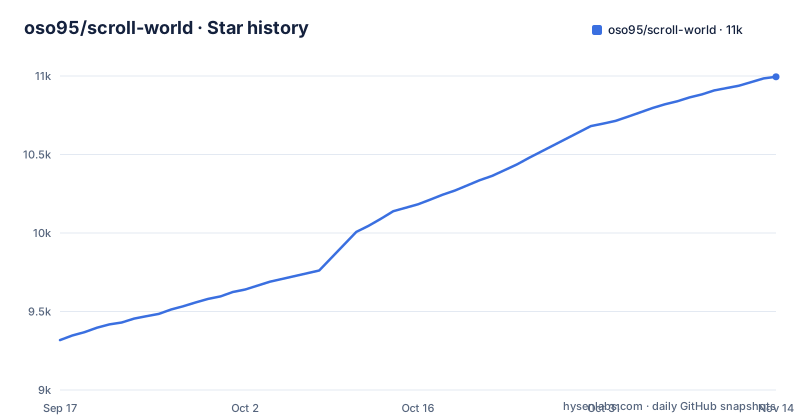
Star history
- oso95/scroll-world10,995 ★ · +1,677
| Repository | 2026-09-17 | 2026-11-14 |
|---|---|---|
| oso95/scroll-world | 9.3k | 11k |
1,677 Stars in the last 58 days, measured from the daily GitHub snapshot. Compare with other projects
Editorial analysis
Scroll position is a time scrubber, and the camera moves inside the footage
The core claim is that the camera genuinely moves and scroll only drives time. That distinction matters for what you get at the end: a chain of generated clips where the viewer flies from outside each scene into its interior and onward to the next with no cuts, one continuous connected flight. The reference point offered is a logistics site, and the technique is attributed to Apple's scroll-through product pages.
What you do not get is a 3D scene. There is no geometry, no lighting you can change, no user-controlled camera, and no way to make the world react to a click, a cursor, or a scroll velocity change. Everything downstream of generation is a video element being seeked, so the page's only input is scroll offset.
That is also why the runtime side is small and stack-neutral. `scrub-engine.js` is a portable, config-driven scrub engine doing blob-seek, lazy load, and seam crossfade, and `index-template.html` is a minimal standalone page that mounts it. The same engine drops into plain HTML, Next.js, Vue, or a page served by Python, because nothing in it assumes a framework. The cost of that portability is that your entire deliverable is bytes of video, and the engine's job is to make seeking them cheap.
Seams are made frame-identical by generating connector clips from rendered neighbours
The hard part of a no-cut flight is the moment between scenes, and the skill solves it by refusing to blend. Connector clips that join consecutive scenes are generated from the actual rendered frames of their neighbours, so every seam is frame-identical rather than crossfaded into a hidden cut. The crossfade in the engine is a polish layer on top of that, not the mechanism that hides transitions.
This constraint propagates upward. First and last frame conditioning is what frame-locks a chain, and only models that can frame-lock a seam are eligible, which is why the fallback path is Seedance or Kling on Higgsfield credits rather than an arbitrary model. The Monid default was verified on 2026-07-25 for exactly this property. The seam rule and the gotchas live in SKILL.md next to the procedure, and `pipeline.md` holds the copy-paste batch scripts that go generate, then frames, then connectors, then encode.
The arithmetic is the cost of that rule. Connectors mean a scene count of N produces roughly N stills, N dive-in clips, and close to 2N-1 video generations in total, because the joins cost as much as the scenes. A build cannot be parallelized past the seams either, since a connector needs both neighbours already rendered.
Monid bills the video, Higgsfield bills the stills, and Codex is the no-credits path
Three generation backends sit behind one skill, with different billing models and different failure modes. Monid CLI, with an API key and balance, is the default video-chain backend on Seedance 2.0, billed per clip in USD. The Higgsfield CLI, authenticated with `higgsfield auth login`, renders the scene stills with GPT Image 2, provides the `kling3_0` fallback, and carries the entire chain when Monid is absent. The Codex CLI is optional: if it is present, stills can go through its built-in `image_gen`, the same GPT Image model, billed to a ChatGPT subscription instead of Higgsfield credits.
Two details in the default arrangement are worth knowing. Frames travel through Monid's free workspace file system, so the asset path between stages is a hosted service you do not control. And the skill re-checks the endpoint schema on every build while keeping qualification probes in the pipeline for when the catalog changes, which is a defensive stance against a model catalog it does not control.
The practical consequence is that you are buying from two vendors to build one page. A missing Monid balance does not stop stills, it downgrades the chain to Higgsfield credits at a different cost, and a missing Higgsfield login does not stop video, but it removes the default still source that everything else is generated from, unless the optional Codex CLI renders the stills.
The mobile version is a second paid chain, and it doubles the video bill
Mobile is an explicit interview question with an explicit cost, and the answer is not responsive CSS. The mobile opt-in renders a parallel chain in 9:16 portrait, composed for phones rather than cropped from the landscape film, and it is frame-locked against its own portrait renders, so it gets its own connectors rather than reusing the landscape ones.
The generation math is stated plainly: the mobile chain doubles the video generations. So the decision has to be made during intake, before anything generates, because adding it later means paying for a second full flight rather than re-encoding the first.
What the runtime does with mobile is simpler than what the build does. The scroll engine serves the portrait clips and posters automatically on phones, so the detection and switching are handled, but the decision about which assets exist has already been made and paid for. If you skip mobile, a phone visitor gets the landscape film.
Cost scales with scene count in a formula you can check before spending
The estimate is arithmetic rather than guesswork. Generation costs roughly N image generations on Higgsfield credits plus about 2N-1 video generations billed per clip on Monid by default, and with the mobile chain included the video generations double again. A six-scene 1080p chain is given as approximately $27 on the default Monid path. Pay-per-use with no subscription and no monthly expiry means unused balance does not rot, and it also means there is no plan to cancel if a build goes wrong.
The estimate is not drawn from a published price list, because Higgsfield pricing is not exposed by its CLI, so the skill calibrates against your live balance instead. Monid pricing is per-token and printed per run. The interview stage shows render tiers and the stills source with estimated credit costs, and nothing generates until you approve.
What you cannot do is see the flight before paying. Stills are themselves billable, and every clip after that is billed whether or not the result is usable. Since generations run in the background and the skill polls for them, a build that stalls costs wall-clock time and whatever it already spent.
A JavaScript skill with a Python and ffmpeg build stage, not a JavaScript pipeline
The runtime story is vanilla JS, but the machine that produces the assets is not. `ffmpeg` and `ffprobe` handle frame extraction and encoding, which is what lets a connector clip be generated from the real rendered frames of its neighbours instead of an approximation. Python 3 with Pillow is required for the mobile portrait canvases, and `knockout.py` handles background knockout for floating scenes, described in the contents as the optional transparent-scene step.
So the dependency list for running a build is a CUDA-free but multi-tool one: two authenticated CLIs that spend money, ffmpeg for the frame work, Python for the canvas and knockout work, and optionally the Codex CLI for stills. The repository itself is small, holding `.claude-plugin/`, `.gitignore`, `LICENSE`, `README.md`, and `skills/`, and everything it produces lives outside it.
That last point is the one to plan around. The generated `.mp4` and `.webp` assets are produced per project and are not shipped in the repository, so the project has no sample output to inspect. There are no GitHub releases either, so there is no version to pin, and the last push is dated 2026-07-29, which is the only checkpoint you have for judging how current the pipeline instructions are.
Three install paths drop files into three different agent directories
Installation is the most ordinary part of this project, and the three routes differ in who controls updates.
For Claude Code the documented route is a plugin from a marketplace.
/plugin marketplace add oso95/scroll-world
/plugin install scroll-world@scroll-world
For Codex and other agents, Vercel's skills CLI installs into Codex, Claude Code, Cursor, and more than twenty others.
npx skills add oso95/scroll-world            # pick your agent(s) when prompted
npx skills add oso95/scroll-world -a codex   # or target Codex directly
And there is a manual path that copies the skill folder yourself.
git clone https://github.com/oso95/scroll-world
cp -R scroll-world/skills/scroll-world ~/.claude/skills/   # Claude Code
cp -R scroll-world/skills/scroll-world ~/.codex/skills/    # Codex
The consequence of the manual route is that you own the copy. Nothing tells you when upstream changed the procedure or the prompt templates, and a stale skill folder will still run, still spend money, and still use the old pipeline scripts. What all three routes share is that the skill itself is inert until a paid backend is configured, so installing it buys you instructions, not a page.
The skill folder is the whole deliverable, and five files carry the entire method
Everything the project knows lives in one directory.
skills/scroll-world/
├── SKILL.md                    the procedure + the seam rule + gotchas
└── references/
    ├── prompts.md              intake checklist + every Higgsfield prompt template
    ├── pipeline.md             copy-paste batch scripts (generate → frames → connectors → encode)
    ├── scrub-engine.js         portable, config-driven scrub engine (blob-seek, lazy load, seam crossfade)
    ├── index-template.html     a minimal standalone page that mounts the engine
    └── knockout.py             background knockout for floating scenes
Six files, and the division of labor is deliberate. SKILL.md holds the procedure an agent follows, and the gotchas live there rather than in the scripts, which means the failure modes are prose that a model has to apply correctly. prompts.md holds the intake checklist and every Higgsfield prompt template. pipeline.md is where the ordering constraint becomes explicit: generate, then frames, then connectors, then encode.
The limitation is that this is a procedure, not an implementation with a public interface. There is no configuration schema to validate against and no test suite, so whether a given invocation produces a seamless flight depends on the agent executing the documented steps in order, against live backends, with your budget. Nothing in the folder lets you check that outcome cheaply before the spend.
Editorial conclusion
Use scroll-world when you want a single unbroken camera flight, have budget approval lined up before you start, and can accept a build that takes real wall-clock time while generations run in the background. Do not reach for it to preview scroll animation, to ship a small page, or to get anything rendered without a bill, since the repository contains no sample assets. Before invoking it, confirm you have both a Monid API key with balance and a logged-in Higgsfield CLI, decide up front whether the doubled mobile chain is in budget, and read SKILL.md for the seam rule, because that rule is what the whole pipeline is built around.
Frequently asked questions
What is scroll used for in scroll-world?
Scroll position drives time through a pre-rendered chain of clips. The camera genuinely moves inside the footage, flying from outside each scene into its interior and on to the next with no cuts, and the scrub engine uses blob-seek, lazy load, and seam crossfade to make that seek feel continuous.
What does "scroll" mean in slang?
The project uses the word in its interface sense, not a slang one. Its output type is a scroll-scrubbed fly-through landing page, built as one continuous connected flight through generated isometric diorama scenes rather than a page assembled from separate sections.
What is the best website for scroll animation?
No ranking or comparison is offered. The project names a logistics site as its visual reference and attributes the underlying technique to Apple's scroll-through product pages, then positions itself as applying that technique to any industry or brand.
How do I turn on scroll-world in an agent?
For Claude Code, run /plugin marketplace add oso95/scroll-world then /plugin install scroll-world@scroll-world, or use npx skills add oso95/scroll-world, then invoke /scroll-world in Claude Code or $scroll-world in Codex. You still need an authenticated Higgsfield CLI, a Monid API key with balance, and ffmpeg before anything can render.
Official sources
Add this badge to your README
If you maintain this project, the badge below links readers to this analysis and shows its maintenance status from the daily GitHub snapshot. Paste the markdown into your README; add ?metric=license or ?metric=stars to the image URL for a different field.

[](https://hysenlabs.com/projects/oso95-scroll-world)Star history chart for your README
[](https://hysenlabs.com/projects/oso95-scroll-world)Was this useful?