AgentOps: A Python SDK for Tracing, Costing, and Replaying AI Agent Runs
Python SDK for AI agent monitoring, LLM cost tracking, benchmarking, and more. Integrates with most LLMs and agent frameworks including CrewAI, Agno, OpenAI Agents SDK, Langchain, Autogen, AG2, and CamelAI
At a glance
- What is it?
- AgentOps is an open-source Python SDK that records LLM calls inside agent frameworks, sends them to a dashboard, and supports self-hosting. It is useful for teams that need session-level visibility, but the thin README leaves deployment details to the docs.
- Who is it for?
- Adopt AgentOps if you build agents with CrewAI, Agno, OpenAI Agents SDK, LangChain, AutoGen, AG2, or CamelAI and need a single dashboard for session replays, cost totals, and step-by-step execution graphs. Skip it if you cannot send session data to a third-party dashboard and are not ready to operate the self-hosted app, because the self-hosting setup guide lives in app/README.md rather than the main README.
- Can I use it commercially?
- Yes. MIT is a permissive licence: you can use, modify and sell software built on it, as long as you keep its copyright and licence notices.
- Is it still maintained?
- Yes. The repository last received commits 143 days ago.
- What is it written in?
- Mainly Python, according to GitHub's language statistics.
Answers come from the project's GitHub data, last synced on November 14, 2026, and from our analysis. They are not legal advice.
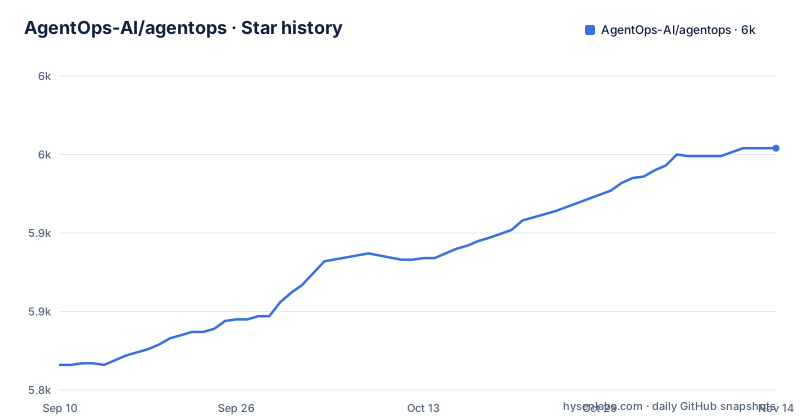
Star history
- AgentOps-AI/agentops5,954 ★ · +138
| Repository | 2026-09-10 | 2026-11-14 |
|---|---|---|
| AgentOps-AI/agentops | 5.8k | 6k |
138 Stars in the last 65 days, measured from the daily GitHub snapshot. Compare with other projects
Editorial analysis
What AgentOps Actually Tracks
The SDK exists to answer three questions that otherwise require stitching together logs from different providers: what did each agent session do, what did it cost, and where did it go wrong. The README lists replay analytics with step-by-step execution graphs, LLM cost management by foundation model provider, and framework integrations as the main features. The target user is a Python developer who builds multi-step agents and wants a chronological view of tool calls, LLM responses, and session outcomes. The two-line quick start, calling agentops.init at the start of the program and agentops.end_session('Success') at the end, implies that the core value is automatic capture of every LLM call inside that window. The documentation also mentions a session decorator that creates a root span for other spans, so the model is hierarchical: one session contains many events, and each event can be nested.
The Mechanism: Decorators, Spans, and a Remote Dashboard
Based on the repository layout and the README examples, AgentOps works by wrapping your agent entry points and automatically intercepting LLM calls. The quick start uses a plain function call to init, which suggests a global client that hooks into supported frameworks under the hood. The decorated example imports from agentops.sdk.decorators and applies @session to a workflow function, which implies that the SDK uses Python decorators to define the boundaries of a session. Inside that session, the SDK records events such as LLM requests, tool executions, and errors, then sends them to the hosted dashboard at app.agentops.ai. The mention of 'Replay Analytics' points to a feature that reconstructs the session as a sequence of steps, which is different from simple log aggregation because it preserves the order and nesting of agent actions.
Getting Running: Two Lines, Then a Dashboard Account
Installation is a single pip command: pip install agentops. After that, you need an API key from the AgentOps dashboard, which the README links to app.agentops.ai/settings/projects. The init call takes that key as an argument. The README example shows agentops.init( < INSERT YOUR API KEY HERE >) without any other configuration, which is unusually terse. For a production setup you will likely need to read the documentation to learn how to set the API key via environment variables, because hard-coding a key in source is a bad practice. The end_session call accepts a string like 'Success'. For framework-specific integrations, the README links to separate pages for OpenAI Agents SDK, CrewAI, LangChain, and others, so the actual setup may require importing a framework-specific module rather than just calling init. The self-hosting path is mentioned only as a pointer to app/README.md.
Framework Coverage and the Cost of Being Broad
The integration list is the strongest part of the pitch: CrewAI, Agno, OpenAI Agents SDK, LangChain, AutoGen, AG2, CamelAI, plus Cohere and LlamaIndex appear in the README badges and links. That breadth means a team can standardise on AgentOps across different agent stacks without writing custom instrumentation for each one. The trade-off is that each integration is a separate code path that the maintainers must keep in sync with upstream framework changes. The release dates in the repository metadata show a cadence of roughly two weeks between versions 0.4.19, 0.4.20, and 0.4.21, which indicates active maintenance but also frequent changes. A team that pins an exact SDK version may find that a framework upgrade breaks the integration until AgentOps releases a matching update. Verify compatibility against your own dependency set before upgrading either side.
Where the README Leaves You Hanging
The README is a marketing document, not an operations manual. Its quick start does not explain how the SDK transmits data, whether it buffers events locally, what happens on network failure, how much overhead the decorators add, or how the hosted dashboard handles data retention and privacy; check the documentation at docs.agentops.ai. For an observability tool, those details matter because agents often process sensitive input. The README does say all decorators support async/await and generator functions, but it does not cover multi-process runs in the quick-start material. The self-hosting section is a single line pointing to app/README.md, so the README itself does not say whether the backend requires a database, a queue, or a specific container runtime. If you need to run AgentOps behind a corporate firewall, the only honest answer is that the repository contains the app code, but the setup guide is not in the main README.
Alternatives and the Difference in Approach
One alternative is Langfuse, another LLM observability tool. AgentOps sends sessions to its own dashboard by default, with self-hosting of the full app available, and its pyproject.toml depends on opentelemetry-sdk. Another alternative is to build your own logging layer around each LLM provider's usage fields, which gives you full control but requires you to write the session correlation logic that AgentOps provides out of the box. For teams that want a quick start, the two-line setup is the draw.
Maintenance, Licensing, and What to Verify First
The project is MIT licensed, which means you can fork it, modify the SDK or the app, and use it in commercial products without paying a license fee. The last push to the default branch was June 2026, and the releases listed are from August 2025, so there is a gap between the most recent release and the latest commit activity. That could mean the repository has unreleased changes, or that the release process lags behind development. Before adopting, check the changelog between 0.4.21 and the current main branch to see if any breaking changes are pending. The app directory is part of the same repository, so you can inspect the backend code yourself, but you should verify that the self-hosted version supports the same features as the hosted dashboard, because the README only says 'you're covered' without listing feature parity.
Editorial conclusion
Adopt AgentOps if you build agents with CrewAI, Agno, OpenAI Agents SDK, LangChain, AutoGen, AG2, or CamelAI and need a single dashboard for session replays, cost totals, and step-by-step execution graphs. Skip it if you cannot send session data to a third-party dashboard and are not ready to operate the self-hosted app, because the self-hosting setup guide lives in app/README.md rather than the main README. Before committing, verify the exact integration steps for your framework in the documentation, confirm the data retention policy of the hosted dashboard, and test the SDK in a staging environment while watching for any overhead on long agent runs.
Frequently asked questions
is agentops open source
Yes, under the MIT license. The repository has a LICENSE file at the root, the packaging metadata carries the MIT classifier, and the readme states that the AgentOps app is open source with the code in the app directory. Self-hosting is supported, covering the dashboard and the API backend.
is agentops free
The SDK and the app are released under the MIT license, and self-hosting the dashboard and API backend on your own cloud is described as supported. The quick start does assume an account, since initializing the client requires an API key obtained from the project settings page.
What does the agentops SDK do?
It provides observability for AI agents: step-by-step agent execution graphs for replay and debugging, LLM cost tracking across foundation model providers, and framework integrations. Instrumentation is done through decorators for session, agent, operation, task and workflow spans, which nest to form the trace hierarchy.
Where does agentops send session data?
By default to the hosted dashboard, since initializing the client takes an API key and sessions are viewed on the AgentOps dashboard at app.agentops.ai. Self-hosting is offered for running the full app, dashboard and API backend on your own cloud, with the setup guide in the app directory of the repository.
Which agent frameworks does agentops integrate with?
The examples directory carries directories for ag2, agno, anthropic, autogen, crew, crewai, dspy, google_adk, google_genai, haystack, langchain, langgraph, litellm, llamaindex, mem0, openai, openai_agents, smolagents, watsonx, xai and xpander. The OpenAI Agents SDK is covered for both Python and TypeScript, and CrewAI and AG2 pick up monitoring from an AGENTOPS_API_KEY environment variable.
Official sources
Add this badge to your README
If you maintain this project, the badge below links readers to this analysis and shows its maintenance status from the daily GitHub snapshot. Paste the markdown into your README; add ?metric=license or ?metric=stars to the image URL for a different field.

[](https://hysenlabs.com/projects/agentops-ai-agentops)Star history chart for your README
[](https://hysenlabs.com/projects/agentops-ai-agentops)Was this useful?