Hands-on Machine Learning with Scikit-Learn and PyTorch: what the notebook repository contains and where the local setup stops
A series of Jupyter notebooks that walk you through the fundamentals of Machine Learning and Deep Learning in Python using Scikit-Learn, PyTorch, and Hugging Face libraries.
At a glance
- What is it?
- ageron/handson-mlp holds the example code and exercise solutions for Aurélien Géron's Hands-on Machine Learning with Scikit-Learn and PyTorch (1st edition), organized as 19 chapter notebooks plus appendices. Running locally requires Python 3.11 to 3.12 and dozens of direct dependencies, while Google Colab offers an install-free reading path with a temporary-data warning.
- Who is it for?
- Pick this repository if you are working through the first edition of Aurélien Géron's Hands-on Machine Learning with Scikit-Learn and PyTorch and want executable code alongside each chapter. Skip it if you need a standalone ML curriculum, because the notebooks reference exercises and explanatory text that only the book supplies.
- Can I use it commercially?
- Yes. Apache-2.0 is a permissive licence: you can use, modify and sell software built on it, as long as you keep its copyright and licence notices.
- Is it still maintained?
- Yes. The repository last received commits 20 days ago.
- What is it written in?
- Mainly Jupyter Notebook, according to GitHub's language statistics.
Answers come from the project's GitHub data, last synced on October 23, 2026, and from our analysis. They are not legal advice.
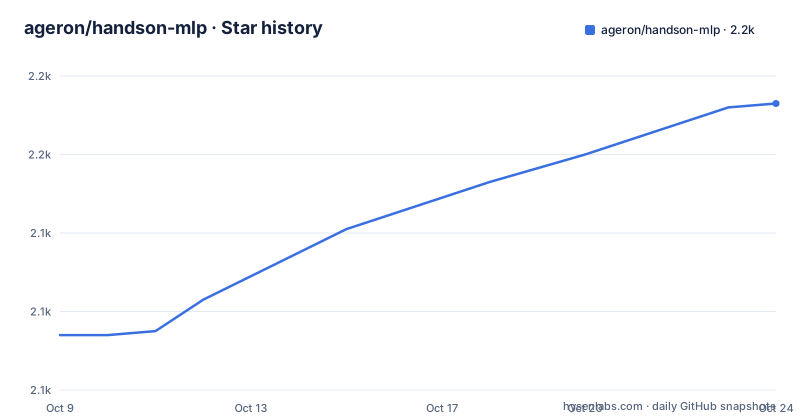
Star history
- ageron/handson-mlp2,172 ★ · +58
| Repository | 2026-10-09 | 2026-10-23 |
|---|---|---|
| ageron/handson-mlp | 2.1k | 2.2k |
58 Stars in the last 14 days, measured from the daily GitHub snapshot. Compare with other projects
Editorial analysis
The repository holds example code for the book, not a standalone curriculum
ageron/handson-mlp is the GitHub repository where Aurélien Géron published the Jupyter notebooks for the first edition of his O'Reilly book Hands-on Machine Learning with Scikit-Learn and PyTorch. Chapter by chapter, each notebook holds the runnable cells that accompany the printed explanations and end-of-chapter exercises. Without the book, the notebooks supply runnable code but not the explanatory text or the exercises that give the code its context.
The audience is readers of that specific edition who want to execute each example as they read, rather than type it out by hand. A student who only wants a Python ML refresher will find the notebooks dense, since they assume the reader has already worked through the chapter text. Anyone who bought the TensorFlow/Keras edition of the book is in the wrong repository: those notebooks live at ageron/handson-ml3, and the two are not interchangeable.
pyproject.toml records the package name as "handson-mlp" at version 1.0.0, authored by Aurélien Géron under the Apache-2.0 license. That version number does not correspond to a GitHub release: the repository has no releases.
Nineteen chapters and five appendices span linear models through diffusion models and reinforcement learning
The chapter notebooks run from 01_the_machine_learning_landscape.ipynb through 19_reinforcement_learning.ipynb. Between those endpoints the scope covers classification, linear models, decision trees, ensemble learning, dimensionality reduction, unsupervised learning, feedforward neural networks, PyTorch training, computer vision with CNNs, sequence processing, NLP with attention mechanisms, transformers for NLP and chatbots, vision and multimodal transformers, transformer speed-up techniques, autoencoders and GANs, diffusion models, and reinforcement learning.
Five appendices extend that range: Appendix A covers autodiff, B covers mixed precision and quantization, C covers support vector machines, D covers relative positional encoding, and E covers state space models. Two supplementary math notebooks address differential calculus and linear algebra. Three tools notebooks cover matplotlib, numpy, and pandas. An index.ipynb at the root links to all of them and provides an overview before the reader picks a starting point.
Working through all of it while also reading the corresponding book text is a project measured in months. Each chapter builds on earlier ones, so skipping sections risks prerequisite gaps in the later deep learning notebooks.
Google Colab is the stated first-choice path, with a temporary-data warning
The README offers three ways to read the notebooks. First is Google Colab, which it marks as recommended: a badge opens notebooks directly in Colab's environment without any local installation. One constraint is worth noting before you start: Colab runs in a temporary session, and when that session ends the workspace is wiped. Any data generated inside the environment needs to be saved externally before that happens.
nbviewer is the second option, producing a read-only rendering of each notebook for reference without running any code. This path works well for checking a chapter's structure before committing to a local install.
GitHub's built-in renderer is the third option listed, with a caveat: the renderer struggles with equations in some notebooks, large notebooks frequently fail to load at all, and the overall performance lags behind nbviewer.
Local setup follows INSTALL.md entirely. That file is not reproduced in the README, so its contents are only accessible by reading the file in the repository directly.
Python 3.11 through 3.12 is the working range; 3.13 has incomplete library support
pyproject.toml sets requires-python = ">=3.11,<3.14", which accepts 3.11, 3.12, and 3.13 but nothing below 3.11. The README's FAQ identifies Python 3.12 as the target, calling it the version you get if you follow the INSTALL.md instructions. The FAQ adds that 3.10 and 3.11 should work too, which creates a small discrepancy with the pyproject.toml floor since the metadata excludes 3.10. The 3.13 ceiling in the metadata comes with a caveat: several of the project's dependencies had not published 3.13 builds when the FAQ was written, so 3.12 is the version with the fewest surprises.
On macOS, the README's FAQ documents one specific failure. A Python 3.12 install from python.org can produce an SSL certificate error when load_housing_data() runs, and the fix is:
/Applications/Python\ 3.12/Install\ Certificates.commandFor Python installed via MacPorts, the documented alternative is:
sudo port install curl-ca-bundleThose are the only environment-level troubleshooting notes in the README. No Windows-specific setup issues are mentioned, and neither path gives a fallback if the given commands fail.
The dependency list spans deep learning, NLP, reinforcement learning, and generation in one environment
The dependency list in pyproject.toml covers several ML domains at once. Core scientific computing pins numpy>=2.1.3, pandas>=2.2.3, scipy>=1.16.2, and matplotlib>=3.10.0. Deep learning requires torch>=2.8.0 alongside torchvision>=0.23.0, torchaudio>=2.8.0, and torchmetrics>=1.8.2.
The NLP and transformer cluster is the largest group. transformers>=4.57.0 handles the model layer, datasets>=4.1.1 loads training data, peft>=0.17.1 adds parameter-efficient fine-tuning, trl>=0.23.1 handles reinforcement-learning-based fine-tuning, and sentence-transformers>=5.1.1 covers embeddings. google-genai>=1.41.0 adds Google's generative AI API on top of that group.
Reinforcement learning brings gymnasium[atari]>=1.2.1, stable-baselines3>=2.7.0, and pygame>=2.6.1, while generation and computer vision require diffusers>=0.35.1 and ultralytics>=8.3.206. Hyperparameter optimization uses optuna>=4.5.0 and gradient boosting adds xgboost>=3.0.5. A uv.lock file at the repository root records exact resolved versions, which means uv users get a reproducible environment. The size of this dependency set means a fresh install takes time and considerable disk space, and GPU support depends on which build of torch is installed.
This is the PyTorch edition; ageron/handson-ml3 has the TensorFlow/Keras version
For readers of the TensorFlow/Keras edition, ageron/handson-ml3 is the correct repository; the README is explicit on this point. The two cover different editions of the same O'Reilly title and use different frameworks throughout. Notebooks from one will not match the chapter text of the other.
The shift to PyTorch and the Hugging Face ecosystem is visible in pyproject.toml. NLP chapters draw on transformers>=4.57.0, peft>=0.17.1 for parameter-efficient fine-tuning, and trl>=0.23.1 for reinforcement-learning-based fine-tuning. sentence-transformers>=5.1.1 handles embedding work, and google-genai>=1.41.0 covers Google's generative AI API. A project arriving from ageron/handson-ml3 will find that all NLP chapters use Hugging Face libraries as the primary interface for models, not Keras APIs, and that generation tasks use diffusers rather than TensorFlow-native tools. That is a substantive framework difference, not a cosmetic one.
No GitHub releases and no tagged checkpoints to pin to a known-working state
The repository has no GitHub releases. pyproject.toml records version = "1.0.0" under the project name, but that number is not backed by a GitHub tag. CHANGES.md at the root tracks modifications. The last push was on 2026-10-03, and the repository is not archived.
For anyone who needs to reproduce a specific notebook state, the absence of tagged versions is a concrete constraint. A notebook that runs correctly at one point may behave differently after a dependency update, since none of the dependency bounds in pyproject.toml are pinned to a single version. The uv.lock file locks exact resolved versions, which helps when installing from the repository root, but there is no documented way to name a known-good state other than by commit hash. The README does not describe that approach.
INSTALL.md holds the local setup steps, and the README does not document GPU configuration
For every local setup question, the README sends readers to INSTALL.md. That file handles how to install the project, how to update it, and how to update Python libraries with Anaconda. None of those steps appear in the README itself.
GPU configuration is absent from the README entirely. Chapters 10 through 18 cover neural network training, and running those notebooks on CPU alone will be slow, but no guidance appears for CUDA versions, MPS setup on Apple Silicon, or which torch build to install for a given GPU. A docker/ directory exists in the repository root and a .dockerignore file is present, which suggests a container-based option, but the README does not reference it.
The ml-project-checklist.md file appears in the top-level file listing but is not described or linked in the README. Its name suggests a practical reference for structuring ML work outside the chapter exercises, though the README offers no context about when to use it.
Editorial conclusion
Pick this repository if you are working through the first edition of Aurélien Géron's Hands-on Machine Learning with Scikit-Learn and PyTorch and want executable code alongside each chapter. Skip it if you need a standalone ML curriculum, because the notebooks reference exercises and explanatory text that only the book supplies. Before running locally, confirm your Python version is 3.11 or 3.12, since 3.13 is flagged in the README as having incomplete library support. For the TensorFlow/Keras edition of the course, the correct repository is ageron/handson-ml3.
Frequently asked questions
What is the ageron/handson-mlp repository?
ageron/handson-mlp is a collection of Jupyter notebooks holding the example code and exercise solutions for the first edition of Aurélien Géron's Hands-on Machine Learning with Scikit-Learn and PyTorch, published by O'Reilly. pyproject.toml names the package "handson-mlp" at version 1.0.0 under the Apache-2.0 license.
Do I need the O'Reilly book to use the handson-mlp notebooks?
The notebooks hold executable code, not the explanatory text or exercise questions that come from the book. Without the book, the code runs but lacks the context that the chapter text provides.
How do I run handson-mlp notebooks without installing Python?
The README recommends Google Colab and provides a badge that opens any notebook in Colab directly. Colab sessions do not retain their state when they end, and the README advises saving any data you want to keep before closing.
What Python version does handson-mlp require?
pyproject.toml sets requires-python = ">=3.11,<3.14" and the README's FAQ identifies 3.12 as the safest target, flagging that 3.13 had library coverage gaps when the FAQ was written.
Is there a TensorFlow version of the Hands-on Machine Learning notebooks?
Yes. The README points to ageron/handson-ml3 for the TensorFlow/Keras version. The two repositories cover different editions of the same O'Reilly book and are not interchangeable.
Official sources
Add this badge to your README
If you maintain this project, the badge below links readers to this analysis and shows its maintenance status from the daily GitHub snapshot. Paste the markdown into your README; add ?metric=license or ?metric=stars to the image URL for a different field.

[](https://hysenlabs.com/projects/ageron-handson-mlp)Star history chart for your README
[](https://hysenlabs.com/projects/ageron-handson-mlp)Was this useful?