claude-obsidian turns an inbox folder into a linked Obsidian wiki through Claude Code skills, with write access gated by command and platform
Self-organizing AI second brain for Obsidian + Claude Code. Drop any source and Claude reads, links, and files it into one connected knowledge graph of plain Markdown you own. AI note-taking, personal knowledge management (PKM), and an open-source Notion alternative. Based on Karpathy's LLM Wiki pattern.
At a glance
- What is it?
- claude-obsidian is an MIT-licensed set of 15 Agent Skills and 3 agents that has Claude read sources dropped into inbox/, write linked Markdown notes with citations, and answer questions from the vault. The interesting parts are where it draws the line between reading and writing, what it needs on Windows, and how its plugin name changed between releases.
- Who is it for?
- claude-obsidian suits Claude Code users who already collect papers, articles and transcripts and want them turned into a linked Obsidian vault of plain Markdown they keep on disk. It does not suit native Windows users who will not run WSL, or anyone who cannot send vault content to the AI tool they chat with.
- Can I use it commercially?
- Yes. MIT is a permissive licence: you can use, modify and sell software built on it, as long as you keep its copyright and licence notices.
- Is it still maintained?
- Yes. The repository last received commits 21 days ago.
- What is it written in?
- Mainly Python, according to GitHub's language statistics.
Answers come from the project's GitHub data, last synced on November 15, 2026, and from our analysis. They are not legal advice.
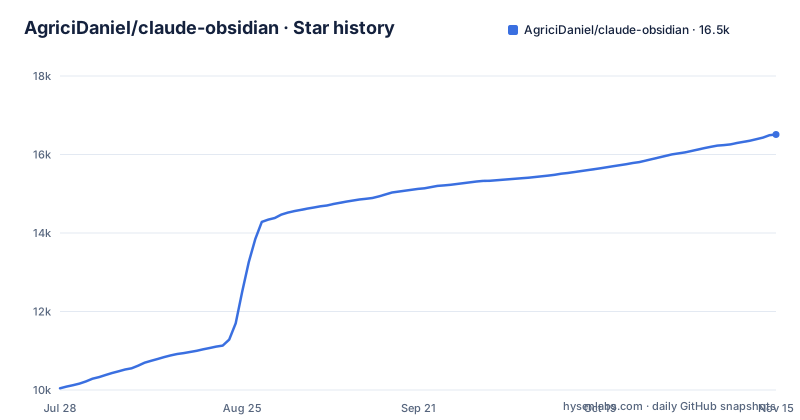
Star history
- AgriciDaniel/claude-obsidian16,510 ★ · +6,467
| Repository | 2026-07-28 | 2026-11-15 |
|---|---|---|
| AgriciDaniel/claude-obsidian | 10k | 16.5k |
6,467 Stars in the last 110 days, measured from the daily GitHub snapshot. Compare with other projects
Editorial analysis
Sources go into inbox/ and stay untouched while Claude writes linked pages
The workflow starts with a folder. You put a paper, article, transcript or your own notes into inbox/, then run the ingest skill. Claude reads each source and writes linked pages, indexes and maps of content, and records which source each page came from. The originals are kept untouched in the vault, so every summary can point back to the file it was drawn from rather than to a paraphrase of a paraphrase.
The design follows Andrej Karpathy's LLM Wiki pattern: instead of re-reading raw documents on every question, the model maintains a growing wiki of its own notes. The consequence is that the quality of the vault depends on each ingest pass. A bad summary becomes a page that later answers draw on, which is why the source link on every page matters: it is how you check a claim when a note looks wrong. The result is a normal Obsidian vault, browsable in Graph view or laid out as a map in Obsidian Canvas, and it stays usable without any AI attached.
Five slash commands split reading from writing
After installing the plugin, you open the folder you want as a vault and start Claude Code there. The core loop is five commands:
claude                                   # start Claude Code in your vault folder

/claude-obsidian:wiki                    # set up the vault (shows you a preview first)
/claude-obsidian:wiki-ingest             # turn what is in inbox/ into linked notes
/claude-obsidian:wiki-query              # ask a question, answered from your notes
/claude-obsidian:save                    # keep a good answer as a note
/claude-obsidian:wiki-lint               # health check: dead links, orphans, gaps
The split between query and save is deliberate. wiki-query answers from what the vault already holds, with citations, and does not change a single file. An answer only becomes a note when you run save, and save keeps one answer at a time. That protects the vault from filling up with every chat reply, but it also means nothing you learn in a query session persists unless you ask for it. wiki-lint reports dead links, orphan pages, missing metadata and empty sections, so problems surface before later ingests build on them. Every skill can also be called by name with /claude-obsidian:<skill>, or you can describe what you want in plain words.
Installation needs Claude Code and Python 3.11, and adopts an existing vault in place
The requirements are Claude Code, Python 3.11 or newer, and Obsidian for the visual side. The plugin installs with two commands:
claude plugin marketplace add AgriciDaniel/claude-obsidian
claude plugin install claude-obsidian@agricidaniel-claude-obsidian
Then open the same folder in Obsidian with Open folder as vault to watch the notes grow. If you already keep an Obsidian vault, /claude-obsidian:wiki can adopt it without moving your notes, and the installation guide in docs/install-guide.md has a section on adopting an existing vault. The setup command shows a preview before it writes anything. Even so, adopting a vault you have curated for years is the step to test on a copy first: the ingest skill writes new pages into it, and you want to see how they treat your existing structure before pointing them at the original. The repository includes examples/sample-vault/ if you want to see the expected layout before touching your own files.
Native Windows can preview but refuses to write to the vault
Windows support has a hard limit. Anything that writes to the vault has to run under WSL. Native Windows can inspect and preview, but it stops with an error instead of writing. The project points to a Windows and WSL guide in docs/windows-wsl.md for the details.
For a Windows user, the consequence is that the core value of the tool, ingesting sources and saving notes, is not available without setting up WSL. A native install will appear to work for setup previews and read-only checks, then refuse the first real ingest. The error is explicit rather than a silent partial write, which is the safer failure, but it means Windows users should plan the WSL setup before installing rather than discovering it on the first ingest.
The 3.0.0 plugin rename leaves one release on a different name
The release history shows a naming detour. v3.0.0, titled Hardening and Plugin Rename, shipped on 2026-10-21 under the plugin name agricidaniel-obsidian. Less than an hour later, v3.0.1 restored the original name. If you upgrade from 2.x or 3.0.0, the commands are:
claude plugin marketplace update agricidaniel-claude-obsidian
claude plugin update claude-obsidian@agricidaniel-claude-obsidian
Anyone who installed 3.0.0 has the wrong plugin name. After the marketplace update they need to run claude plugin install claude-obsidian@agricidaniel-claude-obsidian and restart Claude Code; docs/namespace-migration.md covers the move. The release before these, v2.2.0 on 2026-09-10, was a backlog triage. The last push to the repository was on 2026-10-25.
Other agent hosts get the skills through a preview-then-apply script
Because claude-obsidian is packaged as Agent Skills, it also runs in Codex, OpenCode, Gemini, ZCode, Cursor and Windsurf. For those hosts you clone the repository and run a setup script that links the skills, with a dry run first:
git clone https://github.com/AgriciDaniel/claude-obsidian.git
cd claude-obsidian
bash scripts/setup-multi-agent.sh --host codex            # preview, writes nothing
bash scripts/setup-multi-agent.sh --host codex --apply    # link the skills
The same flag takes opencode, gemini or zcode. Cursor and Windsurf need a workspace folder passed with --workspace alongside --apply. The trade-off for these hosts is upkeep: the skills are linked from your clone, so keeping them current means updating that clone yourself, while Claude Code users run claude plugin update. The repository carries host-specific files such as GEMINI.md, ZCODE.md, AGENTS.md, .cursor/ and .windsurf/.
Local Markdown keeps your notes on disk, but the chat model still reads them
Everything is stored as plain Markdown files on your computer. There is no cloud database, no lock-in and no telemetry. The privacy claim has one stated exception: the AI tool you chat with. When you ingest a source or query the vault, that content goes to whatever model Claude Code or your other host is using. For notes under confidentiality rules, the deciding question is your AI provider's terms, not this plugin's storage model.
Some skills reach further on purpose. autoresearch runs bounded web research only with your consent, and its findings are merged after review. defuddle plans a clean Markdown capture of a web page, but the cleaner itself is an optional external tool you install separately, so web capture is not complete out of the box. For contributors, make test runs every hermetic Python and shell test plus the contract checks, and make validate runs only the package and contract validators. Legacy extensions such as setup-dragonscale and setup-retrieve remain as opt-in helpers.
Editorial conclusion
claude-obsidian suits Claude Code users who already collect papers, articles and transcripts and want them turned into a linked Obsidian vault of plain Markdown they keep on disk. It does not suit native Windows users who will not run WSL, or anyone who cannot send vault content to the AI tool they chat with. Before adopting it, preview the setup on a copy of your vault, confirm which plugin name your install uses after the 3.0.0 rename, and decide whether optional pieces such as autoresearch are allowed in your setup.
Frequently asked questions
Can Claude work with Obsidian through claude-obsidian?
Yes. claude-obsidian is a Claude Code plugin that reads sources from inbox/, writes linked Markdown notes into a folder you open in Obsidian as a vault, and answers questions from those notes with citations.
How to install claude obsidian?
With Claude Code and Python 3.11 or newer, run claude plugin marketplace add AgriciDaniel/claude-obsidian, then claude plugin install claude-obsidian@agricidaniel-claude-obsidian. Start Claude Code in your vault folder and run /claude-obsidian:wiki.
Is claude obsidian free?
claude-obsidian is open source under the MIT license. You still need Claude Code or another supported AI host to run its skills.
What does claude obsidian do?
claude-obsidian has Claude turn sources in inbox/ into linked pages with recorded sources, answer read-only questions from the vault, save answers as notes when you ask, and run a health check for dead links, orphans and gaps.
Official sources
Add this badge to your README
If you maintain this project, the badge below links readers to this analysis and shows its maintenance status from the daily GitHub snapshot. Paste the markdown into your README; add ?metric=license or ?metric=stars to the image URL for a different field.

[](https://hysenlabs.com/projects/agricidaniel-claude-obsidian)Star history chart for your README
[](https://hysenlabs.com/projects/agricidaniel-claude-obsidian)Was this useful?