aioquic gives you QUIC without the event loop, and asks for Python 3.11
QUIC and HTTP/3 implementation in Python
At a glance
- What is it?
- aioquic implements TLS 1.3, QUIC and HTTP/3 as a Python library with a bring your own I/O design. The price of that design is that you own connection setup, datagram plumbing and certificate handling.
- Who is it for?
- Adopt aioquic when you are writing a Python client or server library that has to speak QUIC or HTTP/3 at the RFC level and you want the I/O loop to stay under your control, which covers DNS tooling, proxies and protocol experiments. Verify first that your platform has a wheel for your interpreter, since a source build needs a C compiler and python3-dev headers, and check that your Python version is 3.11 or newer before planning the integration.
- Can I use it commercially?
- Yes. BSD-3-Clause is a permissive licence: you can use, modify and sell software built on it, as long as you keep its copyright and licence notices.
- Is it still maintained?
- Yes. The repository last received commits 7 days ago.
- What is it written in?
- Mainly Python, according to GitHub's language statistics.
Answers come from the project's GitHub data, last synced on October 23, 2026, and from our analysis. They are not legal advice.
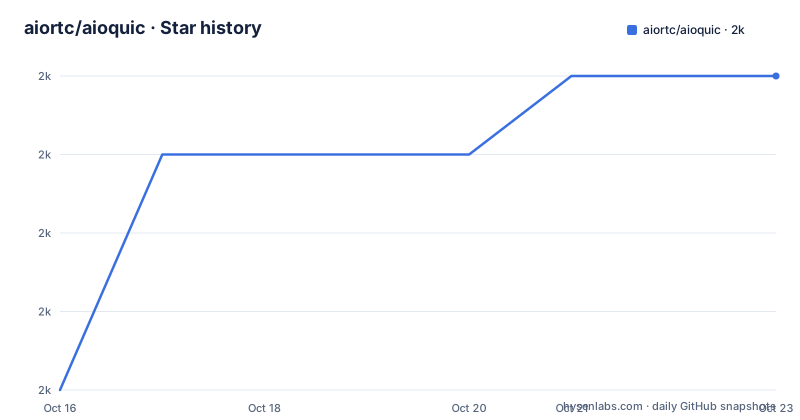
Star history
- aiortc/aioquic2,014 ★ · +4
| Repository | 2026-10-16 | 2026-10-23 |
|---|---|---|
| aiortc/aioquic | 2k | 2k |
4 Stars in the last 7 days, measured from the daily GitHub snapshot. Compare with other projects
Editorial analysis
Bring your own I/O, and what that costs you
The defining design choice in aioquic is stated in the README as the "bring your own I/O" pattern, applied to both the QUIC API and the HTTP/3 API. The library never performs a read or a write on your behalf. Instead you feed received datagrams into the protocol objects and you push outgoing datagrams out to a socket you own. The README names the two benefits: the code becomes testable, and it integrates with different concurrency models.
Both are real, and both come at a cost the documentation does not spell out. Because the socket is yours, so are the details a QUIC connection depends on: you must send Initial packets from a source address that the peer can answer, keep datagrams flowing during the handshake, and survive connection migration and NAT rebinding, which the feature list names explicitly. Connection migration is a capability of the stack, not something the stack arranges for you. An application that treats aioquic as a drop-in replacement for its existing HTTP client will find no connection pool and no retry policy, because those live above the I/O boundary the library refuses to cross.
That boundary is why the library is described as designed to be embedded into Python client and server libraries, with the stated goal of providing a common codebase so other projects do not duplicate the effort.
The C extension is small, and it sets your minimum version
The repository ships exactly one compiled extension, defined in setup.py as aioquic._buffer, built from src/aioquic/_buffer.c. It is compiled with Py_LIMITED_API set to 0x030B0000 and marked py_limited_api, and the wheel tag is set to cp311. On every platform except win32 it adds -std=c99 to the compiler arguments.
Two things follow. The limited API means one binary can serve every supported interpreter rather than one per release, and the version number baked into that constant is Python 3.11. The pyproject.toml confirms the floor independently with requires-python = ">=3.11" and classifiers listing 3.11 through 3.15, so 3.11 is the documented minimum Python version.
The runtime dependencies are the other half of the story: cryptography>=43.0.0, certifi, pylsqpack>=1.0.0,<2.0.0, pyopenssl>=24 and service-identity>=24.1.0. The TLS implementation is described as minimal and conforms to RFC 8446. Anyone auditing dependencies for a supply chain review should note that pylsqpack is pinned to a 1.x range, which means an upgrade to 2.x is a breaking change when it arrives.
The package version is not hardcoded in pyproject.toml. It is dynamic, read from the aioquic.__version__ attribute through setuptools, and the project publishes no GitHub releases, so the changelog at aioquic.readthedocs.io is the release record.
QUIC v1, QUIC v2 and the version negotiation escape hatch
The QUIC stack conforms to RFC 9000 for QUIC v1 and RFC 9369 for QUIC v2, and both are supported rather than one being legacy. IPv4 and IPv6 are supported. Logging is treated as a first-class feature rather than a debug afterthought: the library can log TLS traffic secrets, and it can log QUIC events in QLOG format, which is the structured event format tooling expects.
Version negotiation conforms to RFC 9368. That matters more than it sounds. QUIC version negotiation is the mechanism a peer uses to reject a version it does not implement, so having it in the stack is what lets aioquic interoperate with the long tail of implementations that speak an earlier draft or a different version, instead of dropping the connection silently.
On top of that sits the HTTP/3 stack conforming to RFC 9114, with server push support, WebSocket bootstrapping conforming to RFC 9220, and datagram support conforming to RFC 9297. The WebSocket piece is worth calling out: HTTP/3 does not inherit the HTTP/1.1 upgrade mechanism, so the RFC 9220 bootstrap is a separate mechanism rather than an automatic consequence of the base stack, and aioquic implements it directly.
Interoperability is treated as a release criterion, not an aspiration. The README links to interop.seemann.io as the place where aioquic is regularly tested against other QUIC implementations, and it is used by dnspython, hypercorn, mitmproxy and the Web Platform Tests cross-browser suite, which is a broader reference set than most single-implementation libraries gather.
Installing from a wheel, or compiling on Debian and Ubuntu
The documented install is a single pip command, which is what most users should do because it selects a prebuilt wheel when one exists for the platform:
pip install aioquicThe source path is the documented fallback for two cases only: there is no wheel for your system, or you specifically want to build from source. It requires a C compiler and the Python development headers, and on Debian or Ubuntu the README gives the package to install:
sudo apt install python3-devThat header package is only half the requirement on Linux; a working toolchain is the other half, and the README names the compiler requirement without giving a command for it. On Windows the setup.py path takes a different branch and adds no extra compiler flags at all, which is worth knowing if you are comparing build failures across platforms.
The documented learning path is the hosted documentation at aioquic.readthedocs.io, which carries the changelog, the licence text and the API reference. The README itself stays short and delegates everything else there, so a team adopting this will spend its first hour in the reStructuredText docs rather than in the repository.
What the examples directory actually gives you to copy
The examples folder is the closest thing to a tutorial, and its file names describe the use cases the project expects: http3_client.py and http3_server.py for the HTTP/3 stack, doq_client.py and doq_server.py for the DoQ client and server pair, interop.py for interoperability work, and demo.py as a general entry point. There are also an htdocs directory of static files and a templates directory, both of which suggest a server example that serves something rather than only exchanging protocol messages.
The README links to the examples directory on GitHub and says aioquic comes with examples illustrating various QUIC use cases, but it does not give a command for launching any of them. So the realistic first session is: install the package, open http3_server.py, and work out the socket setup yourself. The examples also double as the reference for how the bring your own I/O contract is meant to be honoured in practice, which is the part the API docs tend to describe abstractly.
Project tooling is visible in pyproject.toml as well. mypy runs with disallow_untyped_calls and disallow_untyped_decorators across files, examples, src and tests, with strict_optional turned off, and ruff lints with the pycodestyle, Pyflakes and isort rule sets.
Why an existing project might already contain this code
The strongest argument against wiring aioquic directly into a service is visible in the README's own dependency list. The README says they are used by aioquic, and that aioquic has also been used extensively in research papers about QUIC.
So for a team building an HTTP service, the difference in approach is not API shape, it is ownership. Embedding aioquic means owning datagram I/O, handshake timing, certificate loading and the migration behaviour the feature list names.
The reverse framing also holds. If what you need is a QUIC stack to build on rather than a QUIC stack to call, the library's limited API surface and its published set of Python consumers make it a plausible reference implementation, and the README says it has been used extensively in research papers about QUIC.
Maintenance pace, licensing and upgrade cost
The repository is not archived and the last push was on 2026-10-16. The repository has no GitHub releases, while its project metadata links to a hosted changelog.
The licence is BSD-3-Clause, declared in pyproject.toml and with a LICENSE file at the repository root. That is a permissive licence with no copyleft obligation on applications that merely import the library, and no legal advice is implied here. The practical upgrade cost comes from the dependency floor rather than the licence: cryptography is required at 43.0.0 or newer, pylsqpack is held below 2.0.0, and the Python floor of 3.11 means a team on an older interpreter cannot install current releases at all rather than installing an old one.
What is not documented is worth listing too. The README does not give a supported platform matrix beyond the OS Independent classifier, does not state a maximum supported Python version as a policy, and does not describe a deprecation or compatibility window for API changes between minor releases.
Editorial conclusion
Adopt aioquic when you are writing a Python client or server library that has to speak QUIC or HTTP/3 at the RFC level and you want the I/O loop to stay under your control, which covers DNS tooling, proxies and protocol experiments. Verify first that your platform has a wheel for your interpreter, since a source build needs a C compiler and python3-dev headers, and check that your Python version is 3.11 or newer before planning the integration.
Frequently asked questions
How do I install aioquic?
Run `pip install aioquic`, which pulls a prebuilt wheel when one exists for your platform. Building from source instead requires a C compiler and the Python development headers, and on Debian or Ubuntu the README gives `sudo apt install python3-dev`.
What Python version does aioquic require?
Python 3.11 or newer. pyproject.toml sets requires-python to >=3.11 and lists classifiers for 3.11 through 3.15, and the C extension is compiled against the stable ABI at that version level.
Does aioquic handle sockets and event loops for me?
No. Both the QUIC and HTTP/3 APIs follow the bring your own I/O pattern, so datagram reads and writes stay with your code. The README points to testability and integration with different concurrency models as the reasons for that choice.
Which QUIC and HTTP/3 versions does aioquic implement?
The QUIC stack covers RFC 9000 for QUIC v1 and RFC 9369 for QUIC v2, with version negotiation under RFC 9368. The HTTP/3 stack follows RFC 9114 and adds server push, WebSocket bootstrapping under RFC 9220 and datagrams under RFC 9297.
Official sources
Add this badge to your README
If you maintain this project, the badge below links readers to this analysis and shows its maintenance status from the daily GitHub snapshot. Paste the markdown into your README; add ?metric=license or ?metric=stars to the image URL for a different field.

[](https://hysenlabs.com/projects/aiortc-aioquic)Star history chart for your README
[](https://hysenlabs.com/projects/aiortc-aioquic)Was this useful?